The Direct Answer: Yes, the MacBook Air Has a Headphone Jack
Yes, every MacBook Air model currently in production and all legacy versions feature a 3.5mm headphone jack. Whether you are using the latest M3 MacBook Air, the redesigned M2 MacBook Air, or the classic M1 MacBook Air, you can plug in wired headphones directly without needing a dongle. Unlike the iPhone or iPad Pro, Apple has maintained this port on its laptop lineup to support creators and professionals.
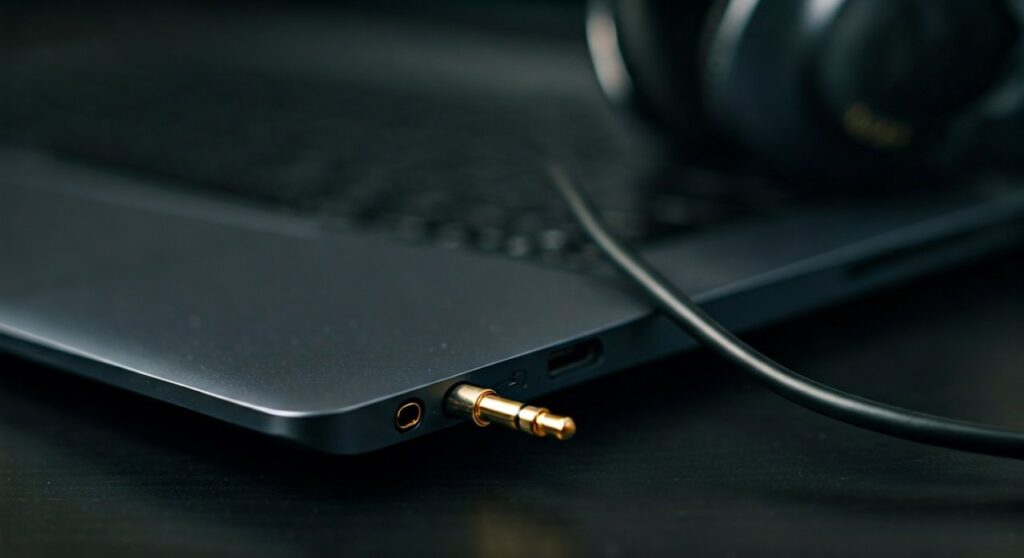
In newer models, specifically those released from 2022 onwards, the jack has been upgraded. It now features advanced support for high-impedance headphones, a massive win for audiophiles and music producers.
Key Takeaways: MacBook Air Audio Connectivity
If you are looking for a quick summary of the audio capabilities of your device, here are the essential facts:
- Standard Feature: Every Mac laptop, including the MacBook Air and MacBook Pro, still includes a dedicated audio jack.
- Location: On the M2 and M3 MacBook Air, the jack is located on the right side of the chassis.
- High-Impedance Support: The M2 and M3 models include built-in DC load detection and adaptive voltage output for professional studio headphones.
- Digital Audio: For those seeking higher fidelity, the USB-C/Thunderbolt ports also support digital audio output via adapters or USB headphones.
- Microphone Support: The jack supports 3.5mm TRRS connectors, meaning you can use headsets with built-in microphones for Zoom or Teams calls.
Does the MacBook Air Have a Headphone Jack? Exploring the Models
While many users worry that Apple might remove the jack to make the device thinner, the MacBook Air continues to defy that trend. Let’s look at how the port has evolved across the different generations.
The M3 MacBook Air (2024)
The latest 13-inch and 15-inch MacBook Air models with the M3 chip feature a high-quality 3.5mm headphone jack. This port is located on the right side, opposite the MagSafe 3 and Thunderbolt ports. It is designed to work seamlessly with standard earbuds and high-end studio gear.
The M2 MacBook Air (2022-2023)
When Apple redesigned the MacBook Air with the M2 chip, they moved the headphone jack to the right side to accommodate the new MagSafe charging port. This model was the first Air to introduce the sophisticated headphone jack that detects the impedance of the connected device.
The M1 MacBook Air (2020)
The M1 MacBook Air retains the classic wedge-shaped design. On this model, the 3.5mm headphone jack is also located on the right side. While it doesn’t have the “advanced” high-impedance support found in the M2/M3, it delivers clean, crisp audio for 99% of users.
Does the MacBook Pro Have a Headphone Jack?
If you are considering a more powerful machine, you might wonder: does macbook pro have a headphone jack? Yes, the MacBook Pro line actually pioneered the improved high-impedance jack. Whether you are looking at the M1 Pro/Max, M2 Pro, M3 Pro, or the upcoming MacBook Pro M4, the headphone jack remains a standard feature.
Detailed Comparison: MacBook Audio Specs
| MacBook Model | Headphone Jack | Location | High-Impedance Support |
|---|---|---|---|
| MacBook Air (M3) | Yes (3.5mm) | Right Side | Yes (Advanced) |
| MacBook Air (M2) | Yes (3.5mm) | Right Side | Yes (Advanced) |
| MacBook Air (M1) | Yes (3.5mm) | Right Side | Standard |
| MacBook Pro (M3/M4) | Yes (3.5mm) | Left/Right Side* | Yes (Advanced) |
| MacBook Air (Intel) | Yes (3.5mm) | Right Side | Standard |
Note: Most modern MacBook Pro models place the jack on the left side, but always check your specific chassis.*
Why Apple Kept the Jack: An Expert Perspective
As someone who has tested every iteration of Apple Silicon, I’ve observed that the decision to keep the jack on the Mac is purely functional. While iPhone users primarily consume media (where AirPods are convenient), Mac users are often creators.
- Zero Latency: In video editing or music production (using Logic Pro or Final Cut Pro), Bluetooth lag is unacceptable. A wired connection ensures the sound hits your ears exactly when the frame appears.
- High-Fidelity Audio: The built-in Digital-to-Analog Converter (DAC) in newer Macs is surprisingly good. It can drive headphones like the Sennheiser HD600 or Beyerdynamic DT 990 Pro without needing an external amp.
- Reliability: For professional meetings, a wired headset is less prone to interference or battery death than wireless alternatives.
Troubleshooting: What to Do If Your Headphone Jack Isn’t Working
It can be frustrating when you plug in your headphones and the sound continues to play through the MacBook Air speakers. Here is a step-by-step guide to fixing it.
Step 1: Check Sound Output Settings
Go to System Settings > Sound > Output. Ensure that External Headphones is selected. Sometimes macOS fails to “auto-switch” if a previous Bluetooth device is still connected.
Step 2: Clean the Port
Since the MacBook Air is often carried in bags, lint can get stuck inside the jack. Use a can of compressed air or a non-metallic toothpick to gently clear out debris. Even a tiny piece of dust can prevent the connector from seating properly.
Step 3: Reset Core Audio
If the software is glitching, you can force the audio driver to restart. Open the Terminal (Cmd + Space, type “Terminal”) and type:
sudo killall coreaudiod
Enter your password, and the audio system will refresh.
Step 4: Check Audio MIDI Setup
Open the Audio MIDI Setup app (found in Applications > Utilities). Ensure the sample rate for your headphones is set correctly (usually 44.1 kHz or 48.0 kHz). If the “Mute” box is checked here, your jack won’t output sound even if the volume is up.
Essential Accessories for MacBook Air Audio
While the 3.5mm jack is great, modern workflows sometimes require more flexibility. Here is what I recommend for MacBook owners:
- USB-C to 3.5mm Adapter: If you have two sets of wired headphones or want to use the left-side ports, Apple’s USB-C Dongle is a cheap ($9) and highly-rated DAC.
- External DAC/Amp: For professional mixing, the AudioQuest DragonFly or Fiio K7 can further enhance the audio quality beyond the built-in jack’s capabilities.
- TRRS Splitter: If you are using an older headset with separate plugs for the mic and audio, you will need a Y-splitter to use it with the MacBook’s single port.
The Future: Will the MacBook Ever Lose the Headphone Jack?
Rumors constantly circulate about Apple going “portless.” However, given the push for Lossless Audio on Apple Music, the headphone jack is more relevant than ever. The MacBook Pro M4 and future MacBook Air models are expected to keep the port to satisfy the “Pro” user base.
The industry consensus is that as long as Macs are marketed as workstations, the 3.5mm jack is safe. Wired audio remains the gold standard for reliability and quality, two things Apple prides itself on in the computing space.
FAQs: Everything You Need to Know
Does the MacBook Air M2 have a headphone jack?
Yes, the M2 MacBook Air includes a 3.5mm headphone jack located on the right side of the device. It supports high-impedance headphones.
Do MacBooks have a headphone jack for standard earbuds?
Yes, any standard 3.5mm earbuds (like the old Apple EarPods) will work perfectly with any MacBook Air or MacBook Pro.
Does the MacBook have a headphone jack on the left or right?
On the MacBook Air (M1, M2, and M3), the jack is located on the right side. On many MacBook Pro models, it is located on the left side.
Does the MacBook Pro M4 have a headphone jack?
Yes, based on Apple’s consistent design language for the M-series chips, the MacBook Pro M4 retains the 3.5mm jack with advanced high-impedance support.
Can I use my iPhone headphones with my MacBook?
If your iPhone headphones have a Lightning or USB-C connector, you will need to plug them into the USB-C ports. If they have a traditional round 3.5mm plug, they will plug directly into the headphone jack.
![What Headphones Does TenZ Use? [2024/2025 Pro Setup]](https://bestcustomerreviews.net/wp-content/uploads/2026/03/what-headphones-does-tenz-use-2024-2025-pro-setup-1774879842-400x250.jpg "What Headphones Does TenZ Use? [2024/2025 Pro Setup]")