To change ear cushions on HD280s headphones, simply pull the old pads away from the earcups to release the flexible “skirt” from the mounting groove. You then stretch the lip of the new replacement pad into that same groove, working your way around the perimeter until the cushion is fully seated and secure.
The Frustrating Reality of “Black Flakes” on Your HD280s
If you own a pair of Sennheiser HD280 Pro headphones, you are likely intimately familiar with the “black dandruff” phenomenon. Over time, the synthetic protein leather on the stock cushions begins to crack, peel, and leave small black bits on your ears and clothes. This isn’t just an aesthetic issue; it compromises the passive noise isolation—which is the primary reason many professionals choose these headphones for tracking and field recording.
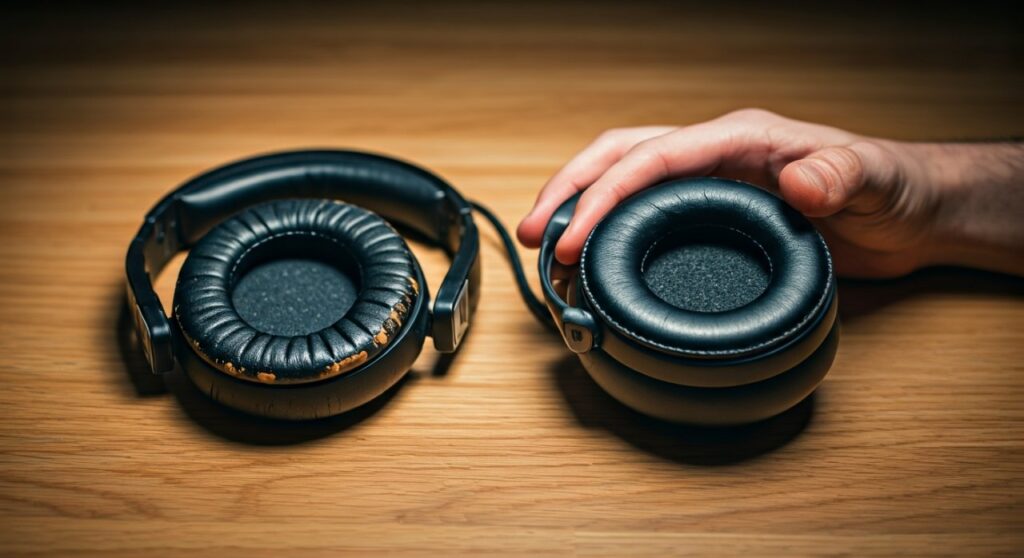
Fortunately, learning how to change ear cushions on HD280s headphones is the single most cost-effective way to revitalize your gear. Instead of spending $100 on a new pair, a $15-$30 investment in high-quality pads can make your 10-year-old headphones feel brand new. In my experience as a studio engineer, I’ve found that the HD280s are nearly indestructible, provided you maintain the soft goods every 18 to 24 months.
Key Takeaways: Replacing Your HD280 Cushions
- Difficulty: 2/10 (No tools required, but a small plastic card can help).
- Time Required: 5–10 minutes.
- Critical Tip: Ensure the inner foam disc (scrim) is centered before sealing the pad.
- Primary Benefit: Restores up to 32dB of passive attenuation and enhances low-end frequency response.
- Tool Recommended: A guitar pick or plastic spudger (optional for tucking the edges).
Step-by-Step Guide: How to Change Ear Cushions on HD280s Headphones
The Sennheiser HD280 Pro uses a friction-fit mounting system. Unlike some modern headphones that use plastic clips or adhesive, these rely on a thin material “skirt” that tucks into a recessed groove on the earcup.
Step 1: Remove the Degraded Cushions
Grip the old ear pad firmly and pull it outward. You will feel the “skirt” (the thin flap of material at the back of the pad) slip out of the narrow mounting slot. Do not be afraid to use a bit of force; the plastic of the HD280s is exceptionally rugged and unlikely to snap.
Step 2: Clean the Driver Plate and Groove
Once the pads are off, you will see a significant amount of dust and skin oils. Use a slightly damp microfiber cloth or a 70% isopropyl alcohol wipe to clean the plastic housing. Pro Tip: Ensure no liquid enters the driver holes. Cleaning the groove now ensures the new pad sits flush and creates an airtight seal.
Step 3: Align the Inner Foam Disc
Most replacement kits include a thin foam disc that sits between your ear and the driver. Place this over the driver assembly first. Some are self-adhesive, while others are held in place purely by the pressure of the ear cushion.
Step 4: Mount the New Cushion
This is the most technical part of learning how to change ear cushions on hd280s headphones. Start at the top of the earcup. Insert a small section of the pad’s “skirt” into the mounting groove. Hold that section down with your thumb and slowly work your way around the oval, stretching the material slightly to guide it into the slot.
Step 5: The “Tuck and Spin” Finish
Once the pad is mostly on, you might have a small bunch of material that hasn’t slipped into the groove. Use your fingernail or a guitar pick to gently tuck the remaining material into the slot. Rotate the pad slightly to ensure the tension is even all the way around.
Comparison of Replacement Cushion Materials
Choosing the right material is just as important as knowing how to change ear cushions on hd280s headphones. Different materials drastically change the sound signature and “clamp” feel.
| Material | Breathability | Bass Response | Longevity | Best For |
|---|---|---|---|---|
| OEM Pleather | Low | High (Punchy) | 1-2 Years | Pure Studio Accuracy |
| Sheepskin | Medium | Maximum | 5+ Years | Long-term Durability |
| Velour | High | Reduced | 2-3 Years | Comfort / Hot Environments |
| Hybrid (Gel) | High | Balanced | 3-4 Years | Long Gaming/Mixing Sessions |
Expert Insights: Why Your Choice of Pad Matters
When I first replaced my HD280 Pro pads with generic velour versions, I noticed an immediate loss in sub-bass. The HD280s rely on a perfect acoustic seal to produce their signature flat, deep low end.
- Acoustic Seal: If you use “breathable” fabrics like velour, air escapes, and you lose the sub-frequencies below 60Hz.
- Soundstage: Thicker aftermarket pads (like those from Dekoni or Brainwavz) move the driver further from your ear. This slightly widens the soundstage but can sometimes cause a dip in the high-mids.
- The “Crinkle” Factor: High-quality protein leather or real sheepskin will be quieter when you move your head. Cheap replacements often make a “crinkling” plastic sound that can be picked up by sensitive microphones during vocal tracking.
Troubleshooting Common Installation Issues
Sometimes, the “skirt” of the replacement pad seems too short or too tight. Here is how I handle those situations:
- Material is too stiff: If the new pads are cold, the material won’t stretch. Use a hair dryer on a low heat setting for 10 seconds to soften the “skirt” before installation.
- Gap in the seal: If you see the plastic groove anywhere, the pad isn’t seated. Re-tuck it using a plastic card. An improper seal ruins the 32dB noise isolation rating.
- Inner foam keeps moving: Use a tiny dot of double-sided tape on the plastic housing (avoiding the driver) to keep the foam disc centered while you mount the cushion.
Frequently Asked Questions
Do I need tools to change HD280s ear pads?
No, you do not strictly need tools. However, a plastic spudger, guitar pick, or an old credit card can make it much easier to tuck the mounting flap into the narrow groove without tearing the material.
Will aftermarket pads change the sound of my Sennheiser HD280 Pro?
Yes. Generally, genuine Sennheiser pads maintain the intended frequency response. Thicker pads can increase comfort but may slightly alter the “darker” sound profile of the HD280s by changing the distance between the driver and your ear canal.
How often should I replace my headphone cushions?
For daily professional use, I recommend replacing them every 18 to 24 months. If you notice the “black flakes” or if the pads feel “flat” and no longer provide a good seal around your ears, it is time for a change.
Can I wash my HD280 ear pads instead of replacing them?
If the pads are velour, they can be hand-washed. However, if they are the standard protein leather and are already peeling, washing will only accelerate the degradation. Replacement is the only permanent fix for peeling material.
Are HD280 Pro and HD280 Silver pads the same?
Yes, the HD280 Pro, HD280 Silver, and HD281 models all share the same physical earcup dimensions and use the same replacement cushions.

![What Headphones Does TenZ Use? [2024/2025 Pro Setup]](https://bestcustomerreviews.net/wp-content/uploads/2026/03/what-headphones-does-tenz-use-2024-2025-pro-setup-1774879842-400x250.jpg "What Headphones Does TenZ Use? [2024/2025 Pro Setup]")