To splice headphone wires effectively, you must strip the outer insulation, remove the protective enamel coating from the internal copper strands, and join the matching colored wires (Left, Right, and Ground) using soldering or a secure twist. This process allows you to restore high-fidelity audio to broken headsets for a fraction of the cost of a replacement.
Key Takeaways: The TL;DR of Headphone Repair
If you are in a hurry, here are the essential points for a successful splice:
- Tool Must-Haves: You need a soldering iron, 60/40 rosin core solder, and heat shrink tubing for a permanent fix.
- The Enamel Barrier: Most headphone wires are coated in a thin lacquer. You must burn or sand this off before the wires will conduct electricity.
- Color Coding: Generally, Red is the Right channel, Green/Blue is the Left channel, and Copper/Gold is the Ground.
Why Splicing is Better Than Buying New
In my years of repairing professional audio equipment, I have seen countless $300 headphones thrown away due to a simple $0.50 wire break. Splicing isn’t just about saving money; it’s about sustainability and maintaining the audio integrity of your favorite gear.
Modern headphone cables are often made of Oxygen-Free Copper (OFC) or even silver-plated strands. When you splice them correctly, you maintain the low resistance required for high-quality sound.
Essential Tools and Materials
Before you begin, gather these specific items. Using the wrong tools (like bulky electrical tape) will result in a messy, temporary fix that fails within days.
| Tool/Material | Purpose | Expert Recommendation |
|---|---|---|
| Soldering Iron | Melts solder to create a permanent bond. | 15W – 40W iron with a fine tip. |
| Rosin Core Solder | The “glue” for electronics. | 0.8mm diameter for precision. |
| Heat Shrink Tubing | Insulates and strengthens the joint. | 2mm and 4mm diameters. |
| Wire Strippers | Removes outer plastic casing. | Use a dedicated gauge stripper or a sharp hobby knife. |
| Sandpaper (400 grit) | Removes enamel coating. | Can also use a lighter to burn it off. |
Step 1: Preparing the Cable Ends
Start by cutting out the damaged section of the cable. You want to work with clean, unfrayed wire. Use your wire strippers or a utility knife to remove about 1 inch of the outer protective jacket from both ends.
Be extremely careful not to nick the delicate internal wires. These internal wires are often thinner than a human hair and made of litz wire, which consists of multiple strands twisted together.
Step 2: Decoding the Wire Colors
Once the outer jacket is gone, you will see several colored wires. Understanding the standardized wiring schemes is the most critical part of the process.
- Three-Wire Cables (Standard Stereo): Usually Red (Right), Green/Blue (Left), and Bare Copper (Ground).
- Four-Wire Cables (Stereo + Mic): Usually Red, Green, Blue/White (Mic), and Copper (Ground).
- Five-Wire Cables (High-end/Noise Cancelling): Often includes separate grounds for left and right channels.
Expert Tip: If you are unsure which wire is which, use a multimeter on the continuity setting. Touch one probe to the tip of the 3.5mm jack and the other to the wires to identify the Left channel.
Step 3: Removing the Enamel Coating
This is where most beginners fail. Headphone wires are coated in a polyurethane enamel to prevent them from shorting out against each other inside the cable. If you don’t remove this, your solder will not stick, and no signal will pass through.
There are two professional ways to do this:
- The Burn Method: Quickly pass a lighter flame over the tips of the wires (about 0.5 cm). The enamel will shrivel. Wipe the soot off with your fingers.
- The Sanding Method: Fold a small piece of 400-grit sandpaper and gently pull the wire through it until the bright copper is visible.
Step 4: Tinning the Wires
Tinning is the process of coating the bare wire tips with a thin layer of solder before joining them. It makes the final splice much easier and ensures a “cold solder joint” doesn’t occur.
- Heat your soldering iron to roughly 350°C (662°F).
- Touch the iron tip to the wire and simultaneously apply a tiny amount of solder.
- The solder should “wick” into the copper strands, turning them silver.
Step 5: The Physical Splice (Joining)
Now it is time to connect the two ends.
- Slide the Heat Shrink On: Before joining anything, slide a piece of large-diameter heat shrink tubing over one side of the main cable. Then, slide smaller pieces over each individual colored wire.
- The Lineman’s Splice: Twist the matching colored wires together (Red to Red, Green to Green, etc.). A Lineman’s splice is preferred because it provides mechanical strength, so the wire won’t pull apart under tension.
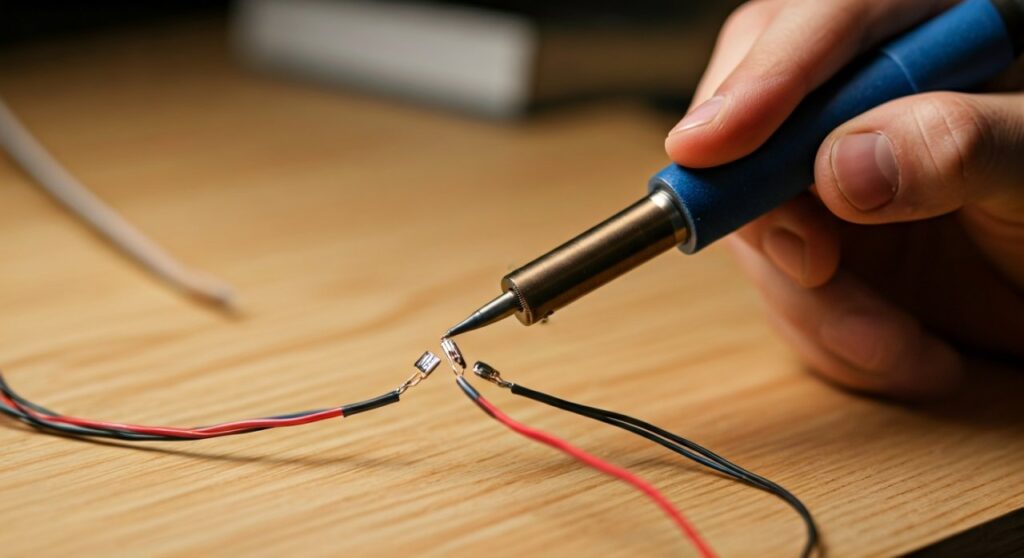
- Apply Heat: Touch your soldering iron to the twisted joint and add a small drop of solder. It should flow smoothly across the connection.
Step 6: Insulation and Final Assembly
After the solder has cooled, slide the small heat shrink tubes over the exposed metal of each individual wire. Use a heat gun or the side of your soldering iron (don’t touch the wire!) to shrink them.
Finally, slide the large tube over the entire repaired section. This provides strain relief, ensuring that when you tug on the cord, the stress is distributed across the cable rather than the delicate solder joints.
Troubleshooting Common Splicing Issues
Even for professionals, things can go wrong. If your headphones don’t work after the splice, check these common failure points:
- No Sound: This is usually caused by the enamel coating not being fully removed. Redo the burn/sand process.
- Crackling Audio: This indicates a “cold joint.” Re-heat the solder until it flows like liquid and let it cool undisturbed.
- Muffled Sound/Out of Phase: You may have swapped the Ground wire with one of the signal wires (Left or Right).
- Short Circuits: If the individual wires are touching each other inside the main jacket, the audio will cut out or sound distorted. Ensure each wire is properly insulated with heat shrink.
Advanced Tips for Longevity
To ensure your repair lasts longer than the original cable, consider these “pro-level” additions:
- Reinforced Core: If your cable has Kevlar fibers inside, do not cut them. Knot them together across the splice to provide extreme tensile strength.
- Liquid Electrical Tape: If the wires are too thin for heat shrink, a dab of liquid electrical tape can provide excellent insulation in tight spaces.
- Use a Splice Box: For heavy-duty studio headphones, consider using a small plastic housing to protect the splice area from bending.
FAQ: Frequently Asked Questions
Can I splice headphone wires without a soldering iron?
Yes, you can use the twist-and-tape method. Twist the bare wires together tightly and wrap each connection individually in electrical tape. However, this is a temporary fix and will likely result in signal loss or crackling over time.
Why does my headphone wire have five colors?
High-end headphones or those with inline remotes and microphones often use five wires: Left, Right, Microphone, and separate Ground wires for the audio and the mic. You must match each color specifically or bridge the grounds if necessary.
Will splicing my wires reduce sound quality?
If done correctly with rosin core solder, there is no measurable loss in sound quality. The electrical resistance of a well-soldered joint is negligible. However, a “dry” twist-only connection can introduce resistance and noise.
What is the best way to strip very thin wires?
For the hair-thin wires found in earbuds, avoid metal strippers. Instead, use your fingernails or a soldering iron tip to melt through the outer plastic, then pull it off. This prevents you from accidentally cutting the copper core.
Can I splice a 3.5mm jack from one brand onto another?
Yes. Headphone signals are universal analog signals. As long as you correctly identify which wire corresponds to the Tip (Left), Ring (Right), and Sleeve (Ground), you can mix and match cables and jacks from different manufacturers.

![What Headphones Does TenZ Use? [2024/2025 Pro Setup]](https://bestcustomerreviews.net/wp-content/uploads/2026/03/what-headphones-does-tenz-use-2024-2025-pro-setup-1774879842-400x250.jpg "What Headphones Does TenZ Use? [2024/2025 Pro Setup]")