What Are Overhead Projectors and How Do They Work?
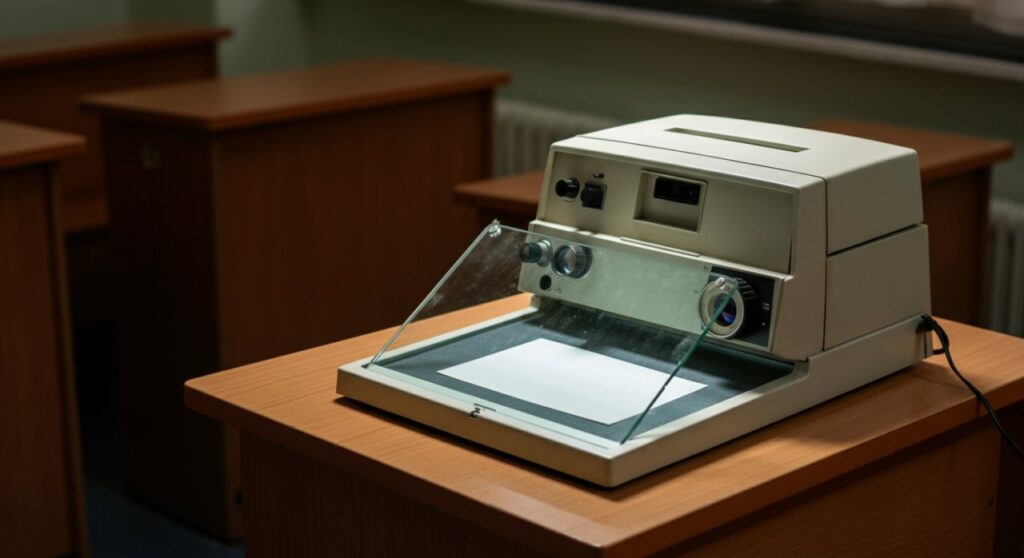
Overhead projectors are optical devices that project enlarged images onto a screen or wall by shining a bright light through a transparent sheet of film, known as an acetate transparency. They were the gold standard for classroom and corporate presentations before digital projectors became mainstream, serving as a reliable tool for visual communication. Today, while digital technology dominates, understanding what are overhead projectors helps appreciate the foundation of modern visual aids.
TL;DR: Key Takeaways
- Definition: An overhead projector is an analog device that projects images from transparencies using a light source, a mirror, and a lens system.
- Core Components: Key parts include the Fresnel lens, the projection head, and the high-intensity halogen lamp.
- Usage: Still widely used in niche artistic, educational, and theatrical settings for tracing or retro-style projections.
- Verdict: While they are largely replaced by digital projectors, they remain excellent for hands-on, low-tech presentations.
The Anatomy of an Overhead Projector
To truly grasp what is an overhead projector, you must look inside its housing. It is a deceptively simple machine built around basic principles of optics.
- Light Source: Usually a high-powered halogen lamp that generates significant heat.
- Cooling Fan: Essential for preventing the melting of transparencies during long presentations.
- Fresnel Lens: A flat, grooved lens that spreads light evenly across the glass stage.
- Glass Stage: The flat surface where you place your acetate sheet.
- Projection Head: Contains a mirror and a focusing lens to direct the image onto the screen.
How the Optical System Functions
When you turn the device on, the light passes up through the Fresnel lens and the transparency. The light then hits the mirror in the projection head, which reflects the image horizontally onto your display surface. You adjust the focusing knob to move the head up or down, ensuring the image is crisp and legible for your audience.
Comparing Projection Technologies
While you might ask what is the overhead projector compared to modern tech, the differences are stark. Here is a quick breakdown of how they stack up against digital alternatives.
| Feature | Overhead Projector | Digital Projector (DLP/LCD) |
|---|---|---|
| Media Type | Acetate Transparencies | Digital Files (PPT, PDF, Video) |
| Connectivity | None (Analog) | HDMI, USB, Wi-Fi |
| Maintenance | Lamp replacement, cleaning | Filter cleaning, bulb/LED life |
| Ease of Use | Immediate, physical | Requires setup and drivers |
| Best For | Manual tracing, retro effects | Modern presentations, media |
Step-by-Step: How to Use an Overhead Projector
Using this equipment is a tactile experience that digital tools cannot replicate. Follow these steps to set up your display properly.
- Placement: Position the projector on a stable, flat surface about 4 to 8 feet from the screen.
- Power On: Plug the unit in and flip the switch to activate the halogen lamp and cooling fan.
- Alignment: Place your transparency sheet on the glass stage. Adjust the projector’s angle so the image is square on the screen.
- Focusing: Rotate the focus adjustment knob on the arm until the text or graphics appear sharp.
- Operation: Place a sheet of paper over parts of the transparency you want to hide to reveal information progressively.
Practical Tips for Best Results
Even though you may have mastered what are overhead projectors, getting a clear image requires a bit of finesse. My experience in early academic settings taught me that transparency quality is everything.
- Use Proper Pens: Always use permanent markers or special pens designed for transparency film to prevent smudging.
- Manage Heat: Never leave a transparency on the glass for more than 15 minutes at a time to prevent accidental melting.
- Cleaning: Wipe the Fresnel lens with a dry, soft cloth before every use to remove dust that shows up as annoying spots on the wall.
- Positioning: Ensure the room lights are dimmed; these devices are significantly less bright than modern LED projectors.
Frequently Asked Questions
What is the main disadvantage of using an overhead projector?
The primary limitation is the lack of digital connectivity. Unlike modern projectors, you cannot stream video or pull files directly from a computer; you are limited to the physical content printed or drawn on transparencies.
Can I still buy overhead projectors today?
Yes, they are available through office supply outlets and secondary markets, though production has slowed significantly. They are currently favored by artists for large-scale mural tracing and by nostalgic educators.
What is an overhead projector lamp life?
Standard halogen lamps for these projectors typically last between 50 and 200 hours. Always keep a spare bulb on hand, as these lamps are prone to blowing out unexpectedly.
Are transparencies reusable?
If you use water-soluble markers, you can wipe the acetate sheets clean with a damp cloth and reuse them multiple times. Permanent marker sheets are generally intended for one-time use or long-term storage.