Understanding What Charger Does Beats Headphones Use
Most modern Beats headphones and earbuds produced after 2021 utilize a USB-C charging port, while models released between 2016 and 2020 typically use Apple’s proprietary Lightning connector. Older, “legacy” models manufactured before the Apple acquisition or shortly after often require a Micro-USB cable.
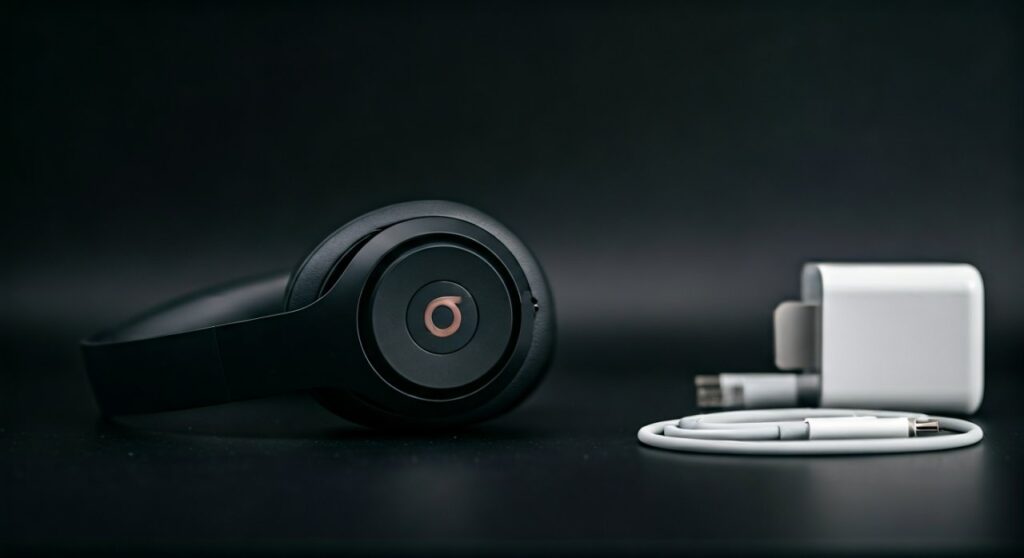
Knowing exactly what charger does beats headphones use is the first step to ensuring your device maintains a healthy battery life and supports Fast Fuel technology. In this guide, we provide a definitive breakdown of every major model and the specific hardware required to power them up.
Key Takeaways: Beats Charging Compatibility
If you are in a hurry, use this quick reference table to identify your hardware requirements:
| Beats Model Category | Specific Models | Required Cable Type |
|---|---|---|
| Latest Releases | Beats Studio Pro, Beats Solo 4, Beats Studio Buds + | USB-C |
| Performance Buds | Beats Fit Pro, Beats Studio Buds | USB-C |
| Neckband Style | Beats Flex | USB-C |
| Classic Over-Ear | Beats Studio3 Wireless, Beats Solo3 Wireless | Micro-USB / Lightning |
| Legacy Earbuds | Powerbeats Pro, BeatsX | Lightning |
| Older Sport | Powerbeats3, Powerbeats2 | Micro-USB |
Identifying Your Beats Charging Port
Identifying what charger does beats headphones use can be confusing because Apple (which owns Beats) transitioned between three different standards over the last decade. Here is how to visually distinguish them:
USB-C (The Modern Standard)
The USB-C port is a small, rounded rectangle. It is symmetrical, meaning you can plug the cable in “upside down” or “right side up,” and it will still work. Most Beats Studio Pro and Beats Fit Pro users will find this port on the bottom of the right earcup or the back of the charging case.
Lightning (The Apple Standard)
The Lightning port is a very thin, flat slot. If you own an iPhone 14 or older, this is the same cable you use for your phone. You will find this on the Powerbeats Pro case and the Beats Solo3 Wireless.
Micro-USB (The Legacy Standard)
The Micro-USB port is shaped like a trapezoid (flat on top, angled on the bottom). It only fits one way. This is common on older models like the Beats Studio 2.0 or the Powerbeats3 Wireless.
Detailed Breakdown: What Charger Does Beats Headphones Use by Model?
The USB-C Era (2021 – Present)
In alignment with global electronics standards and European Union regulations, Apple has moved almost all Beats products to USB-C. This allows for faster data transfer and higher power delivery.
- Beats Studio Pro: This flagship model uses USB-C and supports USB-C audio, allowing you to listen to lossless audio while charging.
- Beats Solo 4: The latest on-ear model features a USB-C port for both charging and high-resolution wired audio.
- Beats Studio Buds & Buds +: These popular noise-canceling earbuds use a USB-C port located on the bottom of the pebble-shaped case.
- Beats Fit Pro: Designed for athletes, these use USB-C.
- Beats Flex: These budget-friendly neckband buds were one of the first Beats products to adopt USB-C.
The Lightning Era (2016 – 2020)
After Apple acquired Beats, they integrated the Lightning connector to simplify the ecosystem for iPhone users.
- Powerbeats Pro: The charging case for these earbuds uses a Lightning port.
- Beats Solo3 Wireless: Despite being an older model still in production, it maintains the Lightning port.
- BeatsX: These slim earbuds use a Lightning connector located on the neckband.
- Beats Pill+: The portable speaker uses a Lightning port for input and a USB-A port for output (to charge your phone).
The Micro-USB Era (Pre-2016)
If you have a pair of “vintage” Beats, you are likely looking for a Micro-USB cable.
- Beats Studio 2.0 / 3.0: While the Studio3 is newer, many iterations still utilized Micro-USB before the Studio Pro transition.
- Powerbeats2 & Powerbeats3: These sport-focused earbuds hidden the Micro-USB port under a small rubber flap on the earpiece.
Choosing the Right Power Adapter (Wall Plug)
Knowing what charger does beats headphones use involves more than just the cable; the power brick matters too. While Beats often include a cable in the box, they rarely include the wall adapter anymore.
Recommended Wattage
For the best results, especially when using Fast Fuel, you should use a power adapter with at least 20W (Watts) of output.
- Standard USB-A Bricks (5W): These will charge your headphones, but very slowly.
- Apple 20W USB-C Power Adapter: Ideal for Beats Studio Pro and Beats Fit Pro.
- Third-Party Chargers: Brands like Anker or Belkin are excellent, provided they are MFi Certified (Made for iPhone/iPad/iPod) for Lightning models or USB-IF Certified for USB-C models.
Is it safe to use a MacBook charger?
Yes. You can safely use a high-wattage MacBook charger (30W, 61W, or 96W) to charge your Beats. The internal charging circuit of the headphones will only “draw” the amount of power it can handle, preventing damage to the battery.
Step-by-Step Guide: How to Properly Charge Your Beats
To maximize the lifespan of your Lithium-ion battery, follow these professional steps:
- Inspect the Port: Before plugging in, ensure there is no lint or debris in the charging port. Use a toothpick or compressed air if necessary.
- Connect the Cable: Insert your USB-C, Lightning, or Micro-USB cable into the headphones or the charging case.
- Check the LED Indicator:
- Avoid Overnight Charging: While modern electronics have overcharge protection, it is best practice to unplug them once they reach 100% to reduce chemical aging of the battery.
- Use “Fast Fuel”: If you are in a rush, a 5-to-10-minute charge typically provides 1.5 to 3 hours of playback time, depending on the model.
Troubleshooting: Why Won’t My Beats Charge?
If you have the correct cable but your device remains dead, consider these common fixes:
- Reset the Device: For most Beats, hold the Power Button and Volume Down button for 10-15 seconds until the LED flashes.
- Swap the Cable: Cables are the most common point of failure. Try a different USB-C or Lightning cable to rule out hardware damage.
- Update Firmware: Connect your Beats to an iPhone or use the Beats App on Android to check for firmware updates that might resolve charging bugs.
- Temperature Check: Lithium-ion batteries will not charge if they are too hot or too cold. Ensure your headphones are at room temperature.
Technical Comparison: USB-C vs. Lightning for Beats
| Feature | USB-C (Newer Models) | Lightning (Older Models) |
|---|---|---|
| Data Speeds | Up to 10Gbps+ (Model dependent) | 480Mbps (USB 2.0 speeds) |
| Power Delivery | Supports high-wattage PD charging | Limited to roughly 12W-20W |
| Audio Capability | Supports USB-C Lossless Audio | Charging and data only |
| Universality | Works with Android, PC, Mac, and iPad | Primarily Apple-ecosystem focused |
Expert Tips for Battery Longevity
Based on my experience testing dozens of audio products, the way you charge your Beats dictates how long they will last before the battery begins to degrade.
- Avoid Extreme Heat: Never leave your Beats charging on a car dashboard or in direct sunlight. Heat is the #1 killer of headphone batteries.
- The 20-80 Rule: If possible, try to keep your battery level between 20% and 80%. Deep discharges (letting it hit 0%) put more stress on the battery cells.
- Storage Charge: If you aren’t going to use your headphones for a few months, charge them to approximately 50% before turning them off.
Frequently Asked Questions (FAQs)
Can I use my Samsung or Android phone charger for my Beats?
Yes, if your Beats use a USB-C or Micro-USB port, you can use any standard Android phone charger. Most modern Beats (like the Studio Buds) are designed to be platform-agnostic, meaning they work perfectly with non-Apple hardware.
Do Beats headphones come with a wall plug?
No. Currently, Apple and Beats only include the charging cable in the box. You will need to provide your own USB-A or USB-C wall adapter, or plug the cable into a computer’s USB port.
What should I do if my Powerbeats Pro case isn’t charging?
First, ensure the Lightning cable is pushed all the way into the port. Second, check that the earbuds are seated correctly on the internal pins; if the pins are dirty, the case might not recognize that it needs to charge.
How long does it take to fully charge Beats headphones?
On average, a full charge from 0% to 100% takes about 90 minutes to 2 hours. However, using a high-wattage USB-C charger with a model like the Beats Studio Pro can slightly decrease this time.
Why is the light on my Beats flashing red and white?
A flashing red and white light usually indicates a hardware error or that the device needs to be reset. Try the factory reset method (holding Power and Volume Down) to see if the charging logic clears.
![What Headphones Does TenZ Use? [2024/2025 Pro Setup]](https://bestcustomerreviews.net/wp-content/uploads/2026/03/what-headphones-does-tenz-use-2024-2025-pro-setup-1774879842-400x250.jpg "What Headphones Does TenZ Use? [2024/2025 Pro Setup]")