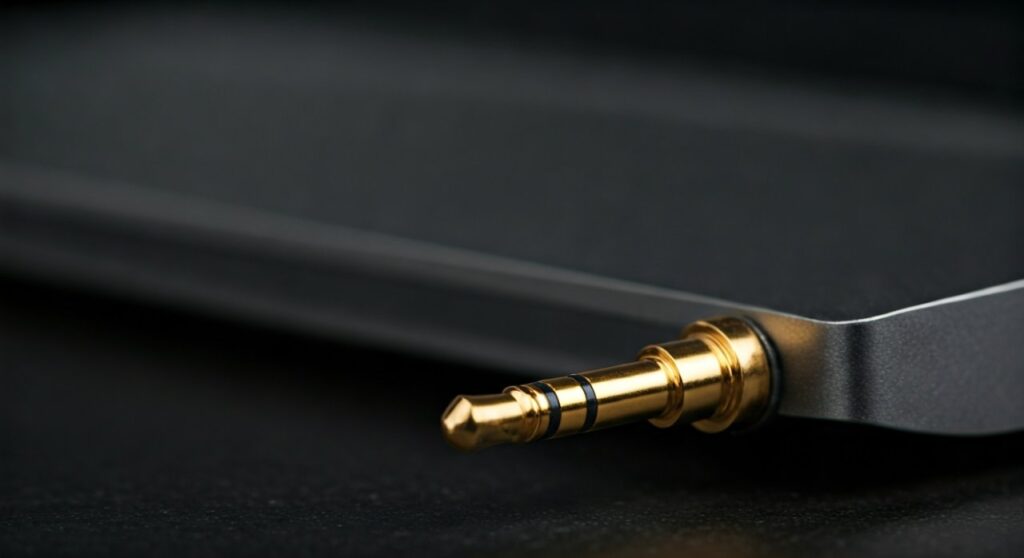
A 3.5 mm headphone jack is a standard circular connector used to transmit analog audio signals from a source device to your headphones, speakers, or microphones. Also known as a mini-jack or TRS connector, it is the most ubiquitous audio interface in the world, found on billions of devices including laptops, older smartphones, and professional audio equipment.
Despite the rise of wireless technology, this tiny port remains the gold standard for high-fidelity, lag-free audio. Understanding what is a 3.5 mm headphone jack is essential for anyone looking to maximize their audio experience or troubleshoot connectivity issues across different hardware ecosystems.
Key Takeaways: Understanding the 3.5 mm Standard
Before diving into the technical depths, here is a quick summary of what you need to know about the 3.5 mm headphone jack:
| Feature | Description |
|---|---|
| Common Name | Mini-jack, audio jack, or 1/8-inch connector. |
| Primary Use | Transmitting analog audio signals to headphones and speakers. |
| Signal Type | Analog (no digital conversion required at the headphone level). |
| Variations | TRS (Stereo), TRRS (Stereo + Microphone), TRRRS (Balanced). |
| Standard Size | 3.5 millimeters in diameter (approx. 0.14 inches). |
| Durability | High; physical connections are less prone to software glitches. |
What is a 3.5 mm Headphone Jack? A Deep Dive
The 3.5 mm headphone jack is the small, round socket you see on the side of a computer or the bottom of a tablet. It serves as the physical interface for a jack plug, which is the metal tip at the end of your headphone cable.
In technical terms, it is a family of electrical connectors typically used for analog signals. It was originally designed in the 19th century for telephone switchboards, though it was much larger then (the 6.35 mm version). The 3.5 mm version became a household name with the release of the Sony Walkman in 1979, which revolutionized portable music.
When you ask, “what is 3.5 mm headphone jack technology,” you are really looking at a system that converts electrical pulses into the physical movement of a speaker diaphragm. Because it is an analog connection, there is virtually zero “latency” or delay, making it the preferred choice for gamers and music producers.
Is a Headphone Jack 3.5 mm on Every Device?
A common point of confusion for consumers is whether all audio ports are created equal. While the 3.5 mm is the standard, is a headphone jack 3.5 mm on every single device? The answer is no, though it is the most common “consumer” size.
There are actually three primary sizes used in the audio world:
- 2.5 mm (Sub-miniature): Often used in older mobile phones or specialized communication headsets.
- 3.5 mm (Miniature): The standard for smartphones, laptops, and tablets.
- 6.35 mm (1/4-inch): Found on professional amplifiers, electric guitars, and high-end audio interfaces.
While are headphones 3.5 mm in most cases? Yes, the vast majority of wired headphones sold at retail use the 3.5 mm plug. However, if you buy professional studio monitors, you might find they require an adapter to fit into your laptop’s smaller port.
The Anatomy of a 3.5 mm Plug: Understanding the Rings
If you look closely at the metal tip of your headphones, you will see black or white plastic rings. These are insulators that separate different parts of the signal. This is where most people get confused when asking, “are headphone jacks 3.5 mm compatible with my mic?”
TS (Tip-Sleeve)
This plug has one ring and two contact points. It is strictly for mono audio. You rarely see this in headphones, but you see it often in patch cables for instruments.
TRS (Tip-Ring-Sleeve)
This plug has two rings and three contact points. This is the standard for stereo audio (Left channel, Right channel, and Ground). Most standard headphones without a microphone use this configuration.
TRRS (Tip-Ring-Ring-Sleeve)
This version has three rings and four contact points. This allows for stereo audio AND a microphone signal. If you have a headset with an inline mic, it is almost certainly a TRRS 3.5 mm plug.
TRRRS (Tip-Ring-Ring-Ring-Sleeve)
A rarer configuration used for balanced audio or specialized noise-canceling headsets. These are typically found in high-end audiophile equipment from brands like Sony or Sennheiser.
How to Use a 3.5 mm Headphone Jack: A Step-by-Step Guide
Using a 3.5 mm headphone jack seems straightforward, but ensuring the best audio quality and device longevity requires a bit of “pro-user” knowledge.
Step 1: Inspection
Check the plug for any debris or oxidation. A dirty plug causes “cracking” or static sounds. Use a soft cloth to wipe the metal surface.
Step 2: Alignment and Insertion
Line up the plug with the port. Push it in firmly until you hear or feel a “click.” If the connection feels “mushy,” there might be lint inside the jack of your device.
Step 3: Source Configuration
On Windows or macOS, ensure your output device is set to “Headphones (Realtek Audio)” or a similar internal driver name. The 3.5 mm jack is an “active” port, meaning the device usually detects it automatically.
Step 4: Troubleshooting Static
If you hear a buzzing sound, it may be due to “ground loop” interference. This happens if your laptop is charging while you use the 3.5 mm jack. Try unplugging the power cable to see if the noise vanishes.
Are All Headphone Jacks 3.5 mm? Comparing Variations
To help you identify which cable you need, refer to this comparison of common audio connector sizes found in modern electronics.
| Connector Size | Common Name | Primary Devices |
|---|---|---|
| 2.5 mm | Sub-mini | Two-way radios, old Nokia phones, Bose QuietComfort (QC25) internal port. |
| 3.5 mm | Mini-jack | iPhone (pre-7), Samsung Galaxy (pre-S20), Laptops, PS5 Controllers. |
| 4.4 mm | Pentaconn | High-end Digital Audio Players (DAPs) for balanced audio. |
| 6.35 mm | 1/4-inch | Electric guitars, Yamaha receivers, Marshall amps. |
The “Death” and Survival of the 3.5 mm Jack
In 2016, Apple famously removed the 3.5 mm jack from the iPhone 7, citing “courage” and the need for more internal space. This started a trend where flagship phones from Samsung, Google, and OnePlus also ditched the port.
However, the question “are all headphone jacks 3.5 mm going away?” has a surprising answer: No.
- Gaming: Pro gamers still use the 3.5 mm jack because Bluetooth has too much latency (delay) for competitive play.
- Audiophiles: High-resolution audio cannot be fully transmitted over standard Bluetooth codecs. A wired 3.5 mm connection is required for “lossless” sound.
- Budget Devices: Lower-end smartphones and almost all laptops still include the jack because it is cheap and reliable.
Why the 3.5 mm Jack is Still Superior to USB-C Audio
Many people transition to USB-C dongles, but the 3.5 mm headphone jack offers several technical advantages:
- Passive Connection: The jack is just a physical conduit. The Digital-to-Analog Converter (DAC) inside your phone does the work. USB-C headphones require their own internal DAC, which often drains more battery.
- Charging While Listening: With a dedicated 3.5 mm port, you don’t have to choose between charging your phone and listening to music.
- Durability: 3.5 mm ports are structurally simpler and often more durable than fragile USB-C pins.
Expert Maintenance: How to Clean a 3.5 mm Jack
If your headphones keep falling out or the sound only comes out of one ear, your jack is likely dirty. As an expert who has repaired hundreds of devices, here is the safest way to clean it:
- Do Not Use Water: Never put liquids inside the port.
- Compressed Air: Use a can of compressed air to blow out loose dust.
- The Toothpick Method: Gently use a wooden toothpick to “hook” out lint that accumulates at the bottom of the port.
- Isopropyl Alcohol: Use a 90% or higher solution. Dip the headphone plug in the alcohol, insert it into the jack, and rotate it. This cleans the internal contact points without flooding the device.
FAQs: Frequently Asked Questions about 3.5 mm Jacks
Is a 3.5 mm jack the same as an AUX port?
Yes, in most consumer contexts, they are the same. AUX (Auxiliary) refers to the function of the port, while 3.5 mm refers to the physical size of the connector.
Can I plug a 3.5 mm headset into a laptop with two ports?
If your laptop has separate ports for headphones and a mic, you will need a Y-Splitter adapter. A standard TRRS headset plug will only work for audio or mic, not both, unless it is a “combo” port (indicated by a headset icon).
Why do some 3.5 mm microphones not work with my phone?
This is usually due to the wiring standard. There are two types: CTIA (used by Apple and most modern Androids) and OMTP (used by older Sony and Nokia phones). If the Ground and Mic sections are swapped, the mic won’t work.
Are headphone jacks 3.5 mm on the PS5 and Xbox controllers?
Yes. Both the Sony DualSense and Xbox Wireless Controller feature a 3.5 mm TRRS jack that supports both stereo game audio and microphone input for party chat.
Can I convert 3.5 mm to USB-C?
Yes, using an “adapter” or “dongle.” These adapters contain a small chip that converts the digital signal from the USB port back into an analog signal for the 3.5 mm headphones.

![What Headphones Does TenZ Use? [2024/2025 Pro Setup]](https://bestcustomerreviews.net/wp-content/uploads/2026/03/what-headphones-does-tenz-use-2024-2025-pro-setup-1774879842-400x250.jpg "What Headphones Does TenZ Use? [2024/2025 Pro Setup]")