

Why Do Projector Screens Make a Difference? The Expert Verdict
Yes, projector screens make a massive difference in image quality by providing a uniform, reflective surface that enhances brightness, contrast, and color accuracy. While a flat white wall might seem sufficient, it lacks the specialized optical coatings required to reflect light efficiently back to your eyes, often resulting in a dull, grainy, and washed-out image.
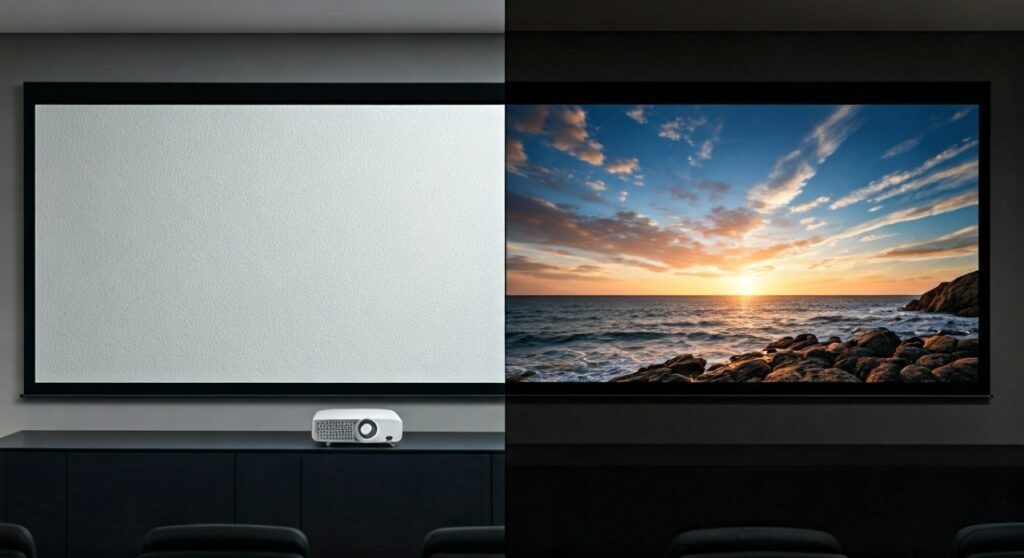
As someone who has spent over a decade calibrating high-end home theaters, I have seen enthusiasts spend $3,000 on a 4K Laser Projector only to ruin the experience by projecting onto a $20 can of white paint. A dedicated screen is not just a “backup” accessory; it is 50% of the optical system.
Key Takeaways: Why the Surface Matters
- Uniformity: Screens eliminate the “hotspots” and texture imperfections found on drywall.
- Gain Management: Specialized materials can boost brightness (high gain) or improve black levels (low gain).
- Ambient Light Rejection (ALR): Modern screens can filter out ceiling lights, allowing for daytime viewing.
- Resolution Support: High-quality screens are engineered with a micro-texture to support 4K and 8K resolutions without pixel distortion.
The Science of Reflection: Wall vs. Screen
When you ask, does a projector screen make a difference, you are really asking about light physics. A standard wall is designed to be “matte” to hide architectural flaws, but this causes it to scatter light in every direction (diffuse reflection).
A professional screen uses controlled reflection. Depending on the material, it can focus light back toward the viewing cone, ensuring that the Lumens produced by your projector aren’t wasted.
Comparison Table: Performance Metrics
| Feature | Standard White Wall | Fixed Frame / Motorized Screen |
|---|---|---|
| Surface Texture | Visible grains and bumps | Micro-smooth / Optical grade |
| Color Neutrality | Often has yellow/blue tints | Lab-certified D65 Neutral |
| Light Gain | Typically 0.7 to 0.9 (Dim) | 1.0 to 1.5+ (Bright) |
| Contrast Ratio | Poor (Light bleeds into shadows) | Enhanced (Deeper blacks) |
| Durability | Scuffs easily, hard to clean | Tensioned, mildew resistant |
Critical Factors Where Projector Screens Make a Difference
To understand why does projector screen make a difference, we need to look at the three pillars of projection science: Gain, Color Accuracy, and Texture.
The Power of “Gain”
Gain is a measurement of the light reflectivity of a surface. A standard white wall usually has a gain of less than 1.0, meaning it absorbs more light than it reflects.
- High Gain (1.1 – 1.5): These screens reflect more light toward the center of the room. This is ideal for lower-lumen projectors or rooms with some ambient light.
- Negative Gain (0.7 – 0.9): Often used in “Grey Screens,” this helps improve black levels in rooms that aren’t perfectly dark.
Eliminating Texture and “Sparkle”
Modern 4K projectors have incredibly small pixels. If you project these onto a wall with even a slight “orange peel” texture, the image will look noisy or blurry. High-end screen materials, like those from Stewart Filmscreen or Elite Screens, use a surface that is virtually invisible even at 8K resolutions.
Color Accuracy (D65 Calibration)
Most white paints contain “Optical Brighteners” that have a blue tint. This shifts the color balance of your movie, making skin tones look sickly or skies look unnatural. A professional screen is chemically balanced to be color-neutral, ensuring you see the director’s original vision.
Does the Projector Screen Make a Difference in Bright Rooms?
The short answer is: Absolutely. This is where Ambient Light Rejection (ALR) technology comes into play.
In a room with windows or overhead lights, a white wall will look completely washed out because it reflects all light sources equally. An ALR Screen uses a microscopic “saw-tooth” structure or multi-layer optical filters. These layers reflect light coming from the projector (front) while absorbing light coming from the ceiling or sides.
Expert Insight: If you plan to use your projector as a TV replacement in a living room, an ALR screen is mandatory. Without it, your $2,000 projector will look worse than a $400 budget TV.
Step-by-Step Guide: How to Choose the Right Screen for Your Setup
Choosing the right surface is just as important as the projector itself. Follow these steps to ensure you maximize your investment.
Step 1: Evaluate Your Room Lighting
- Dedicated Dark Room: Go with a Reference White Screen with 1.0 gain. This provides the most natural image.
- Living Room/Multi-purpose: Choose an ALR (Ambient Light Rejection) or Grey Screen to preserve contrast when the lights are on.
Step 2: Determine Your Viewing Distance
The size of your screen should depend on how far away you sit. A common rule of thumb is the THX Standard: your screen should take up about 40 degrees of your field of vision.
- 10-foot distance: Aim for a 110″ to 120″ screen.
Step 3: Select the Screen Format
- Fixed Frame: Best for dedicated home theaters. The screen is permanently stretched over a metal frame, ensuring it stays perfectly flat.
- Motorized/Tab-Tensioned: Ideal for hidden setups. Ensure it is “Tab-Tensioned” (strings on the side) to prevent the “wave” effect common in cheap roll-down screens.
Step 4: Account for Projector Type
If you are using an Ultra Short Throw (UST) projector (the kind that sits inches from the wall), you MUST use a specific UST-ALR screen. These have a unique horizontal lens structure that catches light from below. A regular screen or a wall will reflect the UST light up toward the ceiling instead of at the audience.
Common Myths About Projector Screens
“I can just use high-quality white paint.”
While “projector screen paint” exists (like Screen Goo), it requires a perfectly sanded, level-5 drywall finish. Even then, it lacks the optical depth and specialized layers of a physical screen.
“Black screens are only for 3D.”
False. Darker grey or “Black” screens are designed to improve the Dynamic Range. By lowering the floor of the black levels, the colors appear more vibrant and “pop” more effectively.
Expert Tips for Maximizing Screen Performance
Based on my experience setting up over 200 home cinemas, here are a few “pro tips” that most retailers won’t tell you:
- Avoid “Cheap” Motorized Screens: Non-tensioned motorized screens will eventually develop curls at the edges. If you can’t afford a tensioned one, stick to a Fixed Frame.
- Match Your Aspect Ratio: Most content is 16:9, but if you are a hardcore cinephile, consider a 2.35:1 (Cinemascope) screen to eliminate black bars on top and bottom.
- Check the Acoustic Transparency: If you want to hide your speakers behind the screen, you need a Perforated or Woven screen material. This allows sound to pass through without muffled audio.
Frequently Asked Questions (FAQs)
Is a projector screen worth it for a budget projector?
Yes. Even a $200 budget projector sees a significant boost in clarity and brightness on a basic $100 manual screen compared to a wall. It is often the cheapest way to “upgrade” your projector’s performance.
Can I use a bedsheet as a projector screen?
I strongly advise against this. Bedsheets are thin and porous, meaning light passes right through them. This results in a dim image and “ghosting” if there is anything behind the sheet.
What color projector screen is best?
- White: Best for total darkness and maximum color accuracy.
- Grey: Best for rooms with light walls or minor ambient light to help black levels.
- Black/ALR: Best for bright living rooms.
Does a 4K projector need a special 4K screen?
While any screen can show a 4K image, a “4K-rated” screen has a finer surface grain. Lower-quality screens have textures that can interfere with the tiny 4K pixels, causing a “moiré pattern” or a gritty look.
How do I clean my projector screen?
Most screens can be cleaned with a microfiber cloth and a very small amount of warm water with mild soap. Never use harsh chemicals or Windex, as this can strip the optical coating.









