

Can a Projector Replace a TV? The Direct Answer
Can a projector replace a TV? Yes, a projector can absolutely replace a TV in your home, provided you choose a model with high ANSI Lumens and pair it with an Ambient Light Rejection (ALR) screen. While traditional TVs offer better brightness in daylight, modern Ultra Short Throw (UST) laser projectors now deliver a comparable 100-inch to 120-inch 4K experience that can function as your primary entertainment hub.
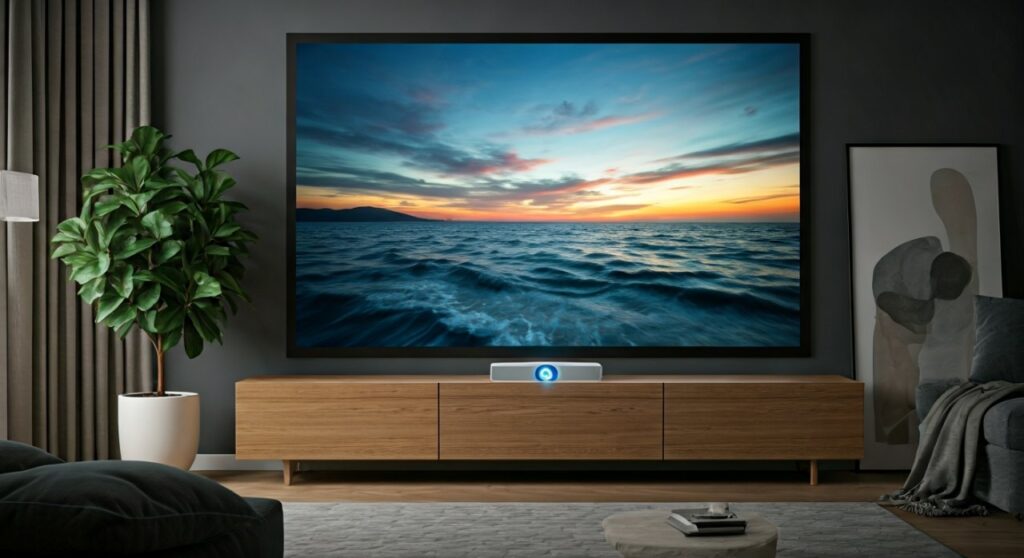
The transition from a standard LED screen to a projector setup is a dream for many cinephiles and gamers. However, it requires a strategic approach to lighting, audio, and hardware connectivity. If you frequently watch content in a dark or dimly lit room, the immersion provided by a projector is unmatched by any consumer-grade TV.
Key Takeaways: Transitioning from TV to Projector
Before diving into the technical details, here is a summary of what you need to know about making the switch.
- Size Advantage: Projectors offer much larger screens (100″+) at a lower cost-per-inch than large-format OLED or QLED TVs.
- Light Control is Crucial: Unlike TVs, projectors struggle with direct sunlight. You will need blackout curtains or specialized screens.
- Audio Requirements: Most projector speakers are inadequate. Plan to invest in a Soundbar or a dedicated 5.1 Surround Sound system.
- Maintenance: Laser projectors last 20,000+ hours (similar to TVs), but lamp-based models require bulb replacements every few years.
- Eye Comfort: Projectors use reflected light rather than direct light, which significantly reduces eye strain during long viewing sessions.
The Ultimate Comparison: Projectors vs. Smart TVs
Choosing whether can we use projector as tv depends on your specific lifestyle. Below is a data-driven comparison of how these two technologies stack up in a typical living room environment.
| Feature | Modern 4K Smart TV | Laser Projector (UST) | Traditional Lamp Projector |
|---|---|---|---|
| Max Screen Size | Typically 65″ – 85″ | 100″ – 150″ | Up to 300″ |
| Brightness | High (Excellent for daylight) | Moderate (Needs ALR Screen) | Low (Needs Dark Room) |
| Color Accuracy | High (OLED/QLED) | Very High (DLP/3LCD) | Varies by Model |
| Setup Complexity | Plug-and-Play | Moderate (Alignment needed) | High (Mounting & Wiring) |
| Lifespan | 50,000 – 100,000 Hours | 20,000 – 30,000 Hours | 4,000 – 10,000 Hours |
| Input Lag (Gaming) | 1ms – 10ms | 16ms – 35ms | 30ms – 100ms |
Step-by-Step Guide: How to Successfully Replace Your TV with a Projector
If you have decided that can projector replace tv is the right move for your home, follow these steps to ensure a professional-grade setup.
Step 1: Evaluate Your Room’s Lighting
The biggest “TV killer” for projectors is ambient light. Examine your room at midday. If you have floor-to-ceiling windows, you must either install Blackout Shades or invest in an Ambient Light Rejection (ALR) screen. ALR screens use specialized optical layers to reflect light coming from above while focusing the projector’s light toward the viewer.
Step 2: Choose the Right Projector Technology
For a true TV replacement, I highly recommend a Laser Ultra Short Throw (UST) projector like the Samsung The Premiere or the Hisense L9G. These sit just inches from the wall, eliminating the need for ceiling mounts and long HDMI cables running across the floor.
Step 3: Select a Permanent Screen Surface
Do not just project onto a white wall. Walls have textures and “hot spots” that ruin 4K clarity. A fixed-frame screen provides a perfectly flat surface, which is essential for 4K resolution. If you want a minimalist look, consider a Motorized Floor-Rising Screen that disappears when not in use.
Step 4: Integrate a Streaming Source
Most projectors now come with built-in Android TV or Tizen OS. However, for the best experience, plug in a Roku Ultra, Apple TV 4K, or Amazon Fire Stick. These devices ensure you have access to Netflix, Disney+, and Hulu with the fastest interface and best HDR support.
Step 5: Configure the Audio Output
Projectors are usually located behind or above you, but the sound should come from the screen. Use the HDMI eARC port on your projector to send high-quality audio to a Sonos Arc or a Samsung Q-Series Soundbar. This creates the “Wall of Sound” effect necessary for cinematic immersion.
Why You SHOULD Replace Your TV (The Benefits)
From my experience testing dozens of home theater setups, there are three areas where projectors objectively beat TVs.
Unbeatable Scale and Immersion
A 100-inch TV can cost upwards of $5,000 to $10,000. A high-end 4K projector like the Epson Home Cinema 5050UB can produce a 120-inch image for a fraction of that price. When watching sports or action movies, the sheer scale makes you feel like you are part of the event.
Superior Eye Health
TVs emit light directly into your eyes, which can cause fatigue and “blue light” strain. Projectors use Reflected Light. The light hits the screen and then bounces to your eyes, which is much more natural and less taxing during a late-night binge-watch.
Portability and Aesthetics
A giant 85-inch black rectangle dominates a room’s decor when turned off. A projector setup can be nearly invisible. With a retractable screen, you can have a clean, minimalist wall during the day and a massive cinema at night.
Why You MIGHT NOT Want to Ditch the TV (The Drawbacks)
Despite the “cool factor,” there are practical reasons why some users stick with traditional screens.
The “Washout” Effect
Even the brightest projectors (like those from Sony or BenQ) struggle against direct sunlight. If your lifestyle involves watching news or talk shows at 2:00 PM in a bright sunroom, a projector will likely look “washed out” and grey.
Fan Noise and Heat
Projectors generate significant heat and require internal fans to stay cool. In a small room, the persistent hum of a fan can be distracting during quiet movie scenes. High-end models are quieter, but they are never as silent as a fanless LED TV.
Startup Time
Most TVs turn on instantly. Many projectors, especially lamp-based ones, require a “warm-up” period of 30 to 60 seconds before the image reaches full brightness. While laser models have shortened this significantly, it is still not as snappy as a modern LG C3 OLED.
Expert Tips for a Pro Projector Setup
To maximize the value of your investment, keep these professional tips in mind:
- Check the Throw Ratio: Use an online Throw Distance Calculator before buying. Ensure the projector can actually fit in your room to create the screen size you want.
- Input Lag for Gamers: If you play competitive games like Call of Duty or Street Fighter, look for “Gaming Mode.” Brands like BenQ and Optoma now offer projectors with 4.2ms to 16ms input lag, which is perfect for PS5 and Xbox Series X.
- Calibration Matters: Out of the box, projectors are often set to “Vivid” mode, which looks blue and unnatural. Switch to “Cinema” or “Filmmaker Mode” for accurate skin tones and deep blacks.
Frequently Asked Questions (FAQs)
Can I watch regular cable TV on a projector?
Yes. You can connect any cable box, satellite receiver, or streaming device directly to the projector via an HDMI cable. It functions exactly like a TV monitor.
How long do projector bulbs last compared to a TV?
Traditional UHP lamps last about 4,000 to 6,000 hours. If you watch 4 hours of TV a day, you will need a new bulb in roughly 3-4 years. Laser projectors, however, last 20,000+ hours, which is over 13 years of daily use.
Do I need a special screen for a projector?
While you can use a white wall, a dedicated screen is highly recommended. For living rooms with light, an ALR (Ambient Light Rejection) screen is mandatory to maintain contrast and color saturation.
Is a projector better for gaming than a TV?
It depends. For “couch co-op” and immersive RPGs like The Witcher or Elden Ring, the massive screen is incredible. However, for professional-level esports, a high-refresh-rate TV or monitor is still superior due to lower response times.
Can a projector work in a bright room?
Yes, but it requires a high-lumen projector (at least 3,000 ANSI Lumens) and a high-quality ALR screen. Without these, the image will appear faint and difficult to see during the day.









