

Understanding How Projectors “Project” Blackness
Projectors do not actually project “black light”; instead, they create the appearance of black by blocking or omitting light from specific areas of the screen. The “black” you see is simply the absence of light, meaning the color you perceive as black is actually just the unlit surface of your projector screen.
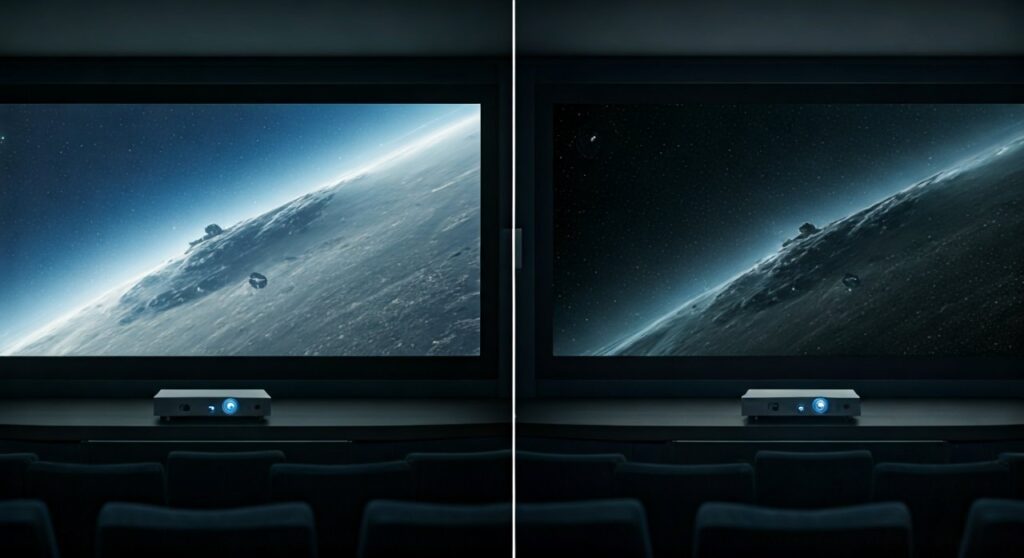
To understand how do projectors project black, you have to think about contrast. Because a projector is a light source, it can only add light to a surface. To create a dark shadow or a black object in a movie, the projector must be efficient at stopping light from hitting that specific coordinate on the screen.
Key Takeaways: The TL;DR on Projector Black Levels
If you are looking for a quick summary of the science behind dark scenes on your home theater, here are the essential facts:
- Absence of Light: Projectors create black by turning off or diverting light away from specific pixels.
- The “Black Floor”: The darkest a projector can get is limited by its “black floor,” which is the small amount of light that “leaks” through even when the projector tries to be dark.
- Contrast Ratio is King: The quality of black depends on the Contrast Ratio—the difference between the brightest white and the darkest black the unit can produce.
- Room Environment: Your room’s ambient light is the biggest enemy. If your room isn’t pitch black, your “blacks” will only ever be as dark as the screen looks when the power is off.
- Technology Matters: LCoS and DLP technologies generally handle black levels differently than standard LCD projectors.
The Physics of Darkness: Why “Black Light” Doesn’t Exist
In the world of physics, light is an additive property. When you combine all colors of light, you get white. Black, by definition, is the total absorption or absence of visible light. Therefore, asking how does projector project black is technically a trick question—it projects “nothing.”
When I first set up a high-end JVC D-ILA projector in a dedicated “bat cave” home theater, the most striking thing wasn’t the brightness, but the shadows. In a dark room, when the projector blocks light perfectly, the screen seems to disappear. This is because your eyes interpret the lack of photons as a solid black object.
However, in a room with the lights on, the “black” parts of the image will look like the color of your screen (usually white or grey). This is why professional installers focus so heavily on light control.
How Different Projector Technologies Handle Black Levels
Each projection technology has a unique “engine” that determines how effectively it can block light. Understanding these differences is crucial for anyone trying to achieve a true cinematic experience.
DLP (Digital Light Processing)
DLP projectors use millions of tiny microscopic mirrors on a DMD (Digital Micromirror Device) chip.
- To create light, the mirrors tilt toward the lens.
To create black, the mirrors tilt away* from the lens and toward a light-absorbing “heat sink.”
- Expert Insight: While DLP is known for sharpness and “pop,” entry-level chips often have a bit of “light scatter,” which can make blacks look slightly dark grey.
LCD (Liquid Crystal Display)
3LCD projectors (like many Epson models) use liquid crystal panels to let light through or block it.
- It works much like a pair of polarized sunglasses.
- To create black, the liquid crystals align to block the light path.
- The Challenge: It is very difficult for liquid crystals to block 100% of the light. Some light usually “leaks” through, which is why older or cheaper LCD projectors often have “milky” or “muddy” blacks.
LCoS (Liquid Crystal on Silicon)
LCoS (used in Sony SXRD and JVC D-ILA projectors) is widely considered the gold standard for black levels.
- It combines the reflective nature of DLP with the light-blocking of LCD.
- Because the crystals are placed directly on a reflective silicon backplane, they can block light much more efficiently.
- Data Point: High-end LCoS projectors can achieve native contrast ratios of 40,000:1 to 100,000:1, whereas standard DLP might only reach 2,000:1.
The Role of Contrast Ratio in Perceived Blackness
When researching how do projectors project black, you will constantly see the term Contrast Ratio. This is the mathematical difference between the brightest and darkest parts of an image.
Native vs. Dynamic Contrast
There are two ways manufacturers measure this:
- Native Contrast: The actual physical capability of the hardware to block light at any given moment. This is the most “honest” spec.
- Dynamic Contrast: This uses a Dynamic Iris or Laser Dimming. The projector physically narrows a mechanical “iris” (like a human pupil) during dark scenes to reduce light output, making the blacks look deeper.
| Technology Type | Typical Native Contrast | Black Level Quality | Best Use Case |
|---|---|---|---|
| Entry-Level DLP | 500:1 – 1,500:1 | Poor (Greyish) | Bright Living Rooms |
| High-End DLP | 2,000:1 – 5,000:1 | Good | Home Cinemas |
| 3LCD (Epson) | 1,000:1 – 5,000:1 | Fair to Great | Multi-purpose rooms |
| LCoS (Sony/JVC) | 20,000:1 – 100,000:1 | Elite (True Black) | Dedicated Dark Theaters |
Environmental Factors: Why Your Room is Ruining Your Blacks
You could buy a $10,000 Sony projector, but if you have white walls and a window, you will never see “true” black. This is because of Reflected Light.
When the projector hits a white wall with a bright image, that light bounces off the wall, hits the ceiling, and then bounces back onto the “black” parts of your screen. This “washes out” the image.
Solutions for Better Black Levels:
- The “Bat Cave” Approach: Paint your theater room walls and ceiling a dark, matte color (like Munsell Super Black or Sherwin Williams Tricorn Black).
- ALR Screens: Use an Ambient Light Rejecting (ALR) screen. These screens have special optical layers that only reflect light coming from the projector’s specific angle while absorbing light from the ceiling or windows.
- Grey Screens: Using a grey-tinted screen instead of a white one lowers the “black floor” of the image, making shadows look much deeper.
Step-by-Step: How to Improve Your Projector’s Black Levels
If you feel your projector’s blacks look washed out, follow these expert steps to calibrate your setup:
Step 1: Control the Ambient Light
Close the curtains and turn off all lamps. Even a tiny LED on a microwave can degrade the contrast of a high-end projector.
Step 2: Adjust the “Brightness” Setting
Contrary to its name, the Brightness setting on a projector actually controls the Black Level.
- Use a “PLUGE” pattern (Picture Line-Up Generation Equipment).
- Lower the brightness until the darkest bars disappear into the background, but stop before you lose detail in shadows (like the texture of a black suit).
Step 3: Enable Dynamic Iris
If your projector has a Dynamic Iris or Eco Mode, turn it on. In Eco Mode, the lamp dims, which naturally lowers the amount of light leaking through the “black” pixels.
Step 4: Use a Bias Light (Carefully)
Sometimes, placing a very dim, neutral white (6500K) LED strip behind the projector screen can trick the human eye. This is called Simultaneous Contrast. By providing a reference for “light” behind the screen, the dark areas on the screen appear even darker to your brain.
Advanced Tech: Laser Dimming and Local Dimming
The newest frontier in how does projector project black involves Solid State Lighting (SSL).
Laser projectors have a massive advantage: they can turn the laser off entirely and instantly. When a movie cuts to a total black screen, a laser projector can stop emitting photons completely. This results in “infinite” contrast for that specific frame.
Local Dimming (found in some ultra-short-throw projectors like the Hisense L9G) attempts to dim specific parts of the light source, similar to how modern LED TVs work. While not yet as precise as a TV, it is a massive step forward for projection technology.
FAQs: Common Questions About Projector Blacks
Can a projector project the color black on a white wall?
No. It can only project “nothing” onto the white wall. If the room is bright, the “black” part of your movie will be the color of the white wall under that room’s light.
Why do cinema projectors look so much blacker than home projectors?
Commercial cinemas use massive DLP chips and have strictly controlled environments with zero windows and dark, non-reflective seating. They also use high-end “masking” (black velvet curtains that move to fit the movie’s aspect ratio).
Is a grey screen better than a white screen for black levels?
Yes, generally. A grey screen absorbs more ambient light and lowers the “black floor.” This makes it much easier for the projector to create the illusion of deep black, though it may slightly reduce the peak brightness of whites.
Does 4K affect black levels?
Not directly. 4K (Resolution) refers to the number of pixels. Black levels are determined by the Light Engine and Contrast Ratio. However, many 4K projectors also support HDR (High Dynamic Range), which provides better metadata to manage light and dark transitions.
Conclusion: Mastering the Illusion of Darkness
In summary, how do projectors project black is a masterpiece of optical engineering and human perception. By effectively “starving” parts of the screen of light, projectors create the deep, immersive shadows we love in cinema.
To get the best results, remember that the projector is only half of the equation. The screen material and the room’s reflectivity are just as important as the projector’s LCoS or DLP chip. If you want true blacks, start by turning off the lights and considering a grey or ALR screen.
**
**
**
**
Shopping for a projector? Read the best Netflix-certified mini projector.







