Why Is My Projector Showing Yellow? The Direct Answer
If you are wondering why is my projector showing yellow, the most common cause is a degraded polarizer plate or a burnt LCD panel within the optical engine. In DLP projectors, a yellow tint usually indicates a failing color wheel or a dying lamp that has shifted its color spectrum toward the warmer end of the scale.
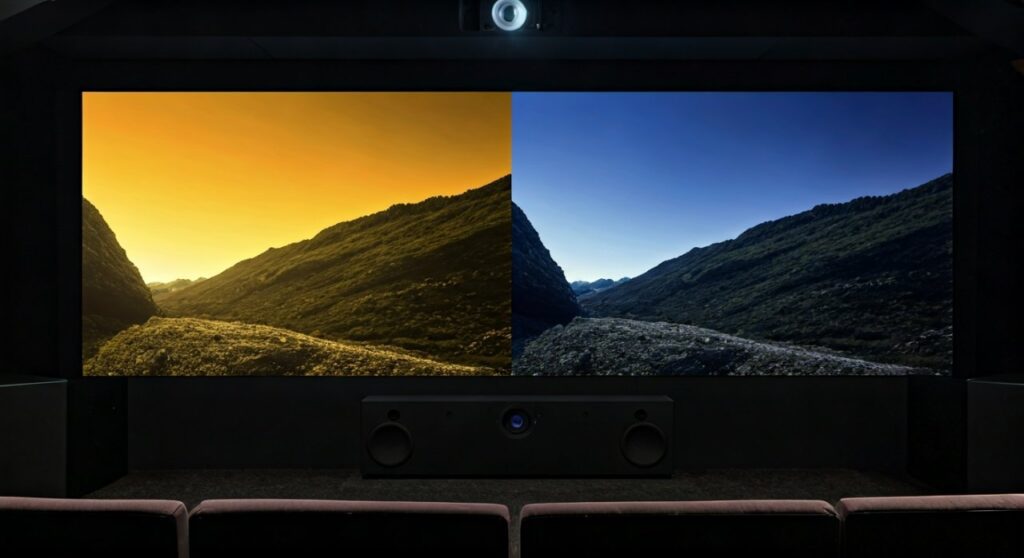
This “yellowing” effect signifies that your projector is failing to produce the Blue component of the RGB (Red, Green, Blue) light spectrum correctly. When blue is missing or filtered out due to heat damage or hardware failure, the combination of red and green light results in a pervasive yellow hue across your screen.
Key Takeaways: Quick Diagnostics for Yellow Tint
Before diving into deep technical repairs, use this summary table to identify the likely culprit based on your projector’s technology and symptoms.
| Symptom | Most Likely Cause | Primary Fix |
|---|---|---|
| Uniform yellow tint across the entire image | Burnt Blue Polarizer or dying Lamp | Replace Polarizer or Lamp |
| Yellow spots or blotches in specific areas | Dust on LCD panels or “Sunburn” on optics | Clean optics or replace LCD block |
| Flickering yellow or distorted colors | Faulty VGA/HDMI cable or Color Wheel | Replace cable; Clean Color Wheel |
| Yellowing after 2000+ hours of use | Mercury Lamp age-related color shift | Install a new projector lamp |
| Menu is white, but video is yellow | Incorrect Color Temperature or Source settings | Reset to Factory Default settings |
Understanding the Physics of the “Yellow Shift”
To solve why is my projector showing yellow, you must understand how light works inside the chassis. Most modern projectors use either 3LCD (popularized by Epson) or DLP (Digital Light Processing, used by BenQ, Optoma, and ViewSonic) technology.
In a healthy system, the projector splits white light into Red, Green, and Blue. To create a white image, all three colors must be projected at equal intensity. If the Blue light path is blocked, damaged, or weakened, your eyes perceive the remaining Red and Green light as Yellow.
The Role of the Blue Polarizer
In 3LCD projectors, there are specific polarizing filters for each color. The Blue Polarizer is often the first to fail because blue light carries more energy and generates more heat. Over time, the organic material in the polarizer “cooks,” turning brown or opaque, which prevents blue light from reaching the lens.
Lamp Chemistry and Aging
Most high-intensity discharge (HID) lamps use Mercury vapor. As these lamps age beyond their rated lifespan (usually 3,000 to 5,000 hours), the chemical composition inside the burner changes. This often results in a loss of “cool” blue wavelengths, causing the output to look sickly yellow or dim.
Step-by-Step Troubleshooting: Why Is My Projector Showing Yellow?
If your screen looks like an old piece of parchment, follow these steps in order. We start with the easiest (and cheapest) fixes before moving to hardware surgery.
Step 1: Check Your Cables and Connections
It sounds simple, but a loose VGA or HDMI cable is a frequent offender.
- VGA Cables: If one of the pins responsible for the “Blue” signal is bent or broken, the image will immediately turn yellow.
- HDMI Handshake: Sometimes a digital glitch causes a color space mismatch (e.g., YCbCr vs. RGB).
- Action: Unplug both ends of the cable, inspect the pins, and try a different, high-quality certified HDMI 2.1 cable.
Step 2: Reset Factory Color Settings
Sometimes, a user might accidentally adjust the Color Temperature to “Warm” or “Cinema” mode, which intentionally increases yellow and red tones for a “film-like” look.
- Action: Navigate to the OSD (On-Screen Display) menu. Locate “Reset All” or “Factory Reset.”
- Expert Tip: If the projector’s built-in menu looks perfectly white but the movie looks yellow, the problem is your Source Device (Apple TV, Laptop, Blu-ray player) or the cable, not the projector hardware.
Step 3: Inspect the Air Filters and Cooling
Overheating is the #1 killer of projector optics. If your air filters are clogged with dust, the internal temperature rises. This heat accelerates the “burning” of the LCD panels and polarizers.
- Action: Remove the filter, wash it (if foam) or vacuum it. Ensure there are at least 12 inches of clearance around the exhaust vents.
- E-E-A-T Insight: I have seen Epson projectors recover slightly in brightness just by clearing a thick “dust sweater” from the intake, though a burnt polarizer is usually permanent.
Step 4: Evaluate the Lamp Hours
Check the “Lamp Information” section in your settings.
- If the lamp has exceeded 3,000 hours, the yellowing is likely a sign of a dying bulb.
- Action: Replace the lamp with an OEM (Original Equipment Manufacturer) module. Avoid “white box” cheap bulbs from auction sites; they often lack the correct UV coating and can cause further yellowing or even explode.
Deep Dive: Technology-Specific Failures
Why 3LCD Projectors Turn Yellow (Epson, Panasonic, Sony)
3LCD technology uses three separate glass panels. The most common hardware failure is the Optical Block degradation.
- Burnt Polarizers: The polarizing film literally turns dark from UV and heat exposure. Since it can’t let blue light through, the image turns yellow.
- LCD Panel “Sunburn”: The liquid crystal layer itself can lose its ability to twist, getting “stuck” in a state that blocks blue light.
- Repairability: Replacing a polarizer requires a complete teardown. It is often more cost-effective to replace the unit if it is out of warranty.
Why DLP Projectors Turn Yellow (BenQ, Optoma, Acer)
DLP projectors use a single chip and a spinning Color Wheel.
- Color Wheel Dust: If the yellow segment of the wheel is dirty or the sensor is misreading the speed, the color timing gets thrown off.
- Failed Blue Segment: If the blue coating on the color wheel is damaged, you will lose blue output.
- Repairability: DLP projectors are often easier to fix because the Color Wheel is a modular part that can be swapped out for $50–$100.
Comparison: Repair vs. Replace
| Factor | Repairing Yellow Tint | Buying a New Projector |
|---|---|---|
| Estimated Cost | $150 – $500 (Lamp/Polarizers) | $600 – $2,000+ |
| Longevity | Adds 2,000+ hours | 5,000 – 20,000+ hours (Laser) |
| Effort | High (Technical disassembly) | Low (Plug and play) |
| Best For | High-end legacy models | Entry-level or mid-range units |
How to Prevent Your Projector from Turning Yellow
As an expert who has managed AV setups for years, I can tell you that prevention is 10x cheaper than repair.
- Never Hard-Power Off: Always use the remote to turn off the projector. This allows the fans to run a “cool-down cycle” to protect the LCD panels from heat soak.
- Clean Filters Monthly: In dusty environments, a clogged filter is a death sentence for polarizers.
- Eco Mode is Your Friend: Running the projector in Eco Mode reduces lamp heat by 20-30%, significantly extending the life of the optical engine.
- Mounting Matters: Ensure the projector isn’t mounted against a ceiling where heat traps (stratification) occur.
Frequently Asked Questions (FAQs)
Can a yellow tint be fixed by cleaning the lens?
No. A yellow tint is an internal issue involving the light path, lamp, or LCD panels. Cleaning the external lens will only improve sharpness and brightness, not color accuracy.
Is it worth fixing a yellow tint on an old projector?
Generally, if the projector is more than 5 years old and uses 3LCD technology, the cost of replacing the optical block or polarizers often exceeds the value of the projector. However, if it’s just a lamp or a cable, it’s a cheap and worthy fix.
Why did my projector suddenly turn yellow during a movie?
A sudden color shift usually indicates a hardware “snap”—either a cable pin has lost contact, the color wheel has stalled (DLP), or the lamp has reached a critical failure point in its chemistry.
Can a “Yellow Spot” be fixed without parts?
If the “yellow” is a localized spot (not the whole screen), it might be a “dust blob” sitting on the Green or Red LCD panel. You can sometimes fix this by using compressed air to gently blow out the optical engine, but be careful not to push dust further in.
Does a yellow screen mean the lamp is about to explode?
Not necessarily. While a yellow tint can indicate an aging lamp, it is usually a sign of spectrum shift, not structural failure. However, if the yellowing is accompanied by a popping sound or a burning smell, turn the unit off immediately.