

To effectively how to clean headphones, start by wiping the exterior surfaces with a microfiber cloth lightly dampened with 70% isopropyl alcohol. Use a soft-bristled toothbrush or a wooden toothpick to gently remove earwax from the mesh and clean the headphone ear pads with a dedicated leather cleaner or mild soapy water. Never submerge your gear in water; instead, use targeted, moisture-controlled steps to sanitize the earbuds, headphone jack, and cushions without damaging the delicate internal drivers.
Key Takeaways: How to Clean Your Audio Gear
| Component | Cleaning Agent | Frequency | Pro Tip |
|---|---|---|---|
| Headphone Pads | Mild soap / Leather cleaner | Bi-weekly | Don’t use alcohol on real leather; it cracks. |
| Earbud Mesh | Dry toothbrush / Blu-tack | Weekly | Hold the mesh facing down so debris falls out. |
| Headphone Jack | Compressed air / Toothpick | Monthly | Avoid using metal pins; they short the circuit. |
| White Headphones | Melamine sponge (Magic Eraser) | As needed | Gently buff stains to prevent yellowing. |
| Charging Case | 70% Alcohol + Q-tip | Weekly | Focus on the internal charging pins. |
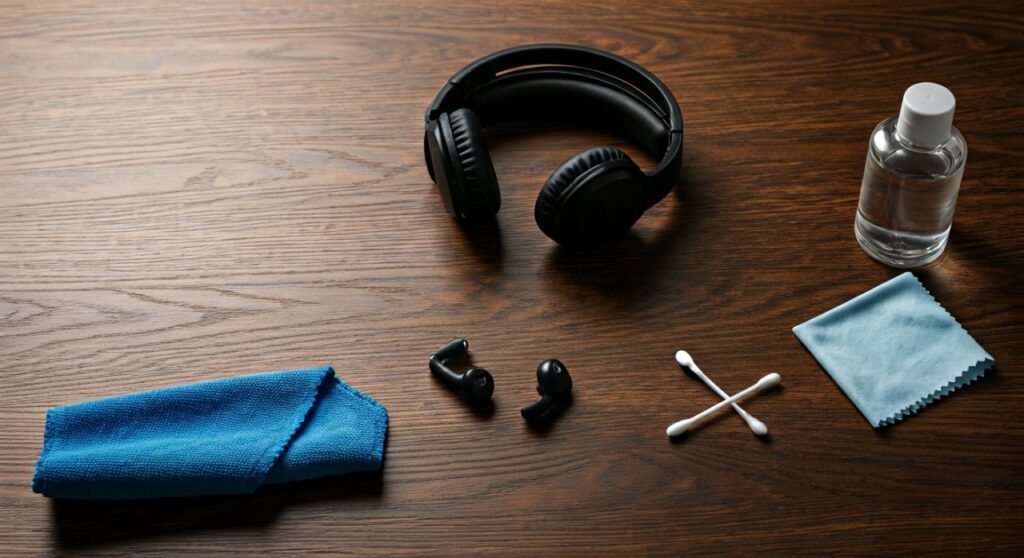
Essential Supplies for Professional Cleaning
Before you begin learning how to clean a headphone, gather these expert-recommended tools. Having the right supplies prevents accidental damage to high-end models like Sony XM5 or Bose QuietComfort.
- 70% Isopropyl Alcohol: The gold standard for sanitizing plastics and silicone.
- Microfiber Cloths: Essential for lint-free wiping of Sony XM4 headphones.
- Cotton Swabs (Q-tips): Perfect for reaching the inside of headphones.
- Soft-Bristled Toothbrush: Used to dislodge dry wax from earbud headphones.
- Wooden Toothpicks: Best for precision cleaning in the headphone jack.
- Leather Conditioner: For premium over ear headphones with genuine leather skins.
Step-by-Step: How to Clean Over-Ear Headphones
Knowing how to clean over the ear headphones is vital because sweat and skin oils degrade the synthetic leather over time. This process works for major brands, including how you clean bose headphones and Sony models.
How to Clean Headphone Pads and Cushions
The ear pads are the most high-contact area. Over time, they can develop an unpleasant odor, especially if you use headphones after gym sessions.
- Remove the pads: Most Sony headphones and Beats Solo 4 have clip-on or twist-off pads. Consult your manual to avoid snapping the clips.
- Wipe with soapy water: Mix a drop of dish soap with warm water. Use a damp (not dripping) cloth to wipe the headphone ear cushions.
- Sanitize the surface: For protein leather (synthetic), a quick wipe with alcohol is fine, but for real leather, use a specialized cleaner.
- Dry completely: Let the pads air dry for at least 24 hours before reattaching them to avoid trapping moisture inside the driver housing.
How to Clean Inside of Headphones
If you notice muffled sound, you may need to learn how to clean inside of headphones where the driver mesh is located.
- Use a dry, soft brush to sweep the mesh.
- If wax is stubborn, use a tiny amount of 70% alcohol on a Q-tip, ensuring it is only damp.
- Keep the driver facing downward so any liquid or loosened debris falls away from the internal electronics.
How to Clean Earbuds and In-Ear Monitors
Learning how to clean headphones earbuds requires more precision because they sit deeper in the ear canal. This applies to how to clean apple headphones (AirPods) and other silicon-tipped buds.
- Remove Silicone Tips: Pull the tips off and soak them in warm soapy water for 5 minutes.
- The Wax Removal Hack: Use a piece of Blu-Tack or adhesive putty. Press it gently into the mesh and pull it out to lift stubborn wax.
- Sanitize the Buds: Wipe the plastic housing with an alcohol prep pad.
- Dry the Tips: Ensure the silicone tips are 100% dry before sliding them back onto the earbud headphones.
Deep Cleaning Your Beats by Dre
If you own Beats, you know they are both a fashion statement and a high-performance tool. Here is how to clean beats headphones properly to maintain their iconic look.
How to Clean Beats Headphone Pads
To clean headphone pads on Beats Solo 4 or Studio Pro, focus on the seams. Sweat often accumulates in the stitching, leading to the “peeling” effect common in older models.
- Use a dedicated “Electronic Wipe” to remove oils after every long listening session.
- For white headphones, use a mixture of water and a tiny bit of baking soda to gently rub out stains on the headband.
How to Wash Beats Headphones After the Gym
While you cannot literally wash beats headphones in a sink, you must sanitize them after exercise.
- How to clean my beats headphones post-workout: Wipe the entire frame with a microfiber cloth.
- Focus on the headphone plug and buttons where sweat can seep into the crevices.
Cleaning the Connection: Headphone Jacks and Plugs
A crackling sound is often caused by lint in the port. Knowing how do you clean a headphone jack can save you a trip to the repair shop.
How to Clean Headphone Jack
- Inspect with a light: Look for “fuzz” or lint balls inside the port.
- The Toothpick Method: Gently swirl a wooden toothpick inside the headphone jack to hook the lint.
- Compressed Air: Use short bursts of air to blow out dust. Do not stick the nozzle too deep.
- How do you clean headphone jack contacts? Wrap a tiny piece of an alcohol wipe around a toothpick and rotate it inside the port once.
How to Clean Headphone Plug
The headphone plug (the 3.5mm connector) can develop oxidation.
- Wipe the headphone plug with an alcohol-soaked cloth.
- If it looks tarnished, use a very fine magic eraser to buff the metal until it shines.
Brand-Specific Expert Tips
Different brands use different materials. Here is how to handle the most popular high-end models.
How to Clean Sony XM4 and Sony XM5 Headphones
The Sony XM4 headphones and Sony XM5 have a matte finish that easily picks up fingerprints.
- Do not use harsh chemicals: These can strip the matte coating.
- Use distilled water: If the alcohol is too strong, dilute it with distilled water to clean the outer earcups.
- Focus on the sensors: The XM4/XM5 have proximity sensors inside the earcups. Clean these gently with a dry Q-tip to ensure “Auto-Pause” continues to work.
How to Clean Bose Headphones
Bose headphones are known for their incredibly soft “Protein Leather.”
- To clean bose headphones, avoid any citrus-based cleaners.
- If the pads start to flake, cleaning won’t help; it is time to buy replacement headphone ear cushions.
How to Clean White Headphones
White headphones like the Apple AirPods Max or White Beats Solo can turn yellow or gray.
- Use a Melamine sponge (Magic Eraser) very lightly on the plastic parts.
- For the fabric mesh on AirPods Max, use a mixture of liquid laundry detergent and water (1:5 ratio).
Frequently Asked Questions (FAQs)
Can I use hand sanitizer to clean my headphones?
It is not recommended. Hand sanitizers often contain moisturizers (like aloe vera) or fragrances that leave a sticky residue on your headphone ear pads or can clog the mesh of your earbuds. Always use 70% isopropyl alcohol.
How often should I clean my headphones?
If you use them daily, wipe the surfaces once a week. If you use headphones after gym sessions, you should wipe them down immediately after every workout to prevent bacteria growth and “headphone funk.”
Is it safe to use a vacuum cleaner on my headphones?
No. The suction from a standard vacuum cleaner can damage the delicate diaphragms inside over ear headphones. Use a soft brush or low-pressure compressed air instead.
How do I get the smell out of my headphone pads?
If your headphone ear cushions smell, it’s due to bacteria. Clean them with alcohol, then place them in a sealed container with a silica gel packet or a small bowl of baking soda overnight to absorb the odor.
Can I use baby wipes on my headphones?
Baby wipes are generally safe for the plastic frame, but they often contain oils that aren’t ideal for headphone ear pads. A microfiber cloth with a little water is a better, residue-free alternative.









