

To fix a crooked headphone jack, you can use needle-nose pliers to gently bend the plug back into alignment or, for a permanent fix, solder a replacement TRS connector onto the cable. For minor bends, applying incremental pressure with a mechanical pencil tip or hollow tube can also restore the shape without snapping the metal.
Quick Summary: How to Fix a Crooked Headphone Jack
If you are in a rush, here is the essential breakdown of how to handle a bent or broken audio connector.
| Method | Best For | Difficulty | Success Rate |
|---|---|---|---|
| Pliers Method | Slight bends in the metal | Easy | Moderate |
| Hollow Tube Lever | Precision straightening | Easy | Moderate |
| Full Jack Replacement | Severed tips or severe bends | Hard (Requires Soldering) | Very High |
| Professional Repair | High-end audiophile gear | Expensive | Guaranteed |
Key Takeaways (TL;DR):
- Safety First: Never try to straighten a jack while it is plugged into a device, as you may damage the internal port.
- Incremental Pressure: When bending the metal back, use tiny movements to avoid metal fatigue or snapping the tip.
- Diagnosis: If the jack is straight but you have no sound, the issue is likely a broken headphone wire or internal solder joint.
- Tool Kit: You will ideally need needle-nose pliers, a multimeter, and potentially a soldering iron.
Understanding Why Your Headphone Jack Bent
A headphone jack typically bends due to mechanical leverage. When your phone or laptop falls while the headphones are plugged in, the port acts as a fulcrum, forcing the jack to absorb the entire impact.
Most 3.5mm jacks are made of brass or copper with a thin gold or nickel plating. While these metals are conductive, they are relatively soft. This makes it possible to learn how to fix a crooked headphone jack, but it also means the metal becomes brittle if bent back and forth too many times.
Anatomy of a Headphone Plug
To perform a successful headphone jack repair, you need to understand the three main components:
- Tip: Carries the left channel signal.
- Ring(s): Carries the right channel and/or microphone signal (in TRRS jacks).
- Sleeve: Acts as the ground.
If the bend occurs at the “insulator rings” (the plastic circles), the internal connection is likely severed, and you will need to learn how to repair a headphone jack plug by replacing the entire unit.
Method 1: The Precision Pliers Technique
This is the most common way to address how to fix a bent headphone jack at home without specialized electronics knowledge.
Step 1: Secure the Base
Hold the headphone housing (the plastic or metal part you grip) firmly with your non-dominant hand. Do not pull on the headphone cable, as this can cause the internal wires to snap.
Step 2: Identify the Bend Point
Look closely at the jack to see exactly where the deviation starts. Most bends happen right above the sleeve.
Step 3: Apply Gentle Pressure
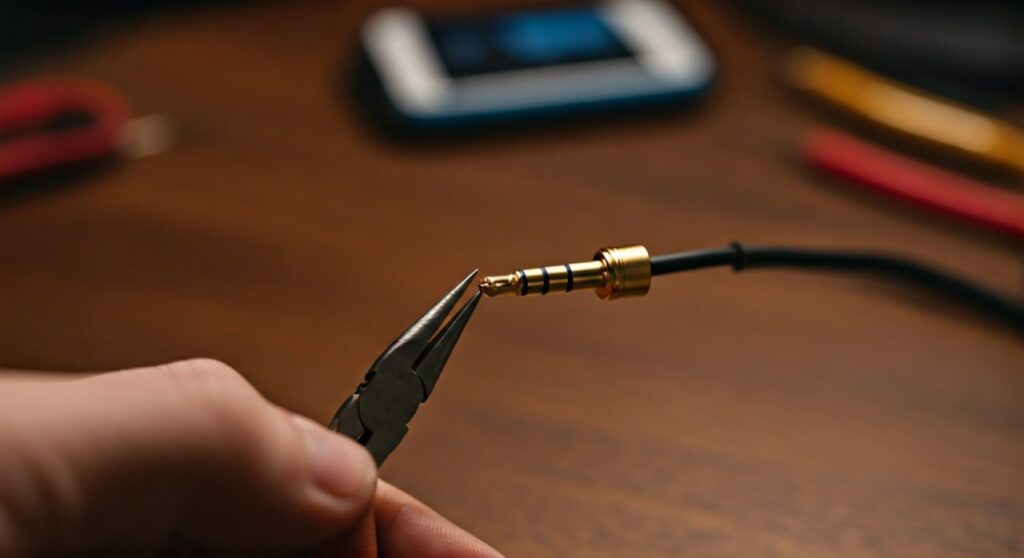
Use needle-nose pliers to grip the bent section. Slowly apply pressure in the opposite direction of the bend.
- Expert Tip: Wrap the teeth of the pliers in electrical tape to avoid scratching the gold plating on the jack.
Step 4: Check for Straightness
Rotate the jack 360 degrees to ensure it is straight from every angle. Even a 1-degree deviation can prevent the jack from seating correctly in a headphone port.
Method 2: The Hollow Tube or Mechanical Pencil Trick
If you want to know how do you fix a headphone jack with more precision than pliers allow, the lever method is superior.
- Find a mechanical pencil with a metal tip or a small hollow brass tube.
- Slide the hollow end over the bent headphone plug.
- Use the length of the pencil as a lever to slowly pull the jack back into alignment.
- This method provides more even pressure than pliers and reduces the risk of “kinking” the metal.
Method 3: How to Repair Headphone Jack via Replacement
When the bend is too severe, the metal will snap if you try to straighten it. In this case, you must learn how to repair jack on headphones by installing a new connector.
Tools Needed for Replacement:
- Replacement 3.5mm TRS/TRRS Jack
- Soldering iron and Solder (60/40 or Lead-free)
- Wire strippers
- Heat shrink tubing
Step-by-Step Replacement Guide:
- Cut the old jack: Use wire cutters to snip the wire about an inch above the broken headphone jack plug.
- Strip the wires: Carefully remove the outer insulation. You will see three or four colored wires (usually Red, Green/Blue, and Copper/Gold).
- Tin the wires: Apply a small amount of solder to the ends of the wires to prevent fraying.
- Solder to the new jack:
- Seal it up: Slide the heat shrink tubing over the joint and use a heat gun to shrink it for a professional finish.
How to Fix a Broken Headphone Port
Sometimes the problem isn’t the jack, but the broken headphone port on your device. If your jack is straight but the connection is loose, follow these steps:
- Clean the Port: Use a wooden toothpick or compressed air to remove pocket lint. A single piece of debris can prevent the jack from clicking into place.
- Check for Loose Soldering: On laptops or controllers, the internal port may have come loose from the motherboard. This requires opening the device and re-soldering the pins.
- Tighten the Internal Springs: Using a very fine needle, you can sometimes reach inside the port (with the device powered off!) and gently pull the contact springs inward to create a tighter grip on the headphone plug.
Comparing Repair Options: DIY vs. Buy New
| Feature | DIY Straightening | Replacing the Jack | Buying New Headphones |
|---|---|---|---|
| Cost | $0 | $5 – $15 | $20 – $300+ |
| Time | 5 Minutes | 30 Minutes | Instant |
| Durability | Low (Metal is weakened) | High (Permanent fix) | High |
| Tools Required | Pliers | Soldering Iron | None |
Expert Advice on Preventing Future Damage
As someone who has repaired hundreds of headphone cords and audio jacks, I recommend the following to avoid repeating this process:
- Use a 90-Degree Adapter: These adapters reduce the leverage applied to the jack, making it nearly impossible to bend the plug if the device drops.
- Unplug by the Housing: Never pull the headphone wire to disconnect your headphones. Always grip the solid plastic housing.
- Reinforce with Spring: Slide a small spring from a ballpoint pen over the end of the headphone cable near the jack to provide strain relief.
Troubleshooting Common Audio Issues After Repair
If you have followed the steps on how to fix a headphone plug but the audio still sounds “thin” or “distant,” check for these common errors:
- Phase Issues: If you swapped the Left and Ground wires during a headphone jack repair, the audio will sound hollow.
- Short Circuits: Ensure no stray strands of the headphone wire are touching other terminals inside the plug.
- Incomplete Insertion: If you didn’t straighten the bent headphone jack perfectly, it might not be clicking past the final internal spring in the port.
FAQs: How to Fix a Crooked Headphone Jack
Can I use a hammer to straighten a bent headphone jack?
No. Using a hammer is too imprecise and will likely flatten the audio jack, making it impossible to insert into any port. Stick to needle-nose pliers or a lever-based tool.
Will fixing a bent jack ruin my phone’s warranty?
Straightening the headphone jack itself won’t void your phone’s warranty, but using a damaged jack inside your phone might damage the headphone port, which could lead to a denied warranty claim.
How do I know if the internal wire is broken?
If you can “wiggle” the headphone cord near the plug and the sound cuts in and out, you have a broken headphone wire. Straightening the metal won’t fix this; you will need to perform a full headphone cable repair by cutting and re-soldering the wires.
What if the tip of the headphone jack broke off inside the port?
This is a serious issue. You can try using a “GripStick” tool or a very small amount of superglue on the end of a toothpick (be extremely careful!) to extract the broken piece. Do not try to use a bent jack if the tip feels loose.
Is it worth learning how to repair headphone wire for cheap earbuds?
For $10 earbuds, the time and cost of tools probably exceed the value of the headphones. However, for high-end brands like Sony, Sennheiser, or Audio-Technica, learning how to repair headphone jack components can save you hundreds of dollars.









