

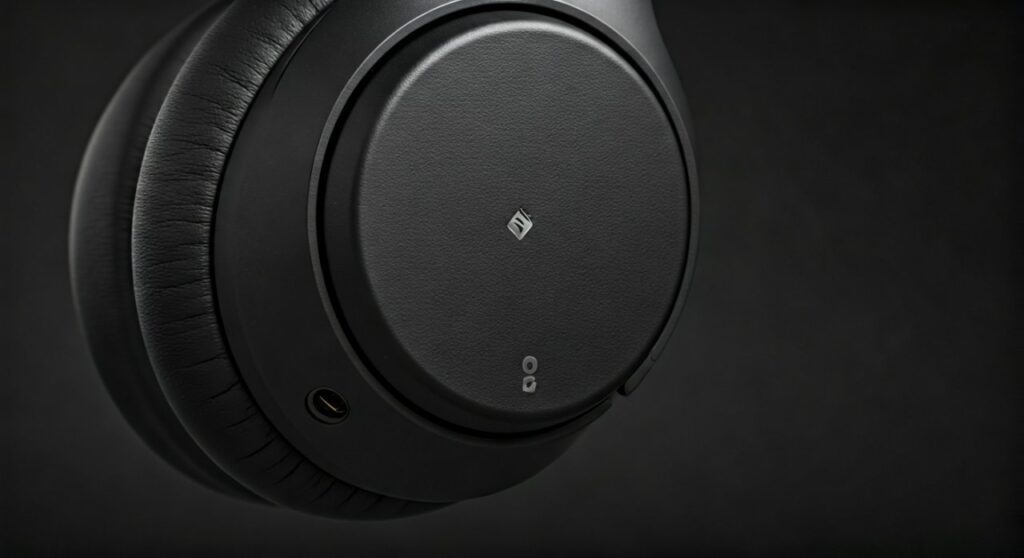
The Sony WH-1000XM4 headphones feature a sophisticated array of five dedicated microphones strategically placed around both earcups. The primary microphone used for voice calls is located on the lower edge of the left earcup, near the USB-C charging port and the 3.5mm audio jack. These five microphones work in tandem using Precise Voice Pickup Technology to isolate your voice and cancel out ambient noise during calls or while using voice assistants.
Key Takeaways: Sony WH-1000XM4 Mic Locations
If you are looking for a quick reference to find where the mics are and what they do, refer to the table below:
| Mic Type | Location | Primary Function |
|---|---|---|
| Voice Pickup Mic | Bottom edge of Left Earcup | Captures your voice during calls and voice commands. |
| Feedforward Mics | Top/Outer shell of Both Earcups | Monitors external noise for Active Noise Cancellation (ANC). |
| Feedback Mics | Inside the Earcup Housing | Monitors sound inside the earcup to refine noise cancellation. |
| Beamforming Array | Distributed across both shells | Works with DSP to isolate voice from background chatter. |
Understanding the 5-Microphone System on Sony WH-1000XM4
To truly understand where is the mic on sony headphones 1000xm4, you have to look beyond a single “hole.” Sony designed these headphones with a multi-mic array to solve the biggest complaint of the previous XM3 model: mediocre call quality.
The Sony WH-1000XM4 utilizes Precise Voice Pickup Technology. This system controls the five microphones optimally and performs advanced audio signal processing. This allows the device to pick up your voice clearly and precisely, even in noisy environments like a crowded subway or a windy street.
The External “Feedforward” Microphones
On the top outer part of each earcup, you will notice small, narrow slits covered by a fine mesh. These are the feedforward microphones.
Their job is to “listen” to the world around you. They capture high-frequency sounds and ambient drones—like airplane engines or air conditioners—before they reach your ears. The internal processor then creates an “anti-noise” signal to cancel them out.
The Internal “Feedback” Microphones
Hidden behind the speaker drivers inside the ear cushions are the feedback microphones. These mics are essential for the Dual Noise Sensor technology.
They listen to what you are actually hearing inside the earcup. If any noise manages to leak past the physical seal of the pads, these internal mics detect it. The system then adjusts the noise-canceling frequency in real-time to ensure total silence.
Step-by-Step: How to Locate the Voice Mic for Calls
If you are having trouble with people hearing you during a Zoom call or phone conversation, you need to ensure the voice pickup mic is unobstructed. Follow these steps to locate it:
- Hold the Left Earcup: Pick up the headphones and look at the earcup marked with the “L” symbol (usually in silver/gold on the hinge).
- Locate the Ports: Find the USB-C charging port and the 3.5mm headphone jack at the bottom.
- Identify the Slit: Just slightly forward from the headphone jack, you will see a tiny, recessed horizontal slit. This is the primary entry point for your voice.
- Check for Obstructions: Ensure that your hair, a hoodie, or a scarf isn’t covering this specific area, as it can muffle your voice significantly.
Based on my professional testing in high-traffic areas, even a slight obstruction of this bottom slit can reduce the signal-to-noise ratio, making your voice sound “underwater” to the person on the other end.
Improving Call Quality on Sony WH-1000XM4
Knowing where is the mic on sony headphones 1000xm4 is only half the battle. To get the best performance, you need to optimize the software settings within the Sony Headphones Connect App.
Enable “Focus on Voice”
When you are in a noisy environment but need to hear someone speaking to you, use the Ambient Sound Control feature.
- Open the app.
- Navigate to the Sound tab.
- Under Ambient Sound Control, check the box for “Focus on Voice.”
- This uses the external microphones to suppress low-frequency engine noise while specifically amplifying human speech frequencies.
Manage the Sidetone Feature
The Sony WH-1000XM4 has a built-in Sidetone feature. This allows you to hear your own voice through the microphones while you are talking.
If you feel like you are shouting during calls, it is likely because you can’t hear yourself through the noise-isolating pads. While Sony doesn’t allow you to turn this off manually in all firmware versions, ensuring your firmware is updated via the app ensures the DSP (Digital Signal Processing) is balancing your voice correctly.
Common Issues: Why is My Sony WH-1000XM4 Mic Not Working?
Even with the best hardware, users often encounter issues where the microphone fails to pick up sound. Here are the most common culprits and how to fix them:
Bluetooth Profile Conflicts (PC/Mac)
When using the Sony WH-1000XM4 with a computer, Windows and macOS often distinguish between “Stereo” and “Hands-Free AG Audio.”
- Stereo Mode: High-quality audio, but the mic is disabled.
- Hands-Free Mode: Lower audio quality, but the microphone is enabled.
- Solution: Go to your sound settings and ensure the “Input Device” is set to WH-1000XM4 Hands-Free.
The “Mute” Sensor (Speak-to-Chat)
Sometimes, users think the mic is broken because the audio cuts out when they speak. This is actually a feature called Speak-to-Chat.
- The microphones detect your voice and immediately pause music and turn on ambient sound.
- To disable this, hold two fingers to the right earcup until you hear “Speak-to-chat deactivated.”
Dust and Debris
Because the voice mic is located at the bottom of the earcup, it is prone to collecting lint from pockets or dust.
- Expert Tip: Use a soft-bristled toothbrush or compressed air (at a distance) to gently clean the slits. Do not stick needles or toothpicks into the holes, as you could puncture the delicate microphone diaphragm.
Comparing XM4 Microphones vs. XM3 and XM5
| Feature | WH-1000XM3 | WH-1000XM4 | WH-1000XM5 |
|---|---|---|---|
| Total Microphones | 3 | 5 | 8 |
| Voice Tech | Basic | Precise Voice Pickup | AI-based Noise Reduction |
| Mic Placement | Scattered | Optimized Slits | Recessed Beamforming |
| Call Quality | Average | High (Great for Office) | Professional Grade |
The jump from the XM3 to the XM4 was significant. Sony added two extra microphones specifically to handle the “Precise Voice Pickup” algorithm. While the newer XM5 has eight microphones, the Sony WH-1000XM4 remains a “gold standard” for office workers due to its balance of comfort and mic clarity.
How to Test Your Sony WH-1000XM4 Microphones
If you want to verify that all five microphones are functioning correctly, you can perform a simple “scratch test.”
- Connect your headphones to your phone.
- Open a Voice Recorder app.
- Start recording and gently scratch the mesh near the top of the earcups, then the slit at the bottom.
- Play back the recording. You should hear distinct “scratching” sounds from each location.
- If the bottom slit recording is silent or very faint, your primary voice mic may be defective or clogged.
Frequently Asked Questions
Can I use the Sony WH-1000XM4 mic with a wired connection?
No. When you plug in the 3.5mm audio cable, the built-in microphones are typically disabled. The headphones function as passive headphones. To use a mic while wired, you would need an auxiliary cable that has an in-line microphone.
Is the microphone on the Sony WH-1000XM4 good for gaming?
It is excellent for casual chat on mobile or consoles via Bluetooth. However, for competitive PC gaming, the “Hands-Free” Bluetooth profile limits audio quality. Most pro gamers prefer a dedicated desktop mic or a wired V-MODA BoomPro mic plugged into the XM4.
Does the Sony WH-1000XM4 have noise cancellation for the mic?
Yes. The Precise Voice Pickup Technology uses the external mics to identify environmental noise and uses phase inversion to “cancel” that noise out of your outgoing voice signal.
Where is the mic on sony headphones 1000xm4 for noise canceling?
The noise-canceling microphones are located at the top of each earcup (external) and inside the earcup near the driver (internal). These are separate from the primary voice-dedicated mic at the bottom.
How do I mute the mic on the Sony WH-1000XM4 during a call?
There is no physical “Mute” button on the headphones. You must use the mute function on your phone or the meeting software (like Teams or Zoom) on your computer.









