

Why Your Bose Headphones Need a Refresh
If you have started noticing small black flakes on your ears or a decrease in noise-canceling performance, it is time to learn how to replace bose headphone pads. You can easily replace these cushions yourself in under 10 minutes to restore your headset to factory-new comfort and sound quality.
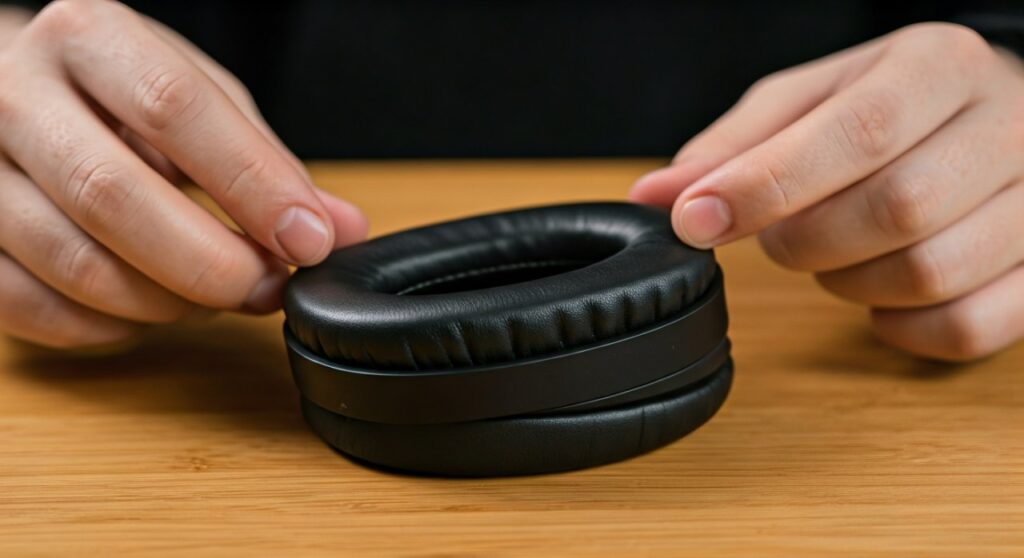
Replacing the ear pads is a standard maintenance task for all Bose QuietComfort and Noise Cancelling models. Over time, the protein leather degrades due to sweat, skin oils, and friction. By installing new cushions, you ensure the Active Noise Cancellation (ANC) remains effective by maintaining an airtight seal around your ears.
Key Takeaways: How to Replace Bose Headphone Cushions
Before diving into the full guide, here is the essential information you need for a successful replacement:
- Ease of Repair: Very Easy (No specialized tools required).
- Time Required: 5 to 10 minutes.
- When to Replace: Every 18–24 months, or when flaking and flattening occur.
- Crucial Step: Ensure all plastic mounting clips “click” into place to prevent the pads from falling off.
- Performance Impact: New pads significantly improve bass response and noise isolation.
Understanding the Anatomy of Bose Ear Cushions
To understand how to replace headphone pads effectively, you must know what you are looking at. Most Bose models, including the QC35, QC45, and QC Ultra, use a specialized mounting system.
The assembly consists of three main parts: the outer leatherette cushion, the internal memory foam, and the scrim (the fabric mat labeled L or R). The cushion is held in place by approximately 8 to 10 small plastic hooks located around the perimeter of the ear cup.
Can you replace bose headphone pads without professional help? Absolutely. Unlike some brands that use glue, Bose designs their premium headphones with user-replaceable parts. This modularity is why many audiophiles prefer the Bose QuietComfort series for long-term ownership.
Essential Tools and Materials
While you don’t need a toolbox, having these items ready will make the process of how to change bose headphone cushions much smoother:
- Replacement Ear Pads: Choose between OEM Bose cushions or high-quality third-party alternatives like Wicked Cushions.
- Internal Scrims: These usually come in the replacement kit and protect the drivers from dust.
- Microfiber Cloth: For cleaning the internal housing once the old pads are removed.
- Isopropyl Alcohol (70%): To remove any old adhesive residue from the scrim area.
- Plastic Prying Tool (Optional): A fingernail usually works, but a plastic tool can help release stubborn clips.
Step-by-Step: How to Replace Bose Headphone Ear Pads
This guide applies to the Bose QC35, QC35 II, QC45, QC25, and the newer QuietComfort models. If you are wondering how to replace the ear cushions on bose headphones, follow these precise steps.
Step 1: Removing the Old Cushions
Grasp the edge of the old ear cushion where it meets the plastic ear cup. Pull firmly but steadily toward the center of the ear cup. You will hear a series of “pops” as the leather flange slips out from under the plastic mounting clips.
Do not be afraid to use a little force. The old pads are likely worn out and will be discarded anyway. Once the cushion is off, you will see the scrim (the fabric liner) attached with small adhesive strips.
Step 2: Peeling Off the Old Scrims
The scrims protect the delicate electronic drivers. Carefully peel the old scrim away from the plastic housing. If there is sticky residue left behind, use a microfiber cloth dampened with a tiny amount of isopropyl alcohol to wipe it clean.
Wait about 30 seconds for the alcohol to evaporate completely before proceeding. A clean surface ensures the new adhesive on your replacement scrims will bond correctly.
Step 3: Installing the New Scrims
Take your new scrims and identify the Left (L) and Right (R) markings. Peel the backing off the adhesive strips on the back of the scrim. Align the scrim carefully within the ear cup, ensuring it does not cover any of the plastic hooks.
Press down firmly on the adhesive points. Experts recommend focusing pressure on the edges to ensure the fabric stays flat. If the scrim is bunched up, it may interfere with the “click” when you install the main cushion.
Step 4: Mounting the New Ear Pads
This is the most critical part of how to replace ear pads on bose headphones. Place the new cushion over the ear cup. Use your thumb to press the outer edge of the cushion under one of the plastic mounting clips.
Work your way around the circle, pressing firmly until you hear or feel a “click” at every clip location. There are typically two clips at the top, two at the bottom, and several along the sides.
Step 5: The Final Quality Check
Once you believe all clips are engaged, give the cushion a gentle tug. If any part of the pad pulls away from the rim, that specific clip is not locked. Press down again with more force until the pad is flush against the headphone body.
Repeat the entire process for the other side. Congratulations, you have successfully learned how to change bose headphone pads!
Comparison: OEM vs. Aftermarket Replacement Pads
When looking for how to replace headphone cushions, you will encounter two main choices: original parts from Bose or third-party replacements.
| Feature | OEM Bose Cushions | Premium Aftermarket (e.g., Wicked Cushions) |
|---|---|---|
| Material | Standard Protein Leather | Cooling Gel or Upgraded Leather |
| Fit | Perfect Factory Fit | Tight Fit (requires more pressure) |
| Price | $34.00 – $39.00 | $18.00 – $25.00 |
| Durability | 18 Months | 24+ Months (High-density foam) |
| Color Options | Limited to Factory Colors | Vast (Patterns, Bright Colors) |
In my professional experience, OEM pads provide the most consistent noise cancellation. However, aftermarket pads often offer “Cooling Gel” versions which are superior for users who wear headphones for 8+ hours a day in warm environments.
How to Replace Pads on Bose Noise Cancelling 700 (NC700)
The Bose NC700 uses a slightly different mechanism compared to the QuietComfort line. If you are learning how to replace cushions on headphones specifically for the 700 series, follow this variation:
- No Scrim Peeling: The NC700 has a integrated plastic ring.
- Snap-on Mechanism: Instead of small hooks, the entire perimeter snaps into a groove.
- Removal: Use a plastic pry tool to get between the pad and the ear cup, then twist slightly to pop the ring out.
- Installation: Align the pad and press firmly around the entire circumference until you hear a continuous snapping sound.
Expert Tips to Extend the Life of Your New Cushions
Now that you know how to replace the ear pads on bose headphones, you likely want to make this pair last longer. Based on years of testing audio gear, here is the best maintenance advice:
- Wipe After Use: Use a dry microfiber cloth to wipe away sweat and skin oils after every long session.
- Avoid Harsh Chemicals: Never use wet wipes or alcohol on the leather surface; it dries out the material and causes cracking.
- Store in the Case: Leaving headphones out exposes the foam to humidity and dust, which accelerates degradation.
- Cooling Period: If you have been wearing them in the heat, let them air out before zipping them into the carrying case.
Can You Replace Bose Headphone Cushions on Older Models?
Many users ask, “can you replace the ear pads on bose headphones if they are 5 or 10 years old?” The answer is a resounding yes. Bose has maintained a very consistent design for the QC2, QC15, and QC25 models.
Even if Bose stops selling the official parts for legacy models, the secondary market is flooded with high-quality replacements. This makes Bose one of the most sustainable brands for long-term headphone use, as the battery and drivers often outlast the pads by a decade.
Troubleshooting Common Installation Issues
Sometimes, learning how to replace earpads on headphones comes with a few hiccups. If something doesn’t feel right, check these common issues:
- Muffled Sound: Ensure the scrim is not folded over the driver or covering any internal microphones.
- Pad Falling Off: One or more plastic clips are not engaged. Press firmly around the edge until you hear the click.
- Decreased Noise Cancellation: Check for gaps between the cushion and the ear cup. Any air leak will compromise the ANC technology.
- Discomfort: If the pads feel too stiff, give them 24-48 hours of “break-in” time to conform to your head shape.
Frequently Asked Questions
How often should I replace my Bose ear pads?
For daily users (4-6 hours a day), we recommend a replacement every 18 to 24 months. If you use them at the gym, you may need to replace them every 12 months due to moisture exposure.
Does replacing pads void my Bose warranty?
No, can you replace bose headphone cushions without voiding the warranty? Yes. This is considered a “consumable” part by Bose, similar to tires on a car.
Why are my new Bose pads stiffer than the old ones?
New memory foam hasn’t been compressed by your head yet. After about 10-20 hours of wear, the foam will soften and provide the custom fit you are used to.
Are Bose QC35 and QC45 pads interchangeable?
Technically, they have the same dimensions and will fit. However, the QC45 pads have a slightly different vent design to accommodate the updated ANC tuning. For best results, buy the pads specific to your model.
Where is the best place to buy replacement cushions?
You can buy directly from the Bose website for guaranteed quality, or from Amazon (look for brands like Wicked Cushions or Soulwit) for better pricing and more color variety.









