

Understanding the Connection: Can You Wear Headphones with Hearing Aids?
Yes, you can wear headphones with hearing aids comfortably, provided you choose the correct headphone style that accommodates your specific hearing device. For the majority of users, over-the-ear (circumaural) headphones are the most effective choice because their large cups fit over both the ear and the hearing aid, preventing the physical pressure and acoustic feedback common with other styles.
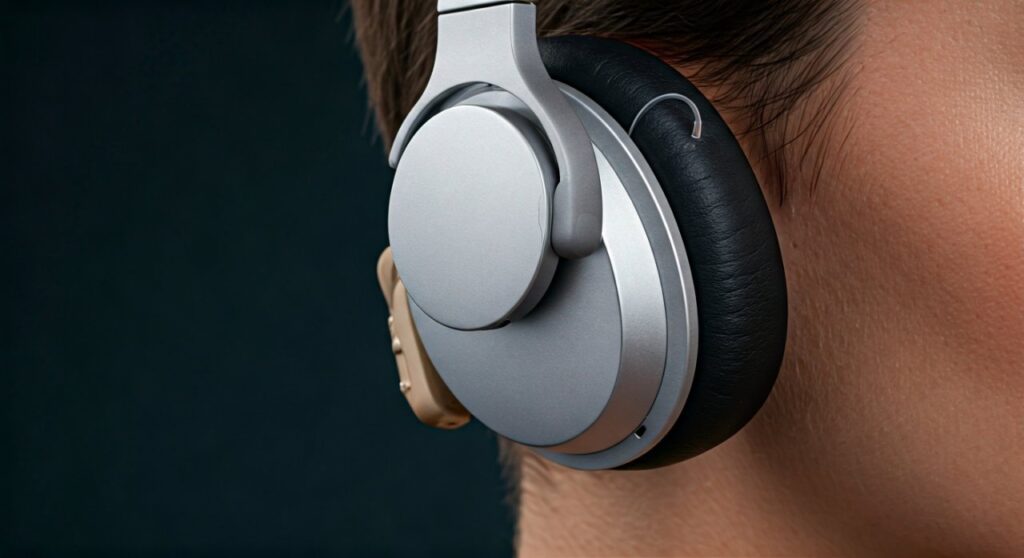
While the combination of these two devices might seem bulky at first, modern technology makes it easier than ever to enjoy high-fidelity audio without removing your essential hearing equipment. Successful integration depends on understanding acoustic coupling—the way sound travels from the headphone speaker to the hearing aid microphone—and ensuring the physical fit does not cause your hearing aid to whistle or “feedback.”
Key Takeaways for Using Headphones with Hearing Aids
If you are looking for a quick summary of how to navigate this setup, here are the essential points to remember:
- Best Style: Over-the-ear headphones are the gold standard for comfort and sound quality when wearing hearing aids.
- Prevent Feedback: Ensure there is a seal around the ear; any sound leakage can cause the hearing aid microphones to create a high-pitched whistling sound.
- Telecoil Support: If your hearing aids have a Telecoil (T-coil), you can use compatible headphones to stream sound via magnetic induction rather than sound waves.
- Volume Safety: Always start at the lowest volume setting. Hearing aids already amplify sound, so you do not need the headphones to be as loud as a typical user might.
- Bone Conduction: For those with certain types of hearing loss or specific hearing aid styles, bone conduction headphones are a revolutionary alternative that avoids the ear canal entirely.
Matching Your Hearing Aid Style with the Right Headphones
The success of your listening experience depends heavily on the physical architecture of your hearing aid. Not all headphones work with all devices. Below is a breakdown of how different hearing aids interact with various headphone types.
Behind-the-Ear (BTE) and Receiver-in-Canal (RIC)
These are the most common hearing aid styles. Because the microphone sits on top of or behind the outer ear, you must use over-the-ear headphones. The ear cup must be deep and wide enough to cover the entire ear and the device body behind it. If the headphone padding touches the hearing aid microphone, it will likely cause feedback.
In-the-Ear (ITE) and In-the-Canal (ITC)
Since these devices sit within the ear bowl or canal, they offer more flexibility. You can often use over-the-ear or on-ear (supra-aural) headphones. However, on-ear styles can sometimes press the hearing aid too firmly into the canal, causing discomfort over long periods.
Completely-in-Canal (CIC) and Invisible-in-Canal (IIC)
These are the most headphone-friendly devices. Because they sit deep in the ear canal, they rarely interfere with any headphone style. You can even use earbuds with some CIC models, though it is generally safer to stick to external headphones to avoid pushing the hearing aid further into the ear.
Comparison Table: Hearing Aid Compatibility
| Hearing Aid Style | Over-the-Ear | On-Ear | Bone Conduction | Earbuds |
|---|---|---|---|---|
| BTE / RIC | Excellent | Poor (Feedback) | Good | Not Recommended |
| ITE / ITC | Great | Fair | Great | Not Recommended |
| CIC / IIC | Excellent | Excellent | Excellent | Possible (Use Caution) |
| Bone Anchored (BAHA) | Fair (Fit Dependent) | Poor | Excellent | Good |
The Step-By-Step Guide: How to Wear Headphones with Hearing Aids Comfortably
Follow this professional protocol to ensure you get the best sound quality while protecting your equipment and your ears.
Step 1: Inspect the Fit
Before putting on your headphones, ensure your hearing aids are seated securely. If you use BTE devices, make sure the tubing or wire is flush against your skin. This reduces the profile of the device and makes it easier for the headphone cup to fit over it without snagging.
Step 2: Position the Headphones Carefully
Slowly lower the headphones over your head. If using over-the-ear models, “roll” the cushions onto your head from front to back. This prevents the cushions from catching on the hearing aid microphones. Ensure the ear cup completely encircles the ear; if the cushion sits on the hearing aid, you will hear a loud whistling noise.
Step 3: Manage the Volume Levels
Always turn the volume on your audio source (phone, laptop, or TV) to zero before starting. Put the headphones on, start the audio, and gradually increase the volume. Remember, your hearing aid’s internal processor is already working to clarify sound, so you will likely require much lower headphone volume than you did before getting hearing aids.
Step 4: Adjust the Equalizer (EQ)
Many hearing aids are programmed to amplify high frequencies (where speech clarity lives). When you combine this with headphones, the audio might sound too “sharp” or “tinny.” Use your music player’s EQ settings to boost the bass or lower the treble to find a balanced, rich sound profile.
Expert Strategies to Prevent Feedback and Whistling
Feedback is the “enemy” of using headphones with hearing aids. It occurs when sound leaks out of the headphones and is immediately picked up and re-amplified by the hearing aid microphone.
- Choose “Closed-Back” Headphones: These are designed with solid outer shells that prevent sound from escaping. This containment is crucial for preventing the feedback loop.
- The “Gap” Test: Use a mirror to see if there is a gap between the headphone cushion and your head near the hearing aid. If there is a gap, sound will leak. You may need headphones with memory foam cushions that mold to the shape of your head and hearing aid.
- Reduce Hearing Aid Gain: Some modern hearing aids have a “Music” program accessible via a smartphone app. This program often reduces the feedback cancellation sensitivity or adjusts the gain, making it more compatible with external speakers like headphones.
Exploring Technical Coupling: Acoustic vs. Induction
When you ask, “can you use headphones with hearing aids?”, you are really asking about how the sound gets into your ear. There are two primary methods:
Acoustic Coupling
This is the standard way of listening. The headphone speaker plays sound into the air, and the hearing aid microphone picks up that sound. This method preserves the natural “spatial” feel of music but is the most prone to feedback. High-quality noise-canceling headphones (like the Sony WH-1000XM5 or Bose QuietComfort Ultra) are excellent for acoustic coupling because they create a quiet environment for the hearing aid to work.
Induction (Telecoil) Coupling
If your hearing aid has a Telecoil, you can look for headphones that are “T-coil compatible.” Instead of using speakers to move air, these headphones use a magnetic field to send the signal directly to the hearing aid’s internal coil. This completely eliminates feedback and background noise. It is a favorite among audiophiles who use hearing aids because the sound is incredibly clean.
Modern Alternatives: Do You Even Need Headphones?
In the current landscape of audiology, the answer to “can i wear headphones with hearing aids” is often “you don’t have to.”
Bluetooth Streaming
Most modern hearing aids (like those from Phonak, Oticon, or ReSound) feature Made for iPhone (MFi) or Asha (Android) Bluetooth connectivity. This allows your hearing aids to act as high-end wireless earbuds. The sound is streamed directly from your device into your ears, perfectly calibrated to your hearing loss profile.
Bone Conduction Technology
AfterShokz (now Shokz) popularized bone conduction headphones. These sit on your cheekbones and bypass the ear canal entirely. They are a fantastic option for hearing aid users because they do not touch the hearing aid at all, allowing you to wear both simultaneously with zero interference.
Safety and Maintenance Tips
- Avoid Moisture Buildup: Wearing large headphones can cause your ears to sweat. Moisture is the leading cause of hearing aid repair. After a long listening session, open the battery doors (if applicable) or place your aids in a dehumidifier.
- Clean Your Cushions: Skin oils and earwax can transfer from your hearing aid to the headphone pads. Wipe your headphones down with a non-alcoholic wipe weekly.
- The 60/60 Rule: To protect your remaining hearing, experts suggest listening at no more than 60% volume for no more than 60 minutes at a time.
FAQ: Frequently Asked Questions
Can you wear noise-canceling headphones with hearing aids?
Yes, active noise-canceling (ANC) headphones are actually highly recommended. By removing background drone, they allow your hearing aid to focus entirely on the audio coming from the headphones, which often results in better clarity and lower required volumes.
Why do my hearing aids whistle when I put headphones on?
This is called acoustic feedback. It happens because the sound from the headphone is reflecting off the ear cup and back into the hearing aid microphone. To fix this, ensure the headphone cup is large enough to not touch the hearing aid, or switch to a “Music” setting on your hearing aid app.
Is it better to just take my hearing aids out to listen to music?
Not necessarily. Your hearing aids are programmed to compensate for your specific frequency gaps. If you take them out, you are hearing an “incomplete” version of the music. It is usually better to leave them in and use over-the-ear headphones to get the full spectrum of sound.
Can I use earbuds if I have ITE hearing aids?
Generally, no. Trying to fit an earbud and an In-the-Ear (ITE) hearing aid into the same space is physically impossible and can cause damage to the device or your ear canal. Stick to external headphones.
Are bone conduction headphones safe for hearing aid users?
Yes, they are very safe and often preferred. Since they transmit sound through vibrations in the temporal bone, they don’t interfere with the microphones or physical fit of BTE or ITE hearing aids.









