

To get a broken headphone jack out of an iPad, the most effective DIY method is using the ink cartridge tube from a ballpoint pen or a specialized extraction tool like the GripStick. Simply press the hollow tube firmly over the broken fragment to create a friction fit, then pull it straight out.
How to Get Headphone Jack Out of iPad: The Ultimate Extraction Guide
It happens in a split second. You trip over a cable or drop your tablet, and suddenly, the 3.5mm plug snaps off perfectly flush with the frame. You are left with no sound from the speakers because the iPad thinks headphones are still plugged in, and no way to connect a new pair.
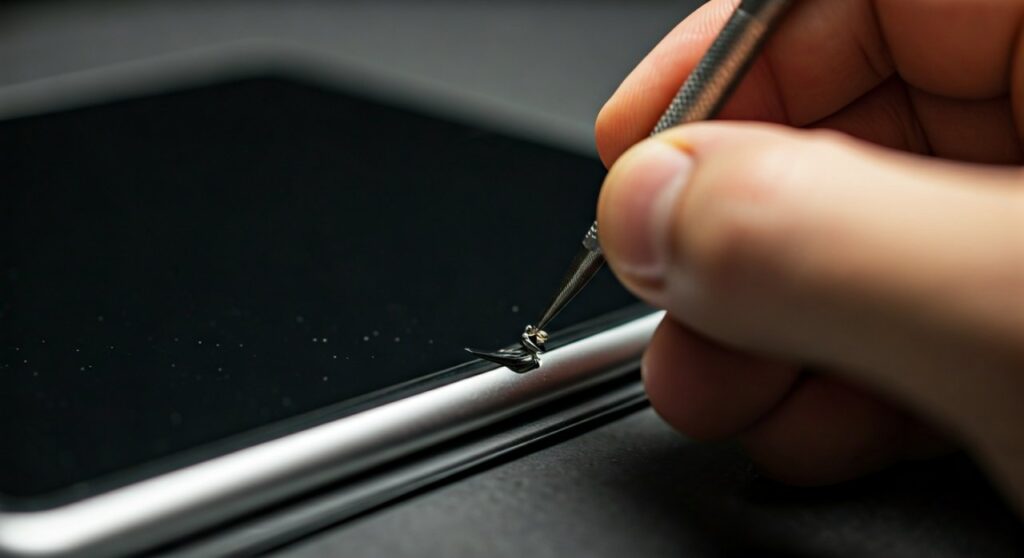
Before you panic and book an expensive Apple Store appointment, realize that this is one of the most common mechanical failures for older iPad models (like the iPad 9th Gen or iPad Air 2). You can often solve this at home with household items, saving you upwards of $200 in out-of-warranty repair fees.
Key Takeaways for Quick Extraction
| Method | Success Rate | Risk Level | Tools Needed |
|---|---|---|---|
| GripStick Tool | 98% | Very Low | Professional Extractor |
| Ink Cartridge | 75% | Medium | Ballpoint Pen, Pliers |
| Super Glue | 40% | Extremely High | Glue, Toothpick, Steady Hands |
| Small Screw | 60% | High | Eyeglass Screw, Screwdriver |
Why Headphone Jacks Snap Inside iPads
The internal structure of an iPad headphone jack is a narrow, spring-loaded cylinder. When a plug snaps, the remaining fragment is usually held in place by internal tension clips designed to keep the headphones from falling out.
Understanding how to get headphone jack out of ipad requires overcoming that tension without damaging the delicate logic board or the gold-plated contact pins inside the port. Most “snaps” occur at the “neck” of the plug, which is the weakest point of the metal conductor.
Method 1: The Ballpoint Pen Technique (Best DIY)
This is the most popular community-recommended way to remove broken headphone plug from ipad units without spending a dime. It relies on the diameter of a standard ink tube being slightly smaller than the jack itself.
- Disassemble the pen: Take a standard ballpoint pen (like a BIC or PaperMate) and remove the internal ink reservoir tube.
- Clean the tip: Ensure there is no excess ink on the end of the tube.
- The “Press and Twist”: Insert the hollow end of the plastic tube into the iPad port. Press down firmly until it slides over the broken metal fragment.
- Extraction: Once the tube has “gripped” the fragment, pull it out quickly and straight.
Expert Insight: If the tube is slightly too small, use a lighter to very briefly soften the plastic tip before pressing it in. This allows the plastic to mold around the jagged edge of the broken jack.
Method 2: Using the GripStick (The Professional Choice)
If you want the safest way how to remove broken headphone jack from ipad without risking permanent glue damage, the GripStick is the industry standard. This tool was specifically designed by repair technicians for this exact nightmare.
- How it works: It features a microscopic, ultra-thin metal cylinder that slides between the iPad’s jack walls and the broken plug.
- The Benefit: It bypasses the internal “locking” springs of the iPad’s port, allowing the fragment to slide out with zero resistance.
- Who should use it: Anyone with a high-value iPad or those who are not confident with “hacky” DIY solutions.
Method 3: The Super Glue Method (Proceed with Caution)
Many guides suggest using super glue to get out broken headphone jack ipad fragments. While effective, this is the #1 cause of permanent iPad damage in DIY repairs. If a single drop of glue touches the sides of the port, the iPad is functionally ruined.
Steps for a Safe Glue Extraction:
- Use a toothpick or a cotton swab with the cotton removed.
- Apply a tiny amount of gel-based super glue (like Gorilla Glue Gel) to the very tip.
- Do not use liquid glue, as it runs into the crevices too easily.
- Touch the glue tip only to the center of the broken metal piece.
- Hold perfectly still for at least 60 seconds.
- Pull straight up.
Warning: If you fail and glue the jack to the port wall, you will need a full Lightning/USB-C assembly replacement, which requires opening the iPad and removing the screen.
Method 4: The Tapping Technique
Sometimes, the simplest physics-based solution is how to get headphone jack out of ipad when the fragment is loose.
- Step 1: Hold the iPad with the headphone jack facing downward toward the floor.
- Step 2: Firmly tap the side of the iPad against the palm of your hand or a padded surface.
- Step 3: Use gravity to see if the fragment slides out far enough to grab with fine-tipped tweezers.
Note: Do not hit the iPad against a hard table. This can crack the digitizer (glass) or damage the LCD/OLED panel.
How to Remove a Stuck Plug Using a Small Screw
If the center of the broken plug is hollow (as many are), you can use a tiny screw—like those found in eyeglass repair kits.
- Find a screw that is slightly wider than the hole in the center of the broken fragment.
- Using a precision screwdriver, turn the screw 1-2 times into the metal fragment.
- Once the screw “bites” into the soft metal of the plug, use pliers to pull the screw and the fragment out together.
This method is highly effective for removing broken headphone plug from ipad ports where the tip is the only thing left behind.
What to Do if the iPad is Stuck in “Headphone Mode”
Even after you remove broken headphone jack from ipad, the software might still think a pair is connected. This happens because the internal trigger switch is bent or dirty.
- Clean the port: Use a compressed air can to blow out any microscopic metal shavings.
- Isopropyl Alcohol: Use a toothpick with a tiny bit of 90% Isopropyl Alcohol to wipe the internal contacts.
- Hard Restart: Hold the Power Button and Home Button (or Volume buttons on newer models) until the Apple logo appears to reset the audio sensing logic.
Repair Costs: DIY vs. Apple Professional
| Provider | Estimated Cost | Risk | Warranty Impact |
|---|---|---|---|
| DIY (Pen Method) | $0 | Moderate | May void warranty if damaged |
| Third-Party Shop | $40 – $80 | Low | Usually voids Apple warranty |
| Apple Store (Out of Warranty) | $249 – $599 | Zero | Maintains warranty |
| GripStick Tool | $25 | Low | None |
Preventing Future Broken Jacks
After you successfully learn how to get headphone jack out of ipad, you likely want to avoid doing it again.
- Switch to Bluetooth: Invest in AirPods or other wireless headphones to eliminate the physical point of failure entirely.
- Use a Dongle: On newer iPads, use a USB-C to 3.5mm adapter. If it breaks, you only lose a $9 cable, not your $600 iPad.
- Right-Angle Plugs: If you must use wired headphones, use cables with a 90-degree L-shape connector. These are significantly harder to snap off during a drop.
FAQ: Frequently Asked Questions
Can I use a magnet to pull out the broken jack?
No. Headphone jacks are typically made of non-ferrous metals like brass or aluminum with gold plating. Magnets will not work and could potentially interfere with internal iPad components like the digital compass.
Will Apple fix a broken headphone jack for free?
Generally, no. A broken jack is considered accidental damage (ADH). Unless you have AppleCare+, you will have to pay a flat-rate “other damage” fee, which is often very expensive.
What if I can see the piece but can’t grab it?
Use precision dental picks or a surgical hemostat. These tools have much thinner tips than standard household tweezers and can reach into the tight tolerances of the iPad port.
Is it safe to use a drill to remove the jack?
This is a last resort only. Using a tiny drill bit can help you create a hole to pull the jack out, but the vibration often damages the audio IC chip on the motherboard. Only attempt this if you are prepared to replace the entire device.
Why does my iPad say “Headphones” when nothing is plugged in?
This is caused by a “short” inside the port. Either a small piece of metal is still inside, or the internal contact leaves are touching. Try cleaning the port with a non-conductive toothpick to see if the “Headphone” notification disappears.









