

Understanding the Core: How Do Headphone Jacks Work?
A headphone jack works by establishing a physical electrical bridge between an audio source and your headphones using conductive metal contacts known as Tips, Rings, and Sleeves (TRS). When you plug the connector into a headphone socket, these contacts align with internal metal springs to transmit analog electrical signals that are later converted into the sound waves you hear.
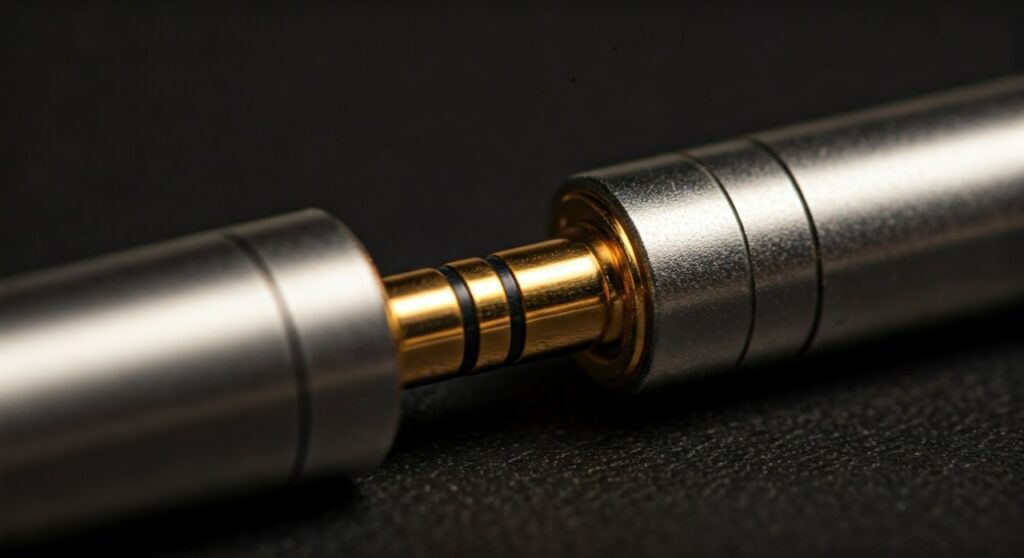
This seamless transition from digital files to the music in your ears relies on a simple yet robust mechanism of electrical continuity. Whether you are using a high-end audiophile setup or a vintage Walkman, the fundamental physics remains the same: translating fluctuating electricity into mechanical vibration.
Key Takeaways: The Essentials of Audio Jacks
If you are looking for a quick summary of how this technology functions, here are the most critical points:
- Analog Transmission: The jack carries an analog electrical signal, which is a continuous wave of electricity that mimics the sound wave.
- The Connector Layout: Most jacks use a TRS (Tip-Ring-Sleeve) configuration to separate the Left channel, Right channel, and Ground.
- Physical Contact: Inside the headphone socket, small metal “fingers” or springs press against the plug to complete the circuit.
- Transduction: Once the signal reaches the headphones, a voice coil and magnet turn that electricity into physical movement (sound).
- Universal Standards: The 3.5mm jack remains the industry standard, though 6.35mm is used for professional equipment and 2.5mm for smaller communications devices.
The Anatomy of a Headphone Plug: TRS, TRRS, and More
To understand how do headphone jacks work, you must first look at the bands on the plug. These aren’t just for decoration; they are insulators that separate different conductive sections.
TS (Tip-Sleeve)
This is the simplest form, often seen in guitar cables. It features one tip (signal) and one sleeve (ground). It is mono, meaning it can only carry one channel of audio.
TRS (Tip-Ring-Sleeve)
This is the standard for stereo headphones.
- Tip: Carries the Left Audio Channel.
- Ring: Carries the Right Audio Channel.
- Sleeve: Acts as the Common Ground for the circuit.
TRRS (Tip-Ring-Ring-Sleeve)
If your headphones have a built-in microphone or remote buttons, they likely use a TRRS connector. The extra ring is dedicated to the microphone signal.
| Connector Type | Conductive Segments | Primary Use |
|---|---|---|
| TS | 2 | Mono audio, Electric Guitars |
| TRS | 3 | Stereo audio, Standard Headphones |
| TRRS | 4 | Stereo audio + Microphone (Smartphones) |
| TRRRS | 5 | Balanced Audio / Noise Cancelling |
Step-by-Step: How the Audio Signal Travels
To truly grasp how does a headphone jack work, we need to follow the “life” of a sound wave from your device to your eardrum. My experience in audio engineering has shown that the “analog-to-digital” handoff is where the magic happens.
Step 1: Digital to Analog Conversion (DAC)
Your phone or laptop stores music as digital bits (0s and 1s). Before it can go through a jack, an internal chip called a Digital-to-Analog Converter (DAC) turns those bits into a varying electrical voltage.
Step 2: The Signal Hits the Socket
The electrical signal travels to the headphone socket. Inside the socket, there are several copper or gold-plated spring contacts. These are designed to “grip” the plug when you push it in, ensuring a tight connection.
Step 3: Traveling Through the Plug
The electricity moves from the socket’s springs into the Tip and Ring of your headphone plug. Because metal is a high-quality conductor, the signal loses very little energy as it travels down the copper wiring inside your headphone cable.
Step 4: Electromagnetic Transduction
Inside the earcups of your headphones, the electrical signal enters a voice coil (a tiny coil of wire) placed near a permanent magnet. The fluctuating electricity creates a changing magnetic field, causing the coil—and the attached diaphragm—to vibrate rapidly.
Step 5: Creation of Sound Waves
The vibrating diaphragm pushes the air around it, creating pressure waves. These waves travel into your ear canal and hit your eardrum, which your brain interprets as music or speech.
Why the “Click” Matters: Physical Mechanics of the Socket
Have you ever wondered why you feel a satisfying “click” when you plug headphones in? This is caused by a detent mechanism inside the headphone socket.
The socket contains a curved metal leaf spring that sits in a small groove on the plug (usually just behind the tip). This serves two purposes:
- Retention: It keeps the plug from falling out accidentally.
- Alignment: It ensures that the Tip, Ring, and Sleeve are perfectly aligned with their corresponding contacts.
If you find that your audio is “cutting out” or sounds “thin,” it is often because these internal springs have lost their tension or have become dirty, preventing a solid electrical connection. I always recommend cleaning the jack with 99% isopropyl alcohol on a thin toothpick if you experience static.
Comparing Jack Sizes: 2.5mm vs. 3.5mm vs. 6.35mm
Not all headphone jacks are created equal. Depending on the device, you might encounter different physical diameters.
The Standard 3.5mm (Mini-Jack)
This is the king of connectors. It was originally popularized by the Sony Walkman in 1979. It is the perfect balance between durability and size, making it ideal for smartphones, laptops, and portable MP3 players.
The Professional 6.35mm (1/4 Inch Jack)
You will find these on high-end amplifiers, audio interfaces, and electric guitars. They are significantly more rugged and provide a larger surface area for contact, which reduces electrical resistance and is preferred by professionals for studio work.
The Tiny 2.5mm (Sub-Mini Jack)
Mainly used in the early 2000s for cell phone headsets and today in some balanced audio outputs for high-fidelity players. It is fragile and prone to breaking, which is why it is less common.
Common Issues: Why Does My Headphone Jack Fail?
Even though the technology is simple, it isn’t bulletproof. Over years of repairing audio gear, I have identified the three most common points of failure:
- Oxidation: Over time, the metal contacts can develop a thin layer of “rust” or oxidation. This increases impedance and causes crackling sounds.
- Lint Accumulation: If you carry your phone in your pocket, the headphone socket acts as a vacuum for lint. If the plug won’t go all the way in, use a non-conductive pin to gently scrape out the debris.
- Broken Solder Joints: Constant plugging and unplugging can put stress on the PCB (Printed Circuit Board) where the socket is mounted. This often requires a professional solder repair.
CTIA vs. OMTP: The Hidden Compatibility Battle
If you have ever plugged a pair of headphones into a phone and found that the microphone doesn’t work but the audio does, you’ve likely encountered the CTIA vs. OMTP conflict.
- CTIA (Cellular Telecommunications Industry Association): Used by Apple, Samsung, and most modern devices. The Sleeve is the Ground, and the second Ring is the Mic.
- OMTP (Open Mobile Terminal Platform): Used by older Nokia and Sony Ericsson phones. The positions of the Ground and Mic are swapped.
How does a headphone jack work in this context? If you mix these standards, the microphone signal gets sent to the ground, resulting in no voice transmission and often distorted, “hollow” sounding audio.
The Future of the Headphone Jack
With the rise of USB-C audio and Bluetooth 5.0, the traditional analog jack is disappearing from flagship smartphones. However, it remains the gold standard for latency-free listening.
Unlike wireless headphones, which require a battery and complex digital compression, a headphone jack provides a direct, uncompressed path for audio. This is why professional musicians and gamers still swear by the “old-fashioned” wired connection.
Frequently Asked Questions (FAQs)
Does a headphone jack affect sound quality?
Yes, but indirectly. The jack itself is just a conductor. However, the quality of the DAC and Amplifier behind the jack determines how clean the signal is. Gold-plated jacks also help by preventing corrosion, which maintains a clear signal over time.
Can I use a 3.5mm jack for balanced audio?
Standard 3.5mm TRS jacks are unbalanced. To get balanced audio, which reduces noise over long cable runs, you typically need a 4.4mm Pentaconn or a dual 3-pin XLR connection, though some specialized 3.5mm TRRS setups exist.
What is the difference between a “jack” and a “plug”?
In technical terms, the jack is the female “hole” (the socket) located on the device. The plug is the male connector at the end of your headphone cable. People often use the terms interchangeably in casual conversation.
Why do I hear static when I twist the headphone plug?
This is usually caused by dirt or oxidation on the contacts. When you rotate the plug, you are briefly breaking and re-establishing the electrical circuit. Cleaning the plug with a cloth and the socket with compressed air usually fixes this.
Are all 3.5mm jacks the same depth?
While the diameter is standardized, the depth and internal spacing can vary slightly between manufacturers. This is why some headphones feel “tighter” in certain devices than others.









