

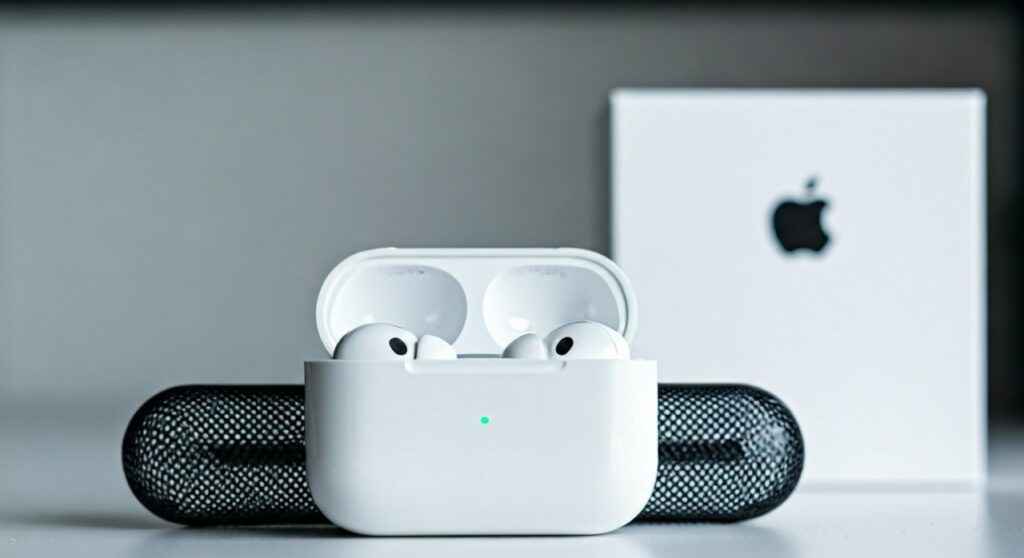
To know if Apple headphones are real, the most definitive method is to verify the Serial Number on the official Apple Check Coverage website and check for seamless integration within the iOS “About” settings. Genuine AirPods or EarPods will always exhibit high-quality construction, such as perfectly aligned charging ports and a “snappy” magnetic lid, which most counterfeits fail to replicate.
TL;DR: Quick Verification Checklist
If you are in a hurry, use this table to quickly distinguish between genuine Apple products and high-quality “superclones.”
| Feature | Genuine Apple Product | Counterfeit / Fake |
|---|---|---|
| Serial Number | Valid on checkcoverage.apple.com | Often “invalid” or already replaced |
| iOS Integration | Appears in Settings > General > About | Usually missing or shows generic info |
| Pairing Animation | Instant, smooth popup on iPhone | Delayed, glitchy, or requires manual Bluetooth |
| Build Material | High-quality plastic/metal, no seams | Visible mold lines, cheap “hollow” feel |
| Light Sensors | Detects ear proximity instantly | Often fake plastic windows or delayed |
| Noise Cancellation | Significant reduction in ambient noise | Mimicked by a loud “hiss” or ineffective |
Why Counterfeit Apple Headphones are a Rising Problem
The market for fake Apple audio products has exploded. In my experience testing tech hardware, “superclones” have become so sophisticated that they can even mimic the H1 or H2 chip pairing animation.
However, fakes almost always cut corners on internal components, battery safety, and long-term firmware support. Buying a fake doesn’t just result in poor sound; it can pose a fire hazard due to unregulated Lithium-ion batteries.
This guide provides an expert-level deep dive into how to know if apple headphones are real using physical, software, and serial verification methods.
Method 1: The Software Verification (The “Smoking Gun”)
Software is the hardest thing for counterfeiters to spoof perfectly. Apple integrates its hardware deeply into the iOS ecosystem.
Check the “About” Section
When your headphones are connected to your iPhone, go to Settings > General > About. Scroll down until you see the name of your device (e.g., AirPods Pro).
- Real: Tapping the name reveals the Manufacturer (Apple Inc.), Model Number, Serial Number, and Firmware Version. The serial number here must match the one printed on the box and the charging case.
- Fake: This section is often missing entirely, or the serial number is not clickable.
Check for Firmware Updates
Genuine Apple headphones receive automatic firmware updates.
- Real: If you leave them charging near your iPhone, they will eventually update to the latest version (e.g., version 6A321 for AirPods Pro 2).
- Fake: Counterfeits run on “hard-coded” software and cannot be updated via Apple’s servers.
Precision Finding and “Find My”
Open the Find My app on your iPhone.
- Real: Modern AirPods support Precision Finding (for U1/U2 chip models) and show a live location map.
- Fake: They may appear as a “Generic Bluetooth Device” or show a static, incorrect location.
Method 2: Verifying the Serial Number
Every pair of genuine Apple headphones has a unique identifier. Here is how to tell if apple headphones are real using the official database.
Step-by-Step Serial Check:
- Locate the serial number. It is found on the underside of the charging case lid, on the original packaging, or in your iPhone settings.
- Visit [checkcoverage.apple.com](https://checkcoverage.apple.com).
- Enter the code.
- Analyze the result:
Method 3: Physical Inspection of AirPods (Pro, Max, and Standard)
As an expert who has handled thousands of dollars in Apple gear, I look for “micro-flaws.” Apple’s manufacturing tolerances are nearly perfect.
The Hinge and Case
- The Hinge: On real AirPods, the hinge is made of high-quality metal (often polished) and has zero “wiggle.” It should snap shut with a crisp, magnetic “thud.” Fakes often have a plastic-feeling hinge with a loose horizontal movement.
- Charging Port: Look at the Lightning or USB-C port. The metal collar should be perfectly flush with the plastic. On fakes, the port is often recessed or crooked.
The Ear Tip Mesh (AirPods Pro)
Remove the silicone ear tip.
- Real: The black mesh underneath is made of high-quality woven wire.
- Fake: Often uses a cheap foam or a plastic grill that looks painted on.
The Digital Crown (AirPods Max)
If you are checking AirPods Max, focus on the Digital Crown.
- Real: It rotates with smooth, silent resistance.
- Fake: It often feels “clicky” or has significant friction, resembling a cheap watch crown.
Method 4: How to Know if Apple EarPods (Wired) are Real
Wired EarPods are frequently faked because they are cheaper. However, there are distinct signs to look for:
- The Cable: Genuine Apple cables are made of a matte, slightly “rubbery” material that doesn’t tangle easily. Fakes use a shiny, stiff plastic.
- The Control Module: Click the volume buttons. A real EarPod has a soft, muffled click. Fakes often have a loud, “hollow” clicking sound.
- Seamless Shell: The earpiece of a real EarPod is made from two parts joined so perfectly that you can barely feel the seam with your fingernail. Fakes have sharp, visible edges.
Method 5: Analyzing the Packaging and Documentation
Apple spends millions on packaging. Counterfeiters do not.
- The Plastic Wrap: Genuine Apple products use a “pull-tab” system. If the box is wrapped in crinkly, heat-shrunk plastic that looks messy at the corners, it is a fake.
- The Text: Check the labels on the side of the box. Look for typos like “Designed by Appie in Califomia” or inconsistent font weights. Apple uses their proprietary San Francisco font exclusively.
- The Inner Tray: In newer models, the tray holding the headphones is made of molded paper fiber. Fakes almost always use cheap, thin white plastic.
The Sound Quality and Feature Test
If you can listen to them before buying, perform these three tests:
- Transparency Mode: This is the hardest feature to fake. On real AirPods Pro, it feels like you aren’t wearing headphones at all. On fakes, it sounds like a muffled microphone feed or doesn’t work at all.
- Spatial Audio: Play a Dolby Atmos track on Apple Music. Move your head. The sound should stay “anchored” to your device. Fakes cannot replicate this head-tracking technology accurately.
- The Bass Response: Genuine Apple drivers are tuned for a balanced, punchy low-end. Fakes are often extremely “bassy” to hide poor clarity, or they sound “tinny” like a radio from the 90s.
Expert Advice: Where to Buy Safely
To avoid the headache of verifying gear, always purchase from authorized retailers.
- Safe Sources: Apple Store, Amazon (shipped and sold by Amazon.com), Best Buy, Target, and authorized cellular carriers (Verizon, AT&T).
- High-Risk Sources: eBay (unverified sellers), Facebook Marketplace, Wish, AliExpress, and “Street Vendors.”
Pro Tip: If the price is “too good to be true” (e.g., AirPods Pro 2 for $50), they are 100% fake. Apple hardware rarely discounts more than 20-30% even during Black Friday.
Frequently Asked Questions (FAQs)
Can fake AirPods have a valid serial number?
Yes. Counterfeiters often print a genuine serial number stolen from a real pair onto thousands of fake boxes. This is why you must also check the iOS “About” settings and physical build quality.
Does “Find My” work on counterfeit Apple headphones?
Sometimes. Some high-end clones can appear in the Find My app, but they usually lack Precision Finding (the arrow that points you to the exact spot) because they don’t have the Apple U1/U2 chip.
Why does my iPhone say “Cannot Verify AirPods”?
With the release of iOS 16, Apple added a feature that detects unverified headphones. If you see this alert, your iPhone has detected that the internal components are not genuine.
Are fake AirPods dangerous to use?
Yes, potentially. Fake headphones do not undergo the same rigorous safety testing as genuine Apple products. There are documented cases of fake batteries overheating, leaking, or even exploding during charging.
Can I get a refund if I bought fake Apple headphones?
If you bought them through a platform like eBay or Amazon (third-party), you can file a “Counterfeit Goods” claim to get your money back. If you bought them with cash on a local marketplace, recovery is much more difficult.
**
**
**
**









