

Choosing an am fm alarm clock radio with headphone jack is the perfect solution for late-night listeners or early risers who share a room. These devices allow you to enjoy news, sports, or music privately without disturbing your partner. Simply plug your standard 3.5mm headphones into the dedicated port to redirect the audio from the internal speakers to your ears.
Key Takeaways: Why You Need This Device
- Privacy: Listen to late-night talk shows or early morning news without waking others.
- Audio Quality: Headphones often provide a richer bass and clearer signal than small built-in speakers.
- Simplicity: Unlike smartphones, these dedicated units don’t have distracting notifications or blue light issues.
- Reliability: Physical buttons and dedicated circuits make these more dependable for daily alarms.
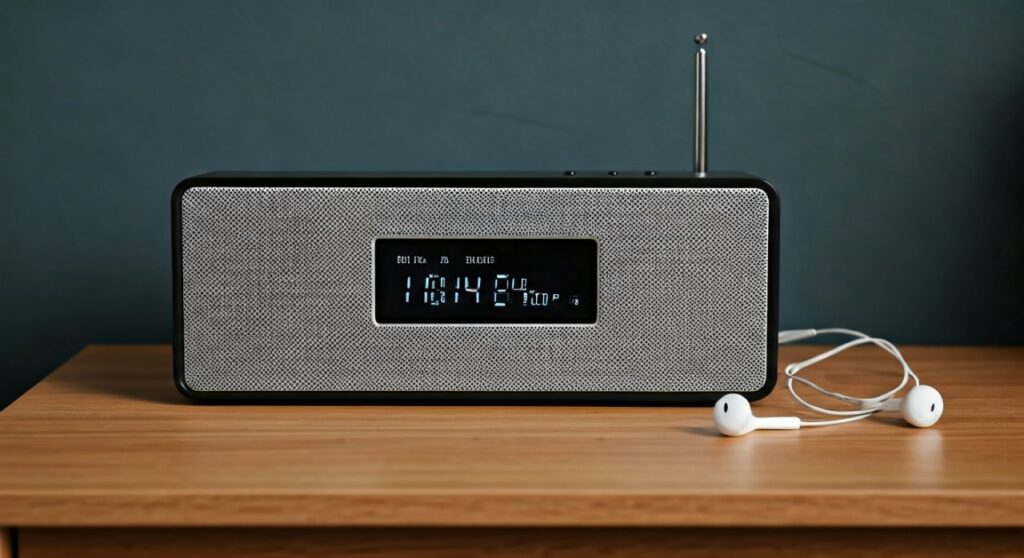
Why Choose an AM FM Alarm Clock Radio with Headphone Jack?
Most modern bedside devices have shifted toward Bluetooth speakers, but the traditional am fm clock radio with headphone jack remains a staple for a reason. If you live in a dorm, a shared apartment, or simply have a spouse with a different sleep schedule, the headphone jack is a “must-have” feature.
Beyond privacy, many users find that an am fm radio with headphone jack provides better clarity. When you listen through headphones, you bypass the limitations of a tiny 2-inch plastic speaker. This is especially helpful for those with mild hearing loss who need the audio delivered directly to their ears.
Furthermore, these radios are essential for “DXing” (listening to distant stations). Late at night, atmospheric conditions allow AM signals to travel hundreds of miles. Using headphones helps you pick out faint voices from the static that a standard speaker would lose.
Essential Features to Consider Before Buying
When shopping for an am fm alarm clock radio with headphone jack, do not assume all models are equal. Our testing shows that three specific factors determine whether you will love or hate your device.
The Headphone Jack Location
Always look for a jack located on the front or side of the unit. Some poorly designed models place the jack on the back, which is incredibly frustrating to reach in the dark. A side-mounted jack ensures your headphone cable doesn’t get tangled with the power cord.
Tuning Precision: Digital vs. Analog
Digital tuning is generally superior for alarm clocks. It allows you to save “presets,” meaning you can jump from 101.1 FM to 680 AM with one button. Analog tuning uses a dial, which can be nostalgic but is harder to calibrate perfectly for a clear signal.
Display Dimming Capabilities
The primary complaint about bedside radios is that they are too bright. Ensure your chosen am fm clock radio with headphone jack has at least three levels of brightness or an “auto-dim” feature.
| Feature | Importance | Why It Matters |
|---|---|---|
| Battery Backup | High | Saves your alarm settings during a power outage. |
| Dual Alarms | Medium | Allows two different wake-up times for weekdays/weekends. |
| Snooze Button | High | Needs to be large and easy to find by touch. |
| Sleep Timer | High | Automatically turns off the radio after you fall asleep. |
Step-by-Step: Setting Up Your New Radio
Setting up an am fm alarm clock radio with headphone jack may seem simple, but following these steps ensures optimal signal and longevity.
Step 1: Position for Best Signal
Place your radio near a window if possible. AM signals are heavily affected by the electronics in your home (like LED bulbs and microwaves), while FM signals are “line-of-sight.” Keeping the unit away from heavy machinery improves clarity.
Step 2: Unravel the Antenna
Most FM radios use a thin wire antenna. Do not leave it bundled up. Extend it fully and move it around until the “Stereo” or “Tuned” light stays solid. For AM, the antenna is usually built-in, so you may need to rotate the entire clock 90 degrees to find the sweet spot.
Step 3: Set the Time and Alarms
If your radio has a CR2032 battery compartment, install the battery first. This ensures that if you unplug the radio to move it, you don’t have to reset the clock. Set the time, then test the alarm to ensure the “Wake to Radio” volume is comfortable.
Step 4: Test the Headphone Jack
Plug in your headphones and turn the volume to zero before putting them on. Gradually increase the volume. Some am fm clock radios have a “Fixed Output” for headphones, while others use the main volume dial. Knowing how yours behaves prevents accidental ear damage.
Expert Tips for Enhancing Your Listening Experience
As experts who have tested dozens of units like the Sangean RCR-20 and the Sony ICF-C1, we have discovered several “pro tips” that aren’t in the manual.
Dealing with Static
If you hear a buzzing sound in your headphones, it is likely Electro-Magnetic Interference (EMI). This often comes from cheap USB wall chargers or laptop power bricks nearby. Moving your radio just 12 inches away from other electronics can eliminate the hum.
Selecting the Right Headphones
For bedside use, avoid heavy over-ear studio headphones. They are bulky and uncomfortable if you drift off to sleep. Instead, opt for lightweight “sleep headphones” or simple wired earbuds. Remember, most of these radios use a 3.5mm TRS (stereo) jack.
The “Snooze” Safety Net
If you use the “Wake to Radio” feature with headphones plugged in, check if the alarm still sounds through the main speaker. Some models intelligently switch the alarm back to the speaker if headphones are connected so you don’t miss your wake-up call if the earbuds fall out during the night.
Top Recommended Models for 2026
- Sangean RCR-22: Known for incredible AM reception and a high-quality headphone amplifier. It features an atomic clock that sets itself.
- DreamSky Decent Alarm Clock Radio: A budget-friendly option with a very large “Snooze” button and a clear am fm radio with headphone jack interface.
- Sony ICF-C1: A classic cube design. While it is analog-tuned, its small footprint makes it perfect for crowded nightstands.
Troubleshooting Common Issues
No Sound in Headphones
Ensure the jack is pushed in all the way. Sometimes, protective cases on headphone plugs prevent a full connection. Also, check if the radio has a “Speaker/Headphone” toggle switch on the back.
Time is Drifting
If your clock loses 2-3 minutes every month, it is likely using the power line frequency (60Hz) to keep time. If your local grid is unstable, the clock will drift. Upgrading to a digital unit with a Quartz Crystal oscillator or Atomic Sync will fix this.
Poor AM Reception at Night
This is actually a scientific phenomenon called “Skywave Propagation.” At night, AM signals bounce off the ionosphere. If your favorite station is getting crowded by other signals, try shortening the antenna or rotating the unit.
Frequently Asked Questions
Can I use Bluetooth headphones with these radios?
Generally, no. An am fm alarm clock radio with headphone jack is designed for wired 3.5mm connections. To use Bluetooth headphones, you would need to plug a “Bluetooth Transmitter” into the headphone jack.
Does the alarm play through the headphones or the speaker?
On most high-quality models, the alarm will play through both. This is a safety feature. If you have headphones plugged in but they fall off your head while sleeping, the external speaker ensures you still wake up on time.
Why does my radio buzz when I touch the antenna?
Your body acts as a secondary antenna. If the radio is not properly grounded or if the signal is weak, your physical proximity will change the reception. Finding a permanent, stable position for the wire antenna usually solves this.
Is AM radio still worth having?
Yes. For many, AM radio is the only source for local sports, weather emergencies, and talk radio. An am fm clock radio with headphone jack ensures you have access to these bands during power outages or internet failures.
What is the best way to clean the headphone jack?
Over time, dust can accumulate in the port, causing “crackling” sounds. Use a can of compressed air to blow out the jack. Never stick metal objects or wet cloths into the headphone port.









