

To find out how to tell which Beats headphones you have, the most reliable method is checking the serial number located on the headband or charging case and entering it into the Apple Check Coverage website. Alternatively, you can identify your model by checking the Bluetooth settings on your smartphone while the device is paired or by inspecting the charging port type (Micro-USB, Lightning, or USB-C).
Key Takeaways for Quick Identification
If you are in a hurry, use this quick checklist to narrow down your Beats model:
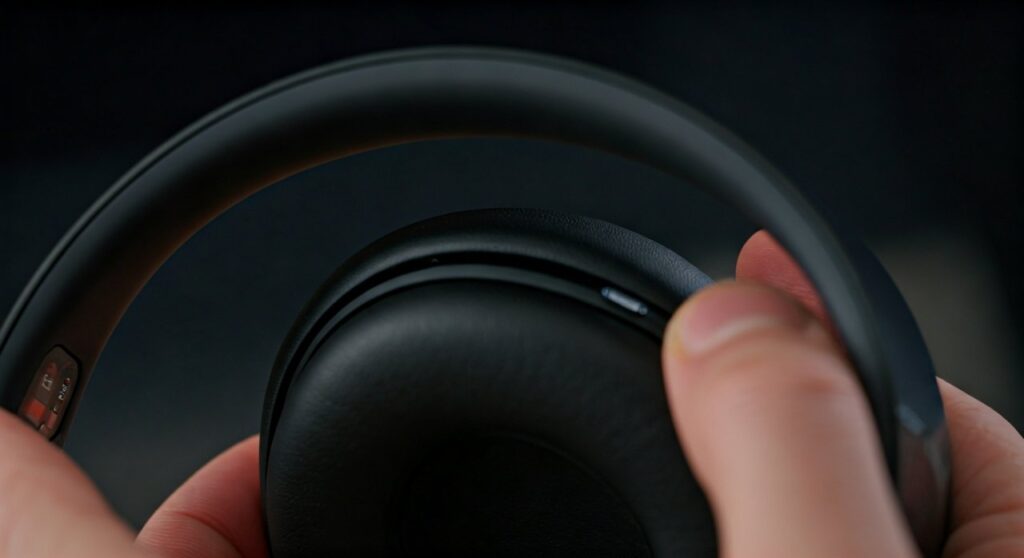
- Check the Serial Number: Usually found on the inner side of the headband or the bottom of the charging case.
- Look at the Port: Older models use Micro-USB, mid-range generations use Lightning, and modern versions (like Beats Studio Pro or Studio Buds+) use USB-C.
- Check Bluetooth Settings: On an iPhone, go to Settings > Bluetooth and tap the “i” next to your Beats to see the model name.
- Examine the Hinge: Foldable headphones with metal hinges are typically from the Solo or Studio wireless lines.
- Use the Beats App: Android users can identify their hardware by syncing with the official Beats App from the Google Play Store.
Identifying Your Beats via Serial Number
The serial number is the “DNA” of your device. It is the only foolproof way to distinguish between nearly identical models like the Beats Solo3 and the Beats Solo4.
Where to Find the Serial Number
Depending on your specific form factor, the serial number is printed in different locations. Manufacturers hide these in discrete areas to maintain a sleek aesthetic.
- Over-Ear/On-Ear (Solo and Studio): Expand the headband. Look at the silver or plastic slider on the right or left side; the serial number is printed in tiny text on the interior.
- Powerbeats Pro: The serial number is printed on the inside of the charging case lid.
- Beats Studio Buds and Fit Pro: Look at the bottom of the charging case or the underside of the earbuds themselves.
- Beats Flex and BeatsX: The serial number is located on the small internal module near the right earbud control.
Using the Apple Coverage Tool
Once you have the alphanumeric code, visit the Apple Check Coverage page. Enter the code to see the official model name, color, and warranty status. This is the best way to verify you don’t have a high-quality counterfeit.
Visual Comparison: Identifying by Hardware Features
Sometimes you cannot read the tiny serial number. In these cases, physical design cues are your best friend. Different generations of Beats introduced specific hardware changes.
| Feature | Beats Solo 2 | Beats Solo 3 | Beats Solo 4 |
|---|---|---|---|
| Charging Port | Micro-USB | Micro-USB | USB-C |
| Battery Life | 12 Hours | 40 Hours | 50 Hours |
| Internal Chip | Standard BT | Apple W1 Chip | Apple Silicon/Proprietary |
| Fast Fuel | No | Yes (5 min = 3 hrs) | Yes (10 min = 5 hrs) |
Identifying the Studio Series
The Beats Studio line is larger and features “Over-Ear” cushions that fully enclose your ears.
- Beats Studio Wireless (Gen 2): Features a Micro-USB port and a battery fuel gauge with five tiny LED lights.
- Beats Studio3 Wireless: Looks identical to Gen 2 but features the Apple W1 chip for instant pairing. It uses Micro-USB.
- Beats Studio Pro: The newest flagship. It features USB-C, no LED fuel gauge on the outside, and “Ultra Plush” leather cushions.
How to Tell Which Beats Earbuds You Have
Earbuds are harder to identify because they lack headbands. However, the shape of the wingtip and the charging case are major giveaways.
Beats Fit Pro vs. Studio Buds
The Beats Fit Pro is easily identified by its integrated, flexible wingtips designed for sports. If your earbuds are small, pill-shaped, and lack a wingtip, you likely have the Beats Studio Buds or the Studio Buds+.
Powerbeats Generations
- Powerbeats3: These have a wire connecting the two buds and a Micro-USB port under a flap on the left bud.
- Powerbeats (High Performance): These have a wire but use a Lightning port for charging.
- Powerbeats Pro: These are Totally Wireless. They have no cords and come in a large, clamshell-style charging case.
Using Software to Identify Your Device
If your Beats are functional and paired to a device, the software will tell you exactly what model you own. This is often the path of least resistance for most users.
On iOS (iPhone or iPad)
- Open Settings.
- Tap on Bluetooth.
- Find your Beats in the list and tap the (i) icon.
- Scroll down to the “About” section to see the Model Name and Model Number.
On Android
Download the Beats App from the Google Play Store. When you pair your headphones to the app, it will display a high-resolution image of your specific model along with its name and battery status.
On Mac
- Click the Apple Menu and select System Settings.
- Navigate to Bluetooth.
- Click the Options or Info button next to your device name to view the hardware details.
Expert Tips for Spotting Specific Generations
As an expert who has tested every iteration of the Beats lineup, I’ve noticed small details that help distinguish them. For example, the Beats Solo3 was the first to feature the Apple W1 chip, which allows for a “popup” animation on iPhones.
If you have a pair of “Solo” headphones and they charge with a Lightning cable, you actually have the Beats Solo Pro. This was the only “Solo” model to feature Active Noise Cancelling (ANC) and a Lightning port before the Solo 4 moved to USB-C.
Furthermore, check the branding. Older Monster Beats (pre-2012) will have the “Monster” logo on the packaging or the cable. These are now considered “legacy” products and have significantly different internal components than modern Apple-era Beats.
Frequently Asked Questions
Why doesn’t my serial number show up on Apple’s website?
If the serial number is not recognized, you may have a counterfeit product. Fake Beats are very common. Another possibility is that the device is a very old Monster Beats era product manufactured before Apple acquired the company in 2014.
What is the difference between Beats Solo and Studio?
The Solo line is “On-Ear,” meaning the cushions sit directly on your earlobes. The Studio line is “Over-Ear,” meaning the cushions create a seal around your entire ear. Studios generally offer better noise cancellation and are physically larger.
How do I find the model number?
The model number usually starts with the letter A followed by four digits (e.g., A1914). You can find this printed in tiny text near the serial number on the headband or on the original product packaging.
Can I identify my Beats by color?
While colors like “Defiant Black-Red” or “Cloud Blue” are specific to certain models (like the Solo Pro), color is not a primary identification method because Beats often releases “Special Edition” colors across multiple product lines. Always use the serial number or port type for accuracy.
Do all Beats use the same charger?
No. Older Beats use Micro-USB, middle generations (and the Solo Pro) use Lightning, and the most recent models (Studio Pro, Solo 4, Studio Buds) use USB-C. Identifying your charging cable is one of the fastest ways to determine the age of your device.
Shopping for a new pair instead? Read our guide to the best headphones under $500.







