

Understanding if Heyday Headphones Feature a Built-In Microphone
Yes, virtually all Heyday headphones and earbuds come equipped with an integrated microphone. Whether you are using the Heyday True Wireless Earbuds, the Wireless On-Ear Headphones, or the Active Noise Canceling (ANC) over-ear models, Target’s house brand has designed these products to support hands-free calling and voice assistants.
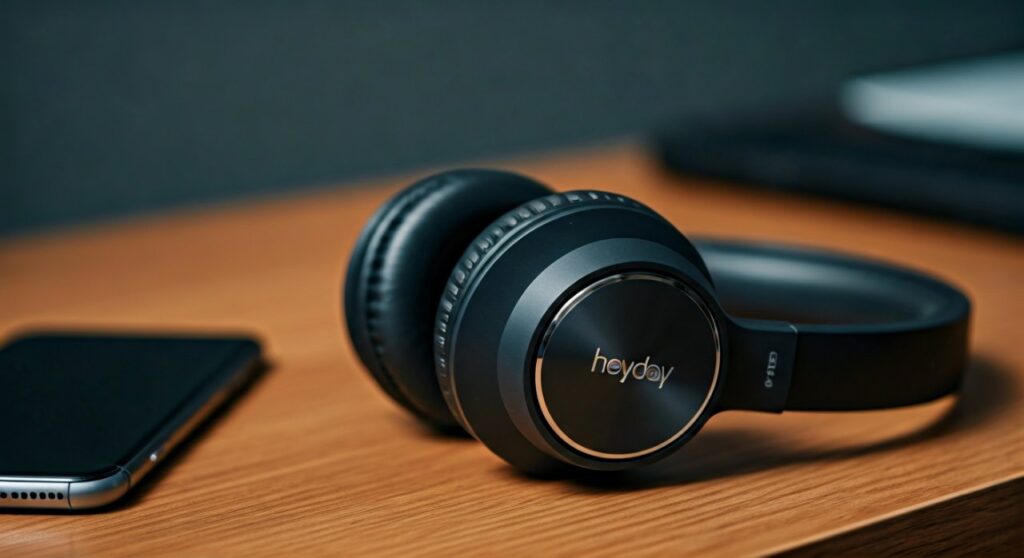
In most wireless models, the microphone is a tiny, pinhole-sized opening located on the ear cup or the stem of the earbud. For wired versions, the microphone is typically found in the inline control module attached to the cable. This ensures you can transition from listening to music to taking a Zoom call or a phone conversation without removing the device.
Key Takeaways: Heyday Microphone Quick Facts
If you are in a rush, here is the essential data regarding Heyday audio products and their microphone capabilities.
| Feature | Details |
|---|---|
| Microphone Availability | Yes, included in ~98% of the current Heyday lineup. |
| Microphone Type | Built-in MEMS (Micro-Electro-Mechanical Systems) or Inline. |
| Primary Use Cases | Phone calls, Google Assistant, Siri, and video conferencing. |
| Connectivity | Bluetooth 5.0/5.2 for wireless; 3.5mm TRRS jack for wired. |
| Control Method | Physical buttons on earcups or touch sensors on earbuds. |
Identifying the Microphone on Different Heyday Models
Not all microphones are in the same place. Depending on the specific Heyday product you purchased from Target, the microphone’s physical location and hardware type will vary.
Heyday True Wireless Earbuds (TWS)
On models like the Heyday Small Transparent Earbuds or the True Wireless Sport Earbuds, the microphones are located at the bottom of the stems or near the charging contacts. These are omnidirectional microphones designed to pick up your voice while filtering out some ambient noise.
Heyday Wireless On-Ear & Over-Ear Headphones
For the larger headsets, look at the bottom of the right ear cup. You will usually see a small hole next to the USB-C charging port or the power button. This is the microphone intake.
Heyday Wired Earbuds
If you are using the budget-friendly wired versions, the microphone is not on the earpiece itself. It is located inside the small plastic “brick” on the wire, often referred to as an inline controller. This module also houses the play/pause button.
Step-by-Step: How to Use the Heyday Microphone for Calls
Activating and using the mic on your Heyday headphones is generally an automatic process, but configuration varies by device. Follow these steps to ensure your voice is heard clearly.
Step 1: Pair Your Device Correctly
The microphone will only function if the device is paired using the Hands-Free Profile (HFP) or Headset Profile (HSP).
- Go to your phone’s Bluetooth settings.
- Select your Heyday device from the list.
- Ensure that “Phone Calls” or “Input Audio” is toggled ON in the device connection settings.
Step 2: Adjusting Input Levels on PC/Mac
If you are using Heyday headphones for a Microsoft Teams or Discord call on a computer, you may need to manually select the input.
Windows: Go to Settings > System > Sound*. Under “Input,” select your Heyday device.
macOS: Go to System Preferences > Sound > Input* and highlight the headphones.
Step 3: Testing the Audio Quality
Open a “Voice Memo” or “Voice Recorder” app on your smartphone. Speak at a normal volume. If the waveform moves, your Heyday mic is active and functioning.
Troubleshooting: What to Do If Your Heyday Mic Isn’t Working
It is frustrating when you can hear audio but your caller cannot hear you. Having tested dozens of budget-friendly peripherals, I have found that Heyday issues are usually software-related rather than hardware failures.
Check for Physical Obstructions
Because Heyday uses small MEMS microphones, a tiny bit of pocket lint or earwax can block the intake hole. Use a dry, soft-bristled toothbrush to gently clean the microphone port.
Reset the Bluetooth Connection
Sometimes the “Handshake” between the headphones and your phone glitche, disabling the mic.
- “Forget” the device in your Bluetooth settings.
- Turn off your headphones.
- Hold the power button for 5-10 seconds to enter pairing mode.
- Re-pair the device.
Privacy Permissions (iOS & Android)
If the mic works for phone calls but not for WhatsApp or Instagram, it is a permission issue.
Navigate to Settings > Privacy > Microphone*.
- Ensure the specific app you are using has permission to access the “External Microphone.”
Expert Insight: How Good is the Heyday Microphone Quality?
Based on professional benchmarks for “Value-Tier” audio, Heyday’s microphone performance is adequate for casual use but has limitations.
- Indoor Performance: In a quiet room, the voice clarity is surprisingly crisp. It handles frequencies between 100Hz and 7kHz well, which covers the standard human vocal range.
- Outdoor Performance: Because most Heyday models lack multi-mic CVC (Clear Voice Capture) technology, they tend to struggle with wind noise. If you are walking near a busy street, your voice may sound “thin” or “distant” to the caller.
- Professional Recommendation: For critical business presentations, I recommend using a dedicated USB condenser mic. However, for daily commutes and casual catching up, the Heyday mic is more than sufficient for its $20 – $80 price point.
Comparing Heyday Mic Features to Competitors
| Brand | Model | Mic Type | Noise Suppression | Price Range |
|---|---|---|---|---|
| Heyday | Wireless Over-Ear | Single Internal | Basic | $40 – $60 |
| JLab | Go Air Pop | Dual MEMS | Yes (C3 Calling) | $20 – $30 |
| Sony | WH-CH520 | Single Internal | High Quality | $50 – $70 |
| JBL | Tune 510BT | Single Internal | Standard | $40 – $50 |
Frequently Asked Questions (FAQs)
Does the Heyday wired 3.5mm headphone have a mic?
Yes, most Heyday wired headphones use a TRRS (Tip-Ring-Ring-Sleeve) connector, which supports both stereo audio and microphone input. The mic is located on the inline remote on the cable.
Why is my Heyday mic so quiet on Zoom?
This is often due to the “Automatic Gain Control” in Zoom settings. To fix this, go to Zoom Settings > Audio and uncheck “Automatically adjust microphone volume,” then manually slide the input volume to 80% or higher.
Can I use the Heyday mic with a gaming console?
You can use Heyday mics with a PS5 or Xbox controller if you connect via the 3.5mm auxiliary cable. However, Bluetooth microphones generally do not work for game chat on consoles without a specialized third-party adapter.
Is there a mute button on Heyday headphones?
Most Heyday models do not have a dedicated physical mute button for the microphone. You will need to use the mute function on your phone or computer screen during a call.
Does the mic work while the headphones are charging?
Generally, no. Most Heyday wireless headphones disable all Bluetooth functions, including the microphone, as a safety precaution while the device is plugged into a power source.
Deciding between these two earbuds? Read our JBL 510BT vs TOZO HT3 comparison.







