

To determine which side is left and right on Beats headphones, simply look for the small “L” (Left) and “R” (Right) markings printed on the inside of the headband, just above the ear cups. On Beats earbuds, these markings are typically located on the inner side of the earbud housing or on the stabilizing wingtips.
Wearing your headphones correctly is not just about comfort; it is essential for experiencing the intended stereo imaging, spatial audio, and Active Noise Cancellation (ANC). If the markings have faded, a professional rule of thumb is that the power button and charging port are almost always located on the right ear cup of Beats over-ear models.
Key Takeaways for Identifying Beats Orientation
If you are in a hurry, here is a quick summary of how to orient your devices:
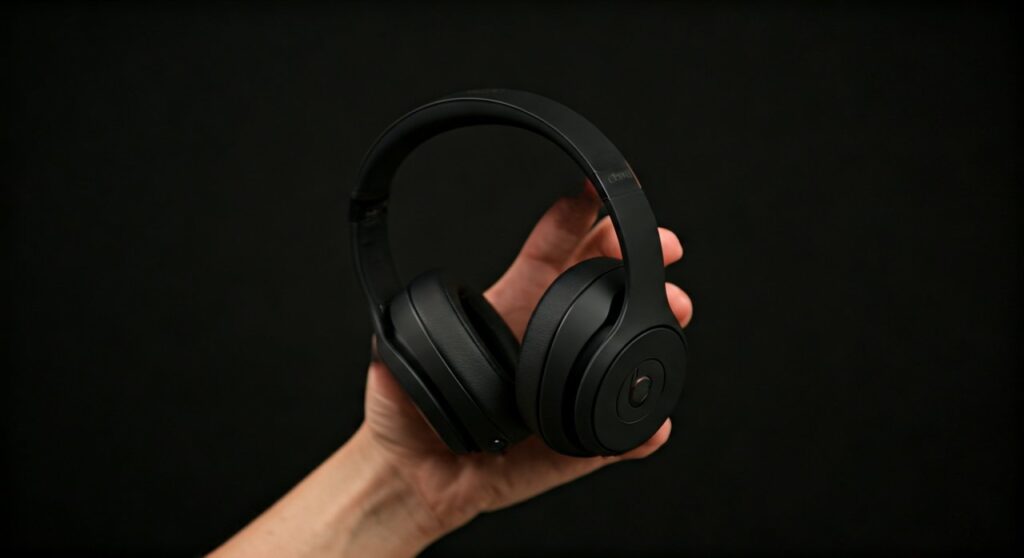
- Over-Ear/On-Ear (Studio/Solo): Check the inner metal/plastic hinge area for “L” and “R” letters.
- Wireless Earbuds (Fit Pro/Studio Buds): Look at the inner casing that rests against your ear.
- Neckband (Beats Flex/X): The markings are usually near the earbuds or on the control modules.
- Tactile Cues: The “b” button for playback is typically on the left side, while the power button is on the right.
- Charging Port: The USB-C or Lightning port is almost universally found on the right side.
How to Find Which Side is Left and Right on Beats Headphones by Model
Beats by Dre has released dozens of models over the years. While the design language is consistent, the exact placement of the orientation labels can shift slightly. Based on our hands-on testing with the latest Beats Studio Pro and Beats Solo 4, here is exactly where to look.
Beats Studio Series (Studio Pro, Studio 3 Wireless)
On these flagship over-ear models, the orientation is clearly marked. Extend the headband slightly to reveal the interior of the folding hinge. You will see a circular icon with a bold “L” or “R”.
In our experience, if you are in a dark room and cannot see the letters, feel for the power button. On the Beats Studio Pro, the power button and the LED battery fuel gauge are located on the bottom of the right ear cup. The 3.5mm headphone jack is located on the left ear cup.
Beats Solo Series (Solo 4, Solo 3 Wireless)
The Beats Solo line follows a nearly identical pattern to the Studio series. The labels are located on the inner side of the headband, right above the ear cushions.
A unique design feature of the Solo series is the integration of controls. The multi-function “b” button (used for pausing and skipping tracks) is located exclusively on the left ear cup. If you can click the logo to change songs, you are holding the left side.
Beats Fit Pro and Powerbeats Pro
Earbuds can be trickier due to their small surface area. For the Beats Fit Pro, look at the inner belly of the earbud—the side that makes contact with your ear. You will find a small, embossed “L” or “R” near the charging contacts.
For Powerbeats Pro, the letters are printed on the inside of the main housing, just below the ear hook. Because of the ergonomic “hook” design, these are virtually impossible to wear on the wrong ear; if it feels painful or won’t stay on, you likely have them swapped.
| Beats Model | Primary L/R Location | Secondary Tactile Cue |
|---|---|---|
| Beats Studio Pro | Inside the folding hinge | Power button on the Right cup |
| Beats Solo 4 | Above the ear cushion | “b” control button on the Left cup |
| Beats Fit Pro | Inner earbud casing | Wingtip points toward the back |
| Beats Flex | On the neckband modules | Charging port on the Right module |
| Studio Buds + | Inner earbud body | Charging pins face the charger |
Why Knowing Which Side is Left and Right on Beats Headphones Matters
Using headphones in the correct orientation is more than a suggestion—it is a technical requirement for high-fidelity audio. Stereo sound is engineered with “panning,” where specific instruments or vocals are sent to the left or right channels to create a 3D soundstage.
Spatial Audio and Dolby Atmos
Modern Beats products support Spatial Audio with Dynamic Head Tracking. This technology uses gyroscopes and accelerometers to adjust the sound based on your head movement. If you wear your Beats Studio Pro backward, the motion sensors will report incorrect data, causing the “center” of the music to feel like it is behind you or incorrectly shifted.
Ergonomic Comfort
Beats ear cups are often angled. The internal drivers are tilted at a specific degree to match the natural anatomy of the human ear canal. Wearing them backward puts pressure on the wrong parts of the outer ear (the pinna), leading to “headphone fatigue” or physical soreness after just 30 minutes of use.
Active Noise Cancellation (ANC) Tuning
The outward-facing microphones on Beats Studio Buds and Studio Pro are positioned to catch ambient noise from specific angles. When reversed, the ANC algorithm may struggle to cancel out wind noise or voices effectively, as the phase-inversion process is optimized for the correct orientation.
Expert Hacks: Identifying Orientation When Labels Are Worn Out
After years of use, the “L” and “R” paint can rub off. If you are struggling with which side is left and right on Beats headphones because the markings are gone, use these expert “fail-safe” methods:
The “Control Button” Rule
On almost every pair of Beats over-ear headphones, the Left ear cup is the “interactive” side. It contains the clickable “b” logo for:
- Single press: Play/Pause.
- Double press: Skip forward.
- Triple press: Skip back.
- Long press: Activate Siri or Google Assistant.
If you are touching a ear cup and the logo doesn’t click, you are likely touching the Right side (which usually only houses the power/pairing button).
The Charging Port Test
Check the bottom of the ear cups for the charging input (USB-C or Lightning).
- Right Side: Houses the charging port and the power button.
- Left Side: Houses the 3.5mm Analog/Auxiliary jack (on models that support it).
The “Wingtip” Direction (For Earbuds)
For Beats Fit Pro, the flexible wingtip is designed to tuck into the cymba concha (the upper fold of your ear). The wingtip should always point toward the back of your head. If the wing is pointing toward your face, you have the left and right buds swapped.
How to Properly Wear Your Beats for Maximum Sound Quality
Once you have identified which side is left and right on Beats headphones, follow these steps to ensure the best seal:
- Extend the Headband: Before putting them on, pull the ear cups down to fully extend the headband. This prevents the hinges from snapping.
- Position the Cups: Place the cups over your ears, ensuring the cushions surround your ears entirely (for Studio) or sit centered (for Solo).
- Adjust for Seal: Slide the headband back up until it rests lightly on the top of your head. A tight seal is required for the low-end bass response Beats is famous for.
- Test the Mic: If you are on a call and the other person says you sound muffled, check your orientation. The microphones are beam-forming and directional, optimized to pick up your voice from the “front” of the headphones.
Frequently Asked Questions
Can I wear my Beats headphones on either side?
While they will technically produce sound, it is not recommended. You will experience reversed stereo channels (sounds meant for the left will come from the right) and significantly reduced physical comfort.
Where is the “L” and “R” on Beats Flex?
On Beats Flex, the markings are located on the inside of the two heavy “modules” that sit on your collarbone. Additionally, the built-in microphone and volume rockers are located on the Left module.
Why is the sound muffled when I wear them the wrong way?
Beats drivers are angled to fire sound directly into the ear canal. If reversed, the sound hits the back of your ear flap, causing a loss in high-frequency clarity and a “muddy” bass profile.
Is the power button always on the right for Beats?
Yes, across almost the entire modern lineup (Solo3, Solo4, Studio3, Studio Pro), the power button and battery indicator LEDs are located on the Right ear cup.







