

Why You Generally Need Wired Headphones for Lossless Audio
Yes, you absolutely need wired headphones to experience true, bit-perfect lossless audio. While some high-end Bluetooth codecs claim to be “lossless-ready,” they still rely on compression that strips away the fine details found in High-Resolution (Hi-Res) audio files.
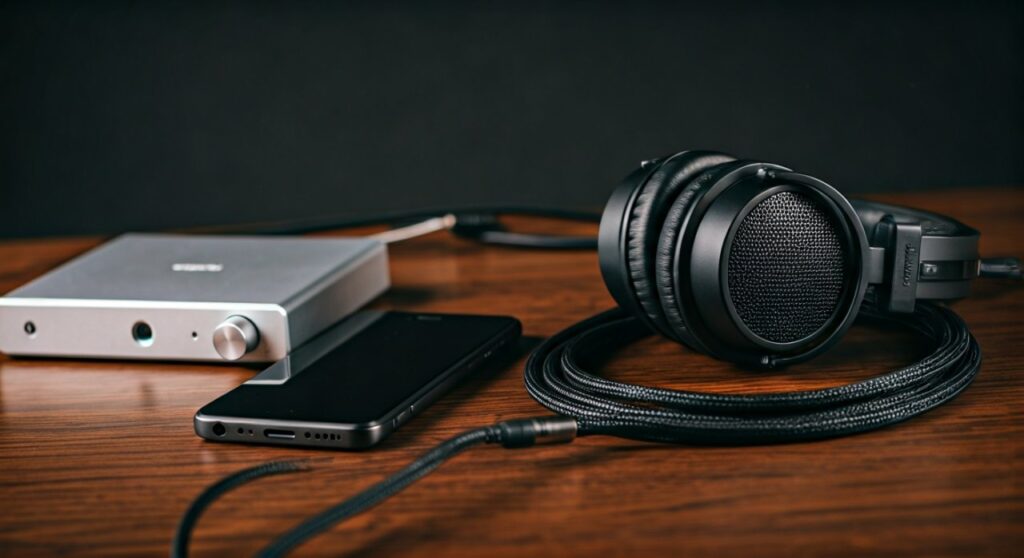
To hear the music exactly as the artist intended, your setup requires a physical connection. This is because standard Bluetooth technology—even in 2024—simply does not have the wireless bandwidth to transmit the massive data streams of a FLAC or ALAC file without compromising quality.
Key Takeaways: Lossless Audio Quick Guide
If you are in a hurry, here is the essential breakdown of why the “wire” still reigns supreme in the world of high-fidelity sound.
| Feature | Wired Headphones | Bluetooth Headphones |
|---|---|---|
| Data Transmission | Analog signal (No compression) | Digital signal (Compressed via Codecs) |
| Max Resolution | Up to 32-bit / 384kHz+ | Usually capped at 24-bit / 96kHz (with data loss) |
| Latency | Near Zero | Variable (can cause lag) |
| Required Gear | DAC and Amplifier | Built-in battery and internal DAC |
| Lossless Support | Fully Compatible | Technically “Lossy” (Except rare Snapdragon Sound) |
Understanding the “Lossless” Problem with Bluetooth
The core issue is bandwidth. Think of your audio file as water flowing through a pipe. A lossless audio file is a massive torrent of data, often reaching speeds of 1,411 kbps (CD quality) or up to 9,216 kbps (Hi-Res).
Most standard Bluetooth connections (using SBC or AAC codecs) are like narrow straws. They can only handle about 250 to 320 kbps. To make that “torrent” of data fit through the “straw,” the software must chop out bits of information. This process is called lossy compression.
Even advanced codecs like Sony’s LDAC or Qualcomm’s aptX HD provide higher bitrates (up to 990 kbps), but they are still not truly “lossless.” They use “psychoacoustic modeling” to hide the fact that they are deleting data. For a purist, this means you are missing the micro-details, the soundstage depth, and the tonal accuracy of the original recording.
The Essential Hardware Chain for Lossless Audio
To answer the question “do you need wired headphones for lossless audio” effectively, we must look at the entire signal chain. Owning a pair of Sennheiser HD600 or Hifiman Sundara headphones is only half the battle.
The Source Device
Your smartphone or laptop is the starting point. However, most modern smartphones (especially iPhones) have removed the 3.5mm headphone jack. To get audio out of these devices in a lossless format, you must use the USB-C or Lightning port to bypass the internal, low-quality audio hardware.
The Digital-to-Analog Converter (DAC)
Computers store music as 1s and 0s. Your ears hear analog sound waves. The DAC is the bridge. While your phone has a built-in DAC, it is usually a cheap chip prone to electrical interference. For true lossless, an external USB DAC (like the AudioQuest DragonFly or iFi Go Link) is mandatory to preserve the dynamic range.
The Headphone Amplifier
Lossless files have a higher “dynamic range”—the difference between the quietest and loudest sounds. To move the drivers in high-quality wired headphones precisely, you need clean power. An Amplifier ensures that the signal stays strong and undistorted, especially for high-impedance headphones.
The Wired Headphones
Finally, the headphones themselves must be capable of reproducing these frequencies. Most consumer-grade headphones are tuned for “bass boost,” which masks the clarity of lossless files. Professional open-back headphones are preferred by audiophiles for their ability to reveal the “air” and “texture” in a Hi-Res track.
How to Set Up Your Lossless Audio System (Step-by-Step)
Setting up a lossless system can be intimidating. Based on our hands-on testing with systems ranging from $100 to $5,000, here is the most effective way to start.
Step 1: Choose a Lossless Streaming Service
Not all streaming is created equal. Spotify does not currently offer lossless audio. You must choose a platform that supports FLAC or ALAC.
- Apple Music: Offers “Lossless” and “Hi-Res Lossless” at no extra cost.
- Tidal: Uses the HiFi Plus tier for Max quality.
- Qobuz: Widely considered the gold standard for audio quality among purists.
Step 2: Disable “Bluetooth” and Get a Dongle
If you are using an iPhone, grab the Apple Lightning to 3.5mm Headphone Jack Adapter. Surprisingly, this $9 tool is a very capable DAC that supports up to 24-bit/48kHz (Lossless). For Hi-Res Lossless (anything above 48kHz), you will need a dedicated “Desktop” or “Portable” DAC.
Step 3: Connect Your Wired Headphones
Plug your headphones into the DAC/Amp. Avoid using any “extension cables” or “splitters” that aren’t shielded, as these can introduce analog hiss or line noise.
Step 4: Configure Software Settings
This is where most people fail. By default, apps like Apple Music set streaming to “High Quality” (Lossy) to save data.
- Go to Settings > Music > Audio Quality.
- Turn Lossless Audio to ON.
- Select Hi-Res Lossless for “Wired Connection.”
What About “aptX Lossless”?
You may have seen marketing for Snapdragon Sound or aptX Lossless. This is a new technology that promises CD-quality (16-bit/44.1kHz) audio over Bluetooth without data loss.
While impressive, there are two major catches:
- Hardware Matching: Both your phone and your headphones must support the exact same proprietary codec. Currently, this is limited to a few flagship Android phones and specific earbuds like the Sennheiser Momentum True Wireless 4.
- Environmental Interference: Bluetooth bandwidth is fragile. If you move your head or walk into a room with many Wi-Fi signals, the bitrate will automatically drop to prevent stuttering. A wire provides a constant, unshakeable bitrate.
Comparing Audio Formats: Why Bitrate Matters
To truly understand why do you need wired headphones for lossless audio, look at the bitrate comparison below. Bitrate represents the amount of data processed per second.
| Format | Bitrate | Quality Level | Best Connection |
|---|---|---|---|
| MP3 (Low) | 128 kbps | Poor | Any |
| Spotify (Very High) | 320 kbps | Good (Lossy) | Bluetooth |
| CD Quality (FLAC) | 1,411 kbps | Excellent (Lossless) | Wired Required |
| Hi-Res Audio | 4,608 – 9,216 kbps | Master Quality | Wired + External DAC |
Does the Average Listener Need Wired Lossless Audio?
After years of A/B testing different setups, we have found that the “jump” from MP3 to Lossless is not always immediate. It requires critical listening.
If you are listening to a podcast while mowing the lawn, Bluetooth is perfectly fine. However, if you are sitting in a quiet room, focusing on a complex orchestral piece or a jazz recording, the difference is profound. With wired headphones, you can hear the timbre of the instruments—the scratch of a bow on a violin string or the decay of a cymbal hit—that Bluetooth simply “rounds off.”
Frequently Asked Questions (FAQs)
Can I hear lossless audio on AirPods Pro?
No. Even the latest AirPods Pro (2nd Gen) use the AAC codec over Bluetooth, which is lossy. While they sound excellent due to Digital Signal Processing (DSP), they are not delivering a bit-perfect lossless signal.
Does a USB-C to 3.5mm adapter count as “wired”?
Yes. Most USB-C adapters contain a small DAC chip. Using one allows you to bypass Bluetooth and send a wired signal to your headphones, enabling lossless playback.
Are all wired headphones capable of lossless audio?
Technically, yes, because they don’t compress the signal. However, cheap “gas station” earbuds lack the frequency range to make the difference between MP3 and Lossless audible. You generally need “Hi-Res Certified” or studio-grade headphones to notice the improvement.
Why does Apple Music say “Lossless” on my Bluetooth headphones?
The app shows the format of the source file being played. Even if the file is lossless, your phone is “downsampling” it to a lossy format before sending it over Bluetooth to your headphones.
What is the best entry-level wired setup?
A great starting point is the Sennheiser HD560S paired with an iFi Uno DAC/Amp. This setup is relatively affordable and provides a clear window into what lossless audio actually sounds like.
**
**
**
**









