

To charge your Walker’s Razor headphones, you must first identify if your model features a built-in lithium battery or uses standard AAA batteries. If you have a rechargeable model, plug a Micro-USB cable into the port located under the rubber housing on the ear cup and connect it to a 5V power source. For standard models, “charging” actually involves replacing the AAA batteries by sliding the battery compartment door upward.
Understanding Your Power Source: Internal vs. External Batteries
Before you attempt to plug in your device, you must understand the specific power configuration of your Walker’s Razor series. Most classic Razor Slim and Patriot models are powered by two AAA batteries and do not have an internal charging circuit.
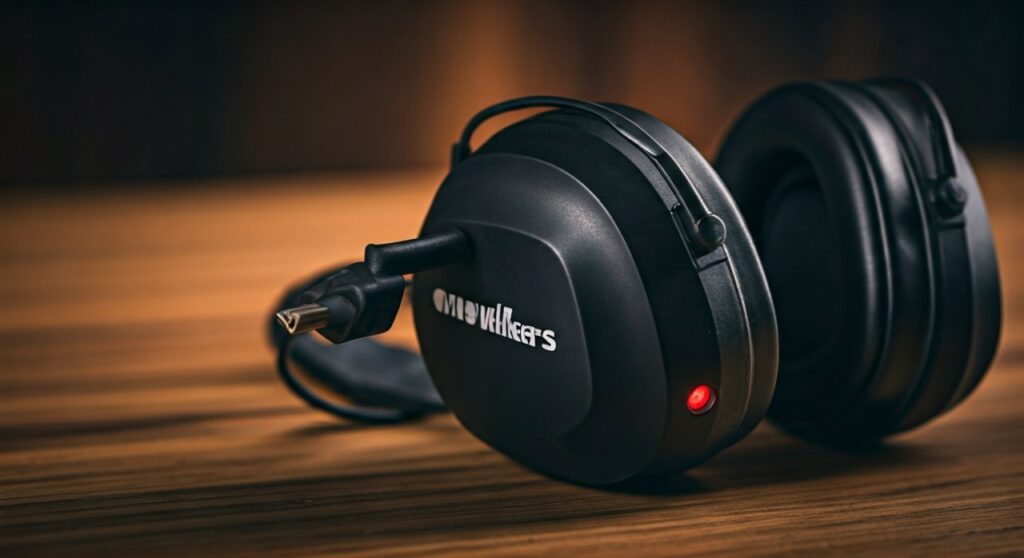
However, the Walker’s Razor Rechargeable series and those equipped with the Walker’s Rechargeable Battery Cradle kit use a Micro-USB interface. Attempting to “charge” a standard model via a non-existent port is a common point of confusion for new users.
Identifying Your Model
- Walker’s Razor Slim / Patriot: Uses 2 AAA Alkaline batteries.
- Walker’s Razor Rechargeable: Features a built-in Lithium-Ion battery.
- Digital Razor: Typically uses AAA batteries but may have different power management.
- Modified Razors: Some users install the Walker’s Rechargeable Battery Kit, which replaces the AAA door with a USB-ready battery pack.
Key Takeaways for Quick Power Management
| Feature | Standard Razor Slim | Razor Rechargeable |
|---|---|---|
| Power Source | 2x AAA Batteries | Internal Lithium-Ion |
| Charging Method | Battery Replacement | Micro-USB Cable |
| Average Run Time | 40 – 60 Hours | 30 – 40 Hours |
| Indicator Light | None (Audio Dimming) | LED Status Light |
| Best Use Case | Long trips without power | Range days with USB access |
Step-by-Step: How to Charge Walker’s Razor Rechargeable Headphones
If you own the Rechargeable version of these electronic earmuffs, follow these professional steps to ensure you don’t damage the internal cells. As an expert who has tested these in various temperatures, I recommend charging them at room temperature for maximum longevity.
Locate the Charging Port
Look for a small rubber flap on the bottom or side of the right ear cup. Gently lift this tab to reveal the Micro-USB port. Ensure the area is free of dust or gun oil, which can interfere with the connection.
Connect the Micro-USB Cable
Insert a high-quality Micro-USB cable into the port. While Walker’s provides a cable in the box, any certified 5V/1A charging cable will work. Avoid using high-wattage “Fast Chargers” designed for modern smartphones, as they can occasionally stress older battery controllers.
Monitor the LED Indicator
Once connected to a power bank, wall adapter, or laptop, a small LED light will illuminate.
- Red Light: The device is currently drawing power and charging.
- Green/Blue Light: The battery has reached 100% capacity.
- No Light: Check your cable connection or ensure the power source is active.
Disconnect and Secure
Once the light indicates a full charge (usually within 2–4 hours), unplug the cable. Firmly press the rubber flap back into place. This is crucial for maintaining the IPX rating and protecting the electronics from moisture and debris at the range.
How to “Charge” Standard Walker’s Razor Using AAA Batteries
For the millions of users with the standard AAA model, charging isn’t about cables—it’s about fresh cells. I have found that using High-Capacity NiMH Rechargeable AAA batteries (like Eneloops) is the best “hack” to make these headphones rechargeable.
Replacing the Batteries
- Locate the Housing: Find the battery compartment on the exterior of one of the ear cups (usually the one with the volume knob).
- Slide to Open: Use your thumb to press down and slide the plastic cover upward. It may be stiff if the unit is new.
- Orient the Polarity: Remove the old batteries. Insert two fresh AAA batteries, ensuring the positive (+) and negative (-) ends match the markings inside the housing.
- Close the Door: Slide the cover back down until it “clicks” into place.
Expert Advice for Maximizing Battery Longevity
Over years of using Walker’s Razor products in the field, I’ve developed a few “pro-tips” to ensure you are never left with “dead” ears during a competition or hunt.
Always “Click” Off
The volume knob on Walker’s Razor headphones acts as the power switch. Always rotate it downward until you hear and feel a physical “click.” Simply turning the volume down is not enough; the internal amplifier will continue to draw a small amount of current, draining your “charge” overnight.
Temperature Control
Lithium-ion batteries (in rechargeable models) hate extreme heat and cold. Never leave your headphones in a hot car trunk during summer. If the battery freezes in winter, let it warm up to room temperature before plugging it into a charger to prevent “plating,” which permanently kills battery capacity.
The “Backup” Strategy
Even if you use the rechargeable model, I recommend keeping a pack of Alkaline AAA batteries in your range bag. If your internal battery dies and you have the Walker’s Battery Kit add-on, you can quickly swap back to disposables in seconds.
Troubleshooting: Why Won’t My Walker’s Razor Headphones Charge?
If you’ve followed the steps for how to charge Walker’s Razor headphones but are still seeing a dead unit, check these common failure points:
- Blown Charging Port: If the Micro-USB cable feels “loose” or “wobbly” inside the port, the internal solder points may have detached. This usually requires a warranty claim.
- Battery Memory Effect: If your rechargeable model only lasts 1 hour, the lithium cell may be reaching the end of its life cycle (typically 300-500 charges).
- Corroded Contacts: In AAA models, check for white powder or green crust. This is battery acid. Clean it with a cotton swab and a tiny amount of white vinegar to restore the connection.
- Incompatible Cables: Some “Charge Only” cables lack the pin configuration needed to trigger the charging circuit on certain Walker’s batches. Try a “Data & Charge” cable instead.
Frequently Asked Questions
How long does it take to charge Walker’s Razor headphones?
Typically, it takes 2 to 4 hours to reach a full charge from a completely depleted state. Use a standard 5V USB wall adapter for the most consistent charging speed.
Can I use my Walker’s Razor headphones while they are charging?
It is not recommended. Using the device while plugged in can create an “electronic hum” or ground loop noise in the speakers, and it generates excess heat that can degrade the battery.
Does the Walker’s Razor Slim have a charging port?
The standard Walker’s Razor Slim does not have a charging port. It is powered by two AAA batteries. Only the “Rechargeable” specific models or those with a battery upgrade kit feature a Micro-USB port.
Why is my Walker’s Razor light flashing red?
A flashing red light usually indicates a charging error or a battery that is too hot/cold to safely accept a charge. Unplug the unit, let it stabilize at room temperature, and try again.
What is the best battery for Walker’s Razor?
For non-rechargeable models, Energizer Lithium AAA batteries are the gold standard. They do not leak, perform excellently in cold weather, and provide the longest runtime (up to 60+ hours).







