

To remove fungus from headphones, you must carefully disinfect the affected surfaces using 70% isopropyl alcohol or a diluted white vinegar solution, scrub with a soft-bristled brush, and allow the components to air-dry completely. This process effectively kills mold spores and removes organic debris that feeds fungal growth without damaging the internal electronics.
The Hidden Danger of Headphone Mold
Finding white or green fuzzy spots on your favorite pair of Sony WH-1000XM5s or Apple AirPods Max is more than just an aesthetic nightmare. Fungus thrives in the warm, humid environment created by your ears and the headphone cushions, often exacerbated by sweat after a long gym session or a humid climate.
Ignoring this growth can lead to serious skin irritation or even Otomycosis (a fungal ear infection). As an audio technician who has restored hundreds of “vintage” and poorly stored headphones, I can tell you that early intervention is the only way to save the material integrity of your earpads.
Key Takeaways: How to Remove Fungus from Headphones
| Action Item | Recommended Method | Why It Works |
|---|---|---|
| Disinfection | 70% Isopropyl Alcohol | Kills 99.9% of mold spores on contact. |
| Deep Cleaning | White Vinegar + Water (1:1) | Acetic acid breaks down fungal structures effectively. |
| Mechanical Removal | Soft Toothbrush | Dislodges spores trapped in leather pores or mesh. |
| Prevention | Silica Gel Packets | Absorbs moisture in your carrying case. |
| Maintenance | UV-C Sterilizer | Provides a chemical-free way to kill bacteria and fungi. |
Why Fungus Grows on Your Audio Gear
Fungus requires three things to thrive: moisture, warmth, and organic matter. When you wear headphones, your body heat warms the earcups, while sweat and earwax provide the nutrients. If you store them immediately in a dark, unventilated case, you create a perfect “petri dish” environment.
Common fungal strains found on electronics include Aspergillus and Penicillium. These organisms don’t just sit on the surface; they can actually digest the proteins in genuine leather or the polymers in protein leather (pleather), leading to “flaking” or permanent cracking.
Essential Tools for the Cleaning Process
Before you begin, gather these supplies. Using the wrong chemicals—like bleach or concentrated acetone—can melt the plastic or ruin the finish of high-end gear.
- 70% Isopropyl Alcohol: The gold standard for electronics. Higher concentrations evaporate too quickly to kill hardy spores.
- Distilled White Vinegar: An excellent alternative for sensitive leather surfaces.
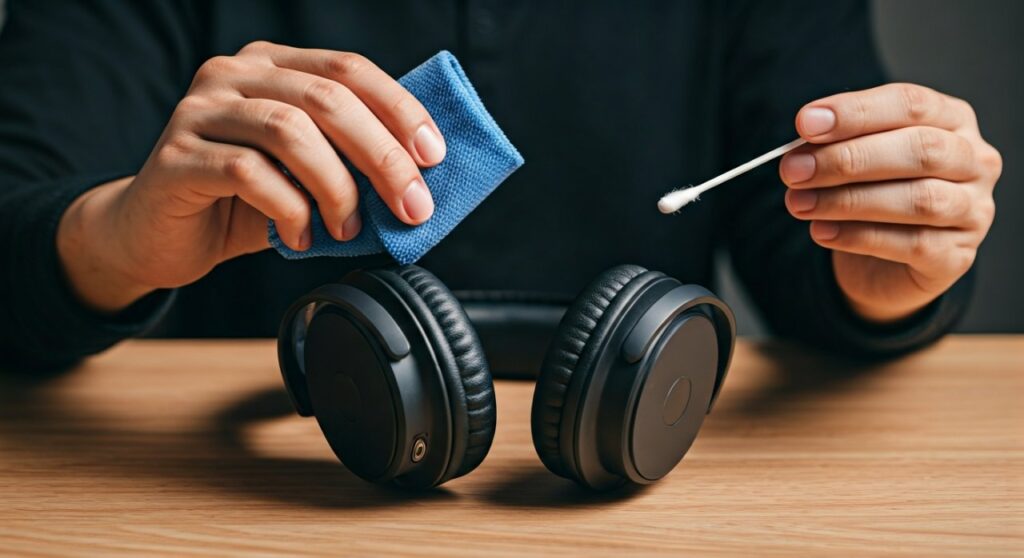
- Microfiber Cloths: To avoid scratching the polished surfaces of your headphones.
- Soft-bristled Toothbrush: Specifically for cleaning the seams and mesh.
- Cotton Swabs (Q-tips): For reaching the narrow crevices around the drivers.
- Replacement Pads (Optional): If the fungus has penetrated deep into the foam, replacement is the only hygienic option.
How to Remove Fungus from Headphones: Step-by-Step
Follow these steps precisely to ensure you eliminate the fungus without short-circuiting the internal drivers or ruining the upholstery.
Step 1: Disassembly and Initial Assessment
Start by removing the earpads if your model allows it. Most over-ear headphones like Bose or Sennheiser have pads that snap off or twist out.
Check the internal scrim (the thin fabric covering the driver). If you see white spots inside the driver assembly, you must be extremely careful not to let liquid drip into the voice coils.
Step 2: The Dry Brush Technique
Use a dry, soft toothbrush to gently brush away visible fungal colonies. Do this over a trash can or outdoors to avoid spreading spores around your living space.
Focus on the stitching and the areas where the pad meets the headphone frame. These are the primary “breeding grounds” for mold.
Step 3: Targeted Disinfection
Dampen—do not soak—a microfiber cloth with isopropyl alcohol. Wipe down all plastic and metal surfaces, including the headband and the outer earcups.
For the earpads, use a 1:1 mixture of water and white vinegar if they are made of genuine leather. For synthetic leather, the alcohol wipes are usually safe, but always test a small, inconspicuous area first.
Step 4: Cleaning the Mesh and Crevices
Dip a cotton swab in alcohol and carefully clean the mesh covering the speakers. Ensure the swab is only damp to prevent liquid from entering the electronics.
If your headphones have Active Noise Cancelling (ANC), be careful around the external microphone ports. Clogging these with liquid or debris will degrade the ANC performance.
Step 5: The Drying Phase
This is the most critical step. Do not put the headphones back in their case immediately. Place them in a well-ventilated area with indirect sunlight.
The UV rays from the sun act as a natural disinfectant, but direct, hot sunlight can warp plastic. Allow them to air-dry for at least 24 hours.
Material-Specific Cleaning Advice
Different materials react differently to cleaning agents. Use this guide to avoid damaging your specific headphone type.
Genuine Leather (e.g., Focal, high-end Sennheiser)
Avoid heavy alcohol use, as it strips natural oils and causes cracking. Use a dedicated leather cleaner or a very dilute vinegar solution. After cleaning, apply a tiny amount of leather conditioner to restore flexibility.
Protein Leather / Pleather (e.g., Sony, Bose)
These are more resistant to alcohol but prone to “peeling.” Wipe gently. If the fungus has caused the top layer to bubble, the pads are compromised and should be replaced.
Velour or Fabric Pads (e.g., Beyerdynamic)
Fabric pads act like sponges for mold. I recommend hand-washing these in warm water with a drop of mild dish soap and a splash of vinegar. Squeeze them thoroughly and ensure they dry near a fan for 48 hours to prevent “musty” smells.
Expert Strategies for Future Prevention
Cleaning is only half the battle; you must change your habits to prevent the fungus from returning. Based on my experience in humid studio environments, these three steps are non-negotiable.
- Wipe After Use: Keep a pack of Zeiss Lens Wipes or a dry microfiber cloth at your desk. Wipe away sweat and skin oils after every long listening session.
- Use Desiccants: Drop two or three 3-gram Silica Gel packets into your headphone carrying case. These will pull residual moisture out of the pads while the headphones are stored.
- Invest in a Dry Cabinet: If you own a collection of high-end audiophile gear (over $2,000 value), a small electronic dry cabinet (used for camera lenses) is a worthwhile investment to maintain a constant 40% humidity level.
When to Throw Away Your Earpads
Sometimes, the fungus is too far gone. If you notice any of the following, it is time to purchase replacement earpads from brands like Dekoni Audio or the original manufacturer:
- The smell of mold persists even after multiple cleanings.
- The internal yellow foam has turned black or green.
- The material is crumbling or “shedding” onto your skin.
- You experience ear itching or rashes every time you wear them.
Frequently Asked Questions
Can I use a hairdryer to dry my headphones faster?
No. The high heat from a hairdryer can melt the glue holding the drivers together or deform the plastic housing. Stick to a cool fan or natural air-drying.
Will fungus grow back if I only use water?
Yes. Water does not kill fungal spores; it actually encourages their growth. You must use a disinfectant like isopropyl alcohol or vinegar to kill the roots (mycelium).
Is it safe to use Lysol wipes on my headphones?
While Lysol is effective against mold, it often contains fragrances and oils that can leave a sticky residue on your gear. 70% Isopropyl Alcohol is a cleaner, safer choice for electronics.
Can I put my earcups in the washing machine?
Only if they are 100% fabric or velour and the manufacturer explicitly states it. However, the agitation can ruin the shape of the internal foam. Hand-washing is always the safer, expert-recommended route.
Does UV light actually kill headphone mold?
Yes, UV-C light (254nm wavelength) disrupts the DNA of mold spores. While it won’t remove the physical “stain” of the fungus, it is an excellent way to sterilize the mesh and hard-to-reach areas after you have done the manual cleaning.







