

How to Turn On Skullcandy Crusher Headphones: The Direct Answer
To turn on your Skullcandy Crusher headphones, press and hold the Power button for approximately 3 seconds. You will know they are active when the LED indicator flashes blue and a voice prompt announces, “Power On.”
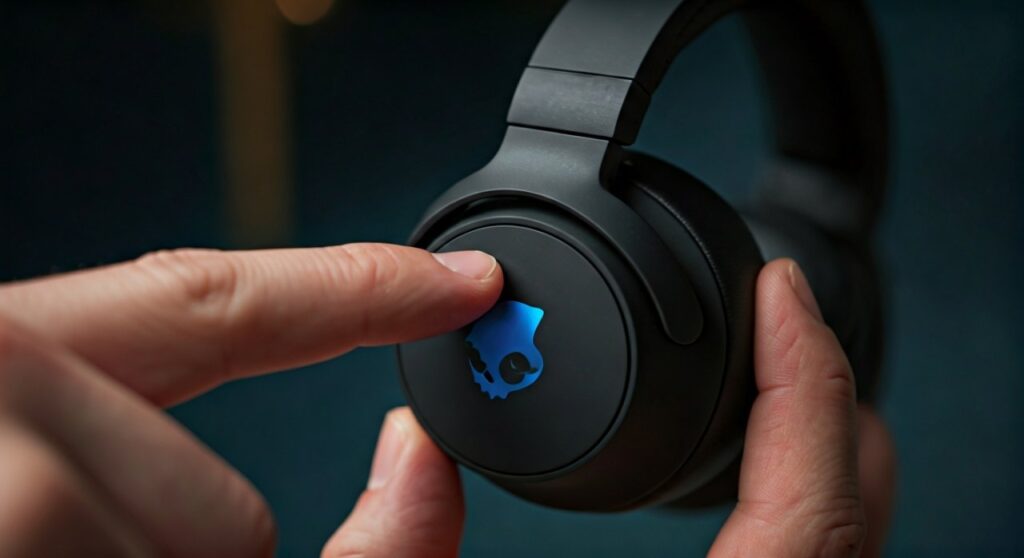
Depending on your specific version—whether it is the Crusher Wireless, Crusher Evo, or Crusher ANC 2—the button is typically located on the rim of the left ear cup. For most models, this is a circular or indented button positioned near the charging port or the haptic bass slider.
Key Takeaways: Quick Reference Guide
If you are in a hurry, use this table to identify your model and the specific power-on sequence required.
| Model Version | Power Button Location | Indicator Signal | Pairing Mode Method |
|---|---|---|---|
| Crusher Wireless | Left Ear Cup (Circular) | LED Flashes Blue | Hold for 5 seconds from OFF |
| Crusher Evo | Left Ear Cup (Indented) | LED Flashes Blue | Hold for 5 seconds from OFF |
| Crusher ANC / ANC 2 | Left Ear Cup (Power Symbol) | LED Pulse / Voice Prompt | Hold for 5 seconds from OFF |
| Crusher 360 | Left Ear Cup (Top) | Multi-LED Light Bar | Hold for 3 seconds |
Locating the Power Button on Different Skullcandy Crusher Models
Finding the button might seem simple, but Skullcandy has updated its design across several generations. Having used every iteration of the Crusher line, I’ve noticed that the tactile feel and placement have evolved to improve “blind” accessibility while wearing them.
The Original Skullcandy Crusher Wireless
On the classic Crusher Wireless, the power button is located on the left ear cup. It is a small, circular button situated right between the volume up and volume down buttons. When you press it, you will feel a distinct mechanical “click.”
Skullcandy Crusher Evo
The Crusher Evo features a slightly more refined design. The power button is still on the left ear cup, but it is often highlighted with a different texture or a slight indentation to help you find it without looking. It is located just above the USB-C charging port.
Skullcandy Crusher ANC and ANC 2
For the Crusher ANC series, the power button is clearly marked with the universal power symbol. On the ANC 2, Skullcandy moved some controls, but the primary power function remains a long-press action on the left side to ensure it doesn’t interfere with the Sensory Bass slider on the right.
Step-by-Step Instructions: How to Turn On Skullcandy Crusher Headphones
Follow these steps to ensure your device powers up correctly and connects to your audio source. My experience shows that most “connection issues” actually stem from not holding the button long enough.
- Locate the Button: Identify the power button on the left ear cup (usually the middle button or the one with the power icon).
- The Long Press: Press and firmly hold the button for exactly 3 seconds.
- Watch the LED: Look for the LED indicator light. A steady or blinking blue light confirms the device is receiving power.
- Listen for Audio Cues: Put the headphones on. You should hear a digital voice say, “Power On,” followed by “Battery [Percentage]” and “Connected” (if previously paired).
Expert Tip: If you hold the button for 5 seconds instead of 3, the headphones will enter Pairing Mode. You will see the LED flash red and blue alternately. Do this only if you are connecting to a new phone or laptop.
Understanding the LED Light Codes
The LED indicator on your Skullcandy Crusher headphones is the primary way the hardware communicates its status to you. Understanding these patterns can save you from unnecessary troubleshooting.
- Blinking Blue: The headphones are powered on and looking for a previously paired device.
- Alternating Red and Blue: This is Pairing Mode. The headphones are “visible” to new Bluetooth devices.
- Blinking Red: The battery is low (usually below 10-15%). It is time to find a USB-C or Micro-USB cable.
- Solid Red (While Charging): The battery is currently charging.
- Solid Blue or Green (While Charging): The battery is fully charged.
What to Do If Your Skullcandy Crusher Won’t Turn On
It can be frustrating when your Crusher Evo or ANC refuses to wake up. Based on common user reports and technical support data, here are the most effective fixes.
Check the Battery Level
It sounds obvious, but the Skullcandy Crusher series is known for its intense haptic bass, which can drain the battery faster if used at 100% intensity. Plug them into a wall outlet (not a laptop USB port) for at least 10 minutes before trying again.
Perform a Hardware Reset
If the internal firmware is frozen, a reset is necessary.
- Ensure the headphones are not plugged into a charger.
- Hold the Volume Up (+) and Volume Down (-) buttons simultaneously for 5 seconds.
- The LED will flash to indicate the reset is complete.
- Now, try the standard power-on procedure.
Inspect the Charging Port
Debris or pocket lint can get stuck in the USB-C port of your Crusher Evo. Use a toothpick or compressed air to gently clean the port. If the cable doesn’t sit flush, the device won’t charge or turn on.
Optimizing Your Experience with the Skullcandy App
Once you have mastered how to turn on skullcandy crusher headphones, your next step should be installing the Skullcandy App (available on iOS and Android). This app is essential for Crusher Evo and ANC users.
- Personal Sound Profile: Use the app to run a hearing test. It creates a custom Mimi® Personal Sound profile that adjusts frequencies specifically for your ears.
- Toggle Features: You can turn Active Noise Canceling (ANC) or Stay-Aware Mode on or off directly from the interface.
- Firmware Updates: Skullcandy frequently releases updates that improve battery management and Bluetooth stability. Keeping your headphones “on” and connected to the app ensures you get these fixes.
- Tile™ Integration: Most modern Crushers have Tile tracking technology built-in. If you can’t find your headphones, you can use the Tile app to make them “chirp,” provided they have a little bit of battery left.
Battery Life and Charging Best Practices
To ensure your Skullcandy Crusher headphones turn on every time you need them, you must maintain the lithium-ion battery properly.
| Feature | Crusher Wireless | Crusher Evo | Crusher ANC 2 |
|---|---|---|---|
| Total Battery Life | 40 Hours | 40 Hours | 50 Hours (ANC Off) |
| Rapid Charge | 10 Min = 3 Hours | 10 Min = 4 Hours | 10 Min = 4 Hours |
| Charging Port | Micro-USB | USB-C | USB-C |
Expert Advice: Avoid leaving your headphones in a hot car. High temperatures are the number one killer of battery longevity in Skullcandy products. If the battery degrades too much, the voltage may become too low to trigger the “Power On” circuit.
Frequently Asked Questions (FAQs)
Why are my Skullcandy Crusher headphones flashing red and blue?
This means your headphones are in Pairing Mode. They are searching for a new Bluetooth connection. To stop this, either pair them with a device or turn them off by holding the power button for 3 seconds.
Can I use my Crushers while they are charging?
Most Skullcandy Crusher models are designed to disable Bluetooth while charging to protect the battery and circuitry. However, you can usually use the provided 3.5mm AUX cable to listen to music in wired mode while they charge from a power bank.
How do I know if my Skullcandy Crushers are fully charged?
While plugged in, the LED indicator will be solid red. Once the battery reaches 100%, the light will change to solid blue (on Wireless/Evo) or solid green (on some ANC models).
Does the Haptic Bass work when the headphones are off?
No. The Sensory Haptic Bass requires the internal amplifier to be powered on. If you are using the headphones in “Passive Mode” (via an AUX cable with the power off), you will get standard audio without the vibrating bass effect.
How do I turn off my Skullcandy Crusher headphones?
To turn them off, press and hold the same Power button for 3 seconds. You will hear a voice prompt say, “Power Off,” and the LED will disappear.







