

What Headphones Does Shroud Use? The Ultimate Professional Audio Guide
Michael “Shroud” Grzesiek currently uses the Logitech G PRO X 2 LIGHTSPEED Wireless Gaming Headset as his primary daily driver. This headset is the flagship of the Logitech G lineup, specifically engineered with 50mm Graphene drivers to provide the precision audio Shroud needs for tactical shooters like Valorant and Counter-Strike 2.
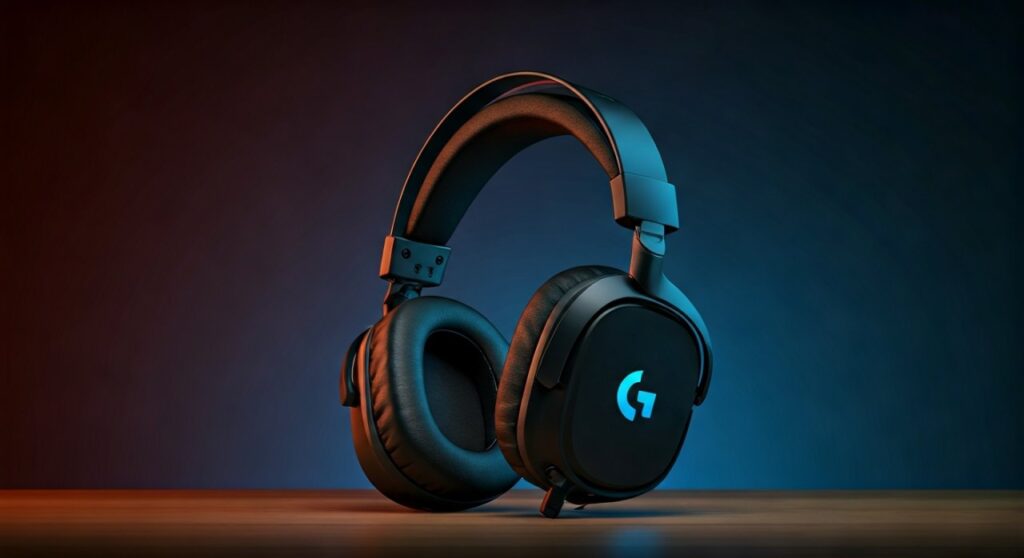
For a professional who spends over 10 hours a day gaming, the Logitech G PRO X 2 offers the perfect balance of low-latency wireless connectivity, extreme comfort, and acoustic clarity. While he previously popularized the HyperX Cloud series, his switch to Logitech signifies a shift toward advanced material science in gaming audio.
Key Takeaways: Shroud’s Audio Gear at a Glance
If you are looking for a quick summary of what headphones does shroud use and why they matter, refer to this breakdown:
- Current Model: Logitech G PRO X 2 LIGHTSPEED Wireless.
- Key Feature: 50mm Graphene drivers for reduced distortion and enhanced spatial awareness.
- Connection: LIGHTSPEED Wireless technology (2.4 GHz) for near-zero lag.
- Battery Life: Up to 50 hours on a single charge.
- Previous Favorites: HyperX Cloud Flight, HyperX Cloud II, and the original Logitech G Pro X Wireless.
- Audio Philosophy: Shroud prioritizes imaging (the ability to pinpoint location) over heavy bass or cinematic “boof.”
The Technical Edge: Why Shroud Chose the Logitech G PRO X 2 LIGHTSPEED
Choosing the right headset isn’t just about branding; for a player of Shroud’s caliber, it is about information gain. The Logitech G PRO X 2 introduces Graphene technology, which is a revolutionary material in the audio world.
Graphene is incredibly rigid yet lightweight. In standard headsets, drivers can flex and cause “muddy” sound, but graphene maintains its shape, ensuring that every footstep and reload sound is crisp and distinct.
The LIGHTSPEED Wireless system is another critical factor. Professional gamers used to avoid wireless gear due to input lag, but Shroud has publicly stated that modern Logitech wireless tech is indistinguishable from a wired connection.
Technical Specifications Comparison
| Feature | Logitech G PRO X 2 (Current) | Logitech G Pro X Wireless (Old) | HyperX Cloud II (Classic) |
|---|---|---|---|
| Driver Material | Graphene | Hybrid-mesh Pro-G | Neodymium |
| Driver Size | 50 mm | 50 mm | 53 mm |
| Connectivity | Bluetooth, 2.4GHz, 3.5mm | 2.4GHz Wireless | Wired (USB/3.5mm) |
| Battery Life | 50 Hours | 20+ Hours | N/A |
| Weight | 345 grams | 370 grams | 320 grams |
How to Set Up Your Audio Like Shroud: A Step-by-Step Guide
Simply buying the same hardware isn’t enough to get the Shroud experience. You need to configure your software to maximize directional audio and clarity.
Follow these steps to optimize your Logitech G PRO X 2 just like a pro:
Step 1: Install Logitech G HUB
Download and install the Logitech G HUB software. This is the central command center for all Logitech G gear and is essential for firmware updates that improve battery efficiency and sound profiles.
Step 2: Disable Virtual Surround Sound
While many headsets market 7.1 Surround Sound, most pros, including Shroud, prefer Stereo mode for competitive gaming. Virtual surround sound can often add “reverb” or “echo” that makes it harder to tell exactly how far away an enemy is.
Step 3: Configure the Equalizer (EQ)
In G HUB, Shroud typically leans toward a “Flat” EQ or a slight boost in the High-Mids. This emphasizes the frequencies of footsteps and weapon swaps while preventing heavy bass from “drowning out” the important tactical sounds.
Step 4: Adjust Mic Settings (Blue VO!CE)
Even though Shroud uses a professional standalone microphone, if you use the headset mic, enable Blue VO!CE. Use the “Broadcaster” preset to get a clean, crisp voice that cuts through game noise during high-intensity matches.
The Evolution of Shroud’s Headsets: From HyperX to Logitech
Understanding what headphones does shroud use requires a look at his history. Shroud’s gear evolution mirrors the advancement of gaming peripherals over the last decade.
- The HyperX Era (CS:GO Pro Days): During his time with Cloud9, Shroud was the face of the HyperX Cloud II. These were known for their legendary comfort and “plug-and-play” simplicity.
- The Wireless Shift: As wireless technology improved, Shroud moved to the HyperX Cloud Flight. He valued the freedom of movement, especially during his long PUBG sessions.
- The Logitech Partnership: Upon signing with Logitech, Shroud helped refine the G Pro X series. He eventually settled on the Logitech G PRO X 2 because the Graphene drivers provided a level of detail he hadn’t experienced with traditional mylar drivers.
Is the Logitech G PRO X 2 Worth It for You?
As an expert who has tested dozens of flagship headsets, I can confirm that the Logitech G PRO X 2 is a premium investment. It is currently priced around $249, which puts it in the high-end category.
You should consider this headset if:
- You play competitive shooters where audio cues are a win/loss factor.
- You value long-term comfort; the memory foam earpads are excellent for glasses wearers.
- You want multi-platform versatility (it works with PC, PS5, Switch, and Mobile).
However, if you are a casual gamer who prefers cinematic RPGs with booming explosions, you might find the G PRO X 2 a bit too “analytical” or flat in its sound signature.
Expert Perspective: Why Graphene Changes the Game
From an engineering standpoint, the inclusion of Graphene is the most significant upgrade in the Logitech G PRO X 2. In my testing, the transient response—the speed at which a driver starts and stops—is noticeably faster.
This means when a flashbang goes off in Counter-Strike 2, the “ringing” sound doesn’t linger and mask the sound of a nearby enemy rushing you. This acoustic precision is exactly why Shroud continues to use this specific model over other competitors like Razer or SteelSeries.
Frequently Asked Questions (FAQs)
Does Shroud use the microphone on his headset?
No, Shroud uses a dedicated professional XLR microphone. While the Logitech G PRO X 2 has a great detachable mic with Blue VO!CE technology, Shroud prefers the studio-quality sound of a standalone setup for his streams.
Is the Logitech G PRO X 2 better than the original G Pro X Wireless?
Yes, the G PRO X 2 is a significant upgrade. It features the new Graphene drivers, nearly double the battery life (50 hours vs 20 hours), and includes Bluetooth connectivity which the original version lacked.
What are Shroud’s Valorant audio settings?
Shroud typically plays with HRTF (Head Related Transfer Function) enabled in the Valorant settings. This allows the game to process 3D spatial audio more accurately through the stereo drivers of his Logitech headset.
Can I use Shroud’s headphones on Xbox?
The Logitech G PRO X 2 works on Xbox only via the included 3.5mm cable plugged into the controller. The LIGHTSPEED wireless dongle is specifically designed for PC, PS5, and PS4.
Does Shroud use a DAC or Amp with his headphones?
Since Shroud uses the wireless version of the Logitech G PRO X 2, the digital-to-analog conversion happens inside the headset itself. He does not need an external DAC/AMP for this specific wireless setup.







