

Finding Your JBL Charging Port: The Quick Answer
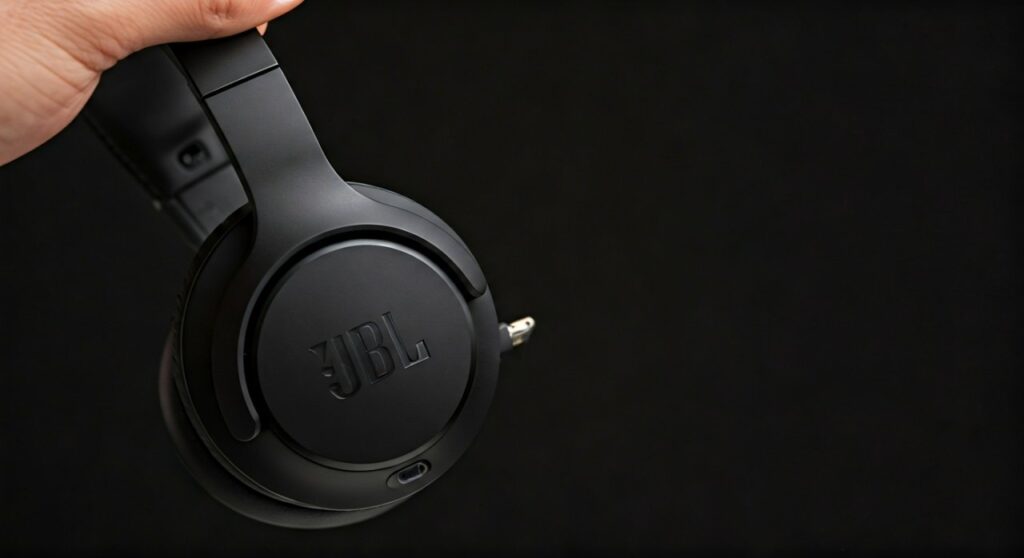
The charging port on JBL headphones is most commonly located on the bottom edge of the right ear cup. For most modern models, this is an exposed USB-C port, though older versions may feature a Micro-USB port sometimes hidden behind a small protective rubber flap. If you are using JBL earbuds, the charging port is located on the back or bottom of the charging case, while the earbuds themselves charge via metallic contact pins inside the cradle.
Key Takeaways: JBL Charging Locations
If you are in a hurry, here is the essential information for finding where is the charging port on jbl headphones across various designs:
- Over-Ear/On-Ear: Look at the bottom of the right ear cup. It is usually near the power button or volume controls.
- In-Ear Earbuds: The port is on the charging case (usually the back or bottom). The buds have no external port.
- Sport/Neckband: Often hidden under a waterproof rubber flap on the inline remote or the neckband’s end.
- Port Types: Newer models (2020+) use USB-C (symmetrical), while older models use Micro-USB (trapezoidal).
- Indicator Lights: A small LED light next to the port will usually glow red when charging and turn off or change color when full.
Where is the Charging Port on JBL Headphones? (Detailed Guide)
JBL offers a massive variety of audio products, from the budget-friendly JBL Tune series to the premium JBL Tour and JBL Quantum gaming headsets. Because the designs vary, finding the port can sometimes feel like a puzzle, especially if it is integrated into a hinge or hidden under a flap for weatherproofing.
JBL Over-Ear and On-Ear Headphones
For models like the JBL Tune 510BT, JBL Live 660NC, or JBL Everest, the design is fairly consistent. Manufacturers place the heavy internal components and the battery in the right ear cup to centralize controls.
- Step 1: Hold your headphones with the ear cushions facing you.
- Step 2: Locate the Right (R) ear cup.
- Step 3: Rotate the ear cup and look at the bottom rim.
- Step 4: You will see a small rectangular or oval slot. This is the charging port.
On some older models like the JBL E45BT, the port might be on the top of the ear cup, near where the headband connects. This design required the headphones to be folded or adjusted to access the port, though JBL has largely phased this out in favor of bottom-mounted ports.
JBL True Wireless Earbuds (TWS)
If you own the JBL Vibe 200, JBL Tune 230NC, or JBL Reflect Flow, the earbuds themselves do not have a charging port. Instead, they rely on a “base station” approach.
- The Charging Case: The port is located on the exterior of the case. Look for a USB-C slot on the bottom or the back hinge area.
- Internal Pins: Inside the case, you will see small gold-plated pogo pins. These align with the metallic contacts on the earbuds to transfer power.
JBL Sports and Neckband Headphones
For athletes using the JBL Endurance or JBL Reflect series, the port is often protected against sweat and rain.
- The Protective Flap: Look for a small rubber indentation on the side of the earbud or the inline remote control.
- The Tool Tip: You may need to use a fingernail to gently pry the flap open to reveal the Micro-USB or USB-C port. Always ensure this flap is closed tightly after charging to maintain the IPX rating (water resistance).
Summary of Port Locations by JBL Model Series
| JBL Series | Common Model | Port Location | Connector Type |
|---|---|---|---|
| JBL Tune | Tune 500BT / 510BT | Bottom of Right Ear Cup | USB-C / Micro-USB |
| JBL Live | Live 650BTNC / 660NC | Bottom of Right Ear Cup | USB-C |
| JBL Quantum | Quantum 400 / 800 | Bottom of Left Ear Cup | USB-C (Gaming Focus) |
| JBL Vibe/Wave | Vibe 100 / Wave 300 | Bottom of Charging Case | USB-C |
| JBL Endurance | Endurance RunBT | Inline Remote (Side) | Micro-USB |
| JBL Club | Club 950NC | Bottom of Right Ear Cup | USB-C |
Step-by-Step: How to Charge Your JBL Headphones Properly
Knowing where is the charging port on jbl headphones is only the first step. To maintain battery health and ensure longevity, follow this expert-verified process:
Step 1: Identify the Cable Type
Most modern JBL headphones (released after 2019) use USB-C. These are oval-shaped and can be plugged in either way. Older models use Micro-USB, which is shaped like a trapezoid and only fits in one direction. Pro Tip: Never force a Micro-USB cable; doing so is the #1 cause of port failure in JBL units.
Step 2: Connect to a Power Source
You can plug the USB-A end of your cable into:
- A laptop or desktop USB port.
- A UL-certified wall adapter (like a smartphone charger).
- A portable power bank.
Expert Insight: JBL batteries generally prefer a 5V/1A or 5V/2A charging speed. Avoid using “Ultra Fast” laptop chargers (65W+) if you notice the headphones becoming excessively hot, although most modern JBL circuits have built-in voltage regulation.
Step 3: Monitor the LED Status
Every JBL headset has an LED indicator near the charging port or power button.
- Solid Red: The device is currently charging.
- LED Off: The device is fully charged.
- Flashing Red: The battery is critically low (usually less than 10%).
Step 4: Disconnect and Secure
Once the light goes out, unplug the cable. If your model has a rubber cover, press it back into place firmly. This prevents dust, pocket lint, and moisture from corroding the internal pins.
Troubleshooting: What if You Can’t Find the Port or It Won’t Charge?
As an expert who has handled hundreds of audio devices, I have found that “missing” or “broken” ports are often simple fixes.
The “Hidden” Port Syndrome
On models like the JBL Live 400BT, the port is located on the very bottom but can be obscured by the swivel hinge if the ear cup is rotated a certain way. If you don’t see it immediately, rotate the ear cup 90 degrees to expose the hidden edges.
Dealing with Debris
If you know where is the charging port on jbl headphones but the cable won’t stay in, check for lint. Because these devices often live in backpacks or pockets, the port acts as a vacuum for debris.
- The Fix: Use a wooden toothpick or a can of compressed air to gently clear the port. Avoid metal needles, as they can short-circuit the pins.
The “Dead Battery” Reset
If your headphones haven’t been used in months, the battery may have entered a “deep discharge” state.
- Expert Advice: Plug them in and leave them for at least 60 minutes even if no lights appear. Often, the LED won’t trigger until the battery reaches a minimum voltage threshold.
Professional Tips for JBL Battery Maintenance
To ensure your JBL headphones last for years rather than months, follow these industry best practices:
- Avoid 0%: Lithium-ion batteries (like those in JBL products) are stressed when they hit 0%. Try to plug them in when they reach 20%.
- Temperature Matters: Never charge your headphones in a freezing car or in direct sunlight. Heat is the primary enemy of battery capacity.
- Use Quality Cables: If you lose the orange JBL cable that came in the box, replace it with a high-quality branded cable (like Anker or Belkin). Cheap, unbranded cables often have inconsistent voltage.
- Firmware Updates: Use the JBL Headphones App on your smartphone. Manufacturers often release updates that optimize charging algorithms and extend battery life.
Frequently Asked Questions
Can I use my JBL headphones while they are charging?
Most JBL over-ear headphones (like the Tune and Live series) will automatically power off when a charging cable is inserted for safety. However, the JBL Quantum gaming series often allows “Play & Charge” functionality via the USB-C cable so you don’t have to stop your gaming session.
Why is the charging port on the left ear cup on my Quantum headset?
JBL’s gaming line, the Quantum series, often places the port on the left ear cup. This is because the left side typically houses the boom microphone and the volume mixer, and gamers usually have their PC towers on their right, allowing the cable to drape across the body with less interference.
My JBL earbuds case isn’t charging. Is the port broken?
First, try a different cable and wall plug. If that fails, check the port for “green crust” or corrosion, which happens if the case gets damp. You can often clean this with a tiny amount of 90% Isopropyl Alcohol on a cotton swab.
How long does it take to charge JBL headphones?
On average, most modern JBL headphones support Speed Charge. A 10-15 minute charge usually provides 2 hours of playback. A full charge from 0% to 100% typically takes between 1.5 and 2 hours.
Does JBL use wireless charging?
Only high-end JBL earbuds, such as the JBL Tour Pro 2 or JBL Live Pro 2, support Qi-certified wireless charging. For these models, you simply place the bottom of the case on a wireless charging pad. Over-ear headphones do not currently support wireless charging.









