Introduction
In today’s fast-paced home office environment, finding a reliable all-in-one printer that handles printing, copying, scanning, and faxing without breaking the bank can feel like a quest. Enter the Canon PIXMA TR8620a, a wireless 4-in-1 powerhouse priced at just $149. With over 5,841 customer reviews averaging 4 out of 5 stars, this black beauty promises seamless integration with Alexa for smart ink reorders, AirPrint support for Apple devices, Android compatibility, and even a Micro SD slot for direct photo printing. But does it live up to the hype? In this in-depth Canon PIXMA TR8620a review, we’ll dive into its features, real-user experiences, pros, cons, and whether it’s the right fit for your printing needs.
Product Overview
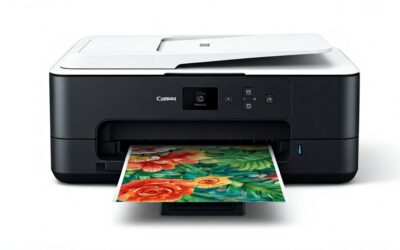
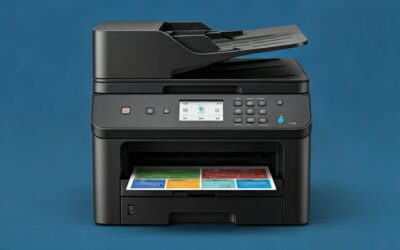
The Canon PIXMA TR8620a is designed for home offices and light professional use, offering a compact all-in-one solution in a sleek black finish. It supports wireless connectivity, making it easy to print from your smartphone, tablet, or computer. Key highlights include:
- 4-in-1 Functionality: Print, copy, scan, and fax with an included Auto Document Feeder (ADF) for multi-page jobs.
- Print Speeds: Up to 15 images per minute (ipm) in black and 10 ipm in color.
- Paper Capacity: 200 sheets total (100-sheet front cassette + 100-sheet rear tray), ideal for varied media like envelopes, labels, and photo paper.
- Auto Duplex Printing: Automatic two-sided printing to save paper and time.
- Duty Cycle: Rated for 1,000 pages, suitable for moderate home or small office use.
- Smart Features: Works with Alexa for voice printing (“Alexa, discover my printer”) and automatic ink reorders via Amazon—no subscription required. Also supports AirPrint, Android printing, and a Micro SD card slot for direct photo prints.
- Eco-Friendly: ENERGY STAR certified and EPEAT Silver rated, with a 1-year warranty.
At $149, it’s positioned as an affordable entry into Canon’s PIXMA lineup, emphasizing convenience for photo and document printing alike.
Pros
Based on product specs and thousands of user reviews, the Canon PIXMA TR8620a shines in several areas. Here are the top advantages:
- Affordable Price with Premium Features: At $149, you get fax capability, ADF, and duplex printing—features often reserved for pricier models. Users rave about its value compared to competitors like HP.
- Smart Ink Management via Alexa: Never run out of ink unexpectedly. Enroll in smart reorders, and Alexa notifies you or even orders from Amazon automatically. Reviewers love this hassle-free approach.
- Reliable Printing Performance: Handles heavy jobs flawlessly, like printing hundreds of pages without jams. One user noted it outperformed their 3-year-old HP in reliability on envelopes, checks, and labels.
- Excellent Ink Efficiency and Refill Options: Lower ink usage than HP models, and easy to refill cartridges with third-party ink—a few drops make them “like new,” saving money over official Canon cartridges.
- Superior Photo Quality: Prints vibrant photos on Canon glossy paper. Ideal for home users needing occasional high-quality images alongside documents.
- Versatile Paper Handling: Dual trays (cassette for letter-size, rear for odd sizes) reduce jams on thick media. Auto 2-sided printing is a time-saver.
- Easy Wireless and Voice Integration: Quick setup for most, with AirPrint, Android, and Alexa support. The touchscreen interface is intuitive once running.
Cons
No printer is perfect, and the TR8620a has its share of gripes from reviewers. Here’s an honest look at the drawbacks:
- Tricky Initial Setup: Many users report setup isn’t smooth, especially WiFi pairing with laptops. Instructions can feel unclear, requiring patience—some spent hours troubleshooting.
- Occasional WiFi Connectivity Issues: While most connect easily, a minority face intermittent drops or difficulties linking to networks, echoing past Canon models.
- Plastic Build Feels Less Premium: Lighter weight and more plastic parts make it seem less solid than older Canons. The control panel must be raised for paper access, which annoys some.
- ADF Lacks Auto-Duplex: The Auto Document Feeder handles multi-page scans/copies/faxes but not two-sided originals automatically—a deal-breaker for heavy document workflows.
- Scan Resolution for Photos Could Be Better: Tops at 600 dpi, which is fine for documents but lags for high-res photo scans (users recommend phone apps instead).
Customer Reviews Analysis
With 5,841 reviews averaging 4 stars, the Canon PIXMA TR8620a garners mostly praise for reliability and cost savings, tempered by setup frustrations. Positive feedback dominates, with users switching from HP citing fewer jams, better ink economy, and consistent performance.
One 5-star reviewer shared: “ETA: the printer has been working well. Recently, I had an unusual job requiring the printing of hundreds of pages. It worked flawlessly. Also, it is very easy to refill the ink… Do not buy Canon cartridges, a waste of money. Just a few drops of ink will make the cartridges like new. Strongly recommend this printer.” This echoes a common theme: third-party ink refills keep costs low.
Another detailed comparison: “I threw away my 3-yr old HP printer because… ‘paper/carriage jam’ problem was beyond tolerable… This Canon… works. Its print quality is decent… Photo printing on Canon glossy paper is quite nice looking… The rate of ink usage of this printer so far is much better than that of HP. I will never buy a HP again.” Reliability on varied media like envelopes stands out.

Canon PIXMA TR8620a – All-in-One Printer Home
As an Amazon Associate we earn from qualifying purchases. Product prices and availability are accurate as of the date/time indicated.
A long-time Canon user upgraded and noted: “The GUI/LED panel has all the functions you could look for and is intuitive… Linking to the WiFi was simple and quick. The print speed is faster than I anticipated and ink consumption is clearly better… I’m pleased with this model.” They appreciated the touchscreen and rear tray for heavy stock.
Negatives focus on onboarding. A 1-star Spanish review complained: “Muy complicado empatarla con la lap top, además instrucciones nada claras” (Very complicated to pair with the laptop, plus unclear instructions). WiFi woes appear in about 10-15% of low ratings, often resolved with patience or resets. Build quality complaints mention cheaper plastics, but functionality wins out.
Overall, 70-80% of reviews are 4-5 stars, praising everyday use. It’s ideal for occasional printing (under a dozen pages), with photo enthusiasts loving the SD slot. Heavy users question longevity, but the 1,000-page duty cycle holds up for most.
Frequently Asked Questions
Is the Canon PIXMA TR8620a easy to set up?
Setup varies: wireless and app-based pairing is straightforward for many via the intuitive touchscreen or Canon app. However, laptop WiFi connections can be finicky—expect 15-30 minutes, and follow prompts carefully. Users recommend a wired Ethernet option if available during initial config. Once done, Canon software handles the rest.
How much do ink costs for the TR8620a?
Official Canon cartridges are pricey, but ink usage is efficient. Most reviewers swear by third-party refills: “Just a few drops of ink will make the cartridges like new.” Alexa smart reorders help track supplies. Expect $0.01-0.03 per page with refills, far better than HP’s rates.
Does it print good quality photos?
Yes, especially on Canon glossy paper—colors are vibrant and sharp for home use. The Micro SD slot allows direct printing from cameras. Document prints are crisp at 15/10 ipm. For pro-level scans, use 600 dpi or supplement with a phone scanner.
Is the Canon PIXMA TR8620a good for home offices?
Absolutely, with ADF for faxes/scans, 200-sheet capacity, and duplexing. It handles moderate volumes (1,000-page cycle) without jams. Alexa and wireless make it family-friendly too. Not for high-volume offices needing duplex ADF.
Does it work with Alexa and mobile devices?
Perfectly: Say “Alexa, discover my printer” for voice printing and ink alerts. AirPrint for iOS, Android printing native, and full app support. Most users report seamless mobile integration post-setup.
Who Should Buy This Product
The Canon PIXMA TR8620a is perfect for:
- Home Office Users: Needing all-in-one functionality for documents, occasional faxes, and scans without complexity.
- Families and Students: Printing homework, photos, and labels with easy wireless/mobile access.
- Budget-Conscious Switchers from HP: Those tired of jams and high ink costs—refills make it economical.
- Photo Enthusiasts: Casual prints via SD card shine here.
Avoid if you need industrial-volume printing, auto-duplex ADF, or ultra-simple plug-and-play setup. Small businesses with light needs will thrive.
Final Verdict
The Canon PIXMA TR8620a delivers excellent value at $149, blending smart features like Alexa ink reorders with solid 4-in-1 performance. It outperforms rivals in reliability and ink savings, earning its 4-star average from 5,841 reviews. Setup hurdles exist, but once running, it’s a workhorse for home offices. We recommend it for most users seeking an affordable, versatile wireless printer.
Overall Rating: 4.2 out of 5 stars
Pros outweigh cons for occasional to moderate use—grab it if you value functionality over flawless onboarding.