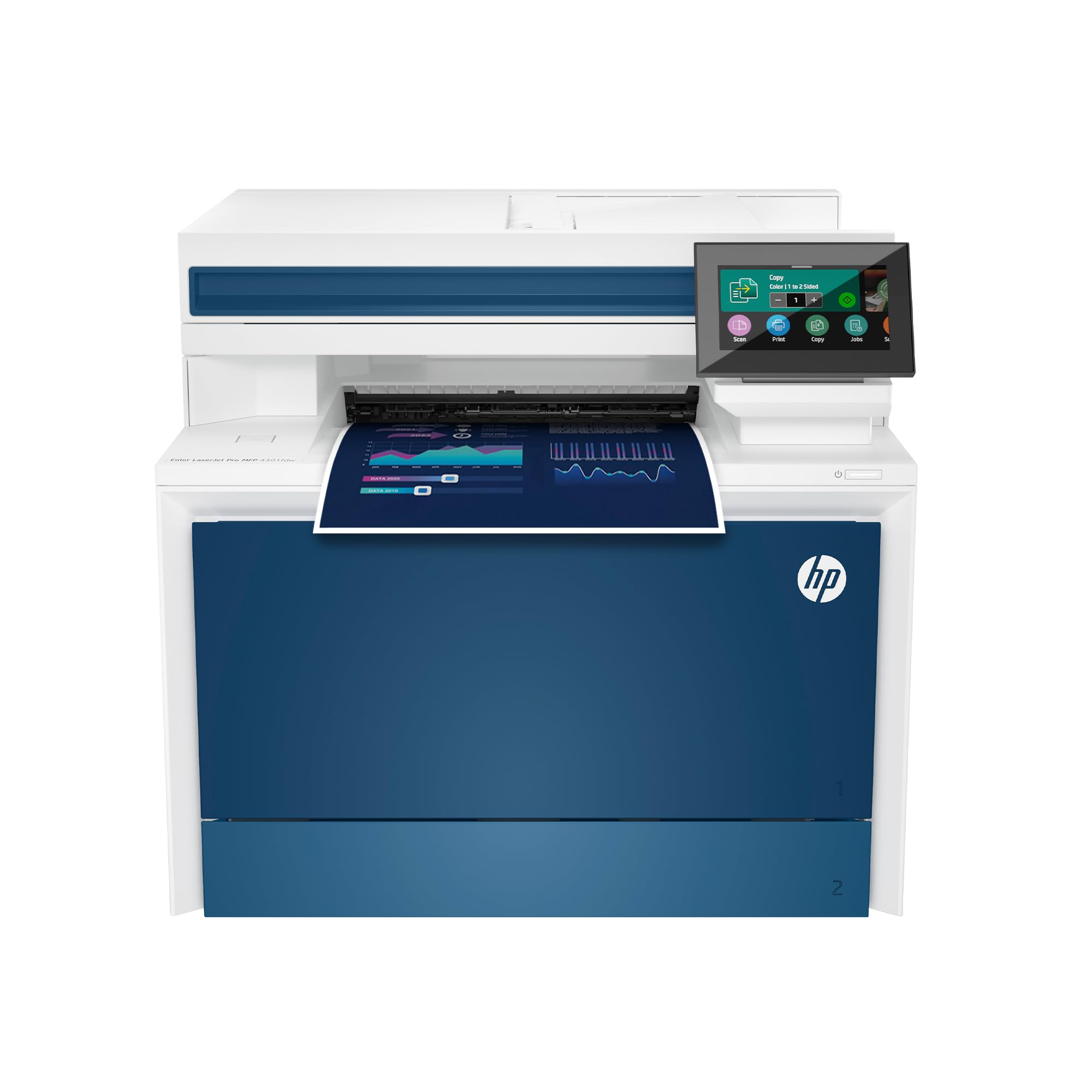
 HP Color LaserJet Pro MFP 4301fdw Wireless All-in-One
💡 As an Amazon Associate, we earn from qualifying purchases.
Introduction
In today’s fast-paced office environments, a reliable all-in-one printer can make all the difference between smooth operations and frustrating downtime. The HP Color LaserJet Pro MFP 4301fdw steps in as a powerhouse designed specifically for small teams, offering print, scan, copy, and fax capabilities in vibrant color. Priced at around $639, it boasts a solid 4 out of 5-star rating from over 4,500 Amazon reviews, making it a popular choice for offices with up to 10 users. But does this wireless color laser printer live up to the hype as the “Best-for-Office” option? In this detailed HP Color LaserJet Pro MFP 4301fdw review, we’ll dive into its features, real customer feedback, pros, cons, and whether it’s the right fit for your workflow.
Product Overview
The HP Color LaserJet Pro MFP 4301fdw is a compact yet robust all-in-one color laser printer tailored for professional use. It handles everything from high-quality color documents to duplex scanning and faxing, with speeds up to 35 pages per minute in color—blazing fast for laser technology. Key highlights include:
- Print, Scan, Copy, and Fax: Auto two-sided printing and a 50-sheet auto document feeder (ADF) for efficient multi-page jobs. It supports both flatbed scanning for single items and ADF for batches, including duplex scanning.
- Connectivity: Wireless printing via intelligent Wi-Fi that auto-selects the best connection, plus Ethernet, Bluetooth, and mobile support for Apple AirPrint, Google Cloud Print, Mopria, and HP Smart app compatibility across Windows, Mac, Android, Chromebook, and more.
- Paper Handling: 50-sheet multipurpose tray, 250-sheet main tray (expandable to 500 sheets optionally), handling letter, legal, and smaller sizes.
- Security: HP Wolf Pro Security with customizable settings to protect data and prevent unauthorized access.
- Design and Build: Sleek, professional look that fits shared workspaces without dominating space. It’s heavy at around 50kg (110 lbs), emphasizing its office-grade durability.
- Toner Note: Optimized for original HP cartridges with chips; it blocks non-HP alternatives via firmware updates, which can impact long-term costs.
This printer shines in producing sharp, professional-grade color output, ideal for reports, marketing materials, and everyday office docs. Setup is plug-and-play for most users, with the HP Smart app enabling email-to-print and mobile scanning.
Pros
With thousands of reviews praising its performance, the HP Color LaserJet Pro MFP 4301fdw excels in several areas that matter most for office productivity. Here are the top advantages:
- Exceptional Speed and Quality: Up to 35 ppm in color with sharp details—customers rave about “blazing fast” prints that look professional, perfect for reports and color docs.
- Easy Setup and Connectivity: Straightforward out-of-the-box setup, seamless AirPrint integration, and reliable Wi-Fi. One reviewer noted it “worked right away” in a shared office.
- Versatile All-in-One Features: Duplex printing/scanning, fax, and mobile app controls like scanning to phone or email-to-print make it a workflow essential.
- Quiet Operation: Surprisingly silent for a laser printer, allowing use in open offices without disruption.
- Robust Security: HP Wolf Pro Security gives peace of mind for sensitive office data.
- Professional Design: Clean, compact footprint that blends into workspaces—”doesn’t feel oversized,” per users.
- HP Smart App Utility: Enables phone-based printing, scanning, and copying, with features like direct email printing praised in international reviews.
Cons
No printer is perfect, and the HP Color LaserJet Pro MFP 4301fdw has notable drawbacks highlighted in negative feedback. Here’s an honest look at the downsides:
- Expensive Toner Costs: Original HP cartridges are pricey ($1000-1200 TL or equivalent in USD), though compatible options exist at half the price—but firmware blocks non-chipped ones.
- Reliability Issues: Frequent paper jams, even without visible paper, and known hardware failures like faulty sensors after 1 year. Multiple users report “paper jam error” loops leading to warranty claims.
- HP Smart App Glitches: App crashes, fails to detect the printer, requires repeated logins, and ignores settings like duplex printing—described as “horrible” by long-term owners.
- Heavy and Bulky: At 50kg, it’s not ideal for frequent moves or small home offices.
- Software Inconsistencies: Unpredictable double-sided printing/scanning and streaking from refurbished parts in repairs.
Customer Reviews Analysis
With 4,522 reviews averaging 4 stars, the HP Color LaserJet Pro MFP 4301fdw polarizes users: office pros love it, but reliability woes frustrate others. Positive feedback (majority 5-stars) emphasizes its office prowess. One user called it a “great addition to an office environment,” highlighting its clean design, easy setup, and AirPrint compatibility. A detailed Turkish review (translated) praised its quality: “Very high quality… silent and fast… HP Smart app is excellent for mobile printing/scanning. Worth it under 5000₺.” Features like duplex ADF scanning, multiple trays, and quiet operation scored high, with many noting it’s built for offices, not light home use.
However, 1-star reviews reveal pain points. Hardware failures dominate: “After a little over a year… paper jam error when there is no jam. Going in the garbage.” Another detailed buyers’ remorse: “Known issue with an electrical part… screeching noise… streaks from dirty refurb part.” Software gripes are common: “HP Smart app is horrible… crashes mid-job.” Long-term users (5+ years on similar models) report worn feeders causing lopsided copies, while new owners face immediate jams and warranty hassles. Toner lockout frustrates cost-conscious buyers.
Overall, 80%+ positives focus on speed/quality for 1-2 year use, but negatives cluster around durability (post-warranty) and app reliability. It’s a strong short-term office pick but risky for heavy, long-term reliance without extended warranty.
Frequently Asked Questions
Is the HP Color LaserJet Pro MFP 4301fdw good for a small home office?
It’s optimized for offices up to 10 users with high-volume color needs, offering fast duplex printing and scanning. For light home use, it might be overkill due to its size (50kg) and toner costs—inkjets could suffice for occasional prints. Reviews confirm it’s “not a home printer” but excels in shared workspaces.
How much do replacement toners cost for this printer?
Original HP color toners run $100-200 each (high-yield), with black around $100. A full set can exceed $500, and firmware blocks non-HP chips. Users recommend compatibles ($50-100) where possible, but expect 5,000-7,000 pages per cartridge. Factor this into ownership costs.
Is setup easy, and does it work with mobile devices?
Yes—most report “straightforward” Wi-Fi setup in minutes. It supports AirPrint, Android, Chromebook, and the HP Smart app for wireless printing/scanning from phones. Bluetooth and Ethernet add flexibility, though app glitches affect some.
Does it have common paper jam issues?
Unfortunately, yes—a recurring complaint. Sensors fail, causing false “paper jam” errors after 1 year. Clearing requires tech support; extended warranty advised. ADF feeder misalignment also skews copies for some.
Can it handle duplex scanning and color printing on various paper sizes?
Absolutely: Auto duplex ADF scans both sides at once, and it prints color on A4, A5, letter/legal. Flatbed for photos/delicate items. Speedy at 35 ppm, but heavy cardstock may need tweaks.
Who Should Buy This Product
The HP Color LaserJet Pro MFP 4301fdw is ideal for small to medium offices (2-10 people) needing professional color output, like real estate agents, marketing teams, or consultants printing reports/brochures. It’s perfect if you prioritize speed, wireless ease, and security over low upfront costs. Avoid if you’re in a solo home setup (too bulky/expensive) or print infrequently—opt for inkjets. Heavy users should budget for toners and consider warranty extensions given reliability flags. If your team values fast, quiet, duplex all-in-one functionality without ink smudges, this is a top contender among color laser all-in-one printers.
Final Verdict
The HP Color LaserJet Pro MFP 4301fdw delivers where it counts: blistering speed, pro-grade color, and versatile office features that earn its 4-star average. It’s a productivity beast for small teams, with seamless wireless setup and robust security setting it apart. However, steep toner prices, app frustrations, and hardware gremlins (jams, failures) temper enthusiasm—especially post-warranty.
Overall Rating: 4 out of 5 stars. Recommended for office buyers who can handle ongoing costs and potential support calls. If reliability trumps speed, explore Brother alternatives. For the right user, it’s a worthy investment at $639.