

Understanding What Is a UST Projector and How It Works
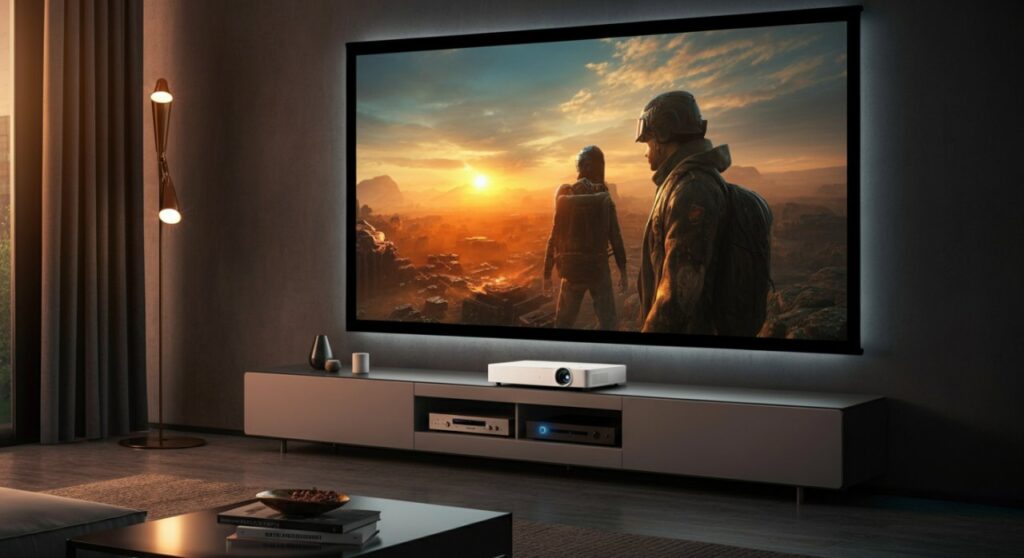
A UST projector (Ultra Short Throw projector) is a specialized display device designed to project a massive, high-quality image from a distance of only a few inches away from the wall or screen. Unlike traditional projectors that require mounting on a ceiling or placing far behind the seating area, a UST projector sits directly below the screen, effectively eliminating shadows and simplifying installation.
TL;DR: Key Takeaways
- Proximity: Projects a 100-120 inch image from less than 15 inches away.
- Convenience: No ceiling mount required; sits on a media console.
- Aesthetics: Mimics a flat-panel TV setup while offering a much larger display.
- Best Use: Ideal for living rooms with limited space or where traditional mounting isn’t feasible.
- Essential Pairing: Always use an ALR (Ambient Light Rejecting) screen for the best image quality.
How UST Projectors Differ from Traditional Projectors
When researching what is a ust projector, the primary differentiator is the lens technology. Standard projectors use a long-throw lens that requires significant distance to expand the light beam into a large image.
In contrast, a UST projector utilizes a complex array of mirrors and a highly specialized wide-angle lens. This allows the light to hit the screen at a very steep angle, creating a huge display while remaining physically close to the wall.
Why Distance Matters
- Shadow Reduction: Since the projector sits in front of the screen, people walking by won’t cast shadows on the display.
- Simplified Cable Management: You can use your existing media console for power and HDMI connections.
- Brightness Efficiency: Because the light travels a shorter distance, it retains more intensity, though it is still sensitive to ambient room light.
Essential Components for a UST Setup
Setting up a home theater with a UST projector requires more than just the unit itself. Having personally tested several high-end models, I can confirm that the surface you project onto is just as critical as the projector.
The Role of ALR Screens
To get the most out of a UST projector, you should pair it with an ALR screen. These screens are engineered to reflect light coming from below (where the projector sits) while absorbing light coming from above or the sides (overhead lamps or windows).
| Feature | Standard Wall | ALR Screen |
|---|---|---|
| Contrast | Low | High |
| Color Accuracy | Moderate | Excellent |
| Ambient Light Handling | Poor | Superior |
| Installation | Easiest | Requires mounting |
Step-by-Step: Installing Your UST Projector
Installing a UST projector is straightforward, but it requires precision. Because the light is projected at such a sharp angle, even a slight misalignment can distort the image geometry.
Positioning the Console
Place your media console against the wall. Measure the distance required by the manufacturer; most UST projectors require roughly 7-15 inches from the wall to achieve a 100-120 inch screen size.
Leveling the Unit
Ensure the surface of the console is perfectly level. Use the adjustable feet on the bottom of the UST projector to fine-tune the image so it sits squarely on your screen or wall.
Adjusting Keystone Correction
Use the onboard software to adjust the corners. Modern UST projectors often include electronic “point correction” to ensure the image rectangle is perfectly straight, even if the floor is slightly uneven.
Focusing the Optics
Once positioned, use the manual or motorized focus feature. Because the lens is wide-angle, you must ensure both the center and the edges of the projected image are razor-sharp.
Performance Metrics to Consider
When comparing models, do not rely solely on “Lumens.” Look for these specific metrics to ensure high-quality output:
- ANSI Lumens: Look for at least 2,000-3,000 ANSI lumens for daylight viewing.
- Contrast Ratio: Higher native contrast ratios provide deeper blacks, which are often the weakness of budget projectors.
- Color Gamut: Look for models that support Rec. 709 or DCI-P3 color standards for cinematic accuracy.
- Input Lag: If you plan to game, prioritize models with a “Game Mode” that offers input lag below 30ms.
Expert Tips for the Best Experience
From my experience, the biggest mistake users make is assuming the projector will look perfect in a bright room without any help.
- Manage Room Light: While ALR screens help, a dark room will always yield the best contrast. Use blackout curtains during the day.
- Audio Setup: Most UST projectors have decent built-in speakers, but a dedicated soundbar or surround system is essential for a true theater experience.
- Firmware Updates: Always check the manufacturer’s website for firmware updates; these often improve color processing and focus uniformity.
Frequently Asked Questions
What is a UST projector’s lifespan compared to a TV?
Most modern UST projectors use laser light sources that last between 20,000 and 30,000 hours. If you watch for 4 hours every day, the projector will last well over 10 years, which is comparable to a high-end LED TV.
Do I need a special screen for a UST projector?
While you can project onto a flat, white wall, the image will look washed out in daylight. An ALR screen is highly recommended to improve contrast and vibrancy.
Can a UST projector be used for gaming?
Yes, but look for specific gaming features. Ensure the model has a low-latency mode and supports high refresh rates if you are using a modern console like a PlayStation 5 or Xbox Series X.
Is a UST projector better than a large TV?
It depends on your goal. A TV offers better peak brightness, while a UST projector provides a more immersive, “cinema-like” experience at sizes (100″+) that are prohibitively expensive for flat-panel TVs.









