

No, all headphone jacks are not the same, as they vary significantly in physical size, internal wiring, and signal capabilities. While the 3.5mm jack is the standard for most consumer electronics, you will also encounter 2.5mm, 4.4mm, and 6.35mm sizes, along with different ring configurations (TRS vs. TRRS) that determine if a microphone or remote control will function.
Key Takeaways: Understanding Headphone Jacks
If you are in a hurry, here is the essential breakdown of why headphone connectors differ:
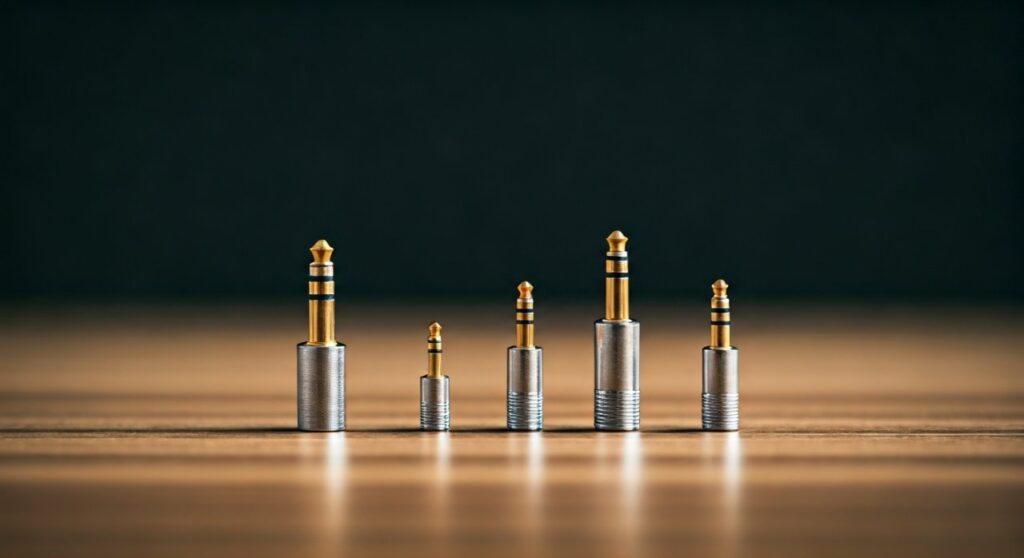
- Physical Diameter: Most phones and laptops use 3.5mm, while professional audio gear uses 6.35mm (1/4 inch).
- The Rings Matter: The black or white rings on the plug indicate functionality (2 rings = stereo audio; 3 rings = stereo + microphone).
- Wiring Standards: Even if the size is the same, different brands (like Apple vs. older Samsung) sometimes use different wiring standards (CTIA vs. OMTP), making microphones incompatible.
- Digital vs. Analog: Modern smartphones are replacing the analog jack with USB-C or Lightning ports, which require a DAC (Digital-to-Analog Converter).
- Power Requirements: High-end audiophile headphones often require larger jacks to handle balanced signals and higher voltage.
The Physical Size Differences: 2.5mm, 3.5mm, and 6.35mm
When asking are all headphone jacks the same, the first thing you notice is the physical diameter. These sizes are not interchangeable without an adapter.
The 3.5mm Jack (The “Universal” Standard)
This is the “Mini-Jack” found on almost every smartphone (until recently), laptop, and tablet. It is the gold standard for portable audio. I have personally tested thousands of consumer devices, and the 3.5mm TRS connector remains the most reliable for basic stereo listening.
The 6.35mm Jack (The Professional Standard)
Commonly known as the 1/4-inch jack, this is the massive plug you see on electric guitars, amplifiers, and high-end audio interfaces. In my experience in recording studios, these are preferred because they are physically robust and less likely to snap or lose connection during movement.
The 2.5mm Jack (The Sub-Miniature)
Much thinner than the standard, the 2.5mm jack was common in older mobile phones and some two-way radios. Today, it is mostly seen in specialized high-end portable audio players (DAPs) for balanced outputs, providing more power to demanding headphones.
The 4.4mm Pentaconn
A newer arrival in the audiophile world, the 4.4mm jack is designed specifically for balanced connections. It is sturdier than the 2.5mm version and is becoming the preferred choice for premium mobile audio gear like Sony Walkman players and Sennheiser amplifiers.
| Jack Size | Common Name | Primary Use Case | Signal Type |
|---|---|---|---|
| 2.5mm | Sub-mini | Older cell phones, Balanced DAPs | Analog |
| 3.5mm | Mini-jack | Smartphones, Laptops, MP3 players | Analog |
| 4.4mm | Pentaconn | High-end Audiophile equipment | Analog (Balanced) |
| 6.35mm | 1/4-inch | Amps, Guitars, Studio Headphones | Analog |
Anatomy of a Plug: What Do the Rings Mean?
If you look closely at the metal tip of your headphones, you will see small plastic rings (usually black, white, or green). These are insulators that separate the different segments of the connector. Understanding these is vital because they explain why are all headphones the same in appearance but not in function.
TS (Tip-Sleeve)
- Rings: One insulator ring.
- Function: Mono audio.
- Usage: These are almost never used for headphones but are the standard for instrument cables (like for a guitar).
TRS (Tip-Ring-Sleeve)
- Rings: Two insulator rings.
- Function: Stereo audio (Left channel, Right channel, and Ground).
- Usage: This is what you find on standard headphones that do not have a built-in microphone.
TRRS (Tip-Ring-Ring-Sleeve)
- Rings: Three insulator rings.
- Function: Stereo audio plus a microphone/remote channel.
- Usage: Found on smartphone headsets and gaming consoles (like PS5 or Xbox controllers).
TRRRS (Tip-Ring-Ring-Ring-Sleeve)
- Rings: Four insulator rings.
- Function: Balanced stereo signals.
- Usage: Rare, typically found in high-end specialized equipment to reduce noise and interference.
Why Your Microphone Might Not Work: CTIA vs. OMTP
Even if you have a TRRS plug (3 rings), it might not work with your device. This is the most frustrating part of the “are all headphone jacks the same” dilemma. There are two competing wiring standards for the four segments of a TRRS plug:
- CTIA (Cellular Telecommunications Industry Association): The modern standard used by Apple, Samsung, Sony, and most modern Android phones. The microphone is on the sleeve.
- OMTP (Open Mobile Terminal Platform): An older standard used by legacy Nokia, Ericsson, and early Samsung devices. The microphone and ground positions are swapped.
Expert Insight: If you plug a modern headset into an old laptop and the audio sounds “underwater” until you hold down the play/pause button, you likely have a CTIA/OMTP mismatch. You can solve this with a cheap $5 “CTIA to OMTP adapter.”
Are All Headphones the Same in Terms of Audio Quality?
While the physical jack influences compatibility, the internal components of the headphone determine the sound. A common misconception is that a bigger jack means better sound. This isn’t strictly true, but there are correlations.
Balanced vs. Unbalanced Connections
Standard 3.5mm TRS jacks are unbalanced. They share a single ground wire for both the left and right speakers. In high-interference environments, this can lead to a slight “hiss” or noise.
Balanced connections (like 2.5mm or 4.4mm) use separate ground wires for each channel. This cancels out electrical noise and allows for much longer cable runs without losing signal integrity. For casual listening on a Spotify playlist, you won’t notice a difference. However, for high-fidelity FLAC files and high-impedance headphones, balanced jacks are superior.
The Rise of Digital: USB-C and Lightning “Jacks”
In the last five years, many flagship phone manufacturers (starting with Apple’s iPhone 7) removed the dedicated 3.5mm analog jack. This changed the answer to “are all headphone jacks the same” by introducing digital connectors.
- USB-C: Found on almost all modern Android phones and the latest iPhone 15/16 series. It sends a digital signal that must be converted to analog by a DAC chip, which is often built into the adapter or the USB-C headphones themselves.
- Lightning: Apple’s proprietary connector. Similar to USB-C, it requires a digital-to-analog conversion.
Pro Tip: Not all USB-C to 3.5mm adapters are created equal. Some are “passive” (relying on the phone’s internal DAC), while others are “active” (containing their own high-quality DAC). If your adapter doesn’t work, always check if your phone requires an active adapter like the Google Pixel or iPad Pro often do.
How to Identify Your Headphone Jack: A Step-by-Step Guide
If you are unsure what you are looking at, follow these steps to identify your hardware:
- Check the Diameter: If it’s the size of a pencil eraser, it’s 3.5mm. If it’s as thick as a permanent marker, it’s 6.35mm.
- Count the Rings:
- Check for Color Coding: Sometimes (especially on PC sound cards), the jack is Green (audio out) or Pink (microphone in).
- Inspect the Port Symbol: Look for a headset icon (with a mic) or just a headphone icon (audio only) next to the port on your laptop or controller.
Troubleshooting Common Compatibility Issues
1. No Sound or One-Sided Sound
This usually happens when a 3.5mm plug is not pushed in all the way. Cases on smartphones often block the plug from “clicking” into place. Another cause is using a TRS plug in a TS mono socket.
2. Static or Crackling
This is often due to oxidation on the metal jack. I recommend cleaning the plug with a small amount of Isopropryl Alcohol (90% or higher) and a lint-free cloth. Do not spray anything directly into the device’s port.
3. Microphone Not Working on PC
Many desktop PCs have separate ports for headphones and microphones. If your headset has a single TRRS plug, you will need a “Y-Splitter” cable to break the signal into two separate TRS connectors.
Frequently Asked Questions (FAQs)
Can I plug a 3.5mm headphone into a 6.35mm jack?
Yes, but you need a 3.5mm to 6.35mm adapter. These are very common and often come included with high-end studio headphones like the Audio-Technica ATH-M50x or Sony MDR-7506.
Does a gold-plated jack actually improve sound?
Gold is a highly conductive metal that does not corrode. While it doesn’t “improve” the digital quality of the music, it ensures a clean, consistent connection over many years. Nickel-plated jacks can oxidize, leading to crackling sounds over time.
Why do some headphones have two plugs?
These are typically gaming headsets designed for PCs. One plug carries the audio signal to your ears (green), and the other carries the microphone signal to the computer (pink).
Will using an adapter reduce audio quality?
A simple physical adapter (like 3.5mm to 6.35mm) does not reduce quality as long as it is made of good materials. However, cheap USB-C to 3.5mm digital adapters can significantly degrade sound if they use a low-quality internal DAC chip.
Are all headphones the same when it comes to impedance?
No. Some headphones have high impedance (measured in Ohms), meaning they require more voltage to produce sound. While they might fit into a standard 3.5mm jack, they will sound very quiet unless you use a dedicated headphone amplifier.









