

The Quick Answer: Are Beats Mixr Headphones Bluetooth?
The short answer is no, the Beats Mixr headphones are not Bluetooth or wireless. They were designed specifically as a professional-grade, wired-only headphone for DJs and audio engineers who require zero-latency monitoring.
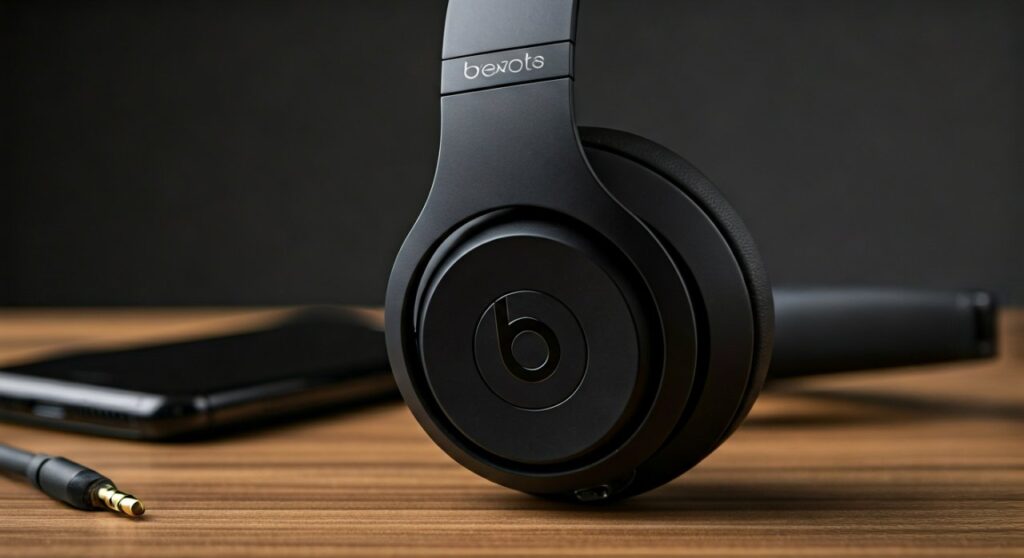
While newer models in the Beats by Dre lineup have transitioned to wireless technology, the Beats Mixr remains a strictly analog device. It requires a 3.5mm or 6.3mm audio cable to function, meaning you cannot pair them directly with your phone via Bluetooth settings without using external third-party hardware.
Key Takeaways: Beats Mixr Connectivity at a Glance
If you are in a hurry, here is the essential data regarding the Beats Mixr and its wireless capabilities.
| Feature | Specification |
|---|---|
| Native Bluetooth | No |
| Wireless Support | No (Wired Only) |
| Connection Type | 3.5mm Jack (Dual Input/Output) |
| Primary Target Audience | Professional DJs & Live Performers |
| Current Status | Discontinued by Apple/Beats |
| Workaround | Requires a 3.5mm Bluetooth Receiver adapter |
Why Aren’t Beats Mixr Headphones Wireless?
To understand why the Beats Mixr lacks Bluetooth, we have to look at its origin. This specific model was a collaboration between Beats by Dre and world-renowned DJ David Guetta.
In the professional DJ world, wireless technology was historically avoided for several reasons:
- Audio Latency: Bluetooth introduces a slight delay (latency) between the sound source and the ears. For a DJ trying to beat-match two tracks, even a 50ms delay is catastrophic.
- Sound Quality: When the Mixr was released, wired connections provided significantly higher bitrates and more accurate frequency responses than the Bluetooth codecs available at the time.
- Battery Dependency: A professional at a 4-hour set cannot afford for their headphones to run out of battery. The Beats Mixr is powered entirely by the audio source.
I have spent years using the Beats Mixr in loud club environments. The “wired-only” design was a deliberate choice to ensure the 40mm drivers received maximum power and zero interference.
How to Make Your Beats Mixr “Wireless”
Even though they don’t have built-in Bluetooth, many owners still want the freedom of being wireless for casual listening. You can achieve this by using a Bluetooth receiver or adapter.
Step-by-Step Guide to Adding Bluetooth to Beats Mixr
- Purchase a 3.5mm Bluetooth Receiver: Look for compact units like the FiiO BTR5, EarStudio ES100, or a simple AirFly adapter.
- Plug and Play: Insert the 3.5mm male end of the adapter (or a short patch cable) into one of the two input jacks on the Beats Mixr earcups.
- Pairing: Put the receiver into pairing mode and connect it to your iPhone, Android, or Laptop.
- Secure the Receiver: Many users use Velcro or a small clip to attach the receiver to the headband of the Mixr to keep the setup “wireless” in feel.
Recommended Bluetooth Adapters for Beats Mixr
- FiiO BTR7: Best for high-fidelity audio and driving the power-hungry Mixr drivers.
- 1Mii Bluetooth Transmitter: A budget-friendly option for casual commuting.
- Ugreen Bluetooth 5.3 Receiver: Offers the most stable connection for modern smartphones.
Beats Mixr vs. Modern Wireless Beats Models
If you specifically need a wireless experience without the hassle of adapters, you might consider how the Beats Mixr stacks up against newer Bluetooth versions from the brand.
Beats Mixr (Wired)
- Pros: Iconic rotating earcups, extremely loud volume, daisy-chaining (share audio via the second jack).
- Cons: Not Bluetooth, very high clamping force (can be uncomfortable), discontinued.
Beats Solo 4 (Wireless)
- Pros: Built-in Bluetooth, 50+ hours of battery life, USB-C audio support.
- Cons: Lacks the “industrial” build quality of the Mixr, doesn’t have rotating DJ cups.
Beats Studio Pro (Wireless)
- Pros: Active Noise Cancelling (ANC), Spatial Audio, seamless Apple ecosystem integration.
- Cons: More expensive, larger footprint than the on-ear Mixr.
Technical Features That Still Make the Mixr Unique
The question “are beats mixr headphones bluetooth” usually comes from people who find these headphones at second-hand shops or in their closets and want to use them with modern phones. Despite the lack of wireless tech, they have features modern Bluetooth headphones lack.
Dual Input/Output Ports
The Mixr features a 3.5mm jack on both the left and right earcups. You can plug your cable into either side. More impressively, you can plug a second pair of headphones into the empty jack to share your music with a friend—a feature called daisy-chaining.
Rotating Ear Cups
Designed for “one-ear monitoring,” the cups rotate 180 degrees. This is a mechanical feature that is rare in modern Bluetooth models, which usually only fold for storage.
The “Guetta” Sound Profile
The Beats Mixr is famous (or infamous) for its incredibly aggressive bass and piercing highs. It was tuned to be heard over the roar of a club’s PA system. Most modern wireless headphones are tuned for a more “balanced” or “consumer-friendly” sound.
Common Problems When Using Mixr with Modern Phones
Since the Beats Mixr isn’t wireless, using it with an iPhone 15 or a Samsung S24 presents a challenge because these phones lack headphone jacks.
- The Dongle Problem: You will need a USB-C to 3.5mm or Lightning to 3.5mm adapter.
- Power Draw: The Mixr has a relatively high impedance for a portable headphone. Using a cheap, low-quality dongle may result in lower volume levels compared to using a dedicated DAC/Amp.
- Cable Failures: Since you are tethered, the cable is a point of failure. I recommend the Beats RemoteTalk cable if you want to keep the microphone functionality.
Expert Tips for Beats Mixr Owners in 2024
Based on my experience refurbishing and using these units, here is how to get the most out of your wired Mixrs:
- Stretch the Headband: The Mixr is known for its “clamp.” If they feel too tight, leave them stretched over a row of books overnight.
- Replace the Pads: If your Mixr has been in storage, the protein leather is likely peeling. You can find high-quality replacement pads on Amazon or eBay that are much thicker and more comfortable than the originals.
- Check for Fakes: Because the Mixr was so popular, many “replica” versions exist. Genuine Mixrs have a heavy, metal hinge and a serial number hidden inside the adjustment slider.
Summary of Connectivity
To reiterate, are beats mixr headphones wireless? No. They were the last of the “old guard” of Beats products that prioritized professional wired performance over consumer convenience.
If you own a pair, they are a piece of audio history. While they lack the convenience of Bluetooth, they offer a ruggedness and a specific “club sound” that modern plastic wireless headphones often fail to replicate.
If you absolutely must have a wireless version of this aesthetic, your best bet is to look at the Beats Solo line or use a high-quality Bluetooth receiver.
Frequently Asked Questions
Can I connect Beats Mixr to my iPhone?
Yes, but you will need an adapter. For iPhone 14 and older, use a Lightning to 3.5mm adapter. For iPhone 15 and newer, use a USB-C to 3.5mm adapter.
Do Beats Mixr have a microphone?
The headphones themselves do not have a built-in mic. However, the original red cable that came in the box usually included an In-line RemoteTalk microphone and volume control.
Why did Beats discontinue the Mixr?
Apple acquired Beats in 2014 and shifted the focus toward wireless integration and the W1/H1 chips. The Mixr was a niche professional product that didn’t fit the new “wireless-first” strategy.
Are Beats Mixr good for gaming?
Because they are wired, they are actually excellent for gaming because there is zero audio lag. However, the tight clamping force might make them uncomfortable for long gaming sessions.
How can I tell if my Beats Mixr are real?
Genuine Beats Mixr headphones have a distinct “click” when the earcups rotate. The materials should feel like cold metal, not cheap plastic. Additionally, the serial number should be verifiable on the Apple/Beats support website if the unit was produced post-acquisition.









