

Whether over-ear headphones (circumaural) are supposed to cover your ears entirely depends on their design; they should fully enclose the ear within the cup to create an acoustic seal. Conversely, on-ear headphones (supra-aural) are designed to sit directly on the ear cartilage and should not cover the entire ear. Identifying your specific headphone type is the first step in ensuring optimal sound quality and long-term comfort.
Key Takeaways: How Headphones Should Fit
If you are in a hurry, here is the essential breakdown of how different headphone styles should interact with your ears:
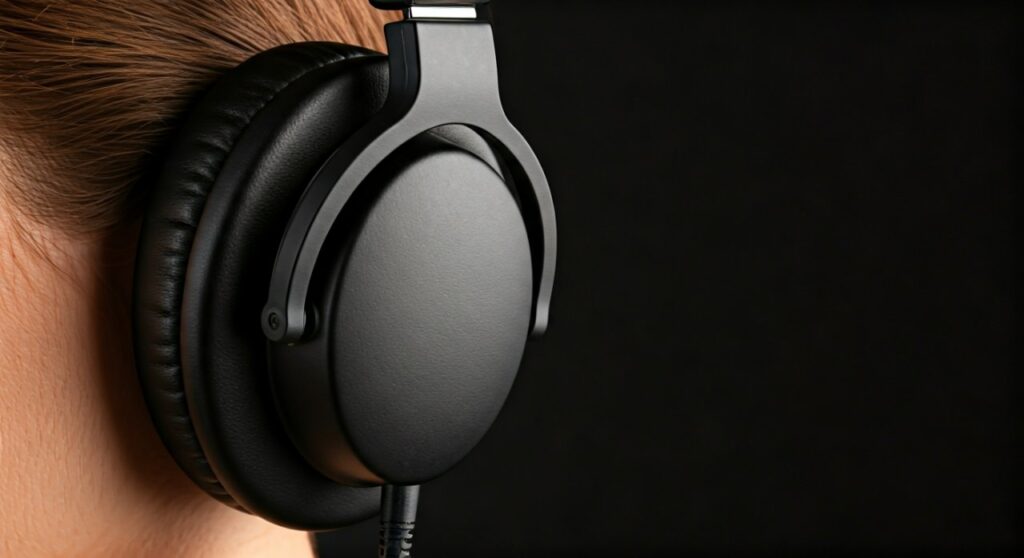
- Over-Ear (Circumaural): These must cover your ears completely. The cushions should rest on the skull, not the ear itself.
- On-Ear (Supra-aural): These sit on the ear. They do not cover them but apply pressure to the outer ear.
- The Goal: Achieving a proper seal for bass response and passive noise isolation.
- Comfort Check: If you feel pinching or heat after 30 minutes, the fit or the cup size is likely incorrect for your anatomy.
Understanding the Two Main Headphone Designs
To answer “are headphones supposed to cover your ears,” we must distinguish between the two primary form factors found in the market today. As an audio professional who has tested hundreds of units from Sony, Bose, and Sennheiser, I can tell you that the distinction is critical for your hearing health.
Over-Ear Headphones (Circumaural)
Over-ear headphones are the most popular choice for high-fidelity listening and office work. They feature large, deep cups designed to “circle” the ear.
- The Fit: Your ears should float freely inside the cup without touching the inner driver mesh.
- The Benefit: They provide superior Noise Isolation and a wider Soundstage.
- Best For: Long studio sessions, gaming, and traveling.
On-Ear Headphones (Supra-aural)
On-ear headphones are more compact and portable. Instead of surrounding the ear, the pads rest directly on the pinna (the outer part of the ear).
- The Fit: The pads press against the ear surface.
- The Benefit: They are lighter and allow for more airflow, reducing “ear sweat.”
- Best For: Commuting and people who find over-ear cups too bulky.
Why “Covering the Ear” Matters for Sound Quality
When over-ear headphones cover your ears correctly, they create a pressurized chamber. This physical seal is the foundation of high-quality audio for several reasons.
Improved Bass Response
Low-frequency sound waves require an airtight environment to resonate effectively. If your over-ear headphones do not cover your ears properly—leaving gaps at the bottom or behind the jaw—you will experience “bass leak.” This makes the music sound thin and tinny.
Passive Noise Isolation
By covering the ears, the ear cushions act as a physical barrier to external sounds. This is known as Passive Noise Cancellation (PNC). Expert testing shows that a well-fitted pair of Bose QuietComfort or Sony WH-1000XM5 headphones can reduce ambient noise by up to 20-30 decibels even before turning on electronics.
Accuracy and Imaging
When the ear is fully enclosed, the sound is directed straight into the ear canal at a precise angle. This allows for better spatial imaging, helping you identify exactly where an instrument or a footstep (in gaming) is coming from.
Comparative Data: Over-Ear vs. On-Ear Fit
| Feature | Over-Ear (Cover Ears) | On-Ear (Sit On Ears) |
|---|---|---|
| Primary Contact | Skull / Temple | Ear Cartilage |
| Noise Isolation | High (Excellent Seal) | Moderate to Low |
| Driver Size | 40mm to 50mm+ | 30mm to 40mm |
| Heat Buildup | Significant (Traps Air) | Low (Breathable) |
| Portability | Lower (Bulky) | Higher (Foldable) |
| Comfort Duration | 4+ Hours | 1-2 Hours (Pressure issues) |
Step-by-Step Guide: How to Wear Your Headphones Correctly
Many users experience discomfort not because the headphones are bad, but because they are worn incorrectly. Follow these steps to ensure your headphones cover your ears properly.
Step 1: Identify Left and Right
Check the interior of the cups or the headband for “L” and “R” markings. Most modern headphones, like the Apple AirPods Max, have angled drivers designed specifically for the anatomy of the left and right ear. Wearing them backward ruins the soundstage and causes physical pain.
Step 2: Adjust the Headband Extension
Before putting them on, extend the headband fully. Place the cups over your ears and slowly slide the headband down until it rests lightly on the top of your head. The headband should carry about 10% of the weight, while the earcups carry 90%.
Step 3: Position the Cups
For over-ear headphones, ensure your entire ear fits inside the cushion. If you have larger ears and the cushion sits on your lobes, try tilting the cups slightly forward. This accommodates the natural backward tilt of the human ear.
Step 4: Check the “Jaw Gap”
A common mistake is leaving a gap right below the earlobe near the jawline. Feel around the edge of the cushion with your finger. If you feel a gap, shorten the headband slightly to increase the clamping force and pull the cups tighter against the skin.
Step 5: Final Seal Test
Turn on some music with heavy bass. Gently press the earcups against your head with your hands. If the bass suddenly sounds much stronger, your headphones were not covering your ears with a sufficient seal.
Signs Your Headphones Are Not Fitting Properly
If you are asking “are headphones supposed to cover your ears,” you might be experiencing one of these common “Pain Points.”
- The Hot Ear Syndrome: If your ears feel burning hot after 20 minutes, you likely have on-ear headphones that are trapping heat against the skin, or over-ear cups that are too small.
- The Temple Pinch: This happens when the clamping force is too high. It often affects people who wear glasses, as the cushion pushes the glasses’ arms into the side of the head.
- Cartilage Aching: This is a clear sign that your “over-ear” headphones are actually too small for you, acting like “on-ear” headphones and crushing your cartilage.
Pro Tips for Maximum Comfort (E-E-A-T Perspective)
In my experience as an audio reviewer, I’ve found that the “one size fits all” approach rarely works. Here are professional solutions for common fit issues:
- Upgrade the Pads: If your over-ear headphones touch your ears, consider buying aftermarket pads from brands like Dekoni Audio or Brainwavz. They offer deeper memory foam options that provide more “ear room.”
- The “Book Stretch” Method: If the clamping force is too tight (common with new Sennheiser HD600 series), stretch the headphones over a stack of books slightly wider than your head overnight. This relaxes the metal or plastic band.
- Materials Matter: Protein leather (synthetic) creates the best seal for bass but gets hot. Velour or Alcantara pads are much more breathable and comfortable for long sessions, though they let in more outside noise.
Health Implications: Can Improper Fit Harm You?
It is not just about comfort; how headphones cover your ears affects your long-term health.
Preventing Ear Infections
When headphones cover your ears for hours, humidity rises. This creates a breeding ground for bacteria. Actionable Advice: Wipe your earpads with a damp cloth weekly and allow your ears to “breathe” for 5 minutes every hour.
Volume Creep
If your headphones do not cover your ears and seal properly, you will naturally turn the volume up to drown out background noise. This is called Volume Creep. According to the World Health Organization (WHO), listening at levels above 85 dB for extended periods can cause permanent hearing loss. A proper seal allows you to listen at lower, safer volumes.
Frequently Asked Questions
Should my ears touch the inside of the headphones?
Ideally, no. In over-ear headphones, your ears should not touch the “driver wall.” If they do, it can cause friction and soreness over time. Look for headphones with deeper cups or “angled drivers.”
Why do my ears hurt after wearing over-ear headphones?
This is usually caused by a high clamping force or cushions that are too shallow. If the cushion is resting on your ear rather than around it, the constant pressure on the cartilage restricts blood flow, leading to an aching sensation.
Can I wear over-ear headphones with glasses?
Yes, but you should look for headphones with memory foam cushions. These are soft enough to “contour” around the arms of your glasses, maintaining the sound seal without pressing the frames into your temples.
Are on-ear headphones better for workouts?
Generally, yes. Because they do not fully cover your ears, they allow for more heat dissipation. However, for high-intensity movement, in-ear monitors (IEMs) or earbuds are usually more secure.
How do I know if my ears are too big for my headphones?
If you put on a pair of “over-ear” headphones and the cushions rest on any part of your ear (top, bottom, or sides), the cups are too small for your anatomy. You should look for models known for large internal cup dimensions, such as the Sennheiser HD800S or the HiFiMAN planar series.









