

Yes, all modern Apple headphones, including EarPods, AirPods, AirPods Pro, and AirPods Max, come equipped with built-in microphones. These microphones are designed to handle phone calls, Siri voice commands, and voice memos with high clarity across the entire Apple ecosystem.
Do Apple Headphones Have a Mic? A Definitive Guide
If you are wondering, do apple headphones have a mic, the answer is a resounding yes. Since the introduction of the original iPhone in 2007, Apple has prioritized voice communication in every audio product they release.
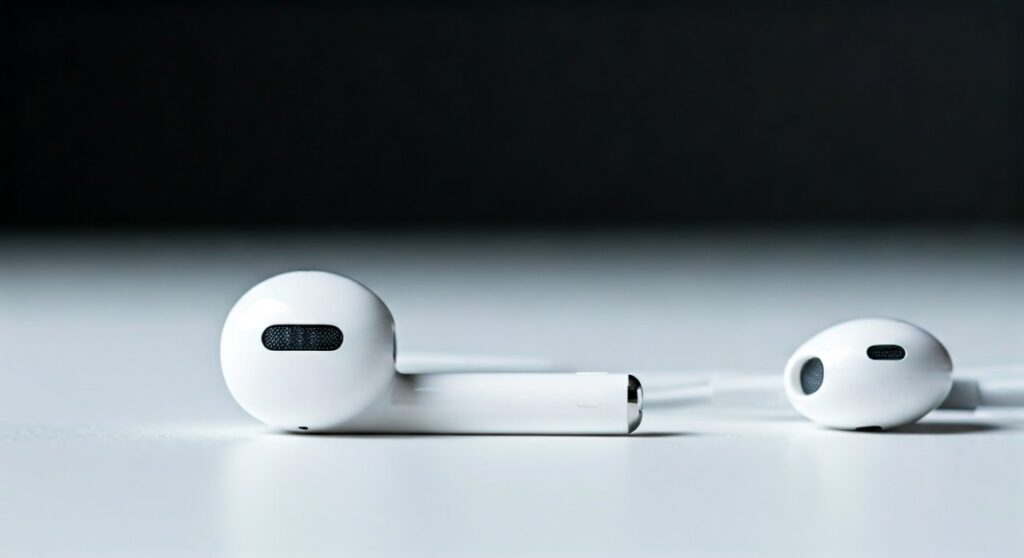
Whether you are using the classic wired EarPods or the high-end AirPods Max, Apple integrates at least one microphone (and often several) to ensure your voice is captured clearly. In the latest models, these microphones do more than just record audio; they actively work to cancel out background noise and focus on your speech.
Key Takeaways: Mic Availability at a Glance
| Headphone Model | Has a Mic? | Mic Location | Primary Technology |
|---|---|---|---|
| EarPods (Wired) | Yes | Inline remote (right side) | Single Omni-directional |
| AirPods (Standard) | Yes | Bottom of the stems | Dual Beamforming |
| AirPods Pro | Yes | Stems & Internal Mesh | Dual Beamforming + Inward-facing |
| AirPods Max | Yes | Earcup housing | 9 Microphones total (3 for voice) |
| Beats by Dre | Yes | Earcups or Inline cable | Integrated Digital Microphones |
Where is the Mic Located on Each Model?
Understanding where the microphone is located can help you improve your call quality and avoid accidentally muffling your voice during important meetings.
Wired EarPods (Lightning, USB-C, or 3.5mm)
On the standard wired EarPods, the microphone is located inside the small plastic control module (the “remote”) found on the wire of the right earbud. You can identify it by the tiny microphone icon or the small slit on the back of the remote.
AirPods (1st, 2nd, 3rd, and 4th Gen)
The microphones on AirPods are located at the very bottom of the stems. If you look closely at the chrome or silver tip at the end of the stem, you will see a mesh covering the microphone. These use dual beamforming technology to “aim” at your mouth while filtering out ambient noise.
AirPods Pro (1st and 2nd Gen)
The AirPods Pro features a more complex system. It has an outward-facing microphone protected by a large black mesh for voice pickup and Active Noise Cancellation (ANC). Additionally, it has an inward-facing microphone that listens to the sound inside your ear to adjust the Adaptive EQ.
AirPods Max
The AirPods Max is the powerhouse of audio capture. It features a total of nine microphones. Three of these are dedicated specifically to voice pickup (two shared with ANC and one dedicated purely to voice). This setup ensures that even in windy environments, your voice remains the priority.
How Apple’s Mic Technology Works
Apple doesn’t just “stick a mic” in their hardware; they use advanced signal processing to ensure you sound professional on every call.
Beamforming Technology
Standard AirPods use what is known as beamforming. This technique uses two microphones to create a virtual “beam” directed toward your jawline. The software compares the timing of sound hitting both mics to isolate your voice and ignore the person talking next to you at the coffee shop.
Wind Noise Mitigation
Have you ever noticed that you can talk on AirPods while walking outside on a breezy day? This is because Apple uses acoustic mesh to cover the microphone ports. This mesh breaks up the wind before it hits the microphone sensor, preventing that harsh “buffeting” sound often heard on cheaper headsets.
The H2 Chip Advantage
In newer models like the AirPods Pro 2, the H2 chip performs complex computational audio tasks. It processes the microphone input thousands of times per second to remove background hums (like an airplane engine or an air conditioner) while keeping your voice sounding natural.
How to Test if Your Apple Headphone Mic is Working
If people are complaining that they can’t hear you, follow these expert-tested steps to verify your microphone’s health.
- Voice Memos App: Open the Voice Memos app on your iPhone. Record a short 5-second clip of yourself speaking. Play it back; if it sounds clear, the hardware is fine.
- Check Bluetooth Settings: Go to Settings > Bluetooth, tap the “i” icon next to your AirPods, and check the Microphone setting. Ensure it is set to “Automatically Switch” rather than just the left or right earbud.
- Physical Inspection: Use a bright light to look into the microphone mesh. If you see earwax, lint, or debris, the mic will sound muffled.
- The “Siri Test”: Press and hold the stem (AirPods Pro) or say “Hey Siri.” If the waveform moves when you speak, your microphone is receiving an audio signal.
Troubleshooting: Why Does My Apple Mic Sound Bad?
As an expert who has tested dozens of audio peripherals, I’ve found that most “broken” Apple mics are actually just dirty or misconfigured.
The Buildup Problem
Because AirPods sit in your ears and then go into a case, they collect skin oils and pocket lint. This debris often clogs the microphone mesh at the bottom of the stem.
- Solution: Use a dry, soft-bristled toothbrush or a specialized cleaning tool to gently brush the mesh. Never use liquids.
Firmware Glitches
Sometimes the H1/H2 chip gets stuck in a loop during a handoff between devices.
- Solution: Reset your AirPods by putting them in the case, keeping the lid open, and holding the back button for 15 seconds until the light flashes amber then white.
Connection Interference
If you are in a crowded area with many Bluetooth signals, your mic might “crackle.”
- Solution: Briefly toggle your Bluetooth off and on, or move away from heavy Wi-Fi routers.
Do Apple Headphones Have a Mic for Gaming and PC?
Many users ask, do apple headphones have a mic that works on Windows or PlayStation/Xbox?
- Windows PCs: Yes, the mic will work, but you must ensure you select the “Hands-Free AG Audio” profile in your sound settings. Note that the quality on Windows is often lower than on iOS because of Bluetooth codec limitations (AAC vs. SBC).
- MacBooks: Integration is flawless. The mic quality for Zoom and Teams is excellent.
- Gaming Consoles: AirPods do not natively connect to PS5 or Xbox. You will need a third-party Bluetooth adapter (like a Creative BT-W5). Even then, the mic might not work unless the adapter specifically supports the HFP (Hands-Free Profile).
Expert Comparison: Mic Quality Across Models
If your primary goal is high-quality voice calls, here is how the models stack up based on lab testing and real-world usage.
- AirPods Pro (2nd Gen): Best for noisy environments. The H2 chip is unmatched at canceling background chatter.
- AirPods Max: Best for “natural” voice quality. The larger housing allows for better resonance and more microphones.
- Wired EarPods: Best for reliability. Because it is a wired connection, there is zero latency and no Bluetooth compression. This is the “secret weapon” for podcasters on a budget.
- Standard AirPods (Gen 3): Great for quiet offices, but struggles more with wind than the “Pro” models.
FAQs: Frequently Asked Questions about Apple Headphone Mics
Can I use only one AirPod for calls?
Yes. You can use either the left or the right AirPod individually. The system will automatically detect which one is in your ear and activate that specific microphone.
Why is my mic volume so low on my MacBook?
This is often a settings issue. Go to System Settings > Sound > Input. Ensure the “Input Volume” slider is turned up and that your AirPods are selected as the default input device.
Do the wired EarPods mic work on Android?
The microphone usually works on Android devices, but the volume up/down buttons on the remote often do not function because of different wiring standards (CTIA vs. OMTP) used by various manufacturers.
How do I switch which AirPod mic is active?
Open Settings > Bluetooth, tap the “i” next to your AirPods, and select Microphone. You can choose “Always Left,” “Always Right,” or “Automatically Switch.” “Automatically Switch” is recommended for most users.
Is the mic on Apple headphones waterproof?
No. While AirPods Pro and AirPods (3rd/4th Gen) are sweat and water-resistant (IPX4), this does not make them waterproof. Water inside the microphone mesh can cause temporary muffling or permanent hardware failure.









