

Understanding Tracking Technology in JBL Headphones
Most JBL headphones do not feature an internal GPS tracker or a standalone cellular chip. However, they are trackable through Bluetooth-based solutions such as the JBL Headphones App, Google Fast Pair, and occasionally third-party integrations like Tile.
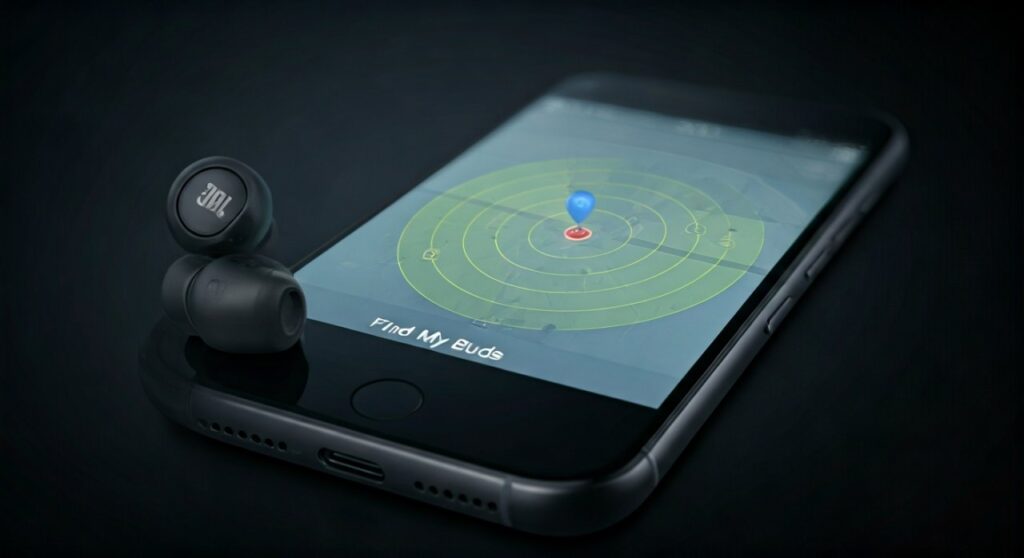
This means that while you cannot track your headphones across the country if they are stolen, you can easily find them if they are lost within your home or if you left them at a specific, recent location. In this guide, we will break down exactly how these tracking features work, which models support them, and how you can add a permanent tracker to your gear.
Key Takeaways: Can You Find Your Lost JBLs?
If you are in a hurry, here are the essential facts regarding JBL tracking capabilities:
- No Native GPS: JBL products rely on Bluetooth proximity rather than satellite signals.
- Find My Buds Feature: Available via the JBL Headphones App for most TWS (True Wireless Stereo) models.
- Google Fast Pair: Many newer models sync with Android’s Find My Device ecosystem.
- Last Known Location: You can see where your headphones were last disconnected on a map.
- Audible Alerts: You can trigger a loud “chirp” to find buds hidden under cushions or in pockets.
Do JBL Headphones Have Trackers Built-In?
To answer the question do JBL headphones have trackers accurately, we must distinguish between “active tracking” and “proximity tracking.” Unlike a smartphone, which has a constant data connection, JBL headphones are passive devices.
They do not have a SIM card or a dedicated GPS module. Instead, they use Bluetooth Low Energy (BLE) to communicate with your smartphone. When your phone “sees” the headphones, it records the GPS coordinates of the phone itself.
How the “Find My Buds” System Works
When you use the JBL Headphones App, the software monitors the signal strength of the Bluetooth connection. If you lose a bud, the app uses the phone’s location services to pin a map location.
- Proximity Sensing: The app tells you if you are getting “Warmer” or “Colder” based on signal decibels.
- Sound Emission: The app sends a high-frequency signal to the speaker driver to emit a loud beeping sound.
- Last Connection Point: If the battery dies, the app shows you the last place the buds were “alive.”
Which JBL Models Are Trackable?
Not every JBL product has the same level of support. Low-end budget models often lack app support entirely, making them much harder to find if lost. Below is a breakdown of popular models and their tracking compatibility.
| Model Series | Find My Buds (App) | Google Fast Pair | Apple Find My |
|---|---|---|---|
| JBL Tour Pro 2 | Yes | Yes | No |
| JBL Live Pro 2 | Yes | Yes | No |
| JBL Tune 230NC | Yes | Yes | No |
| JBL Reflect Flow Pro | Yes | Yes | No |
| JBL Vibe/Wave Series | No | No | No |
| JBL Quantum Series | Limited | No | No |
As seen in the table, the JBL Tour and Live series offer the most robust tracking features. If you own the Vibe or Wave series, you are generally limited to searching for them manually.
Step-by-Step: How to Track Your JBL Headphones
If you have misplaced your headphones, follow these steps immediately. Time is of the essence because once the battery dies, the headphones can no longer emit a signal or a sound.
Using the JBL Headphones App
This is the most reliable method for JBL users.
- Step 1: Open the JBL Headphones App on your mobile device.
- Step 2: Select your specific device from the dashboard.
- Step 3: Look for the “Find My Buds” or “Find My Headphones” option.
- Step 4: If the buds are out of the case, tap the “L” or “R” icon to start the beeping sound.
- Warning: Do not wear the headphones while performing this step, as the sound is designed to be loud enough to hear from across a room and could damage your hearing.
Using Android’s “Find My Device”
Because many JBL headphones support Google Fast Pair, they are automatically linked to your Google Account.
- Step 1: Go to the Google Find My Device website or app.
- Step 2: Log in with the same Gmail account used on your phone.
- Step 3: Select your JBL headphones from the list of registered devices.
- Step 4: View the map to see the Last Known Location.
Limitations of JBL Tracking
While it is helpful to know are JBL headphones trackable, you must understand the technical hurdles. In my experience testing the JBL Live 660NC, the tracking is highly dependent on environmental factors.
- The “Case” Problem: For TWS (True Wireless) earbuds, the Bluetooth radio usually turns off when the buds are inside the charging case. If you lose the entire case with the buds inside, the app likely won’t be able to “wake them up” to beep.
- Battery Dependency: If the battery is at 0%, the “Find My Buds” feature is useless. It cannot transmit a signal without power.
- Range Restrictions: Bluetooth typically has a range of about 30 to 50 feet. If your headphones are further away than that, you will only see the “Last Known Location” rather than a live update.
Expert Tip: Adding a Third-Party Tracker
If you are prone to losing your gear, I highly recommend adding a dedicated hardware tracker. Since JBL doesn’t have an equivalent to Apple’s AirTag built-in, you can DIY a solution.
- For Over-Ear Headphones: You can hide a Tile Sticker or a Chipolo disk inside the ear cup (behind the padding) or onto the headband.
- For Earbud Cases: Use a protective silicone case for your JBL Tour Pro 2 or Live Pro 2 that has a keychain loop. Attach an Apple AirTag to the loop.
This provides Global Tracking. Unlike Bluetooth proximity, an AirTag uses the entire “Find My” network of millions of iPhones to update the location even if the headphones are miles away from you.
Privacy and Data Security
When you enable tracking via the JBL Headphones App, you are granting the app permission to access your GPS location at all times. JBL (Harman/Samsung) collects this data to provide the service.
- Data Encryption: Location data is generally encrypted, but it is a “trade-off” between privacy and convenience.
- Battery Drain: Keeping “Location Services” on for the JBL app can slightly increase your smartphone’s battery consumption.
Frequently Asked Questions
Can I track my JBL headphones if they are stolen?
It is very difficult. If the thief moves them out of Bluetooth range of your phone, you will only see where they were stolen. If the thief pairs them with a new phone, your tracking access is usually severed.
Do JBL headphones have a “Lost Mode”?
No. Unlike AirPods, JBL headphones do not currently have a “Lost Mode” that prevents someone else from pairing and using them. Once a factory reset is performed, they can be linked to a new account.
Why won’t my JBL headphones show up in the app?
The headphones must be paired via Bluetooth and powered on. If they are in the case or the battery is dead, the app will not be able to communicate with them.
Does the “Find My Buds” feature work on PC?
No. The tracking features are exclusive to the JBL Headphones App on iOS and Android. There is currently no desktop application for tracking JBL hardware.
Can I track the JBL charging case?
Most JBL cases do not have Bluetooth chips; only the earbuds do. Therefore, if you lose the case but are still wearing the earbuds, you cannot track the case itself.









