

Can You Replace Beats Headphone Cushions?
Yes, you can absolutely replace the ear cushions on almost all Beats by Dre headphones, including the Beats Studio, Beats Solo, and Beats EP series. This is a simple DIY project that typically takes less than 15 minutes and costs between $15 and $30. Instead of buying a new headset, replacing the pads restores comfort, hygiene, and sound isolation effectively.
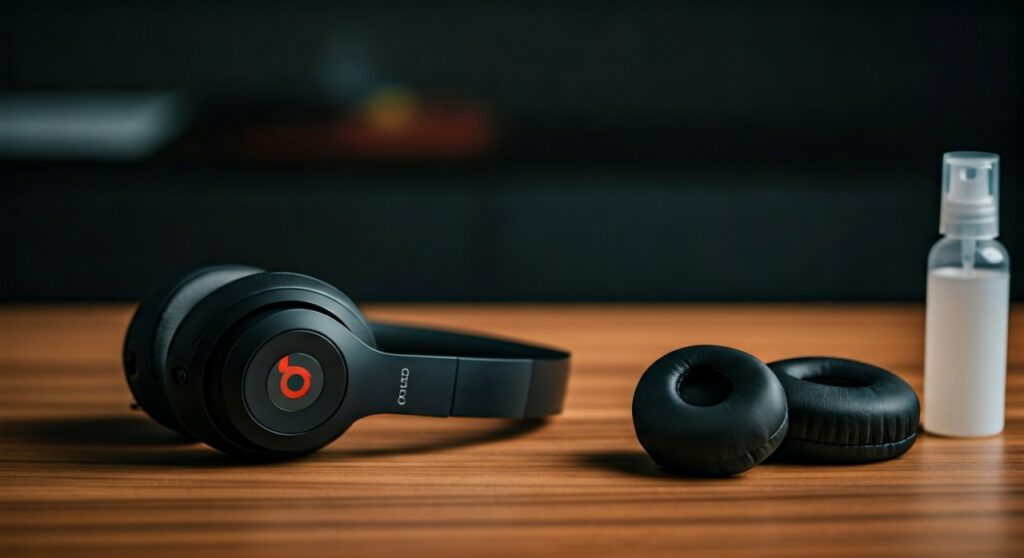
Key Takeaways: Quick Guide to Beats Cushion Replacement
If you are in a hurry, here is the essential information you need to know before starting your repair:
- Difficulty Level: Easy (No technical skills required).
- Time Required: 10–15 minutes.
- Essential Tools: A flat-head pry tool (or butter knife), microfiber cloth, and 70% isopropyl alcohol.
- Attachment Method: Most Beats Studio and Solo models use 3M adhesive tape and plastic alignment pins.
- Cost Efficiency: You save over $200 compared to buying a new pair of headphones.
- Sound Quality: New cushions restore the “seal,” which significantly improves Active Noise Cancelling (ANC) and bass response.
Why Beats Ear Cushions Degrade and When to Replace Them
As a long-time user of Beats Studio3 Wireless and Solo3, I have noticed that the “protein leather” used by Apple/Beats is prone to wear. This material is a synthetic blend designed to feel soft, but it reacts poorly to sweat and skin oils over time.
The Common Signs of Wear
- Flaking and Peeling: Small black flakes of faux leather ending up on your ears or neck.
- Compression Loss: The internal memory foam loses its “spring,” causing the plastic speaker grille to press against your ears.
- Unpleasant Odors: Sweat absorption leads to bacterial growth within the foam.
- Reduced Noise Cancellation: If the seal is broken, the ANC technology cannot effectively block out ambient noise.
Experts recommend replacing your cushions every 12 to 18 months if you use them daily, or sooner if you wear them during intense gym sessions.
Essential Tools and Materials for the Job
Before you begin, gather the following items to ensure a clean and professional-looking replacement:
| Tool/Material | Purpose | Recommended Type |
|---|---|---|
| Replacement Pads | The actual cushions. | Wicked Cushions or Dekoni Audio |
| Pry Tool | To separate the old adhesive. | Plastic spudger or a dull butter knife |
| Isopropyl Alcohol | To remove old glue residue. | 70% concentration or higher |
| Microfiber Cloth | To wipe down the surface. | Any lint-free cloth |
| Adhesive Strips | To secure the new pads. | Usually pre-applied on quality pads (3M) |
Step-by-Step Guide: How to Replace Beats Studio 2 and Studio 3 Cushions
The Beats Studio series (Wireless and Wired) is the most common model requiring pad replacement. Because these are over-ear headphones, the pads are larger and rely heavily on a strong adhesive seal.
Step 1: Prying Off the Old Cushions
Insert your pry tool between the plastic headphone cup and the leather cushion. Start at the bottom near the charging port. Gently wiggle the tool to break the adhesive bond. You will hear a “cracking” sound—this is just the glue releasing. Work your way slowly around the entire circle.
Step 2: The Critical Cleaning Phase
In my experience, this is the most important step that most people skip. You must remove 100% of the old glue. If you leave old residue, the new adhesive will not stick properly and the pads will fall off within a week.
- Use your fingernail to peel off large chunks of glue.
- Dampen a cloth with isopropyl alcohol and scrub the plastic ring until it is smooth and shiny.
Step 3: Aligning the New Pads
Look at the plastic surface of the headphones. You will see two small alignment pins. Your replacement cushions will have corresponding holes.
- Pro Tip: Note that the right-side cushion usually has a cutout for the USB charging port. Ensure you have the correct pad for the correct side before peeling the tape.
Step 4: Application and Pressure
Peel the backing off the 3M adhesive. Line up the pins with the holes and press the cushion firmly against the headphone.
- Expert Insight: To ensure a permanent bond, put the headphones on a flat surface and place a heavy stack of books on top of them for 12 hours. This constant pressure “cures” the adhesive.
Step-by-Step Guide: Replacing Beats Solo 2 and Solo 3 Wireless Pads
The Beats Solo series are on-ear headphones. The process is nearly identical to the Studio series, but the pads are smaller.
- Separate the Seam: Use a thin tool to get under the plastic “skirt” of the ear pad.
- Avoid the Internal Components: Be careful not to shove your pry tool too deep, as the wires for the speakers are located just behind the plastic plate.
- Clean the Rim: Use alcohol to ensure the mounting surface is pristine.
- Check Orientation: Ensure the seam of the ear pad is facing downwards toward the bottom of the headphones.
- Press and Hold: Apply firm pressure for 30 seconds around the entire perimeter.
Choosing the Best Replacement Cushions: OEM vs. Third-Party
Apple does not officially sell “replacement kits” for Beats cushions to consumers. If you go to an Apple Store, they may offer to replace them for a high service fee, or simply suggest buying a new pair.
Aftermarket Brands to Consider
- Wicked Cushions: Widely considered the gold standard. They are often thicker and more durable than the original pads. They also offer unique patterns (camo, floral, etc.).
- Dekoni Audio: Known for high-end materials like Sheepskin and Fenestrated Leather. These are more expensive but significantly improve breathability and comfort.
- Generic Amazon Brands: These are the most affordable ($10-$15). They work fine but the foam often feels stiffer and the adhesive may not be genuine 3M.
The Impact of New Cushions on Sound Performance
Replacing your cushions isn’t just about aesthetics; it’s about acoustics. Headphones are tuned with a specific “air volume” inside the ear cup.
- Bass Response: Worn-out pads allow air to leak. This causes a loss in sub-bass frequencies. New pads restore the “thump” Beats are famous for.
- Active Noise Cancelling (ANC): The Studio3 and Beats Solo Pro rely on microphones sensing external noise. If the cushions are flat, external noise leaks in, forcing the ANC to work harder, which can create a “hissing” sound.
- Clarity: Fresh foam keeps the drivers at the optimal distance from your ear canal, preventing muffled audio.
Maintenance Tips: How to Make Your New Cushions Last Longer
Once you have successfully replaced your pads, follow these steps to prevent them from peeling again:
- Wipe After Use: After a workout, use a dry microfiber cloth to wipe away sweat.
- Avoid Alcohol Wipes on Leather: While alcohol is great for cleaning the plastic during repair, do not use it on the leather surface. It dries out the material and causes cracking. Use a damp cloth with mild soap instead.
- Use a Hard Case: Don’t throw your headphones into a backpack. Friction against other objects tears the thin protein leather.
- Silicone Covers: If you use your Beats primarily for the gym, consider buying silicone ear pad covers. These slip over the cushions and protect them from moisture entirely.
Frequently Asked Questions (FAQs)
Does replacing the cushions void my warranty?
Generally, no. Replacing ear cushions is considered a user-replaceable maintenance task. However, if you damage the internal wiring or the plastic housing while prying the pads off, that damage may not be covered by Apple’s limited warranty or AppleCare+.
Are Beats Studio and Solo cushions interchangeable?
No. Beats Studio pads are “Over-Ear” (larger and oval), while Beats Solo pads are “On-Ear” (smaller and circular). You must purchase the specific kit designed for your exact model (e.g., Solo3 Wireless).
Can I use glue instead of adhesive tape?
It is highly recommended to stick with 3M adhesive tape. Liquid glues (like Super Glue) can off-gas and damage the plastic or the speaker diaphragm. Additionally, liquid glue makes it nearly impossible to replace the pads again in the future.
Why is one side of my new cushions falling off?
This is almost always due to insufficient cleaning. Even a microscopic layer of oil or old glue residue will prevent the new adhesive from bonding. Re-clean the area with 90% Isopropyl Alcohol and apply a new adhesive strip.
How long do I need to wait after installing new pads?
While you can use them immediately, it is best to wait 12 to 24 hours before wearing them for long periods. This allows the pressure-sensitive adhesive to fully bond to the plastic frame.









