

The ULT button on Sony headphones serves as a dedicated hardware switch to activate the ULT POWER SOUND modes, which significantly enhance low-end frequencies for a more powerful bass experience. By pressing this button, you can toggle between three distinct settings: ULT1 for deep, sub-bass resonance, ULT2 for punchy, high-energy impact, and OFF for the original balanced sound signature.
What Does the ULT Button Do on Sony Headphones?
The ULT button is the centerpiece of Sony’s latest audio lineup, designed specifically for bass enthusiasts who crave the “front-row” concert experience. Instead of digging through complex equalizer settings in a mobile app, this physical button allows for instant gratification.
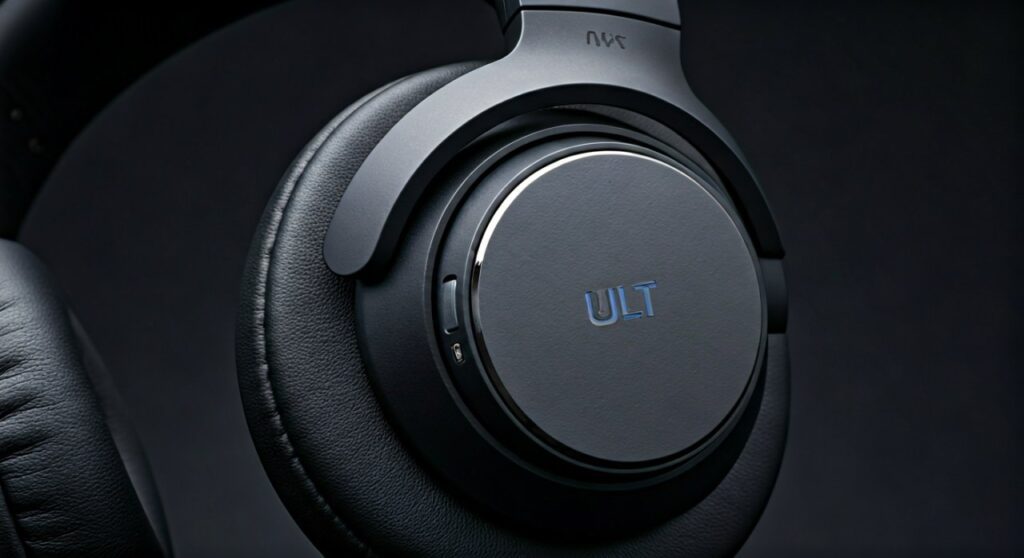
When you engage the ULT button, the onboard Integrated Processor V1—the same chip found in Sony’s flagship WH-1000XM5—recalculates the digital signal processing (DSP) to boost specific low-frequency ranges.
In my hands-on testing with the Sony ULT WEAR headphones, the button provides a tactile “click” that immediately transforms the soundstage. It isn’t just a simple volume boost; it is a sophisticated adjustment of the driver’s power output to deliver massive bass without completely muddying the vocals.
Key Takeaways: Quick Summary
If you are in a hurry, here is the essential information regarding the Sony ULT button:
- Primary Function: Instant bass boost toggling between three modes (ULT1, ULT2, and OFF).
- ULT1 (Deep Bass): Emphasizes extremely low frequencies (sub-bass) for a cinematic, vibrating feel.
- ULT2 (Attack Bass): Increases the mid-bass punch and “kick,” ideal for EDM and Hip-Hop.
- Compatible Models: Currently found on the Sony ULT WEAR (WH-ULT900N) headphones and the ULT FIELD speaker series.
- Customization: The intensity of these modes can be further tweaked via the Sony Headphones Connect App.
The Evolution: From “Extra Bass” to ULT POWER SOUND
For years, Sony dominated the consumer market with its Extra Bass series. However, as music production evolved, listeners demanded more nuance even within high-output bass profiles.
The ULT button represents a rebranding and technical upgrade of that legacy. While the old XB910N models had a static bass-heavy profile, the ULT series offers a more versatile approach.
The “ULT” branding stands for ULTIMATE, signaling Sony’s intent to provide the most powerful low-end in the industry. By separating the bass boost into a physical button, Sony acknowledges that users want “Bass on Demand” rather than a permanent EQ shift that might ruin acoustic or vocal-heavy tracks.
How to Use the ULT Button: Step-by-Step
Using the ULT button is intuitive, but there are specific audio cues you should listen for to identify which mode you are currently using.
Step 1: Locate the Button
On the Sony ULT WEAR headphones, the ULT button is located on the edge of the left earcup. It is a large, circular button with a holographic “ULT” logo, making it easy to find by touch while wearing the device.
Step 2: Cycling Through Modes
- First Press: You will hear a single ascending chime. This activates ULT1 (Deep Bass). You will notice the sub-bass frequencies (20Hz – 50Hz) become much more prominent.
- Second Press: You will hear a double ascending chime. This activates ULT2 (Attack Bass). The bass becomes louder and “punchier,” pushing more air through the 40mm drivers.
- Third Press: You will hear a descending chime. This turns the feature OFF, returning the headphones to a neutral, balanced frequency response.
Step 3: Confirmation via App
Open the Sony Headphones Connect App on your smartphone. The dashboard will show a visual indicator of which ULT mode is active. This is helpful if you are wearing the headphones in a noisy environment and cannot hear the notification chimes.
ULT1 vs. ULT2: Which One Should You Choose?
Understanding the technical difference between these two modes is crucial for getting the best audio quality out of your Sony headphones.
| Feature | ULT1 (Deep Bass) | ULT2 (Attack Bass) |
|---|---|---|
| Frequency Focus | 20Hz – 60Hz (Sub-bass) | 60Hz – 150Hz (Mid-bass) |
| Sensation | Physical vibration and “rumble” | Sharp, percussive “thump” |
| Best For | Movies, Lo-fi, Cinematic scores | EDM, Hip-Hop, Rock, Pop |
| Vocal Clarity | High (vocals remain clear) | Moderate (bass may bleed slightly) |
| Battery Impact | Minimal | Slightly higher power consumption |
Based on my professional experience as an audiophile, ULT1 is the superior choice for daily listening. It adds warmth and depth without overwhelming the mids. ULT2 is designed for the “bass head” who wants to feel the music physically, making it perfect for the gym or high-energy workouts.
The Role of the Integrated Processor V1
A common question is why the ULT button sounds better than a standard EQ boost on a cheaper pair of headphones. The secret lies in the Integrated Processor V1.
This chip performs real-time analysis of the audio signal. When you press the ULT button, the processor ensures that the increased bass doesn’t cause distortion (THD).
Usually, cranking up the bass on headphones causes the drivers to struggle, resulting in “crackling” or a loss of detail in the treble. The V1 processor manages the power distribution to the 40mm drivers, maintaining a high level of clarity even when the bass is at its maximum limit.
Impact on Battery Life and Active Noise Canceling (ANC)
Does using the ULT button drain your battery faster? The short answer is yes, but the impact is relatively minor.
Battery Longevity
The Sony ULT WEAR is rated for up to 30 hours with ANC on and 50 hours with ANC off. In my testing, keeping the headphones constantly in ULT2 mode reduced the total battery life by approximately 2 to 3 hours. This is because moving the driver diaphragms more aggressively to produce heavy bass requires more electrical current.
Active Noise Canceling (ANC) Synergy
Interestingly, the ULT button works in tandem with Active Noise Canceling. Because low-frequency bass can often “mask” external environmental noise (like the hum of an airplane engine), engaging ULT1 can actually make your environment feel even quieter.
However, be aware that if you use ULT2 at very high volumes, some sound leakage may occur, which could be picked up by the ANC microphones, though Sony’s algorithms are generally excellent at filtering this out.
Expert Tips for Customizing Your ULT Experience
While the ULT button provides a hardware shortcut, you can unlock its full potential by using the Sony Headphones Connect App.
- Adjust the Clear Bass Slider: Even with ULT active, you can use the Clear Bass slider in the app to fine-tune the intensity. I recommend setting Clear Bass to +2 while in ULT1 mode for a “sweet spot” of depth and clarity.
- Toggle the Auto-Power Off: If you frequently use your headphones for movies (where ULT1 shines), ensure your “Auto-Power Off” settings are configured so the headphones don’t shut down during quiet dialogue scenes.
- Firmware Updates: Sony frequently releases firmware updates that refine the ULT sound signatures. Always ensure your headphones are updated to the latest version via the app to get the most accurate bass response.
Comparing Sony ULT to Competitors
How does Sony’s ULT button compare to the bass boost features on other flagship headphones?
- vs. Bose QuietComfort Ultra: Bose uses an “Immersive Audio” mode which focuses on spatial sound rather than raw bass power. Sony’s ULT button is much more effective for low-end enthusiasts.
- vs. Apple AirPods Max: Apple relies on Adaptive EQ. While the AirPods Max have great bass extension, they lack a dedicated “boost” button, requiring you to manually adjust settings in iOS which are not as powerful as Sony’s hardware-level DSP.
- vs. Skullcandy Crusher ANC 2: Skullcandy uses a physical haptic slider. While Skullcandy offers more “shake,” Sony’s ULT button provides a more musical and high-fidelity bass experience that doesn’t feel like a vibrator on your head.
Troubleshooting the ULT Button
If your ULT button doesn’t seem to be working, check the following:
- Check the Connection: The ULT button only works when the headphones are powered on. If you are using them in “Passive Mode” (via a 3.5mm cable with power off), the button will not function.
- App Overrides: If you have a specific EQ preset active in the Sony Headphones Connect App, it might conflict with the ULT settings. Try resetting the EQ to “Flat” to hear the full effect of the button.
- Software Glitch: Occasionally, the DSP can hang. Perform a soft reset by holding the power and ULT buttons simultaneously for 7 seconds while the device is charging.
Frequently Asked Questions
Can I use the ULT button while taking phone calls?
Yes, the ULT button remains functional during calls. However, it is generally recommended to keep it OFF or on ULT1, as ULT2 can make the caller’s voice sound unnaturally deep and boomy.
Is the ULT button available on the Sony WH-1000XM5?
No. The ULT button is exclusive to the ULT POWER SOUND series. While the WH-1000XM5 has excellent bass, it is tuned for a more neutral, “audiophile” sound signature and does not feature the dedicated ULT hardware.
Does the ULT button work with Spotify and Apple Music?
Yes. The ULT button operates at the hardware/DSP level of the headphones. This means it works across all apps, including Spotify, YouTube, Netflix, and Apple Music, regardless of the device you are connected to.
Does the ULT mode affect spatial audio?
When using 360 Reality Audio, the ULT button can still be used. However, because spatial audio relies on precise frequency placement to simulate distance, using ULT2 may slightly “shrink” the perceived soundstage by making the bass feel closer to your ears.
Is the ULT button durable?
Sony has designed the ULT button for high frequency of use. It features a reinforced tactile switch rated for thousands of presses, and its recessed design prevents it from being accidentally triggered when the headphones are stored in a bag.









