

Inside a headphone jack, you will find a series of conductive metal contact pins (often made of copper or gold-plated brass), insulation spacers, and a mechanical spring system designed to lock the plug in place. These components work in unison to route electrical analog signals from your device to your speakers or microphone.
Understanding What Is Inside a Headphone Jack: The Internal Anatomy
Have you ever wondered why your audio crackles when you wiggle the cord, or why a slight “click” feels so satisfying when you plug in your favorite cans? To the naked eye, a headphone jack (the female port) looks like a simple dark hole. However, the interior is a precision-engineered environment where physics meets high-fidelity sound.
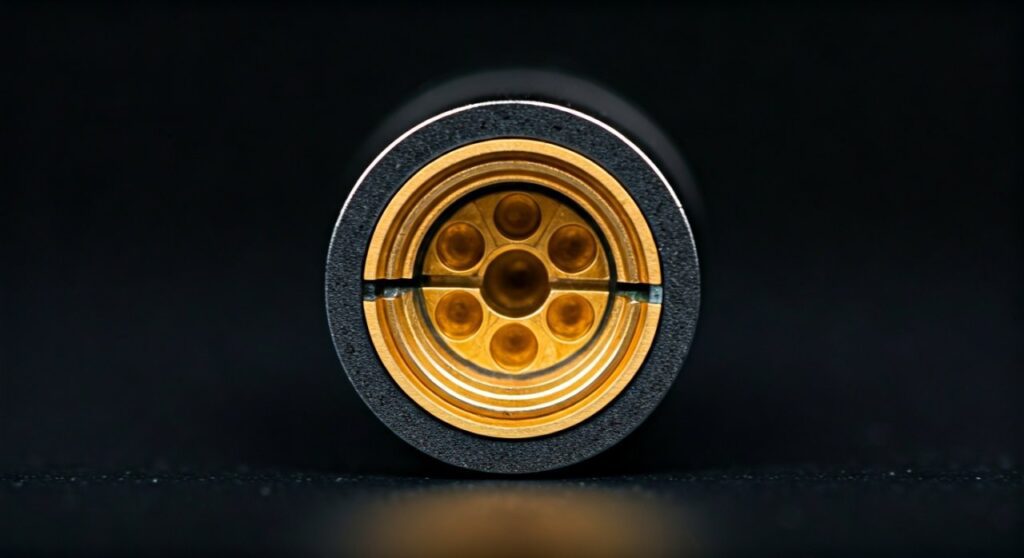
As an audio engineer who has desoldered and repaired hundreds of these ports, I can tell you that the internal architecture is surprisingly delicate. If one of those tiny internal leaves (the metal contacts) gets bent by even a millimeter, your high-end headphones will sound like they are underwater.
Key Takeaways: The Anatomy at a Glance
- Contact Terminals: These are the “fingers” that touch the plug to transfer audio signals.
- Insulation Layers: These prevent the electrical signals from crossing and causing a short circuit.
- Retention Springs: These provide the mechanical “grip” that keeps your cable from falling out.
- Housing/Shielding: Protects the internal pins from Electromagnetic Interference (EMI).
The Physical Components: A Deep Dive Inside the Port
When you peer inside a standard 3.5mm headphone jack, you are looking at a masterclass in space-saving electronics. Here is a breakdown of the specific parts you would find if you were to crack one open.
The Conductive Contact Pins (The Leaves)
The most critical parts inside a headphone jack are the metal contact terminals. These are usually shaped like small, flexible leaves or springs. When you insert a plug, these leaves press firmly against the Tip, Ring, and Sleeve of the male connector.
In high-quality jacks, these contacts are gold-plated to prevent oxidation. In cheaper consumer electronics, they may be made of nickel or tin-plated copper. Based on my experience, gold-plated contacts provide a much more stable signal over several years of use.
The Retention Spring
Ever noticed that “click” sound? That is the retention spring engaging. Inside the jack, the contact pin for the “Tip” is usually bent in a way that it acts as a latch. It drops into the groove of the headphone plug, providing the mechanical tension necessary to hold the cable securely.
Non-Conductive Insulators
Between each metal contact point is an insulating spacer. These are typically made of high-grade plastic, Teflon, or ceramic. Their job is to ensure that the electrical signal for the “Left Channel” does not leak into the “Right Channel” or the “Ground.”
The Switching Mechanism (Optional)
Many modern jacks include a detect switch. This is a tiny mechanical lever that, when pushed by the plug, tells the device’s software to “mute” the external speakers and redirect audio to the headphones. If your phone thinks headphones are plugged in when they aren’t, this internal switch is likely stuck.
Comparing Internal Configurations: TRS vs. TRRS
What is inside a headphone jack changes depending on how many “poles” or channels the jack supports. We measure these using the TRS (Tip, Ring, Sleeve) standard.
| Component Type | Internal Contacts | Common Usage |
|---|---|---|
| TS (Mono) | 2 (Tip, Sleeve) | Electric guitars, patch cables |
| TRS (Stereo) | 3 (Tip, Ring, Sleeve) | Standard headphones, MP3 players |
| TRRS (Stereo + Mic) | 4 (Tip, Ring, Ring, Sleeve) | Smartphones, gaming headsets |
| TRRRS (Balanced) | 5 (Tip, 3 Rings, Sleeve) | High-end Audiophile equipment |
In a TRRS jack, which is standard on modern laptops and smartphones, there is an extra fourth contact pin specifically for the microphone signal.
How the Electrical Connection is Formed
The magic happens through friction-based contact. As the plug slides in, it wipes across the internal pins. This “wiping action” is actually beneficial because it helps clear away microscopic dust and oxidation.
- The Tip Contact: Grabs the very end of the plug, typically carrying the Left Audio Channel.
- The Ring Contact(s): These sit in the middle, carrying Right Audio and sometimes Microphone data.
- The Sleeve Contact: This is located near the entrance of the jack and connects to the Ground (GND), completing the circuit.
Without a solid Ground connection inside the jack, you will hear a loud “hum” or “buzzing” sound. This is often the first part to fail because it bears the most mechanical stress at the mouth of the port.
Common Failures: What Goes Wrong Inside?
After years of plugging and unplugging, the internal components of a headphone jack can degrade. Here are the most common issues I see in the repair shop:
- Fatigued Springs: The metal leaves lose their “springiness” and no longer press hard enough against the plug. This leads to intermittent sound.
- Oxidation: Moisture in the air causes a thin layer of non-conductive “rust” to form on the contacts.
- Lint Accumulation: This is the #1 killer of smartphone jacks. Pocket lint gets compressed at the very bottom of the jack, preventing the plug from seating fully.
- Solder Joint Fractures: The pins inside the jack are soldered to a Printed Circuit Board (PCB). Physical stress can crack these tiny solder balls, cutting the connection entirely.
Step-by-Step: How to Maintain the Inside of a Jack
To keep the components inside a headphone jack working perfectly, follow these expert maintenance steps:
- Inspect for Debris: Use a bright flashlight to look into the port. If you see a grey “mat” at the bottom, that’s compressed lint.
- The Toothpick Trick: Use a non-conductive wooden toothpick or a plastic interdental brush to gently hook out debris. Never use a needle or paperclip, as metal can short out the internal electronics or scratch the contacts.
- Apply DeoxIT: If the audio is crackling, apply a tiny drop of DeoxIT D5 (a specialized contact cleaner) to a headphone plug, insert it, and spin it. This chemically removes oxidation from the internal leaves.
- Avoid Excessive Force: If a plug doesn’t go in, don’t force it. You may bend the internal retention spring, which is nearly impossible to fix without replacing the entire component.
The Science of Sound: Why Materials Matter
The materials used inside a headphone jack directly impact the impedance and signal-to-noise ratio.
- Pure Copper: Offers excellent conductivity but tarnishes quickly.
- Beryllium Copper: Often used for the internal leaves because it maintains its shape and “spring” better than standard brass.
- Gold Plating: While it doesn’t “improve” sound quality in the way some marketers claim, it provides a superior corrosion-resistant surface, ensuring the connection stays clean for years.
FAQs About Headphone Jack Internals
Why does my headphone jack have 3 lines but others have 2?
The lines on the plug correspond to the number of contacts inside the jack. Two lines mean it is a TRS (Stereo) setup. Three lines mean it is a TRRS (Stereo + Microphone) setup. The internal pins are spaced to align perfectly with these segments.
Can I clean the inside of a headphone jack with rubbing alcohol?
Yes, but use 90% Isopropyl Alcohol or higher. Lower percentages contain too much water, which can linger inside the jack and cause corrosion. Use a dampened (not dripping) cotton swab or a specialized cleaning stick.
Is there a difference between 3.5mm and 6.35mm jacks inside?
Scaling aside, the internal mechanics are identical. However, 6.35mm (1/4 inch) jacks are often built with much heavier-duty thick-gauge metal leaves, as they are designed for professional musical instruments and studio gear that see heavy abuse.
What happens if a pin inside the jack breaks?
If an internal contact pin snaps, the circuit is broken. For most devices, this requires a component-level replacement, meaning you must desolder the old jack from the motherboard and solder on a new one.
Why are phone manufacturers removing the headphone jack?
Internally, a headphone jack takes up a significant amount of “real estate” (depth). Removing the jack allows manufacturers to use that internal space for larger batteries, haptic engines, or to make the device more water-resistant by removing a major entry point for liquid.









