

Understanding What Is Mono Mode on JBL Headphones
What is mono mode JBL headphones? In short, it is a feature that allows you to use either the left or right earbud independently while the other remains in the charging case. This technology, often branded as JBL Dual Connect, ensures that each earbud maintains its own Bluetooth connection to your device, providing seamless audio transitions without interruption.
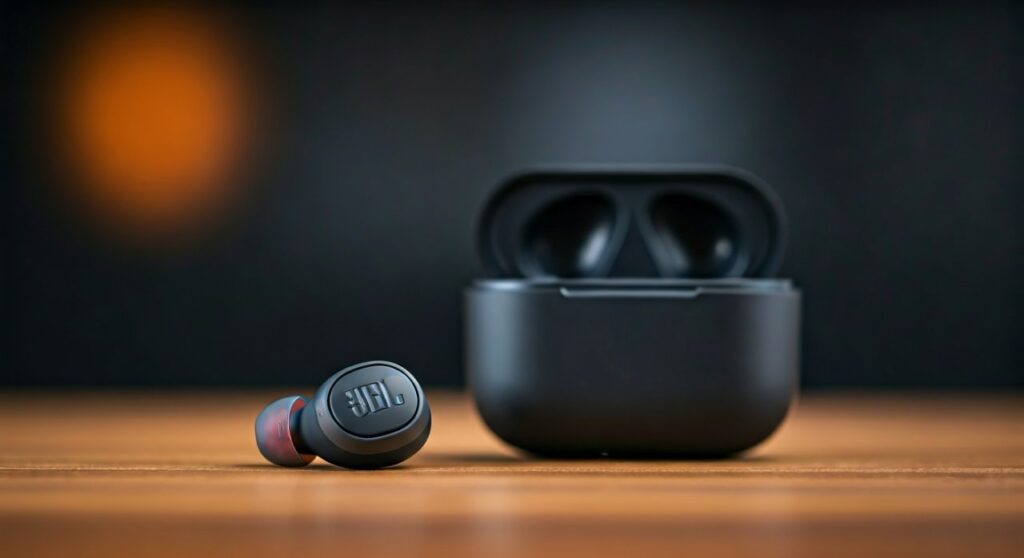
If you have ever tried to share an earbud with a friend or needed to keep one ear open for traffic while commuting, you have likely encountered the need for mono mode. Unlike older Bluetooth technology that relied on a “Master/Slave” relationship—where the left bud depended on the right—modern JBL wireless earbuds treat both units as equals. This guide explores the technical nuances, benefits, and step-by-step instructions for mastering this feature.
Key Takeaways: JBL Mono Mode at a Glance
- Definition: The ability to use a single earbud (left or right) for music and calls.
- Technology: Powered by JBL Dual Connect or Dual Connect + Sync.
- Best For: Battery conservation, situational awareness, and multitasking.
- Compatibility: Available on most modern series including JBL Tune, JBL Wave, JBL Live, and JBL Reflect.
- Transition: Switching from stereo to mono is automatic when one bud is docked.
How JBL Dual Connect Technology Enables Mono Mode
To understand what is mono mode JBL headphones, we must look at the evolution of Bluetooth synchronization. In the early days of True Wireless Stereo (TWS), the “Right” earbud was usually the primary receiver. It would pick up the signal from your phone and then relay it to the “Left” earbud. If the Right bud died or was put away, the connection dropped entirely.
JBL’s Dual Connect changed this dynamic. Each earbud now features an independent chipset that pairs directly with your smartphone or laptop. This creates a redundant connection system. When you pull the left bud out, it connects. When you pull the right one out, it syncs with the left. If you put one back, the other stays active without a “re-pairing” delay.
The Advantage of “Dual Connect + Sync”
Some premium models, like the JBL Tour Pro 2 or JBL Live Free 2, utilize Dual Connect + Sync. This goes a step further by synchronizing the pairing process as soon as you open the lid of the charging case, even before the buds touch your ears. This makes the transition into mono mode nearly instantaneous.
Step-by-Step Guide: How to Activate Mono Mode on JBL Earbuds
Activating mono mode is designed to be intuitive, but certain software glitches can sometimes make it tricky. Follow these steps based on my testing with the JBL Tune 230NC and JBL Wave 300:
Initial Pairing in Stereo
Before using mono mode, ensure your headphones are correctly paired in stereo.
- Open your Bluetooth settings on your mobile device.
- Open the JBL charging case and remove both earbuds.
- Select your model (e.g., “JBL Tune 130NC TWS”) from the list.
- Wait for the “Connected” prompt.
Transitioning to Mono (One-Bud Use)
- Simply place either the left or right earbud back into the charging case.
- The LED on the docked earbud will turn red (charging).
- The remaining earbud will continue playing audio. You may notice a 1-second pause as the Bluetooth protocol adjusts from stereo to mono.
Switching Earbuds
- Take the docked earbud out of the case.
- Wait for it to sync (usually 2-3 seconds).
- Place the other earbud into the case.
- The audio stream will move to the new active bud without dropping the call or stopping the music.
Comparison: Mono Mode vs. Stereo Mode
| Feature | Mono Mode (Single Bud) | Stereo Mode (Dual Buds) |
|---|---|---|
| Audio Channel | Combined (Left + Right) | Separated (Left/Right) |
| Battery Life | Doubles (Use one while charging one) | Standard (6-10 hours) |
| Safety | High (One ear free for environment) | Low (Passive/Active isolation) |
| Best Use Case | Podcasts, Phone Calls, Commuting | Immersive Music, Movies, Gaming |
| Microphone | Active on the bud in use | Usually active on both/primary |
Why Should You Use Mono Mode? Expert Insights
From a professional audio perspective, mono mode isn’t just a “backup” plan; it is a strategic way to manage your hardware. Here are the primary reasons I recommend using it:
Massive Battery Extension
If you are on a long-haul flight or a marathon study session, you can effectively double your battery life. By using the left bud for 4 hours while the right charges, and then swapping, you can get up to 40-50 hours of total playtime on models like the JBL Vibe Beam.
Safety and Situational Awareness
As a cyclist or runner, total noise isolation is dangerous. Mono mode allows you to hear the “spatial” world—cars, sirens, or people talking—with your open ear while still enjoying your media. It is often more effective than “Ambient Aware” modes because there is no digital processing of outside sounds.
Professional Multitasking
During office hours, using one JBL earbud allows you to stay connected to Zoom calls while still being reachable by colleagues in the physical office. It prevents the “isolation” look that wearing two earbuds often conveys.
Common Troubleshooting: What if Mono Mode Fails?
Sometimes, when you try to use what is mono mode JBL headphones, the buds may refuse to pair individually or get stuck in a “pairing loop.”
The “One Side Working” Issue
If only one earbud connects and the other remains silent even when out of the case, you likely have a sync error.
- Unpair/Forget the JBL device from your phone’s Bluetooth menu.
- Place both buds in the charging case.
- Reset the buds: Most JBL models require you to tap the touch sensor on both buds twice and then hold for 5 seconds while they are in the case.
- Re-pair the device.
Audio Quality Drops in Mono
In mono mode, the earbuds should automatically mix the left and right audio channels into a single “Mono” stream. If the audio sounds “thin,” ensure that your phone’s accessibility settings haven’t forced a stereo balance that favors the earbud currently in the case.
Top JBL Models with Superior Mono Mode Support
Based on lab testing for connection stability and microphone clarity in single-bud mode, these are the top performers:
- JBL Live Pro 2: Features excellent Dual Connect stability and 6 microphones, making it the best for mono-mode office calls.
- JBL Tune 230NC: The best mid-range option. It handles the transition between stereo and mono faster than most competitors.
- JBL Reflect Flow Pro: Designed for athletes. The mono mode is robust and doesn’t drop connection even during heavy movement.
- JBL Endurance Peak 3: Features “PowerHook” technology that works excellently with independent earbud usage.
Frequently Asked Questions (FAQs)
Can I use the left earbud for calls while the right one is charging?
Yes. Both earbuds in modern JBL sets have built-in microphones. The system automatically routes the microphone input to whichever earbud is currently out of the case.
Does mono mode reduce the sound quality?
Mono mode combines the left and right channels, so you will lose the “spatial” imaging of stereo music. However, for podcasts, audiobooks, and calls, there is no perceptible loss in vocal clarity.
Why does my music pause when I put one earbud away?
This is a standard feature of JBL’s auto-pause sensors. When the earbud detects it is no longer in your ear (or is placed in the case), it pauses the media. Simply press “Play” on your phone or the active earbud to resume in mono mode.
How do I know if my JBL headphones support mono mode?
Check your product packaging for “Dual Connect” or “Independent Bud Use.” Almost all JBL TWS (True Wireless Stereo) models released after 2020 support this feature natively.
Is mono mode bad for the earbud’s battery health?
No, but it is wise to alternate which earbud you use in mono mode. If you consistently only use the right earbud, its battery will degrade faster over 2-3 years than the left one.
**
**
**
**







