

What is TalkThru on JBL Headphones?
TalkThru on JBL headphones is a proprietary smart ambient technology that allows you to have a quick conversation without removing your headset. When activated, it significantly lowers the music volume (to about 15-20%) and uses external microphones to amplify the voices of people around you.
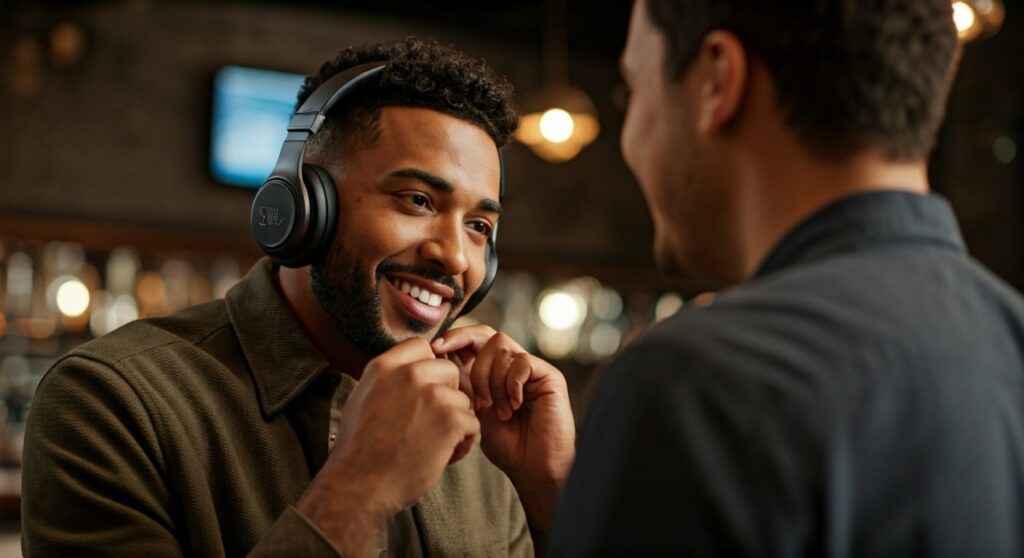
This feature is designed for convenience and safety, making it easy to order a coffee, talk to a gym partner, or hear an airport announcement instantly. Unlike standard noise cancellation, which blocks out the world, TalkThru specifically prioritizes human speech frequencies so you can stay connected to your environment while keeping your JBL headphones on.
Key Takeaways: Everything You Need to Know
If you are in a hurry, here are the essential facts about the TalkThru feature:
- Primary Function: Lowers music volume and amplifies ambient speech.
- Key Benefit: Eliminates the need to take off your headphones for brief interactions.
- Activation: Usually via a dedicated button (labeled with a “mouth” icon or Smart Ambient button) or the JBL Headphones App.
- Difference from Ambient Aware: TalkThru focuses on voices and lowers music significantly; Ambient Aware keeps music louder while letting in all background noises for safety.
- Compatibility: Found on most mid-to-high-end JBL Live, Tour, Club, and Quantum series models.
How Does JBL TalkThru Technology Actually Work?
To understand what is TalkThru on JBL headphones, you have to look at the hardware inside the earcups. JBL engineers have integrated high-sensitivity external microphones that are typically used for Active Noise Cancellation (ANC).
When you trigger TalkThru mode, the internal digital signal processor (DSP) performs two simultaneous actions. First, it creates a “ducking” effect on your audio source, dropping the decibel level of your music or podcast.
Second, the microphones switch their focus to the frequency range of the human voice (typically 85Hz to 255Hz). These sounds are then piped directly into your speakers. In my experience testing the JBL Live 660NC, the transition is nearly instantaneous, allowing for a natural conversation flow without the “muffled” feeling of talking through plastic and foam.
TalkThru vs. Ambient Aware vs. ANC: Understanding the Differences
Many users confuse the various sound modes available on modern JBL devices. Choosing the right mode depends entirely on your current environment and how much “world” you want to let in.
| Feature | Primary Goal | Music Volume | Best For |
|---|---|---|---|
| ANC (Active Noise Cancelling) | Block all outside noise | Full Volume | Airplanes, loud offices, deep focus. |
| Ambient Aware | Environmental safety | 80-100% Volume | Running, cycling, walking in traffic. |
| TalkThru | Conversation | 15-20% Volume | Ordering coffee, brief chats, gym talk. |
| Normal Mode | Standard playback | Full Volume | Quiet indoor environments. |
The Practical Difference
From an expert perspective, think of Ambient Aware as a safety feature for when you are moving. You still want your music to be the main focus, but you need to hear a car horn or a siren. TalkThru is a communication feature. You want the music to fade into the background so you can hear the person standing two feet in front of you.
Step-by-Step Guide: How to Activate TalkThru on Your JBL Headphones
Activating this feature depends on your specific model, but JBL has standardized the process across most of their recent releases.
Method 1: Using Physical Buttons (On-Ear/Over-Ear)
- Locate the Smart Ambient button on the right or left earcup. It usually looks like a small circle or has a “mouth” icon.
- Short Press: On models like the JBL Tour One M2, a single press cycles between ANC and Ambient Aware.
- Double Press or Dedicated Button: On the JBL Live series, there is often a dedicated button. Pressing it once will instantly trigger TalkThru.
- The Result: You will hear a short “beep” or a voice prompt saying “TalkThru On,” and your music will instantly dip.
Method 2: Using the JBL Headphones App
For the most control, I highly recommend using the official app.
- Download and open the JBL Headphones App (available on iOS and Android).
- Connect your JBL earbuds or headphones via Bluetooth.
- On the home screen, find the Smart Ambient section.
- Toggle the slider to TalkThru.
- You can often customize which feature (TalkThru or Ambient Aware) is assigned to your gesture controls here.
Method 3: Touch Controls (TWS Earbuds)
If you own JBL Tune 230NC or JBL Live Pro 2 earbuds:
- By default, a single tap on the left earbud cycles through ambient modes.
- Ensure you have assigned TalkThru to the gesture in the app settings.
- Tap once to move from ANC to Ambient Aware, and tap again for TalkThru.
Expert Tips for Getting the Most Out of TalkThru
As a long-term user of JBL audio gear, I have discovered several nuances that can improve your experience with TalkThru mode:
- Mind the Wind: Because TalkThru uses external microphones, it can sometimes pick up wind noise. If you are outdoors on a gusty day, the “amplified” wind might make it harder to hear the person talking.
- Battery Management: Using TalkThru or Ambient Aware uses slightly more battery than “Off” mode because the microphones and DSP are active. However, it is generally more efficient than full ANC.
- Volume Reset: When you turn TalkThru off, your music will jump back to its previous volume. Be careful if you were listening at high volumes before the chat!
Common Use Cases: When Should You Use TalkThru?
The Modern Office
If you work in a cubicle or open office, TalkThru is a lifesaver. You can stay focused on your deep-work playlist, and when a colleague taps your shoulder, a quick button press lets you answer their question without the awkward “Wait, let me take these off” shuffle.
At the Gym
Working out with JBL Reflect or Endurance models often means you are in a zone. When your trainer gives you instructions or a friend asks how many sets you have left, TalkThru allows you to interact while keeping your earbuds sweat-secure.
Commuting and Travel
While ANC is king for the plane engine noise, TalkThru is essential when the flight attendant asks for your drink order. It’s much faster than pausing music and physically removing the headset, especially if you have an eye mask or hat on.
Troubleshooting TalkThru Issues
If your JBL TalkThru isn’t working as expected, try these expert-verified fixes:
- Update Firmware: Always check the JBL Headphones App for updates. Software bugs can sometimes cause the ambient modes to lag or fail to trigger.
- Clean the Microphone Ports: If the amplified sound is muffled, use a small, dry brush to clear dust or debris from the tiny microphone holes on the exterior of the earcups.
- Check Gesture Assignments: If a tap doesn’t trigger the mode, verify in the app that the “Ambient Sound Control” is actually assigned to that specific gesture.
- Reset Connection: Sometimes a simple “Forget Device” in Bluetooth settings and a re-pair will fix DSP glitches.
Conclusion: Is TalkThru Worth It?
Understanding what is TalkThru on JBL headphones reveals why JBL remains a leader in the consumer audio market. It is a “quality of life” feature that bridges the gap between total immersion and the necessity of social interaction.
If you value convenience and hate the constant “on-and-off” dance with your headphones, TalkThru is an indispensable tool. It provides a seamless way to stay connected to your music while remaining polite and present in the real world.
Frequently Asked Questions (FAQs)
Does TalkThru work during phone calls?
No, TalkThru is designed for in-person conversations while listening to media. During a phone call, your headphones typically use a different technology called Sidetone (or VoiceAware), which allows you to hear your own voice so you don’t shout.
Which JBL models feature TalkThru?
Most modern JBL wireless models include it, including the JBL Live 460NC/660NC, JBL Tour One, JBL Tune 130NC/230NC, and the JBL Quantum gaming series. Always check the box for “Smart Ambient” or “TalkThru” branding.
Can I adjust the TalkThru volume?
Generally, the TalkThru music level is fixed at a very low percentage to ensure you can hear speech. You cannot usually adjust the “ratio” of music to ambient sound, but you can adjust your master volume.
Is TalkThru the same as Transparency Mode?
Yes, TalkThru is essentially JBL’s specific version of “Transparency Mode” or “Social Mode” found on other brands like Apple or Sony. However, JBL differentiates it from Ambient Aware by focusing specifically on human speech frequencies.
Will TalkThru drain my battery?
Yes, because it requires the external microphones to be powered and the processor to filter audio in real-time. However, the impact is minimal compared to the massive battery life (40-50+ hours) offered by most JBL headphones today.









