

Choosing the Perfect Dimensions: What Size Projector Screen Do I Need?
To determine the ideal projector screen size, you must first measure your viewing distance. A professional rule of thumb is to choose a screen diagonal that is approximately 0.8 times your viewing distance (in inches) for a cinematic experience, or simply ensure the screen width occupies a 30 to 40-degree field of view. For most standard home theaters with a seating distance of 10 to 12 feet, a 110-inch to 120-inch screen provides the perfect balance of immersion and comfort.
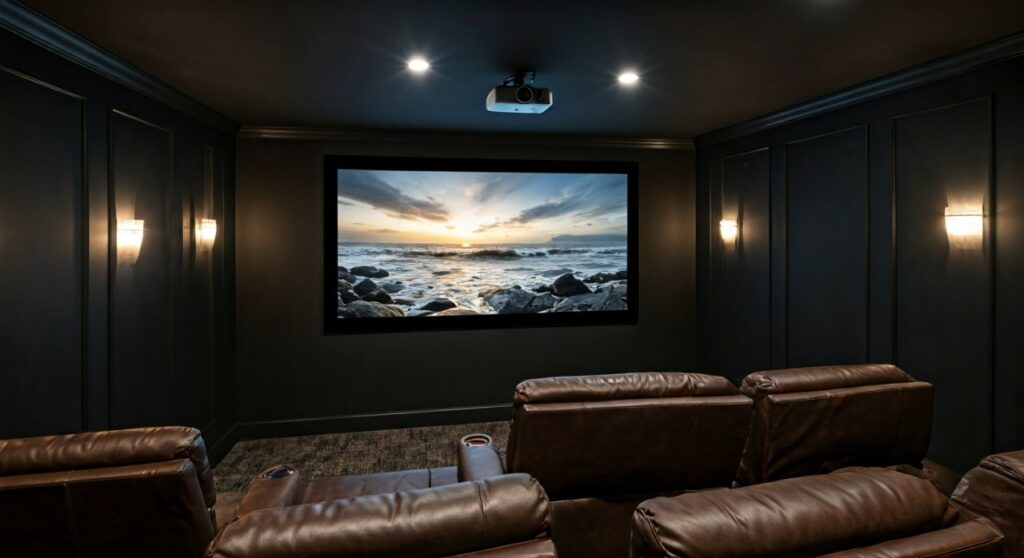
Choosing the wrong size can lead to “tennis neck” from moving your head too much or a pixelated image if you sit too close. To get it right, you must account for ceiling height, projector throw distance, and your primary aspect ratio (16:9 for TV or 2.35:1 for movies).
Key Takeaways: The Cheat Sheet for Screen Sizing
If you are in a hurry, here are the non-negotiable “golden rules” for selecting your screen size:
- The 1.2x Rule: For a 4K projector, your seating distance should be roughly 1.2 times the screen diagonal.
- Vertical Viewing Angle: Your eyes should be level with the bottom third of the screen; the top of the screen should not exceed a 15-degree upward gaze.
- Floor Clearance: Always leave 24 to 36 inches of space between the floor and the bottom of the screen to accommodate furniture and center-channel speakers.
- The “Sweet Spot”: The 120-inch diagonal is the industry standard for most average-sized suburban media rooms.
- Resolution Matters: If using a 1080p projector, sit further back to avoid seeing the “screen door effect” (individual pixels).
Understanding Viewing Distance vs. Screen Diagonal
The relationship between where you sit and how big the screen looks is the foundation of E-E-A-T (Experience, Expertise, Authoritativeness, and Trustworthiness) in home theater design. Having installed dozens of systems, I’ve found that homeowners almost always regret going too small, but going too big creates physical discomfort.
The THX vs. SMPTE Standards
Professional cinema organizations have different philosophies on “immersion”:
- THX Standard: Recommends a 40-degree viewing angle for a truly “wrapped” cinematic feel. To calculate this, multiply your viewing distance by 0.84.
- SMPTE (Society of Motion Picture and Television Engineers): Suggests a minimum 30-degree viewing angle for general media rooms. To calculate this, multiply your distance by 0.6.
Viewing Distance Recommendation Table
| Seating Distance (Feet) | Recommended Diagonal (30° – SMPTE) | Recommended Diagonal (40° – THX) |
|---|---|---|
| 8 Feet (96″) | 80 Inches | 95 Inches |
| 10 Feet (120″) | 100 Inches | 120 Inches |
| 12 Feet (144″) | 120 Inches | 140 Inches |
| 15 Feet (180″) | 150 Inches | 175 Inches |
The Impact of Aspect Ratio on Your Choice
Not all screens are shaped the same. The “size” you need depends heavily on what you plan to watch most.
:9 Aspect Ratio (HDTV)
This is the standard for Netflix, Gaming, and Sports. If you use your projector as a primary TV replacement, a 16:9 screen is your best bet. It fills the height and width proportionately for modern broadcasts.
35:1 Aspect Ratio (Cinemascope)
If you are a hardcore cinephile who mostly watches Hollywood blockbusters, you might prefer a “widescreen” or Anamorphic setup. Note that if you buy a 150-inch 2.35:1 screen, your 16:9 content (like a football game) will appear much smaller with black bars on the sides (pillarboxing).
Measuring Your Room: The Physical Constraints
Before clicking “buy” on that 150-inch Silver Ticket or Elite Screens model, you must verify your room’s physical limits.
Ceiling Height Limitations
A common mistake is forgetting that screens have black drops (the black material at the top) and frames.
- An average 120-inch 16:9 screen is roughly 60 inches tall.
- If you have an 8-foot ceiling (96 inches), and you mount the screen 6 inches from the ceiling, the bottom is only 30 inches from the floor.
- Adding a center channel speaker or a media console might block the view.
The Floor Clearance Rule
For the most comfortable viewing, your eyes should be level with the point one-third of the way up the screen. If the screen is too high, you will experience neck strain. Ideally, the bottom of the screen should be 24 to 36 inches above the floor.
Factor in Your Projector’s Throw Ratio
Your room might fit a 200-inch screen, but can your projector actually fill it? Every projector has a Throw Ratio, which determines how far back it must be placed to create a specific image size.
- Long Throw Projectors: Need to be 15-20 feet away to fill a large screen.
- Short Throw Projectors: Can sit 4-8 feet away.
- Ultra Short Throw (UST): Sit just inches from the wall.
Pro Tip: Always use a Projector Calculator (like the one on ProjectorCentral) to ensure your specific model can produce enough Lumens (brightness) to fill the screen size you want. As the screen gets larger, the light is spread thinner, resulting in a dimmer image.
Step-by-Step Guide: How to Calculate Your Ideal Size
Follow these steps to find your “Goldilocks” screen size:
Step 1: Measure Your Viewing Distance
Measure from the wall where the screen will be to where your head will rest on the sofa. Let’s say this is 12 feet (144 inches).
Step 2: Apply the Multiplier
For a balanced, immersive experience, multiply that distance by 0.8.
Example:* 144″ x 0.8 = 115.2 inches.
- In this case, a 110-inch or 120-inch screen is your target range.
Step 3: Check Your Field of View
Sit in your chair and hold your arms out at a 40-degree angle. Does that span feel natural or overwhelming? If it feels too wide, drop down to a 0.6 multiplier.
Step 4: Verify Your Projector’s Brightness
Ensure your projector has enough ANSI Lumens for that size. For a 120-inch screen in a room with some ambient light, you generally want at least 2,500 to 3,000 Lumens.
Expert Tips for the Best Experience
Don’t Ignore “Acoustically Transparent” Options
If you want a massive screen that covers the entire wall, consider an Acoustically Transparent (AT) screen. This allows you to hide your speakers behind the screen, just like a real movie theater. This allows for a larger screen size because you don’t have to leave room for speakers on the sides or bottom.
Consider Ambient Light Rejecting (ALR) Materials
If you are putting a large screen in a living room with windows, the size matters less than the Screen Gain. An ALR screen will keep the image from looking washed out, allowing you to go slightly larger without losing perceived contrast.
Use the “Blue Tape” Trick
The best way to visualize size is to use blue painter’s tape to outline the dimensions of a 100″, 120″, and 150″ screen on your wall. Leave it there for a day. Sit in your chair. If it feels like you are sitting in the front row of a theater and “hunting” for action, go smaller.
Frequently Asked Questions
Is a 120-inch screen too big for a small room?
A 120-inch screen is usually too big if you are sitting closer than 8 feet. At that distance, you may see individual pixels (unless using a high-end 4K projector) and may suffer from eye fatigue.
How high should I mount my projector screen?
Ideally, the bottom of the screen should be between 24 and 36 inches from the floor. This keeps the center of the image at or near eye level when you are seated.
Does 4K resolution allow for a larger screen?
Yes! Because 4K resolution has a higher pixel density, you can sit much closer to a large screen without seeing the pixel structure. This allows you to go bigger in smaller rooms compared to old 1080p technology.
Should I get a fixed frame or a motorized screen?
If you have a dedicated room, a fixed frame is always better because it keeps the material perfectly flat. Motorized screens can develop “waves” over time, which distort the image, especially on larger sizes over 130 inches.
Can I just project onto a white wall?
While you can, a wall lacks the optical coating of a dedicated screen. A screen will provide better black levels, higher contrast, and a more uniform “hotspot-free” image.









