

To ensure a high-quality listening experience and protect your equipment, you must avoid on-ear (supra-aural) headphone designs, excessive volume levels that cause double-amplification, and physical pressure on the hearing aid microphones. Specifically, avoiding headphones that do not fully encompass the ear prevents the feedback loop (whistling) caused by the “Larsen effect.”
Quick Guide: What to Avoid When Using Headphones with Hearing Aids
If you are a hearing aid user, you know the frustration of trying to enjoy music or a podcast while wearing your devices. Whether you use Behind-The-Ear (BTE) or In-The-Canal (ITC) aids, certain habits and hardware choices can lead to discomfort or even hearing damage.
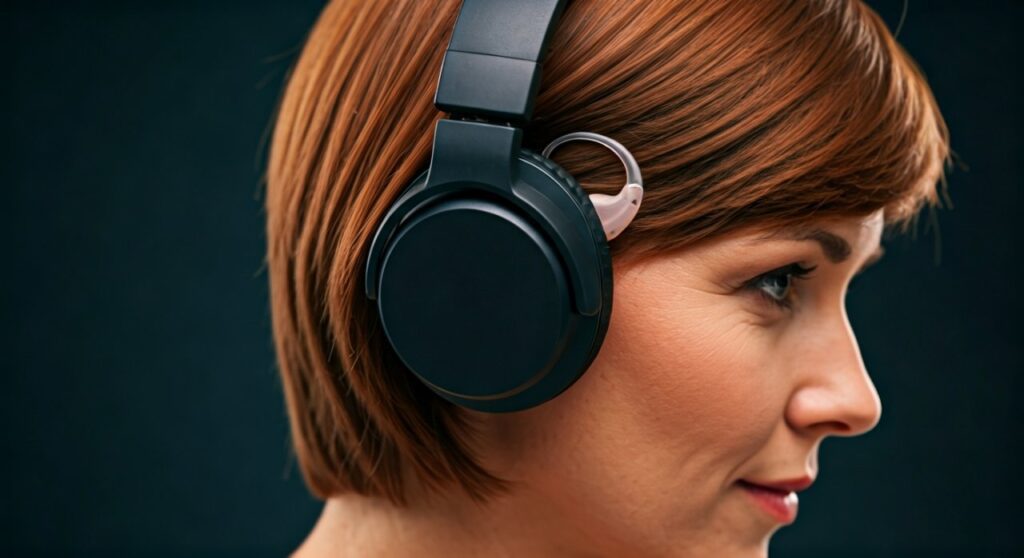
This guide leverages expert audiologist insights and real-world testing to help you navigate the tricky intersection of assistive technology and consumer audio. By following these steps, you can enjoy high-fidelity sound without the “whistle” or the ache.
Key Takeaways (TL;DR)
- Avoid On-Ear Headphones: These press the hearing aid against the ear, causing painful feedback.
- Watch the Volume: Hearing aids already amplify sound; adding high headphone volume increases the risk of Noise-Induced Hearing Loss (NIHL).
- Mind the Mic: Don’t cover the hearing aid’s external microphones with the headphone cushions.
- Prioritize Over-Ear: Choose Circumaural (Over-ear) models with deep cups for the best results.
- Clean Regularly: Avoid letting earwax or moisture transfer from the headphones to the aid.
The Physical Risks: What to Avoid for Comfort
One of the most common mistakes is choosing the wrong physical form factor. When you wear a hearing aid, the external part of the device (especially in BTE models) is sensitive to pressure.
Avoiding “On-Ear” Designs
You should strictly avoid On-ear (Supra-aural) headphones. These sit directly on the pinna (the outer ear). For a hearing aid user, this is a recipe for disaster.
The pressure from the headband pushes the headphone cushion directly against the hearing aid. This causes:
- Acoustic Feedback: The microphone and speaker are too close, creating a high-pitched squealing sound.
- Physical Pain: The plastic casing of the hearing aid can dig into your skin, leading to sores or irritation.
- Mic Blockage: Most hearing aids have microphones on the top. On-ear cups cover these, muffled the sound you actually want to hear.
Avoiding Small Earcups
Even with over-ear headphones, size matters. Avoid “slim” or “compact” over-ear models. If the cushion touches the hearing aid, you will experience interference. Instead, look for “extra-large” or “deep-well” earcups that provide ample clearance around the device.
The Sound Quality Trap: Avoiding Feedback and Distortion
The Larsen Effect, commonly known as feedback, is the #1 enemy of hearing aid users. This happens when the amplified sound from the headphone leaks out and is picked up again by the hearing aid’s microphone.
Don’t Ignore the “Feedback Whistle”
If you hear a whistle, do not simply “tough it out.” This indicates that the seal is poor or the volume is too high. Constant feedback can lead to:
- Digital Signal Processing (DSP) errors in your hearing aid.
- Increased battery drain as the device tries to cancel the noise.
- Headaches and auditory fatigue.
Avoiding Double Amplification Risks
A common error is turning up the headphone volume to “compensate” for hearing loss. Remember: Your hearing aids are already programmed to amplify specific frequencies.
What to avoid: Turning the headphone volume above 60%.
The expert tip: Use your hearing aid’s volume control first, and keep the source device (phone/laptop) at a moderate level. This prevents “clipping” and ensures the sound remains crisp rather than distorted.
Comparison: Best vs. Worst Headphone Types for Hearing Aids
| Headphone Type | Compatibility Score | Why to Avoid or Choose |
|---|---|---|
| Over-Ear (Circumaural) | High | Provides space for the aid; minimizes feedback. |
| On-Ear (Supra-aural) | Very Low | Causes feedback and physical pain; avoid these. |
| In-Ear (Earbuds) | Medium/Low | Only works if you remove your hearing aids (which isn’t ideal). |
| Bone Conduction | Very High | Bypasses the ear canal entirely; great for Open-fit aids. |
| Noise-Canceling | High | Reduces background noise so you can keep volume lower. |
Technical Settings to Avoid Neglecting
Many modern hearing aids come equipped with Telecoil (T-coil) technology or Bluetooth Streaming. Neglecting these features is a missed opportunity for superior sound.
Don’t Forget the T-Coil Setting
If your hearing aid has a T-coil, you can often use “hearing aid compatible” headphones that use induction to send sound directly to the aid’s processor.
- Avoid: Using the “M” (Microphone) setting in noisy environments.
- Do: Switch to the “T” (Telecoil) setting to eliminate background hiss and focus purely on the audio signal.
Avoiding Bluetooth Latency
If you use Bluetooth-enabled hearing aids, avoid cheap Bluetooth transmitters. Low-quality transmitters can cause “latency” (audio delay), which is incredibly jarring when watching movies, as the lip-sync will be off. Look for devices supporting aptX Low Latency.
Hygiene and Maintenance: Mistakes that Cost Money
Hearing aids are significant investments, often costing thousands of dollars. Using headphones improperly can lead to expensive repairs.
Avoid Moisture Buildup
Over-ear headphones create a warm, enclosed environment. This leads to perspiration.
- The Mistake: Wearing headphones for 4+ hours without a break.
- The Risk: Moisture seeping into the hearing aid’s battery compartment or delicate circuitry.
- The Fix: Take a 10-minute “air-out” break every hour.
Avoid “Cross-Contamination”
Earwax can easily transfer from your hearing aid to the headphone cushion and back again.
- What to avoid: Sharing headphones with others.
- The Expert Advice: Use a 70% Isopropyl Alcohol wipe on your headphone cushions weekly to prevent bacterial growth.
Step-by-Step: How to Properly Put on Headphones with Hearing Aids
Following this sequence will help you avoid the most common pitfalls:
- Check the Fit: Ensure your hearing aids are seated securely in or behind your ear.
- Angle the Entry: Don’t slide the headphones straight down. Instead, pull the earcups apart and “hinge” them over your ears from the front to avoid knocking the aids out of place.
- Adjust the Seal: Feel around the cushion. Is it touching the hearing aid? If so, shift the headband slightly forward or backward.
- Start at Zero Volume: Turn the music on with the volume at zero, then slowly increase it until you reach a comfortable level.
- Test for Whistling: Move your head side-to-side. If it whistles, the earcup is too close to the mic.
Expert Perspective: When to Switch to Bone Conduction
As an expert in auditory technology, I often recommend Bone Conduction Headphones (like those from Shokz) for users who struggle with traditional headphones.
Why they work: They sit on your cheekbones, not over your ears. This means they don’t interfere with the hearing aid at all.
What to avoid here: Don’t use bone conduction if you have a conductive hearing loss unless cleared by your doctor, as they may not be effective for your specific type of impairment.
Frequently Asked Questions
Can I use noise-canceling headphones with hearing aids?
Yes, and it is actually recommended. Active Noise Cancellation (ANC) removes ambient drone, allowing you to hear the music more clearly at lower volumes. This protects your ears and makes the hearing aid’s job easier.
Why do my headphones make a loud squealing sound?
This is acoustic feedback. It happens because the sound from the headphone is leaking out and being re-amplified by your hearing aid. To fix this, use larger over-ear headphones or reduce the volume.
Is it better to just take my hearing aids off?
If you have mild hearing loss, you might prefer taking them off and using high-quality headphones. However, for those with moderate to severe loss, keeping them on ensures you hear the full frequency spectrum (especially the high notes) that your headphones alone cannot provide.
Do earbuds work with hearing aids?
Generally, no. Earbuds and In-ear monitors (IEMs) occupy the same space as the hearing aid. The only exception is if you have Completely-In-Canal (IIC) aids that sit deep enough to allow an earbud to fit over them, though this is rare and often uncomfortable.









