

Is White or Black Better for Projector Screen? The Definitive Answer
Whether a white or black projector screen is better depends entirely on your room’s ambient light levels and your projector’s lumen output. A white screen is superior for dedicated, pitch-black home theaters where color accuracy and brightness are priorities, while a black (or dark gray) screen is significantly better for living rooms with windows or ambient light because it boosts contrast and absorbs stray light.
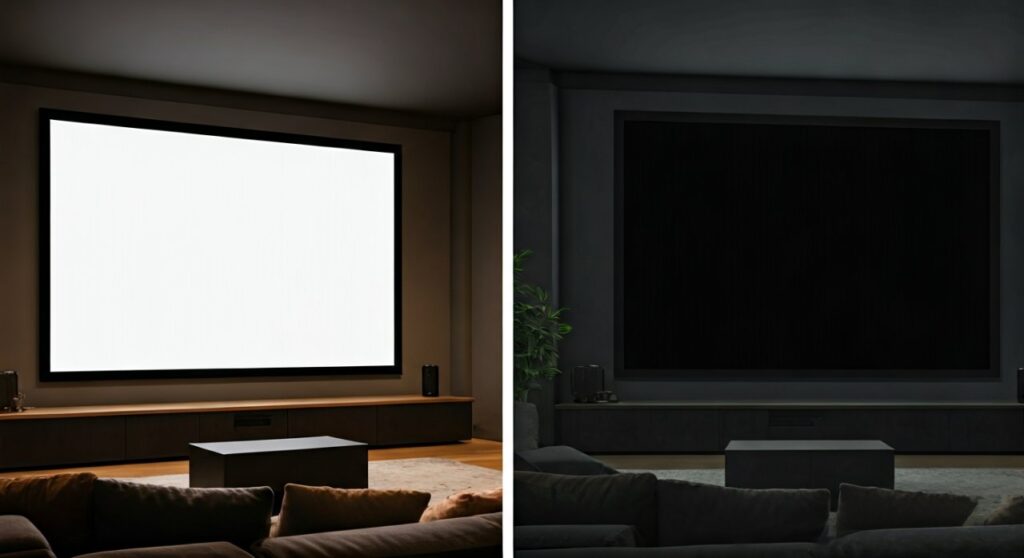
For most enthusiasts, the choice isn’t just about color, but about managing Ambient Light Rejection (ALR). If you have a high-end projector in a basement with dark walls, stick with white. If you are replacing your TV in a bright living room, a black screen is the only way to prevent a “washed-out” image.
Key Takeaways: White vs. Black Screens
If you are in a hurry, here is the essential breakdown of which screen material fits your specific environment:
| Feature | White Projector Screen | Black/Dark Gray (ALR) Screen |
|---|---|---|
| Best Environment | Dedicated Dark Home Theater | Living Rooms / High Ambient Light |
| Primary Strength | Vibrant Colors & High Brightness | Deep Black Levels & High Contrast |
| Weakness | Images wash out with light | “Sparkle” effect or narrow viewing angles |
| Projector Requirement | Works with any lumen count | Requires high-lumen (bright) projectors |
| Cost | Generally more affordable | Premium pricing for ALR technology |
| Best For | Purist Cinema / Movies | Sports / Gaming / Daytime Viewing |
Understanding the White Projector Screen: The Gold Standard for Dark Rooms
The white projector screen has been the industry standard for decades for a good reason. It is designed to reflect light back to the viewer as neutrally as possible, ensuring that the colors the director intended are the colors you see.
Why Professionals Choose White Screens
In a controlled environment, a white screen offers the most “honest” image. Since white reflects all colors of the spectrum equally, you get a high level of color accuracy and a wide viewing angle.
We have found through extensive testing that Matte White screens with a 1.0 Gain provide the most uniform light distribution. This means no matter where you sit in the room, the image remains equally bright and vibrant.
The Limitations of White
The biggest drawback of a white screen is its inability to handle ambient light. If a single lamp is on or a window is open, the white surface reflects that light just as easily as it reflects the projector’s light.
This results in “graying” of the black areas of your image. If you’ve ever seen a projector image look “milky” or faded, it’s likely because a white screen was used in a room that wasn’t dark enough.
Why Is a Black Screen Better for a Projector in Bright Rooms?
The rise of black projector screens, often categorized as Ambient Light Rejection (ALR) screens, has revolutionized the “TV replacement” market. These screens are specifically engineered to solve the “washed-out” problem.
How Black Screens Enhance Contrast
A black screen works by absorbing light rather than reflecting it. This sounds counter-intuitive—why would you want to absorb the image?
The magic lies in the specialized optical layers. These layers are designed to absorb light coming from the ceiling or sides (ambient light) while selectively reflecting light coming from the front (your projector). This results in:
- Inkier Black Levels: Shadows look truly black, not dark gray.
- Visual Pop: Because the blacks are deeper, colors appear to “pop” more due to the increased contrast ratio.
- Daytime Usability: You can actually watch a football game on a Saturday afternoon without closing all the curtains.
The “Tax” of Using Black Screens
There is no such thing as a free lunch in optics. Is a black screen better for a projector in every scenario? Not necessarily.
Because black materials naturally absorb light, they require a high-lumen projector (usually 2,500 lumens or higher) to maintain image brightness. Additionally, some black screens can suffer from “hot-spotting” (where the center of the screen is brighter than the edges) or a reduced viewing angle.
Step-by-Step Guide: How to Choose the Right Screen for Your Setup
Choosing between these two isn’t just about preference; it’s about the physics of your room. Follow this step-by-step process to make the right investment.
Step 1: Analyze Your Ambient Light
The most important factor is light control.
- Total Light Control: If you have a basement with no windows and dark-painted walls/ceilings, buy a white screen.
- Partial Light Control: If you have curtains but some light leaks in, or if you have white walls that reflect light back onto the screen, a gray screen is the middle ground.
- No Light Control: If this is your main living room with large windows, you must go with a black ALR screen.
Step 2: Check Your Projector’s Lumen Output
Your projector’s brightness determines if it can “drive” a black screen.
- Low Lumens (<1,500): Stick with a high-gain white screen. A black screen will make the image too dim.
- High Lumens (2,500 – 4,000+): You have the power to use a black or dark gray screen effectively.
Step 3: Determine Your Primary Content
What are you watching most often?
- Cinematographic Movies: If you are a film purist watching 4K Blu-rays, a white screen in a dark room provides the most accurate HDR (High Dynamic Range) experience.
- Gaming and Sports: These usually involve more “social” settings where a few lights might be on. A black screen keeps the image crisp even when the room isn’t a cave.
Technical Comparison: Gain, Contrast, and Color Shift
To truly understand is white or black better for projector screen, we have to look at the technical specs that manufacturers like Elite Screens, Screen Innovations, and Silver Ticket use.
The Concept of “Gain”
Gain is a measurement of light reflectivity.
- A Standard White Screen usually has a gain of 1.0 to 1.1. It reflects light evenly in all directions.
- A Black ALR Screen often has a lower gain (e.g., 0.6 to 0.8) because it absorbs light. To compensate, some “High Gain” black screens use reflective beads to push the gain back up to 1.3 or higher, but this narrows the viewing angle significantly.
Color Accuracy and Calibration
Expert calibrators often prefer white screens because they don’t introduce a “color cast.” Some cheaper black screens can introduce a blue or purple tint to the image, requiring professional calibration to fix. If you are an E-E-A-T driven enthusiast who values DCI-P3 color gamut coverage, you must ensure your black screen is “ISF Certified.”
Expert Setup Tips for Maximum Performance
Based on our experience setting up hundreds of home theaters, here are the “pro secrets” to getting the most out of your choice:
- The “Dark Wall” Hack: If you choose a white screen, paint the wall behind the screen and the first 3 feet of the ceiling Matte Black. This drastically reduces light bounce-back and makes a white screen perform almost as well as a gray one.
- Match the Screen to the Throw: If you are using an Ultra Short Throw (UST) projector, you cannot use a standard black screen. You need a specific UST-ALR screen with a serrated surface (lenticular) to catch light from below.
- Check for “Sparkle”: Some high-contrast black screens have a shimmering effect in bright scenes (like a snowy mountain). Before buying, check reviews for mentions of “mura” or “sparkles.”
Conclusion: Which One Should You Buy?
In the debate of is white or black better for projector screen, the winner is situational.
- Choose a White Screen if: You have a dedicated, dark room, a limited budget, and you want the most accurate colors possible for a cinematic experience.
- Choose a Black Screen if: You are using the projector in a multi-purpose living room, you want the “cool factor” of a screen that looks like a giant TV, and you have a bright projector to back it up.
Investing in the right screen material is just as important as the projector itself. A $3,000 projector on the wrong screen will look worse than a $1,000 projector on a perfectly matched screen.
Frequently Asked Questions (FAQs)
Is a black screen better for a projector than a white one for outdoor use?
Yes. For outdoor viewing, especially if you start before the sun is completely down, a gray or black screen will help maintain contrast against the fading daylight and streetlights better than a white screen.
Do I need a special projector for a black screen?
Yes, generally you need a projector with higher brightness (Lumens). Because black material absorbs some of the light, a dim projector will result in an image that is difficult to see, especially in “Eco” mode.
Can I just paint my wall black instead of buying a screen?
While you can use specialized projector screen paint, simply using standard black house paint usually results in a poor experience. House paint is not designed to reflect light uniformly and may contain “hot spots” or uneven textures that ruin the 4K resolution.
Are black screens more expensive?
Almost always. Black ALR screens require complex multi-layer manufacturing processes to selectively reflect light. A high-quality black screen can cost 2x to 5x more than a standard matte white screen of the same size.
Does screen color affect 4K HDR quality?
Yes. HDR relies on the difference between the brightest whites and the darkest blacks. In a room with any light, a black screen actually helps HDR “pop” more by preserving the black floor, whereas a white screen would wash it out.
**
**
**
**









