

Yes, There Are Headphones for Swimming—But Technology Matters
Yes, there are headphones specifically designed for swimming, but they function very differently from your standard gym earbuds. Because Bluetooth signals cannot travel through water, effective swimming headphones either use internal MP3 storage (loading files directly onto the device) or specialized FM/transceiver technology. To survive total submersion, these devices must have an IPX8 waterproof rating, allowing them to operate at depths of 1.5 to 3 meters for extended periods.
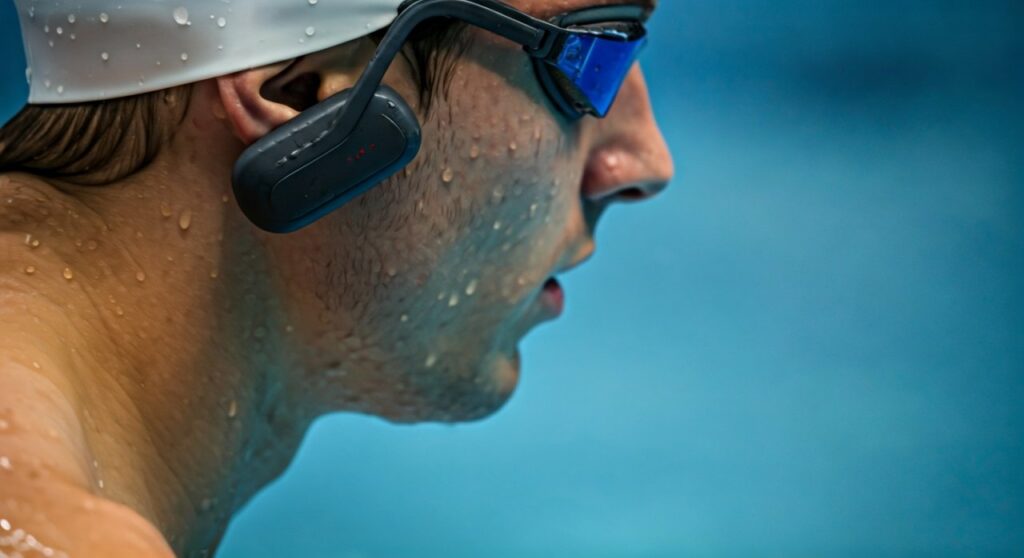
For most swimmers, the “gold standard” today is Bone Conduction technology. Unlike traditional earbuds that sit inside your ear canal, these rest on your cheekbones, sending vibrations directly to your inner ear. This design allows you to wear silicone earplugs to keep water out of your ears while still hearing high-fidelity audio underwater.
Key Takeaways: Quick Guide to Swimming Headphones
If you are in a hurry to hit the pool, here are the essential facts you need to know before buying:
- Bluetooth Limitations: Standard Bluetooth will not work underwater. You need a device with built-in MP3 storage (usually 4GB to 32GB).
- Waterproof Standards: Look specifically for IPX8. Do not settle for IPX7 (which is only for splashes or brief drops).
- Audio Type: Bone conduction is widely considered the best for swimming as it prevents “muffled” sound caused by water entering the ear canal.
- Fitment: Most swimming headphones wrap around the back of the head and are secured by your goggle straps.
- Battery Life: Expect between 5 to 10 hours of playback, which is plenty for even the longest triathlon training sessions.
The Science of Sound: Why Regular Headphones Fail Underwater
Standard wireless earbuds like AirPods or Galaxy Buds rely on a 2.4GHz radio frequency. Water is highly conductive and absorbs this frequency almost instantly. If you submerge your head just two inches below the surface, the signal will cut out.
To solve this, manufacturers use two primary methods:
- Internal Flash Memory: You connect the headphones to a computer via USB and drag-and-drop your MP3, WAV, or FLAC files. This makes the headphones a standalone music player.
- Bone Conduction (Vibration): Sound waves struggle to travel through water-clogged ear canals. Bone conduction transducers bypass the eardrum entirely, delivering clear sound through the temporal bones.
Comparison: Bone Conduction vs. In-Ear Swimming Headphones
| Feature | Bone Conduction (e.g., Shokz OpenSwim) | In-Ear Waterproof Buds (e.g., Sony NW-WS413) |
|---|---|---|
| Comfort | High; nothing enters the ear canal. | Medium; requires a tight seal to work. |
| Audio Quality | Best when used with earplugs. | Good, but degrades if water leaks in. |
| Stay-In Power | Excellent; secured by goggle straps. | Can fall out during flip turns. |
| Ear Health | Reduces risk of Swimmer’s Ear (Otitis Externa). | Can trap moisture in the ear canal. |
| Storage | Typically 4GB – 32GB. | Typically 4GB – 8GB. |
Critical Features to Check Before You Buy
Not all “water-resistant” headphones are created equal. As a regular lap swimmer, I have seen many “waterproof” buds fail after just three sessions because they weren’t built for chlorine or salt pressure.
The IPX8 Rating
This is the non-negotiable benchmark. IPX8 means the device is tested for continuous immersion in water under conditions specified by the manufacturer. If a product only lists IPX7, it is designed for rain or a quick shower, not for 60 minutes of freestyle laps.
Supported File Formats
Since you cannot stream Spotify or Apple Music underwater via Bluetooth, you must own the digital files. Ensure the headphones support:
- MP3: The universal standard.
- WMA/WAV: High-quality uncompressed files.
- AAC: Common for iTunes users (check compatibility specifically).
Goggle Compatibility
The best swimming headphones feature a wrap-around titanium frame. These are designed to sit snugly against your temples and “lock” into place under the straps of your swimming goggles. This prevents them from shifting during high-speed intervals or dolphin kicks.
Step-by-Step Guide: How to Use Headphones for Swimming
Using swimming headphones requires a bit more preparation than standard buds. Follow this professional routine to ensure the best sound and longevity for your gear.
Step 1: Loading Your Content
Connect your headphones to your PC or Mac using the provided magnetic charging cradle. Organize your music into folders or playlists. Since these devices usually don’t have screens, most swimmers prefer a “Shuffle” mode.
Expert Tip: Download your favorite podcasts or audiobooks as MP3 files. Long, steady-state swims are the perfect time to “read” while you burn calories.
Step 2: Achieving the Perfect Fit
Put your swim cap on first. Then, place the headphones over your ears (or against your cheekbones for bone conduction). Finally, put your goggles on, placing the goggle straps over the arms of the headphones. This creates a sandwich effect that keeps everything stable.
Step 3: Use Earplugs for Better Sound
If you are using Bone Conduction headphones (like the Shokz OpenSwim), wear a pair of silicone earplugs. By blocking out the ambient noise of splashing water, the internal vibrations of the headphones become much richer and bass-heavy. It sounds counterintuitive, but it works perfectly.
Step 4: Post-Swim Maintenance (Crucial)
Chlorine and salt are corrosive. After every swim:
- Rinse the headphones in fresh, clean water.
- Pat them dry with a soft towel.
- Ensure the charging pins are completely dry before connecting them to power. This prevents electrolysis and terminal corrosion.
Top Recommended Models for Swimmers
Based on durability, battery life, and ease of use, these are the current market leaders:
- Shokz OpenSwim: The industry leader for bone conduction. It features a 4GB capacity and an incredibly comfortable fit. It is purely an MP3 player (no Bluetooth).
- H2O Audio Tri Multi-Sport: A versatile option that offers both MP3 storage and Bluetooth. You can use Bluetooth for your run/bike and switch to MP3 mode for the pool.
- Sony NW-WS413 / WS623: A classic “all-in-one” design where the electronics are built directly into the earpieces. These are highly resistant to salt water, making them great for open-water swimmers.
- Zygo Solo: One of the few systems that allows you to stream music from your phone while swimming. It uses a FM transmitter “walkie-talkie” style setup to beam the signal through the water.
Overcoming Common Underwater Audio Problems
Even with the best gear, swimming with audio has a learning curve. Here is how to handle the most common frustrations.
The “Muffled Sound” Issue
If you use in-ear buds, a single drop of water trapped between the earbud tip and your eardrum will ruin the sound. To prevent this, apply a tiny amount of Vaseline to the edge of the waterproof earbud tip to create a tighter hydraulic seal.
Managing Large Playlists
Without a screen, navigating 1,000 songs is difficult. I recommend creating specific folders for different types of workouts:
- Folder 1: High-BPM tracks for sprint intervals.
- Folder 2: Steady-state tracks for long-distance endurance.
- Folder 3: Podcasts or Audiobooks for recovery swims.
Volume Levels and Water Resistance
Water pressure can sometimes make headphones sound quieter. Most swimming-specific devices have a “Swimming Mode” EQ setting that boosts the mid-range frequencies to cut through the noise of bubbles and surface splashing.
Are Swimming Headphones Worth the Investment?
From my experience coaching triathletes and fitness swimmers, the answer is a resounding yes. Swimming is one of the most effective workouts for cardiovascular health, but the “sensory deprivation” of staring at a blue line on the bottom of the pool can lead to mental fatigue.
Data indicates that athletes who listen to music during repetitive aerobic exercise can improve their endurance by up to 15%. Music lowers the “Perceived Rate of Exertion” (PRE), meaning you can swim harder and longer without feeling the same level of tiredness.
Frequently Asked Questions (FAQs)
Can I use my AirPods for swimming?
No. Even the water-resistant AirPods Pro are only rated for sweat and light splashes (IPX4). They are not designed for submersion, and the Bluetooth signal will fail the moment your head goes under.
Do I need a special app to load music?
Usually, no. Most swimming headphones act like a USB Thumb Drive. You simply plug them into your computer and drag files into the window. However, some newer models like the H2O Audio have apps to help manage “playlists” from streaming services for offline use.
Will swimming headphones work in the ocean?
Yes, but you must look for a model specifically rated for saltwater resistance (like the Sony WS Series). Salt is much more corrosive than chlorine, so rinsing with fresh water immediately after your swim is mandatory to prevent the charging ports from rotting.
Can I listen to Spotify while swimming?
You cannot stream Spotify live because there is no Wi-Fi or Bluetooth signal in the water. You must use a “converter” to turn your playlists into MP3 files, or use a device like the Mighty Vibe (if paired with a waterproof case) that can store Spotify tracks offline.
Do bone conduction headphones hurt?
Not at all. Most users find them more comfortable than traditional earbuds because they don’t cause pressure inside the ear canal. They are lightweight and designed to be worn for hours without “ear fatigue.”
**
**
**
**









