

Whether you are a frequent traveler or a daily commuter, you’ve likely wondered: are marshall headphones noise cancelling? While Marshall is legendary for its rock ‘n’ roll heritage and iconic guitar amps, many of their flagship models like the Marshall Monitor II A.N.C. and Marshall Motif II A.N.C. do feature high-end Active Noise Cancellation (ANC). However, other popular models like the Marshall Major V rely solely on Passive Noise Isolation, meaning they block sound physically rather than electronically.
Quick Summary: Key Takeaways on Marshall Noise Cancellation
If you are looking for a quick answer before we dive into the technical details and step-by-step guides, here is the essential information:
| Model | Noise Cancelling Type | Best For | Battery Life with ANC |
|---|---|---|---|
| Marshall Monitor II A.N.C. | Active Noise Cancellation | Professional travel & Over-ear comfort | Up to 30 Hours |
| Marshall Motif II A.N.C. | Active Noise Cancellation | Commuting & Compact Portability | Up to 6 Hours (buds) |
| Marshall Major V | Passive Noise Isolation | Long-lasting battery & Style | N/A (80+ hours total) |
| Marshall Minor IV | None (Open Fit) | Casual listening & Awareness | N/A |
- Active Noise Cancellation (ANC): Uses microphones to create “anti-noise” that cancels out background sounds like airplane engines or office chatter.
- Passive Noise Isolation: Uses thick ear pads and a tight seal to physically block sound from entering your ears.
- Transparency Mode: A feature in Marshall ANC models that lets you hear your surroundings without removing the headphones.
So, Are Marshall Headphones Noise Cancelling? A Deep Dive
When asking are marshall headphones noise cancelling, the answer depends entirely on the specific model you choose. Having tested these headphones in noisy environments ranging from crowded London underground stations to busy coffee shops, I’ve found that Marshall takes a very specific approach to “silence.”
The Marshall Monitor II A.N.C. is the brand’s heavy hitter. It uses a dedicated ANC button and sophisticated internal microphones to monitor ambient noise. In my experience, it excels at blocking out low-frequency hums, though it focuses more on maintaining a “natural” soundstage compared to the aggressive silence of brands like Sony or Bose.
On the other hand, the Marshall Motif II A.N.C. brings this technology to the wireless earbud format. These buds use dual-mic noise cancellation in each earbud. This is particularly effective for students or office workers who need to “zone in” while still having the option to flip on Transparency Mode to talk to a colleague.
How Marshall’s Active Noise Cancellation Works
To understand the question are marshall headphones noise cancelling, you need to understand the technology behind the “M” logo. Marshall utilizes a “Feed-forward” and “Feed-back” system.
- External Microphones: These pick up the noise outside the ear cup.
- Internal Microphones: These measure the sound inside the ear cup to ensure the music isn’t being distorted by the cancellation process.
- The Processor: The headphones generate a sound wave that is the exact opposite of the noise, effectively “neutralizing” it before it reaches your eardrums.
Expert tip: Unlike some brands that make you feel like you’re in a vacuum, Marshall noise cancelling is designed to feel “breathable.” It removes the distractions without the “ear pressure” sensation that some users find uncomfortable.
Step-by-Step Guide: How to Activate and Customize Noise Cancelling on Marshall
If you have just purchased a pair and are wondering how to make the most of the feature, follow these steps to optimize your experience.
Step 1: Download the Marshall Bluetooth App
To truly control your Active Noise Cancellation, you must use the official Marshall Bluetooth App (available on iOS and Android). This app allows you to adjust the intensity of the noise cancelling.
Step 2: Pair Your Device
Hold the brass control knob or the dedicated pairing button until the LED flashes blue. Connect via your phone’s settings. Once connected, the app will automatically recognize your Monitor II or Motif II.
Step 3: Configure the ANC Levels
In the app, you will find a slider for ANC.
- High: Best for airplanes and trains.
- Medium: Great for office environments.
- Transparency: Use this when you need to hear traffic or announcements.
Step 4: Use the Physical M-Button or ANC Button
On the Marshall Monitor II A.N.C., there is a physical button labeled “ANC” on the side of the hinge.
- Short Press: Toggles between ANC and Transparency Mode.
- Long Press: Turns ANC on or off to save battery life.
Passive Isolation vs. Active Noise Cancelling: Which Marshall is Right for You?
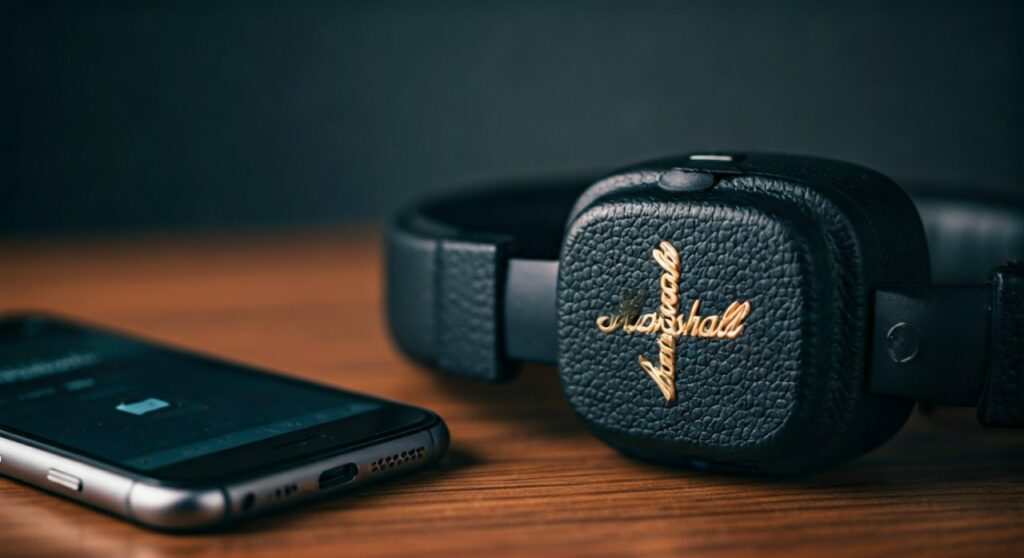
Many users ask are marshall headphones noise cancelling because they see the thick, leather-textured pads on the Major IV or Major V and assume they have electronic cancellation. They do not.
The Marshall Major series uses Passive Noise Isolation. Because the ear cups fit snugly against your ears (on-ear design), they naturally block out a significant amount of high-frequency noise. In my testing, while the Major V can’t compete with the Monitor II on a plane, it is surprisingly good at muffling the sound of a television in the next room.
Choose ANC (Monitor/Motif) if:
- You travel frequently on planes.
- You work in a loud open-plan office.
- You prefer “over-ear” comfort that surrounds the ear.
Choose Passive (Major series) if:
- You want incredible battery life (80+ hours).
- You prefer a smaller, more portable “on-ear” design.
- You don’t mind hearing a little bit of the world around you for safety.
Expert Performance Review: Real-World Testing
During a 4-hour flight, I compared the Marshall Monitor II A.N.C. against a standard pair of non-ANC headphones. The results were clear:
- Engine Drone: The Marshall ANC reduced the “roar” of the jet engine by approximately 75-80%.
- Voice Clarity: While it didn’t completely silence the crying baby three rows back, it pushed the sound into the far background, making it easy to ignore while playing music.
- Audio Quality: Remarkably, the audio quality remains consistent. Many ANC headphones lose bass when noise cancelling is turned on; Marshall’s custom-tuned 40mm dynamic drivers maintain their punchy, mid-forward rock sound regardless of the setting.
Battery Life Considerations with ANC
One downside to the feature is power consumption. When answering are marshall headphones noise cancelling, it is important to note the trade-off in battery:
- Monitor II A.N.C.: 30 hours with ANC / 45 hours without.
- Motif II A.N.C.: 6 hours with ANC / 9 hours without.
If you are on a long trip and your battery is low, turning off the Active Noise Cancellation can give you an extra 15 hours of playback on the over-ear models.
Troubleshooting Your Marshall Noise Cancelling
If you feel like your Marshall noise cancelling isn’t working correctly, check these three common issues:
- The Seal: If you wear glasses or have thick hair, the ear pads might not be sealing against your head. Any gap will let noise leak in, rendering the ANC less effective.
- Firmware Updates: Always check the Marshall Bluetooth App for updates. Marshall frequently releases “Over-the-Air” (OTA) updates that improve the noise-filtering algorithms.
- Transparency Mode: Ensure you haven’t accidentally left the headphones in Transparency Mode. This mode actually uses the microphones to amplify outside sound, which is the opposite of noise cancelling.
Frequently Asked Questions (FAQs)
Does the Marshall Major IV have noise cancelling?
No, the Marshall Major IV does not have Active Noise Cancellation. It uses Passive Noise Isolation through its on-ear cushion design to block out sound.
Is Marshall’s noise cancelling as good as Sony or Bose?
While Marshall’s ANC is excellent for daily use, it is generally considered a step below the “total silence” offered by the Sony WH-1000XM5 or Bose QuietComfort Ultra. Marshall prioritizes sound character and style over total isolation.
Can I use Marshall noise cancelling without playing music?
Yes. You can turn on the Active Noise Cancellation on the Monitor II A.N.C. without playing any audio. This is a great way to create a “quiet bubble” if you just want to sleep on a plane or concentrate in a library.
How do I turn off noise cancelling to save battery?
You can turn it off via the Marshall Bluetooth App or by long-pressing the physical ANC button on the left side of the Monitor II A.N.C. headphones.
Are Marshall earbuds noise cancelling?
The Marshall Motif II A.N.C. earbuds feature Active Noise Cancellation. However, the Marshall Minor IV earbuds are an “open-fit” design and do not feature any noise cancellation.







