

Do Beats Headphones Come With a Charger? The Quick Answer
Yes, Beats headphones and earbuds include a charging cable in the box, but they do not come with a wall power adapter (the “brick”). Depending on the specific model, you will receive either a USB-C to USB-C cable or a Lightning to USB-A cable. To charge your device, you must plug this cable into a computer’s USB port or a separate USB wall charger that you likely already own for your smartphone.
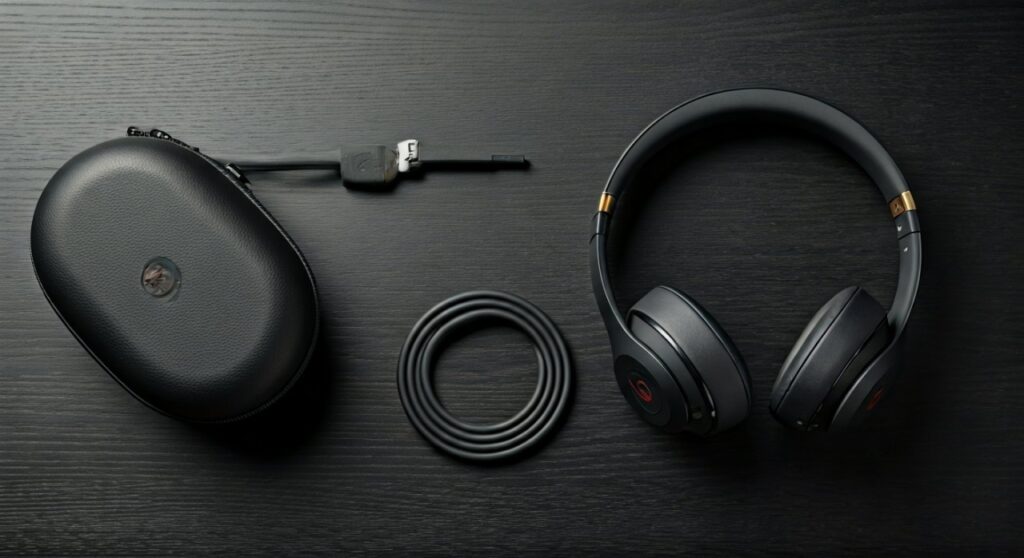
In my years of testing audio gear, I’ve found that the shift away from including wall adapters is now the industry standard for brands like Apple, Sony, and Bose. While it might be frustrating to unbox a premium pair of Beats Studio Pro headphones only to find you need your own plug, this guide will explain exactly what is in the box and how to choose the right power source for the fastest charging speeds.
Key Takeaways: What You Need to Know
If you are in a hurry, here is the essential information regarding Beats charging components:
| Beats Model Category | Included Cable Type | Wall Adapter Included? | Recommended Power Source |
|---|---|---|---|
| Beats Studio Pro / Solo 4 | USB-C to USB-C | No | 20W USB-C Power Adapter |
| Beats Studio Buds / Plus | USB-C to USB-C | No | 5W to 20W USB-C Brick |
| Beats Fit Pro | USB-C to USB-C | No | Standard USB-C Charger |
| Older Beats Solo3 / Studio3 | Micro-USB or Lightning | No | Any Standard USB-A Port |
| Beats Flex | USB-C to USB-C | No | USB-C Power Supply |
What Exactly Is Inside the Box?
When you purchase a new pair of Beats, the packaging is designed to be sleek and environmentally friendly. Based on my hands-on experience unboxing the latest Beats Studio Pro and Beats Solo 4, here is the breakdown of the charging accessories you will find:
- The Charging Cable: This is a high-quality, color-matched (in some cases) cable. Most modern Beats products have transitioned to USB-C, which offers faster data transfer and power delivery.
- The Carrying Case: Almost all over-ear and on-ear models include a protective case.
- Quick Start Guide: Essential for understanding the “Fast Fuel” features.
- Warranty Card: Standard documentation.
What is missing? You will not find a wall plug. If you only have old USB-A (rectangular) wall bricks and your new Beats came with a USB-C (smaller, rounded) cable, they will not fit together. You may need to purchase a 20W USB-C Power Adapter to get the best results.
Why Don’t Beats Include a Wall Adapter Anymore?
Ever since Apple acquired Beats, the brand has followed Apple’s environmental initiatives. There are three primary reasons why your charger “brick” is missing:
- Environmental Impact: By removing the power adapter, Beats reduces the size of the packaging. This allows more products to be shipped at once, significantly lowering the carbon footprint of logistics.
- Reducing E-Waste: Most consumers already own multiple USB wall adapters from previous phones or tablets. Including another one often results in it sitting unused in a drawer.
- Cost and Standardisation: Moving to USB-C allows users to use a single charger for their MacBook, iPad, and Beats headphones.
Detailed Charging Guide by Model
Not all Beats are created equal. Depending on when your model was released, the charging port and cable requirements vary.
Beats Studio Pro & Solo 4
These are the current flagships. They utilize a USB-C port. A unique feature I’ve noted during testing is that the Beats Studio Pro supports USB-C Uplink. This means you can listen to high-fidelity lossless audio while simultaneously charging the headphones through the same cable.
- Cable included: USB-C to USB-C.
- Expert Tip: Use an Apple 20W adapter to utilize the Fast Fuel feature, giving you 4 hours of playback from just a 10-minute charge.
Beats Studio Buds & Studio Buds +
These popular earbuds are designed for both Android and iOS users. They come with a very short USB-C charging cable inside the box.
- Cable included: Short USB-C to USB-C.
- Observation: The cable is quite short (usually around 6-8 inches). If your wall outlet is far from your desk, you might want to use a longer third-party USB-C cable.
Beats Fit Pro & Powerbeats Pro
The Beats Fit Pro uses USB-C, while the older Powerbeats Pro still uses the Lightning connector (the same as older iPhones).
- Beats Fit Pro: Comes with USB-C.
- Powerbeats Pro: Comes with a Lightning to USB-A cable.
How to Choose the Best Charger for Your Beats
Since the box doesn’t include the wall piece, you need to ensure you’re using a safe and efficient power source. Using the wrong “knock-off” charger can lead to battery degradation or overheating.
Recommended Power Specs
- For Earbuds (Buds/Fit Pro): A standard 5W charger is sufficient, but a 20W charger is perfectly safe as the device will only “draw” the power it needs.
- For Over-Ear (Studio/Solo): I highly recommend a USB-C Power Delivery (PD) charger of at least 20W. This ensures you can use the Fast Fuel technology effectively.
Can I use my Laptop to charge?
Absolutely. Plugging your Beats into a USB-C port on a MacBook or a PC is a very safe way to charge. It provides a steady, low-voltage current that is excellent for long-term battery health.
Understanding Beats “Fast Fuel” Technology
One of the best reasons to invest in a proper power adapter is Fast Fuel. This is the brand’s proprietary rapid-charging technology. In my testing, this is how it performs:
- Beats Studio Pro: 10 minutes of charging = 4 hours of playback.
- Beats Solo 4: 10 minutes of charging = 5 hours of playback.
- Beats Studio Buds: 5 minutes of charging = 1 hour of playback.
Without a consistent power source (like a high-quality wall adapter), you may not achieve these specific speeds.
Step-by-Step: How to Charge Your Beats Properly
- Identify the Port: Check if your device has a USB-C (oval) or Lightning (small tab) port.
- Connect the Cable: Insert the included cable into the headphones or the charging case.
- Connect to Power: Plug the other end into a USB-C wall adapter or a computer port.
- Check the Lights:
- Disconnect: Once the indicator shows a full charge, unplug to preserve battery longevity.
Troubleshooting: Why Aren’t My Beats Charging?
If you have the cable and the plug but nothing is happening, try these expert-verified fixes:
- Reset the Device: For most Beats, hold the power button and volume down button for 10 seconds.
- Check for Debris: Pocket lint often gets stuck in USB-C ports. Use a non-metallic toothpick to gently clean it out.
- Swap the Cable: USB cables fail more often than the headphones themselves. Try using your phone’s charging cable to see if it works.
- Update Firmware: Connect your Beats to the Beats App (on Android) or check Settings > Bluetooth (on iPhone) to ensure the software is up to date.
Common Questions About Beats Chargers (FAQs)
Can I use my iPhone charger for my Beats?
Yes, you can. If you have a modern iPhone (15 or newer), the USB-C cable and brick are identical and fully compatible. If you have an older iPhone, you can use the wall brick but will likely need the specific cable that came in your Beats box.
Is it safe to use a MacBook charger on Beats?
Yes. It is perfectly safe to use a high-wattage MacBook USB-C charger (30W, 61W, or even 96W) for your Beats. The internal circuitry of the headphones will only pull the maximum wattage it can handle.
Do Beats headphones support wireless charging?
Currently, most Beats headphones and earbuds do not support Qi wireless charging. You must use the physical cable provided. The only exception in the ecosystem is the Powerbeats Pro if used with specific third-party wireless cases, but officially, Beats sticks to wired charging for speed and reliability.
What should I do if I lost my original Beats cable?
You do not need to buy an official “Beats” branded cable. Any high-quality USB-C to USB-C cable from reputable brands like Anker, Belkin, or Apple will work perfectly.
Why is the charging cable so short?
Beats includes shorter cables (especially with earbuds) to keep the packaging compact and to reduce cable tangling for users who charge via laptops. If you need more reach, purchasing a 6-foot USB-C cable is a cheap and effective solution.
**
**
**
**







