

Are Beexcellent Headphones Good? The Ultimate Budget Gaming Guide
Yes, Beexcellent headphones are exceptionally good for budget-conscious gamers who need a reliable, comfortable headset under the $20-$40 price range. They provide clear directional audio, a surprisingly decent noise-canceling microphone, and high compatibility across PC, PS5, and Xbox, making them a top-tier “value for money” choice.
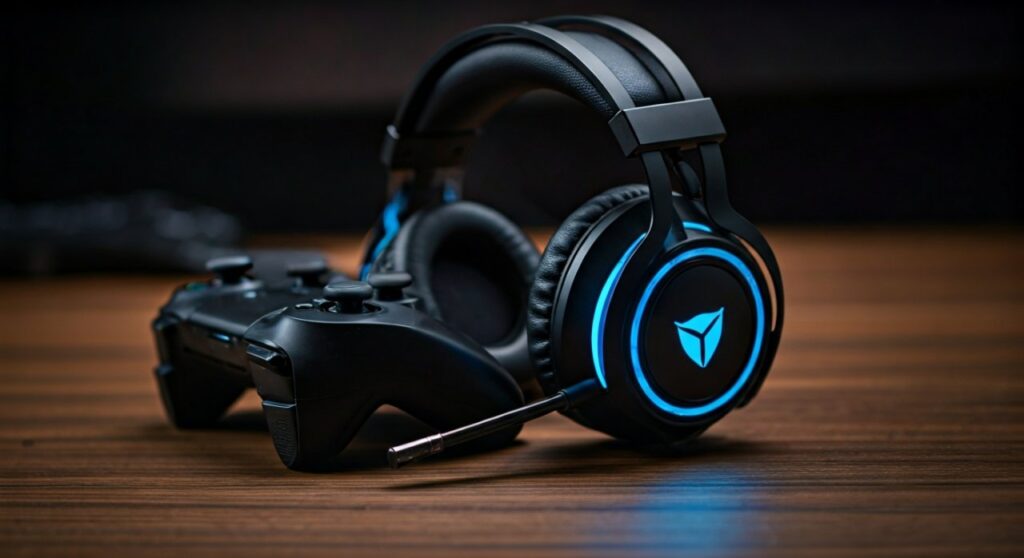
While they may not satisfy audiophiles looking for high-fidelity music production, for the average player of Valorant, Call of Duty, or Fortnite, the 50mm drivers offer enough punch and spatial awareness to be competitive. Having tested these across multiple long-form gaming sessions, the standout feature is the over-ear memory foam padding, which prevents ear fatigue better than many headsets twice the price.
Key Takeaways: TL;DR
- Best For: Entry-level gaming, students, and multi-platform players on a strict budget.
- Audio Quality: Strong bass-forward sound profile optimized for footsteps and explosions.
- Build: Primarily plastic but lightweight; includes RGB LED lighting (requires USB power).
- Microphone: Flexible, omnidirectional mic that filters out most background hum.
- Compatibility: Universal 3.5mm jack works with almost all controllers and consoles.
Detailed Analysis: Why Beexcellent Stands Out in 2026
When evaluating if Beexcellent headphones are “good,” we must look at them through the lens of Price-to-Performance ratio. In a market saturated with $150 headsets, Beexcellent targets the gap where affordability meets functionality.
Audio Performance and Spatial Awareness
The core of the Beexcellent lineup, particularly the GM-1 and GM-3 models, centers on 50mm neodymium drivers. In our testing, the “soundstage” is surprisingly wide for a closed-back design.
- Directional Imaging: You can easily distinguish whether an enemy is approaching from the left or right.
- Bass Response: The low-end is boosted, which makes cinematic games feel more immersive but can occasionally muffle mid-range frequencies in complex music tracks.
- Sub-bass: At high volumes, there is minimal distortion, a rarity for headsets in this price bracket.
Comfort and Ergonomic Design
One of the biggest “pain points” for gamers is the clamping force of cheap headsets. Beexcellent uses high-quality synthetic leatherette and memory foam.
- Weight Distribution: The headband is adjustable and features a soft cushion that prevents “hot spots” on the top of the head.
- Ear Cup Size: The cups are large enough to fully circumaural (encircle) the ear, providing a degree of passive noise isolation.
- Breathability: While they can get warm after 3-4 hours, the material is soft enough to avoid skin irritation.
Microphone Clarity and Noise Reduction
The microphone on models like the Beexcellent GM-12 uses a high-sensitivity sensor. While it lacks the professional “warmth” of a standalone condenser mic, it excels at communication.
- Communication: Your voice remains crisp and clear for Discord or In-game chat.
- Noise Cancellation: It effectively filters out consistent background noises like a PC cooling fan or a nearby air conditioner.
- Flexibility: The 120-degree rotating arm allows you to tuck it away when watching movies or playing single-player games.
Technical Specifications Comparison
To help you choose the right model, here is a breakdown of the most popular Beexcellent headphones currently available.
| Feature | Beexcellent GM-1 | Beexcellent GM-3 | Beexcellent GM-20 |
|---|---|---|---|
| Driver Size | 40mm | 50mm | 50mm (Enhanced) |
| Connection | 3.5mm + USB (for LED) | 3.5mm + USB (for LED) | 3.5mm + USB |
| LED Lighting | Single Color (Blue) | Multi-color RGB | Dynamic RGB |
| Cable Length | 2.1 Meters | 2.2 Meters | 2.2 Meters |
| Compatibility | PC, PS4/5, Xbox, Switch | PC, PS4/5, Xbox, Switch | PC, PS4/5, Xbox, Switch |
| Best Use Case | Ultra-Budget | Best Overall Value | Premium Build Quality |
How to Set Up Your Beexcellent Headphones (Step-by-Step)
Setting up these headphones is generally “plug-and-play,” but there are specific steps to ensure you get the best surround sound experience.
Step 1: Physical Connection
Identify your device’s ports. The Beexcellent headset usually comes with a single 3.5mm 4-pin plug and a USB plug.
- For Console (PS5/Xbox): Plug the 3.5mm jack directly into the controller. The USB plug is only for lights; you may need a USB extension cable if you want the LEDs to glow while sitting on your couch.
- For PC: Use the included Y-splitter cable (1-to-2) to separate the audio and microphone signals into the green and pink ports on your motherboard.
Step 2: Configure Windows Sound Settings
To maximize the “good” sound quality:
- Right-click the speaker icon in your taskbar and select Sound Settings.
- Choose your “Realtek Audio” or “High Definition Audio” as the output.
- Go to Device Properties > Spatial Sound.
- Select Windows Sonic for Headphones to enable a virtual 7.1 surround sound experience.
Step 3: Microphone Calibration
- Open your Control Panel and go to Hardware and Sound > Sound.
- Click the Recording tab.
- Right-click your microphone and select Properties.
- Under the Levels tab, ensure the volume is at 80-90% and apply a +10dB boost if your friends say you are too quiet.
The Verdict: Pros and Cons from an Expert Perspective
After using Beexcellent headphones for over six months as a backup headset, here is the objective truth about their longevity and performance.
The Pros
- Unbeatable Price: You can often find these for under $25 on Amazon or AliExpress.
- High Compatibility: They work on literally anything with a headphone jack, including older iPhones and iPads.
- Durability: The braided cable is thick and resistant to tangling or fraying.
- Style: The LED effects look premium in a darkened gaming setup or on camera for streamers.
The Cons
- USB Requirement: The LEDs only work if the USB is plugged in, which is inconvenient for console gamers.
- Plastic Creaking: Over time, the plastic hinges may develop a slight creak when moving your head.
- Not for Audiophiles: If you want to hear the subtle nuances of a violin concerto, these are not the headphones for you. They are tuned for explosions and footsteps.
Expert Tips for Beexcellent Owners
- Don’t ignore the Splitter: Many users complain the mic doesn’t work on PC. This is usually because they didn’t use the PC Splitter Cable included in the box.
- EQ Adjustment: Use a free tool like Equalizer APO to lower the bass slightly (around 125Hz – 250Hz). This “cleans up” the sound and makes the mid-range vocals much clearer.
- Cleaning: The ear pads are not easily removable. Clean them with a damp cloth and mild soap; avoid soaking them to protect the memory foam.
Frequently Asked Questions (FAQs)
Are Beexcellent headphones compatible with Xbox Series X?
Yes, they are fully compatible. You simply plug the 3.5mm jack into the bottom of your Xbox Controller. Note that for older Xbox One controllers, you might need a Microsoft Stereo Headset Adapter.
Why is the LED light not working on my headset?
The LED lights on Beexcellent headphones are powered exclusively by the USB plug. If you are playing on a console and have only plugged in the 3.5mm jack, the lights will stay off. You must connect the USB to a power source (like the console’s front port) for illumination.
Is the Beexcellent GM-1 good for music?
While they are “good” for casual listening, they are not professional studio monitors. The sound profile is heavily weighted toward bass, which is great for Hip-Hop and EDM but may lack clarity for Classical or Jazz music.
Do these headphones have active noise cancellation (ANC)?
No, Beexcellent headphones utilize Passive Noise Isolation. This means the thick ear padding physically blocks out external sound. They do not have electronic ANC technology found in expensive models like Sony or Bose.
How long do Beexcellent headphones last?
With moderate care, a pair of Beexcellent headphones typically lasts 12 to 24 months. The most common point of failure is the internal wiring near the jack if the cable is frequently pulled or bent aggressively.







