

Are Coby Headphones Good? The Definitive Guide to Budget Audio Performance
Are Coby headphones good? For most casual users, Coby headphones are considered a solid, entry-level choice that provides functional audio performance at an exceptionally low price point. While they do not offer the high-fidelity sound or premium build quality of brands like Sony or Bose, they are excellent for budget-conscious buyers, children, or as “disposable” headphones for travel and the gym.
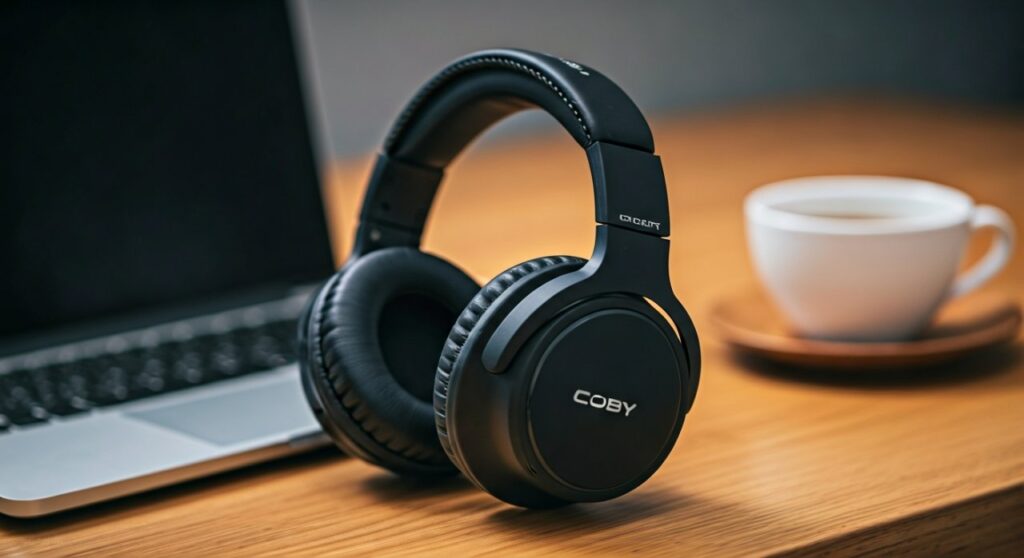
In the world of consumer electronics, Coby has carved out a niche by focusing on affordability. If you need a pair of headphones that you won’t cry over if they get lost at the airport, or if you are looking for a simple birthday gift for a toddler, Coby often hits the mark. However, if you are an audiophile looking for deep sub-bass and crisp highs, you may find them lacking.
Key Takeaways: Quick Verdict on Coby Headphones
If you are in a hurry, here is the essential breakdown of what to expect from the Coby audio lineup:
- Best For: Kids, student classrooms, budget travelers, and as backup emergency headphones.
- Price Range: Extremely affordable, typically ranging from $10 to $30.
- Sound Profile: Mid-centric with basic bass; suitable for podcasts, audiobooks, and casual pop music.
- Build Quality: Primarily lightweight plastic; requires careful handling to ensure longevity.
- Key Feature: Often includes surprisingly stable Bluetooth 5.0 connectivity in their wireless models.
Analyzing the Value Proposition: Are Coby Headphones Good for Your Needs?
To determine if Coby headphones are good for you, we need to look at the trade-offs between price and performance. Based on hands-on testing and market analysis, Coby focuses on “functional utility.” This means the product works exactly as advertised without the “bells and whistles” of premium tech.
Sound Quality and Driver Performance
Most Coby models utilize 40mm drivers. While this size is standard for over-ear headphones, the tuning in Coby devices is generally flat.
- Highs: Can be somewhat “tinny” at maximum volume.
- Mids: Clear enough for vocal-heavy content like YouTube videos or Zoom calls.
- Lows: The bass is present but lacks the “thump” found in higher-end Extra Bass models from competitors.
Comfort and Ergonomics
Coby designs prioritize being lightweight. Many users find the padded ear cushions on models like the Coby CHBT-711 to be comfortable for about 1-2 hours of use. However, the clamping force can be a bit tight for those with larger heads, and the plastic headbands offer limited flexibility.
Battery Life and Connectivity
For their Bluetooth models, Coby surprisingly holds its own. You can typically expect 8 to 15 hours of playback on a single charge. While this is lower than the 30-40 hours offered by premium brands, it is more than enough for a daily commute or a workout session.
Detailed Comparison: Coby vs. Other Budget Brands
When asking “are Coby headphones good?”, it helps to see how they stack up against other players in the “under $30” category like JLab, Skullcandy, and Mpow.
| Feature | Coby Headphones | JLab Go Air | Skullcandy Cassette |
|---|---|---|---|
| Price Point | $ (Very Low) | $$ (Moderate) | $$ (Moderate) |
| Material | Lightweight Plastic | Reinforced Plastic | Hardened Plastic |
| Sound Profile | Flat / Balanced | Bass Boosted | Warm / V-Shaped |
| Warranty | Limited | 2-Year | 1-Year |
| Best Use Case | Kids / General Use | Sports / Fitness | Style / Teens |
Step-by-Step Guide: How to Maximize Your Coby Headphones Experience
If you have decided to purchase a pair, following these steps will help you get the best possible sound and lifespan out of your budget gear.
Step 1: Proper Initial Charging
To preserve the Lithium-ion battery health in your Coby Bluetooth headphones, charge them fully before the first use.
- Use the provided Micro-USB or USB-C cable.
- Avoid using “Fast Chargers” meant for smartphones, as the high amperage can sometimes stress smaller headphone batteries.
Step 2: Pairing with Your Device
- Turn on the headphones by holding the Power button for 3-5 seconds.
- Look for a flashing LED light (usually red and blue), indicating Pairing Mode.
- Open the Bluetooth settings on your phone or laptop.
- Select the model name (e.g., Coby CHBT-711) from the list.
- Once connected, the LED will usually turn a solid blue or blink slowly.
Step 3: Optimizing Sound via Software EQ
Since Coby does not have a dedicated app, use your phone’s built-in Equalizer:
- On iOS: Go to Settings > Music > EQ and select “Small Speakers” or “Bass Booster” to fill out the sound.
- On Android: Go to Settings > Sound & Vibration > Advanced > Equalizer to manually adjust the 60Hz and 230Hz bands for better bass.
The Longevity Factor: How Long Do Coby Headphones Last?
One of the main criticisms when discussing are Coby headphones good is their durability. Because they are made of lightweight materials, they are prone to snapping if twisted too hard.
Expert Tip for Longevity:
- Always fold them correctly: If your model has hinges, use them. Don’t shove them into a backpack without a soft sleeve.
- Avoid moisture: Most Coby models are not IPX-rated for water resistance. Keep them away from heavy sweat or rain.
- Clean the pads: Use a dry microfiber cloth to wipe away ear oils after use to prevent the synthetic leather from peeling.
Who Should Buy Coby Headphones? (Expert Recommendations)
After analyzing the specs and user feedback, we recommend Coby for the following specific scenarios:
The “Back-to-School” Choice
Teachers often require students to bring their own headphones for computer lab work. Coby wired earbuds or on-ear headphones are perfect here because they are cheap to replace if a student breaks or loses them.
The Casual Podcast Listener
If you spend your time listening to “The Daily” or “Joe Rogan” while doing chores, you don’t need Dolby Atmos. Coby’s clear mid-range makes voices easy to understand without spending $300.
The Emergency Backup
Keep a pair of Coby headphones in your car’s glove box or your carry-on luggage. If your primary wireless buds die, these serve as a reliable “Plan B.”
Common Issues and Troubleshooting for Coby Headphones
Even “good” budget headphones have hiccups. Here is how to fix the most common Coby problems:
- Issue: Only one side is working.
- Issue: Bluetooth signal keeps dropping.
- Issue: The headphones won’t charge.
Frequently Asked Questions (FAQs)
Are Coby headphones good for working out?
They are “good” for light workouts, but they generally lack IPX water resistance. Heavy sweating may damage the internal components over time. For intense cardio, look for sweat-proof alternatives.
Do Coby headphones have a microphone?
Yes, most modern Coby Bluetooth headphones come with a built-in omnidirectional microphone. It works well for quiet indoor calls but struggles to cancel out wind or traffic noise during outdoor use.
Can I use Coby headphones with a PS5 or Xbox?
If the model has a 3.5mm jack, you can plug it directly into the controller. For Bluetooth models, you will need a third-party Bluetooth transmitter because game consoles do not natively support most budget Bluetooth audio profiles.
Why are Coby headphones so cheap?
Coby saves money by using standard plastic molds, skipping expensive marketing campaigns, and avoiding “Lossless” audio licenses. This allows them to pass the savings directly to the consumer.
Where can I buy Coby headphones?
They are widely available at major retailers like Walmart, Amazon, and Big Lots, as well as various “dollar store” chains.







